
6 Best Small Wireless Keyboards for Desks and Travel in 2026
Six small wireless keyboards compared for tiny desks, laptops and tablets, covering Bluetooth, USB dongle, rechargeable and foldable designs.

New to Amazon Prime?
Get fast, free shipping on every pick in this guide, plus Prime Video and exclusive deals.
Try Prime Free



At a Glance
People searching for a small wireless keyboard usually want one of three things: to clear space on a desk, to take a proper keyboard to a coffee shop, or to type on a tablet. Those are different jobs, and a model that is great at one can be annoying at another, so this list sorts the picks by what you will actually do with them.
The six keyboards here are slim, low-profile boards, from a foldable pocket model to a premium backlit keyboard. We compared connection type, number of devices, battery approach and dimensions from the listings. Mechanical gaming boards are covered in other guides; this one is about quiet, portable typing.
5 Criteria to Look For Before Buying a Small Wireless Keyboards for Desks and Travel
Key buying criteria so you get the right fit the first time.
Bluetooth, dongle or both
Bluetooth connects phones and tablets without a port but can add slight lag and requires pairing. A 2.4GHz dongle is faster and needs no pairing but takes a USB port. Look for the exact connection list and for how many Bluetooth devices can be stored.
Key size and layout
Small keyboards cut keys in different places: some drop the number pad, others shrink the arrows or the Shift keys. A foldable board can have noticeably smaller keys. Look for 'full-size keys' or dimensions in inches, and compare them against your own keyboard.
Battery type and quoted life
Rechargeable cells avoid buying batteries but need a cable, while coin or AAA cells last longer between swaps. Quoted life usually assumes light daily use, so scale it to yours. The Arteck HB305-2 lists about six months at two hours a day, which is a useful way to compare.
Thickness and portability
A thin board slips into a bag and sits flat on a tray, but a very flat one has less key travel. The Arteck HB305-2 lists 0.24 inch thickness, and a foldable board can be pocketable. Check the listing for thickness and weight.
Operating system support
Some keyboards print Windows legends but also work with macOS and iPadOS through key mapping. Multi-OS boards switch layouts with a shortcut. Check the listing for the specific systems named, especially for Chromebook or iPadOS.
6 Best Small Wireless Keyboards for Desks and Travel in 2026
Logitech Pebble Keys 2 K380s
About this pick
The Pebble Keys 2 K380s is a slim Bluetooth keyboard that pairs with up to three devices across Windows, macOS, iPadOS and ChromeOS and switches between them with one click of an Easy-Switch key. The Fn row includes shortcuts for search, screen capture and the emoji menu, and ten of them can be customized in the Logi Options+ app.
Next to the MX Keys Mini it costs much less and drops the backlight and the rechargeable battery, which are the real trade. Compared with the Tecknet pick it is a better-known brand with deeper software support.
It is the keyboard to buy for most people with a laptop and a tablet. If you work in a dim room, step up to the MX Keys Mini for the backlight.
Best for: a laptop and a tablet used together
Check price on AmazonPros
- +Switches between three devices fast
- +Works on Windows, macOS, iPadOS and ChromeOS
- +Fn shortcuts for emoji and screenshots
- +Slim, easy to carry
Cons
- −No backlight
- −Bluetooth only, no dongle
Logitech MX Keys Mini
About this pick
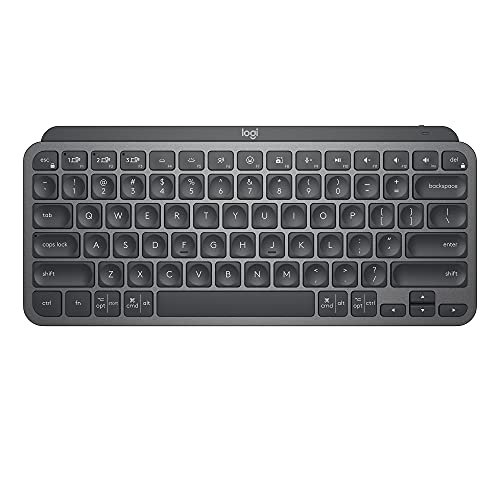
The MX Keys Mini is a minimalist wireless keyboard with USB-C charging, Bluetooth Low Energy for up to three devices, and smart backlighting that lights keys when your hands approach and adapts to room light. The key shapes are cupped for fingertips, and there are Dictation, mic mute and emoji keys.
It costs the most here and delivers a more refined feel than the Pebble Keys 2. It is also the only pick with proximity-sensing backlighting, which matters if you type in the evening.
Choose it as a daily keyboard for a compact desk where typing feel is a priority. Casual users will not notice enough difference to justify the price.
Best for: daily use on a compact desk, including dim rooms
Check price on AmazonPros
- +Backlight turns on as hands approach
- +USB-C rechargeable
- +Dictation and mic-mute keys
- +Cupped keys for comfort
Cons
- −Costs the most of the group
- −No dongle option
Arteck HB305-2
About this pick
The Arteck HB305-2 is an ultra-thin Bluetooth board measuring 14.3 by 4.5 by 0.24 inches and weighing 14.3 ounces, with a rechargeable cell rated for about six months at two hours of use a day. It connects to three devices with a single key press and works with Windows, iOS, iPadOS, Android and macOS.
The listing says the keys are full size, so it keeps a typing feel closer to a normal keyboard than the foldable ProtoArc pick. Compared with the Pebble Keys 2, you get a longer rated battery and a lower profile but less software.
It is a good choice for light, scattered use where you do not want to recharge often. If you want shortcuts and app support, the Logitech picks are better.
Best for: light, occasional use across several devices
Check price on AmazonPros
- +Very thin body
- +Long rated battery life
- +Switches between three devices
- +Full-size keys
Cons
- −Fewer software features
- −Battery quote assumes light use
TECKNET KB006
About this pick
The TECKNET KB006 is a compact rechargeable keyboard with four connection options: a 2.4GHz dongle plus three Bluetooth channels. It uses 86 scissor-switch keys, a 500mAh battery and a spill-resistant design, and the listing says its length is about twice that of an iPhone 15.
It is the cheapest pick that offers both a dongle and Bluetooth, which helps with a desktop that has a spare USB port. Compared with the Macally dongle keyboard it adds Bluetooth, and against the Pebble Keys 2 it offers four rather than three device slots.
It suits a budget buyer with a desktop and a laptop. Do not expect the polish of the pricier brands.
Best for: a budget desktop and laptop combination
Check price on AmazonPros
- +Four connection options
- +Rechargeable battery
- +Low cost
- +Spill-resistant design
Cons
- −Little software support
- −Build feels lighter than premium brands
Macally Compact Wireless Keyboard
About this pick
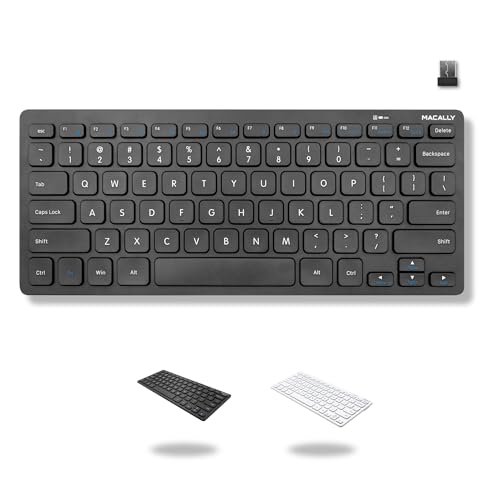
The Macally compact wireless keyboard uses a 2.4GHz USB-A dongle rather than Bluetooth, with a 78-key layout, 12 shortcut keys and plug-and-play setup on PCs and Chromebooks. It has no number pad, which is why the listing pitches it as a space saver.
The dongle approach means less pairing hassle and quicker response than Bluetooth, but it uses a USB port and cannot connect to a phone or iPad. Against the TECKNET KB006, it has fewer connection options but a simpler setup.
Choose it for a single desktop or a Chromebook where you want it to just work. If you need tablets, pick a Bluetooth board.
Best for: a single desktop or Chromebook with a spare USB port
Check price on AmazonPros
- +No pairing process
- +Plug and play on PC and Chromebook
- +Compact without a numpad
- +Low cost
Cons
- −Uses a USB port
- −Cannot pair with phones or tablets
ProtoArc XK04 Foldable
About this pick
The ProtoArc XK04 is a two-fold Bluetooth keyboard weighing 7.8 ounces with a PU leather cover, built for phones and tablets. It uses Bluetooth 5.1 with a range of 33 feet and links to three devices, switching with dedicated keys.
A folded keyboard trades key size for pocketability, which makes it the most portable pick here and the least comfortable for long sessions. Compared with the Arteck HB305-2 it is smaller and lighter but has a tighter layout.
It is the one to buy if you type on a phone or tablet while traveling and carry little. Do not choose it as an all-day desk keyboard.
Best for: typing on a phone or tablet while traveling
Check price on AmazonPros
- +Folds into a pocket-sized size
- +Three-device switching
- +Protective cover built in
- +Very light
Cons
- −Tighter layout for long typing
- −Not made for all-day typing
How We Evaluated These Small Wireless Keyboards for Desks and Travel
Each pick was assessed across 5 criteria weighted for real-world use.
Portability
Thickness, weight and folding design were compared, since a small keyboard that is awkward to carry misses the point.
Connection options
We listed Bluetooth slots, dongle support and cross-platform compatibility for each model.
Battery approach
Rechargeable cells, quoted battery life and the assumptions behind each claim were compared.
Typing comfort
Key travel, full-size or reduced keys, and backlight presence were weighed for a long typing session.
Value
Each pick was weighed against the price bucket for what you gain in features.
How to Choose the Right Small Wireless Keyboards for Desks and Travel
By Device Setup
| Your setup | Pick from this guide |
|---|---|
| Laptop plus tablet | Logitech Pebble Keys 2 K380s: Easy-Switch between three |
| Desktop with spare USB port only | Macally Compact Wireless Keyboard |
| Desktop, laptop and phone | TECKNET KB006: dongle plus three Bluetooth channels |
| Phone or tablet on the go | ProtoArc XK04 Foldable |
| Dim room, daily typing | Logitech MX Keys Mini |
By Budget
| Budget | Pick from this guide |
|---|---|
| Under $25 | TECKNET KB006 for flexibility, Macally Compact Wireless Keyboard for simplicity |
| $25 to $50 | Logitech Pebble Keys 2 K380s, Arteck HB305-2 or ProtoArc XK04 Foldable |
| $75 to $100 | Logitech MX Keys Mini |
Bluetooth vs USB Dongle
A dongle is simpler and a little faster, Bluetooth is more flexible.
Bluetooth
Works with phones, tablets and laptops with no port needed. The Logitech picks, Arteck HB305-2 and ProtoArc XK04 are Bluetooth, and most store three devices.
USB dongle
No pairing and lower latency, but it takes a port and works only with a computer. The Macally Compact Wireless Keyboard is dongle only, and the TECKNET KB006 has both.
Most people should pick Bluetooth unless the keyboard stays on one desktop.
By Battery Preference
| Preference | Pick from this guide |
|---|---|
| Rechargeable over USB-C | Logitech MX Keys Mini |
| Longest rated life | Arteck HB305-2: about six months at two hours a day |
| Rechargeable and cheap | TECKNET KB006: 500mAh cell |
| No charging worries on short trips | Logitech Pebble Keys 2 K380s |
For Tablet Typing Specifically
Look for
Bluetooth with quick device switching, a thin body that rests next to a stand, and iPadOS or Android compatibility.
In this comparison
The Logitech Pebble Keys 2 K380s lists iPadOS support and an Easy-Switch key, and the ProtoArc XK04 Foldable is aimed at phones and tablets.
When to Spend More
Spend more if
You type a lot and work in changing light: the Logitech MX Keys Mini has backlighting and a USB-C rechargeable battery.
Save if
You only need a keyboard for occasional use: the TECKNET KB006 or Arteck HB305-2 cost much less.
Frequently Asked Questions
Can a small wireless keyboard work with my iPad?
Yes, any Bluetooth keyboard can pair with an iPad. Look for models that list iPadOS support, which usually means the function keys map correctly.
How long do small wireless keyboards last on a charge?
It depends on the battery and how you use it. The Arteck HB305-2 lists about six months at two hours a day, while backlit boards use more. Treat all numbers as estimates.
Is Bluetooth or a USB dongle better?
A dongle is simpler and faster on a single desktop, while Bluetooth lets you link phones and tablets. The TECKNET KB006 has both for flexibility.
Will the keyboard work on my Chromebook?
Most Bluetooth keyboards do. The Macally Compact Wireless Keyboard lists PC and Chromebook compatibility through its USB-A dongle, but it needs a USB-A port.
Are foldable keyboards good for long typing?
They are best for short sessions on the go. The keys are smaller and the layout is tighter, which can slow typing, so keep a regular board for the desk.
How do I switch between devices?
Most Bluetooth boards use dedicated keys, such as Easy-Switch on the Logitech models. Press the key for the device you want, and the keyboard reconnects without re-pairing.
Bottom Line
best overall: Logitech Pebble Keys 2 K380s - best overall pick in this roundup.
See the full rankings above for all picks with pros, cons, and best-for summaries.
Browse on Amazon
All Prime-eligible options with current pricing.
Shop on Amazon →