
7 Best Wireless Keyboards Under $100 in 2026
Seven wireless keyboards under $100 compared, from quiet slim Bluetooth boards to solar-charged and wrist-rest models for laptop and desktop desks.

New to Amazon Prime?
Get fast, free shipping on every pick in this guide, plus Prime Video and exclusive deals.
Try Prime Free



At a Glance
A wireless keyboard under a hundred dollars should solve a specific annoyance: noise in a shared room, a cradle for a tablet, a battery you never think about or a wrist rest for long typing days. Spending more than the basics only pays off when one of those problems is real for you.
We evaluated seven boards that reach into the upper half of the range, with one lower-cost pick kept to show what you give up by spending less. Judgement rests on listed specifications and buyer feedback, and the picks lean on mainstream brands with steady software support.
6 Criteria to Look For Before Buying a Wireless Keyboards Under $100
Key buying criteria so you get the right fit the first time.
Bluetooth, dongle or both
Bluetooth is the easiest way to pair a laptop, tablet and phone, but it adds a little delay and a pairing step each time you switch. A 2.4GHz USB receiver is usually quicker and steadier for one computer, yet it takes a USB port and cannot connect to a tablet. Check whether the listing names Bluetooth, a receiver or both, because a board labelled wireless can mean either.
Battery type and real runtime
AAA batteries can last a year or more and swap in seconds, while a rechargeable cell needs a USB-C cable but saves repeated purchases. Quoted battery life assumes light use and low backlight, and RGB lighting or high polling rates can cut it sharply. Read the usage conditions behind the number, such as two hours a day, and favour a battery type you will actually maintain.
Size and number pad
A full-size board keeps the number pad but is about 17 to 18 inches wide, while compact and tenkeyless boards save width and lose the pad. Data entry and spreadsheets are where the pad matters, and a mouse is where a narrow board helps. Decide which you use more and read the listed dimensions before ordering.
Operating system support and layout
Mac keyboards put Command and Option where Windows keyboards print Windows and Alt, and some boards ship with both keycap sets or a toggle. A board without a toggle makes you remap keys by hand. Confirm the supported systems, any Mac layout and whether media keys match your device.
Stand, cradle and ergonomics
A built-in cradle holds a phone or tablet beside the keys, a palm rest cuts wrist bend and a tilt leg changes the angle. These extras add depth to the board and are heavier than the minimal option. Check what the cradle can hold by size, and whether a wrist rest is built in or sold separately.
What the $100 ceiling buys
The cheapest pick here, Logitech K480, is built around an Easy-Switch dial for three devices and an integrated cradle for a phone or tablet, while the priciest, Logitech Signature Slim K950, is built around laptop-style quiet typing, a full-size slim body and customizable keys in Logi Options+. Extra spend is justified when pairing several devices, a cradle or a battery you forget about is part of your daily routine. Look at which of those two features you would reach for every single day, and favour the board that removes a regular annoyance.
7 Best Wireless Keyboards Under $100 in 2026
Logitech Signature Slim K950
About this pick
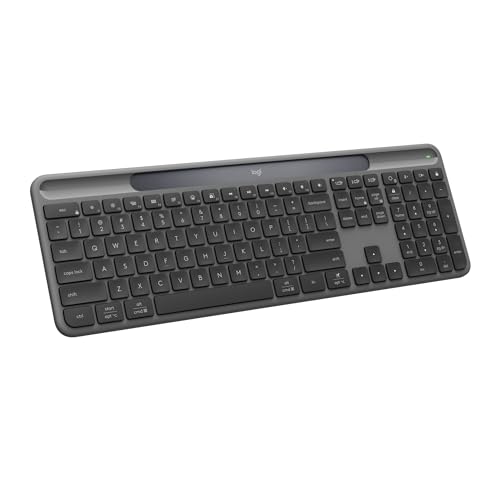
The Logitech Signature Slim K950 is a full-size, slim keyboard with laptop-style keys, a number pad and a quiet-typing design made partly from recycled plastic. It pairs with up to three devices across Windows, macOS, ChromeOS and mobile, and Logi Options+ on Windows and macOS lets you assign custom actions to keys.
Top of the ranking goes to Logitech Signature Slim K950, which offers laptop-style quiet typing, a full-size slim body and customizable keys in Logi Options+. Logitech K780 follows with a cradle holding a phone and a large tablet together with full-size keys and Bluetooth or USB receiver, so the gap between them is a matter of habit more than quality.
It uses Bluetooth only, so it relies on the computer having Bluetooth built in. Otherwise the Logitech Signature Slim K950 suits people in shared spaces who want a quiet slim keyboard that looks tidy.
Best for: people in shared spaces who want a quiet slim keyboard that looks tidy
Check price on AmazonPros
- +Quiet laptop-style keys
- +Pairs with three devices
- +Customizable keys
- +Recycled plastic build
Cons
- −Bluetooth only
- −Full-size width
Logitech K780
About this pick
The Logitech K780 is a full-size keyboard with a number pad and a built-in cradle that can hold a smartphone and a large tablet together. It connects over Bluetooth or a USB receiver, pairs with three devices and switches between them with an Easy-Switch button.
What separates the Logitech K780 from Logitech Signature Slim K950 above it is focus: a cradle holding a phone and a large tablet together with full-size keys and Bluetooth or USB receiver, and it gives up a slim bag-friendly body to get there.
Logitech K780 is aimed at desk workers who run a tablet and a phone beside a laptop or PC. It is large and stays on the desk, so it is not a travel keyboard.
Best for: desk workers who run a tablet and a phone beside a laptop or PC
Check price on AmazonPros
- +Holds phone and tablet
- +Easy-Switch for three devices
- +Large quiet keys
- +Dongle or Bluetooth
Cons
- −Large and heavy
- −Not meant for travel
Logitech Signature K650 Comfort
About this pick
The Logitech Signature K650 Comfort is a full-size wireless keyboard with an integrated soft-touch palm rest and deep-cushioned keys. It connects over Bluetooth Low Energy or the included Logi Bolt receiver, includes mic-mute and screenshot shortcut keys and runs across Windows, macOS, ChromeOS, Linux, iPadOS and Android.
Compared with Logitech K780, which sits one place higher, the Logitech Signature K650 Comfort is stronger on an integrated palm rest, deep-cushioned keys and a choice of Bluetooth or the Logi Bolt receiver but it gives up a slim profile.
The palm rest adds depth, so it needs more desk space than slim boards. Otherwise the Logitech Signature K650 Comfort suits long-session typists who want built-in wrist support in a full-size board.
Best for: long-session typists who want built-in wrist support in a full-size board
Check price on AmazonPros
- +Built-in palm rest
- +Dongle or Bluetooth
- +Shortcut keys for calls
- +Works across many systems
Cons
- −Needs more desk depth
- −Not travel-friendly
Logitech Signature Slim Solar+ K980
About this pick
The Logitech Signature Slim Solar+ K980 charges from sunlight and artificial light through a light-absorbing strip, and the listing rates the battery for up to ten years. It is a full-size Bluetooth keyboard with a number pad, rated for 10 million keystrokes, working across Windows, Mac and Android.
The Logitech Signature Slim Solar+ K980 sits between Logitech Signature K650 Comfort and Apple Magic Keyboard (USB-C). It stands out for solar and indoor light charging with a battery rated up to ten years, whereas Apple Magic Keyboard (USB-C) brings automatic pairing with a Mac and a battery that lasts about a month or more between charges.
Logitech Signature Slim Solar+ K980 is aimed at people who want to stop thinking about batteries and charging cables for good. Light charging needs a regular light source, so a dark drawer or dim room can leave it low.
Best for: people who want to stop thinking about batteries and charging cables for good
Check price on AmazonPros
- +No cable or batteries to manage
- +Rated for 10 million keystrokes
- +Works across major systems
- +Slim, tidy body
Cons
- −Needs regular light exposure
- −Priced above basic boards
Apple Magic Keyboard (USB-C)
About this pick
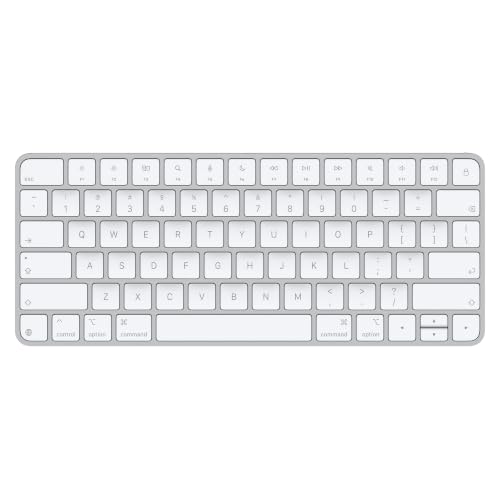
The Apple Magic Keyboard (USB-C) is a compact wireless keyboard that pairs automatically with a Mac and works with Apple Vision Pro. A woven USB-C cable pairs and charges it, and its internal battery runs for about a month or more between charges.
Where Logitech Signature Slim Solar+ K980 leads with solar and indoor light charging with a battery rated up to ten years, the Apple Magic Keyboard (USB-C) answers with automatic pairing with a Mac and a battery that lasts about a month or more between charges, and it gives up a number pad.
It does not include a number pad, so spreadsheet-heavy users should look at the variant that does. Otherwise the Apple Magic Keyboard (USB-C) suits Mac users who want seamless pairing and a compact, low-fuss keyboard.
Best for: Mac users who want seamless pairing and a compact, low-fuss keyboard
Check price on AmazonPros
- +Auto-pairs with Mac
- +Month-plus battery
- +USB-C pairing cable included
- +Compact desk footprint
Cons
- −No number pad
- −Features tuned to Apple devices
Logitech K585
About this pick
The Logitech K585 is a slim wireless keyboard with a full number pad, 12 function keys and a built-in cradle for a phone or a tablet up to 10 inches wide. It connects over Bluetooth or a 2.4GHz USB receiver, with Easy Switch pairing and a range of up to 10 metres.
What separates the Logitech K585 from Apple Magic Keyboard (USB-C) above it is focus: a slim body with a number pad, a built-in cradle and Bluetooth or a 2.4GHz receiver, and it gives up Mac-specific keys to get there.
Logitech K585 is aimed at people who want a slim keyboard with a cradle and a choice of dongle or Bluetooth. The cradle holds a phone or a tablet up to 10 inches, not a larger tablet.
Best for: people who want a slim keyboard with a cradle and a choice of dongle or Bluetooth
Check price on AmazonPros
- +Cradle built in
- +Dongle or Bluetooth
- +Quiet laptop-style keys
- +Easy Switch pairing
Cons
- −Cradle limited to 10 inch tablets
- −Number pad adds width
Logitech K480
About this pick
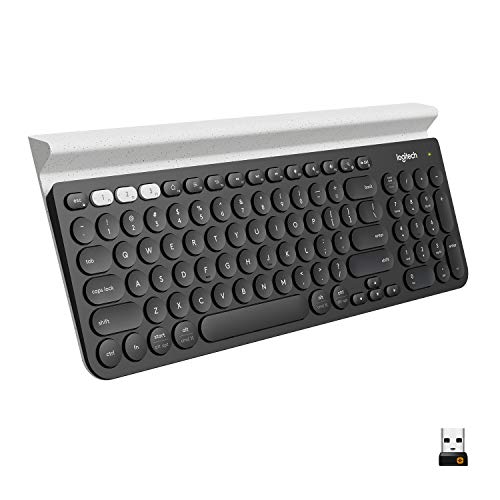
The Logitech K480 is a compact Bluetooth keyboard with a dial that switches typing between three paired devices and a built-in cradle for phones and tablets up to 0.4 inches thick. It runs across Windows, macOS, ChromeOS, iPadOS and Android, and the compact layout lets the mouse sit closer.
At the bottom of this ranking, the Logitech K480 still earns a place through an Easy-Switch dial for three devices and an integrated cradle for a phone or tablet, and it gives up a slim profile and a backlight next to Logitech K585.
The body is thick and heavy compared with slim travel boards, so it lives on a desk. Otherwise the Logitech K480 suits people who type on a tablet or phone and want a stand built into the keyboard.
Best for: people who type on a tablet or phone and want a stand built into the keyboard
Check price on AmazonPros
- +Easy-Switch dial
- +Built-in device cradle
- +Works on all major systems
- +Compact for a mouse close by
Cons
- −Thick, heavy body
- −No backlight
How We Evaluated These Wireless Keyboards Under $100
Each pick was assessed across 5 criteria weighted for real-world use.
Connection and pairing
Each pick was checked for Bluetooth, a USB receiver or both, and for how many devices it can store and switch between.
Battery approach
We compared battery type, rated runtime and what the quoted figure assumes, since lighting and heavy use change real life.
Typing feel and noise
Stroke depth, key mechanism and how loud the board is were scored from what each listing says about its switches.
Size and layout
Full-size, compact and number-pad layouts were compared against desk width and typical tasks.
Value inside the price ceiling
Pairing, battery and size were measured against cost, so a pick that spends less but drops multi-device switching loses ground. Every pick here lists below $100, and Logitech K480 to Logitech Signature Slim K950 marks the spread.
How to Choose the Right Wireless Keyboards Under $100
By Primary Use
Start with the devices you type on, because each board below pairs and powers itself in a different way.
| Primary Use | Pick from this guide |
|---|---|
| Open office or shared home, wants hush | Logitech Signature Slim K950: laptop-style quiet typing, a full-size slim body and customizable keys in Logi Options+ |
| Runs a desktop plus a tablet and phone on one board | Logitech K780: a cradle holding a phone and a large tablet together with full-size keys and Bluetooth or USB receiver |
| Types long hours and wants wrist support | Logitech Signature K650 Comfort: an integrated palm rest, deep-cushioned keys and a choice of Bluetooth or the Logi Bolt receiver |
| Wants a keyboard that never needs a cable | Logitech Signature Slim Solar+ K980: solar and indoor light charging with a battery rated up to ten years |
| Mac and Apple Vision Pro user wanting a no-fuss pair | Apple Magic Keyboard (USB-C): automatic pairing with a Mac and a battery that lasts about a month or more between charges |
| Needs a number pad and a stand for a tablet | Logitech K585: a slim body with a number pad, a built-in cradle and Bluetooth or a 2.4GHz receiver |
| Types on a tablet or phone propped on the keyboard | Logitech K480: an Easy-Switch dial for three devices and an integrated cradle for a phone or tablet |
By Budget
| Budget | Pick from this guide |
|---|---|
| Under $55 | Logitech Signature K650 Comfort (Best With Wrist Rest); Logitech K585 (Best Slim With Cradle); Logitech K480 (Best Built-In Stand) |
| Up to $80 | Logitech Signature Slim K950 (Best Quiet Slim); Logitech Signature Slim Solar+ K980 (Best Never-Charge Pick); Apple Magic Keyboard (USB-C) (Best for Apple Ecosystem); Logitech K780 (Best Desk-and-Tablet Combo) |
USB receiver or 2.4GHz dongle vs Bluetooth only
Whether a board carries a USB receiver is the fork that decides which of these boards suit your devices.
USB receiver or 2.4GHz dongle
A receiver gives a steadier link with less delay and works on desktops without Bluetooth, but it uses a USB port and cannot pair with tablets or phones. In this guide: Logitech K780, Logitech Signature K650 Comfort, Logitech K585.
Bluetooth only
Bluetooth needs no dongle and pairs with laptops, tablets and phones, at the cost of a slightly slower link and a pairing step each switch. In this guide: Logitech Signature Slim K950, Logitech Signature Slim Solar+ K980, Apple Magic Keyboard (USB-C), Logitech K480.
Most buyers should default to a board with Bluetooth plus a receiver unless the desk is a laptop only.
By Second Priority
| Second priority | Pick from this guide |
|---|---|
| Wants a full number pad and large quiet keys | Logitech K780 (Best Desk-and-Tablet Combo): gives up a slim bag-friendly body |
| Needs both a dongle and Bluetooth | Logitech Signature K650 Comfort (Best With Wrist Rest): gives up a slim profile |
| Placed beside a window or under a bright desk lamp | Logitech Signature Slim Solar+ K980 (Best Never-Charge Pick): gives up a lower price |
| Wants a compact, familiar Apple key feel | Apple Magic Keyboard (USB-C) (Best for Apple Ecosystem): gives up a number pad |
| Wants a quiet laptop-style feel at mid cost | Logitech K585 (Best Slim With Cradle): gives up Mac-specific keys |
For Laptop and Tablet Desks Specifically
Look for
Multi-device switching, a cradle or stand, and a battery that does not need weekly charging.
In this comparison
Start with Logitech Signature Slim Solar+ K980, which brings solar and indoor light charging with a battery rated up to ten years.
When to Spend More
Spend more if
You want longer battery life, solar charging or a quieter slim body. Here, Logitech Signature Slim K950 is the example, with laptop-style quiet typing, a full-size slim body and customizable keys in Logi Options+.
Save if
You only need a plain, reliable board for one desk. Here, Logitech K480 is the example, with an Easy-Switch dial for three devices and an integrated cradle for a phone or tablet.
Frequently Asked Questions
Is a Bluetooth keyboard better than a USB dongle keyboard?
They suit different desks. Bluetooth pairs with laptops, tablets and phones without a dongle, while a USB receiver is usually steadier for one computer and does not need Bluetooth built in.
How long should a wireless keyboard battery last?
It varies from weeks to more than a year depending on the battery type and lighting. Compare the conditions behind the quoted figure, not just the number.
Can one keyboard work with my laptop and my tablet?
Yes, if it lists multi-device Bluetooth and an easy-switch key. A receiver-only board cannot pair with a tablet or phone.
Do wireless keyboards work with a Mac?
Many do, but check for a Mac layout or toggle. Boards tuned for Windows may mislabel keys, though they still type correctly.
Is a wireless keyboard secure?
Mainstream Bluetooth and 2.4GHz boards encrypt traffic, but a very old receiver model may not. For sensitive work prefer a recent board from a known brand and keep firmware updated.
What do I give up by staying under $100?
Going to the low end, Logitech K480 keeps an Easy-Switch dial for three devices and an integrated cradle for a phone or tablet but gives up a slim profile and a backlight. Logitech Signature Slim K950 adds laptop-style quiet typing, a full-size slim body and customizable keys in Logi Options+, while giving up a dongle for older machines. If your devices fit the cheaper board's pairing, spending more buys little.
Bottom Line
best overall: Logitech Signature Slim K950 - best overall pick in this roundup.
See the full rankings above for all picks with pros, cons, and best-for summaries.
Browse on Amazon
All Prime-eligible options with current pricing.
Shop on Amazon →