
7 Best Wireless Keyboards Under $30 in 2026
Seven wireless keyboards under $30 compared by connection type, battery and size, from tablet slims to full-size dongle boards for desks and laptops.

New to Amazon Prime?
Get fast, free shipping on every pick in this guide, plus Prime Video and exclusive deals.
Try Prime Free


At a Glance
Under thirty dollars, a wireless keyboard usually forces one trade: a dongle that works on one computer, a Bluetooth board that pairs with everything, or a slim tablet keyboard with a small layout. The right pick depends on which devices you actually type on, not on which board has the longest feature list.
We evaluated seven keyboards that are genuinely wireless and genuinely keyboards, leaving out keyboard and mouse bundles. They cover receiver boards, Bluetooth-only boards and one tri-mode model, sorted by how well they fit a small desk and how little maintenance they need.
6 Criteria to Look For Before Buying a Wireless Keyboards Under $30
Key buying criteria so you get the right fit the first time.
Bluetooth, dongle or both
Bluetooth is the easiest way to pair a laptop, tablet and phone, but it adds a little delay and a pairing step each time you switch. A 2.4GHz USB receiver is usually quicker and steadier for one computer, yet it takes a USB port and cannot connect to a tablet. Check whether the listing names Bluetooth, a receiver or both, because a board labelled wireless can mean either.
How many devices it remembers
Multi-device boards store two to five paired devices and switch between them with a key or a dial, which saves repairing every time you change screens. A board that remembers one device forces a fresh pairing whenever you move. Look for the exact number of device slots in the title or bullets and for an easy-switch key rather than a menu.
Size and number pad
A full-size board keeps the number pad but is about 17 to 18 inches wide, while compact and tenkeyless boards save width and lose the pad. Data entry and spreadsheets are where the pad matters, and a mouse is where a narrow board helps. Decide which you use more and read the listed dimensions before ordering.
Key mechanism and typing noise
Scissor-switch boards give a shallow, quiet stroke close to a laptop, while mechanical boards feel crisper and sound louder. In a shared room or on calls, quiet matters more than feel. Look for scissor or low-profile wording for quiet, and for hot-swap or switch type if you want a mechanical board.
Stand, cradle and ergonomics
A built-in cradle holds a phone or tablet beside the keys, a palm rest cuts wrist bend and a tilt leg changes the angle. These extras add depth to the board and are heavier than the minimal option. Check what the cradle can hold by size, and whether a wrist rest is built in or sold separately.
What the $30 ceiling buys
The cheapest pick here, NOOX Slim Bluetooth Keyboard, is built around a 180g, 0.6cm-thin body with a battery rated for 20 days of two-hour use, while the priciest, Arteck HB193, is built around a stainless steel body with three-device switching and a rated six-month charge. Extra spend is justified when pairing several devices, a cradle or a battery you forget about is part of your daily routine. Look at which of those two features you would reach for every single day, and favour the board that removes a regular annoyance.
7 Best Wireless Keyboards Under $30 in 2026
TECKNET Tri-Mode Keyboard
About this pick
The TECKNET tri-mode keyboard has a number pad, quiet scissor keys and a gentle 7-degree curved profile in a body about 0.78 inches thick. It offers Bluetooth 5.0, a 2.4GHz dongle and a USB-C wired mode and can hold five devices, and its 500mAh battery is rated at 180 days of two-hour days.
We put TECKNET Tri-Mode Keyboard first, chosen for Bluetooth, 2.4GHz and USB-C wired modes with five paired device slots. Runner-up HP 230 Wireless Keyboard trades part of that away for a low-profile, quiet full-size layout with a number pad and a rated 16-month battery.
Claims such as the quoted noise reduction come from the maker, so treat them as marketing. Otherwise the TECKNET Tri-Mode Keyboard suits people who want one keyboard for several devices at the lowest cost.
Best for: people who want one keyboard for several devices at the lowest cost
Check price on AmazonPros
- +Three connection modes
- +Pairs with five devices
- +Quiet scissor keys
- +USB-C rechargeable
Cons
- −Lesser-known brand
- −Full-size width on a small desk
HP 230 Wireless Keyboard
About this pick
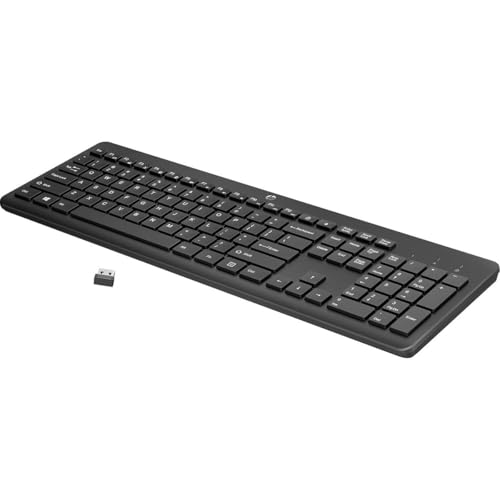
The HP 230 is a full-size wireless keyboard with low-profile chiclet keys, an integrated number pad and shortcut keys for 12 common functions. It runs on two AAA batteries included in the box, and HP rates the cells at up to 16 months of use.
The HP 230 Wireless Keyboard sits between TECKNET Tri-Mode Keyboard and Logitech K270. It stands out for a low-profile, quiet full-size layout with a number pad and a rated 16-month battery, whereas Logitech K270 brings a plug-and-play USB receiver and a 24-month battery rating from a major brand.
HP 230 Wireless Keyboard is aimed at office users who want a plain, quiet full-size keyboard that just works with a dongle. It links through a USB receiver only, so it cannot pair with a tablet or phone.
Best for: office users who want a plain, quiet full-size keyboard that just works with a dongle
Check price on AmazonPros
- +Quiet low-profile keys
- +Batteries included
- +12 one-press shortcuts
- +Number pad kept
Cons
- −Receiver only, no Bluetooth
- −Takes more width than compact boards
Logitech K270
About this pick
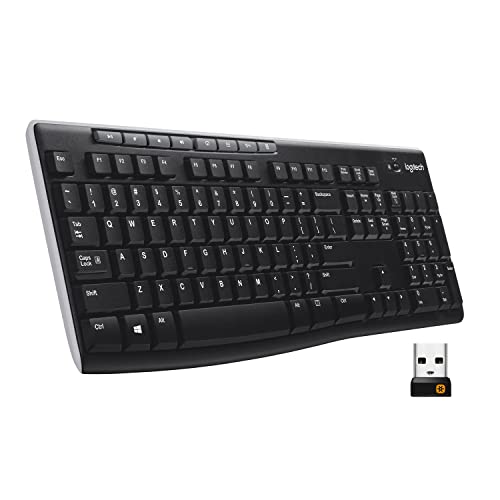
The Logitech K270 is a full-size wireless keyboard with a number pad, eight multimedia keys and a spill-resistant design. A USB receiver gives instant plug-and-play with no software, and the listing rates the battery at 24 months.
Where HP 230 Wireless Keyboard leads with a low-profile, quiet full-size layout with a number pad and a rated 16-month battery, the Logitech K270 answers with a plug-and-play USB receiver and a 24-month battery rating from a major brand, and it gives up Bluetooth and a slim profile.
It targets Windows and uses a deep-profile layout, so it is bulky next to slim rivals. Otherwise the Logitech K270 suits buyers who want the most boring, dependable wireless keyboard for one computer.
Best for: buyers who want the most boring, dependable wireless keyboard for one computer
Check price on AmazonPros
- +Spill-resistant design
- +No software install
- +Very long battery rating
- +Deep, familiar keys
Cons
- −Receiver only, no Bluetooth
- −Bulky deep-profile body
Logitech K250
About this pick
The Logitech K250 is a compact Bluetooth keyboard that still carries a full number pad, arrow keys and F-key shortcuts. Connecting takes seconds over Bluetooth with no dongle or USB port needed, and deep-profile keys with an adjustable tilt leg and a spill-resistant build round it out.
What separates the Logitech K250 from Logitech K270 above it is focus: a compact Bluetooth-only board that keeps a full number pad and needs no dongle, and it gives up a USB receiver for older machines to get there.
Logitech K250 is aimed at laptop owners who want a number pad and a free USB port. It is Bluetooth only with no receiver, so a PC without Bluetooth needs an adapter.
Best for: laptop owners who want a number pad and a free USB port
Check price on AmazonPros
- +No dongle needed
- +Number pad on a compact body
- +Spill-resistant build
- +Adjustable tilt
Cons
- −Bluetooth only
- −Older PCs may lack Bluetooth
Arteck HB193
About this pick
The Arteck HB193 is a full-size Bluetooth keyboard with a stainless steel plate, low-profile keys and a number pad. It connects to three devices and switches between them with one key, and a rechargeable cell is rated for six months at two hours a day.
Compared with Logitech K250, which sits one place higher, the Arteck HB193 is stronger on a stainless steel body with three-device switching and a rated six-month charge but it gives up a lightweight feel.
Stainless steel adds weight, so it is less carry-friendly than slim plastic boards. Otherwise the Arteck HB193 suits people who want a heavier, sturdier board that feels metal and pairs with three devices.
Best for: people who want a heavier, sturdier board that feels metal and pairs with three devices
Check price on AmazonPros
- +Sturdy metal feel
- +Three-device switching
- +Rechargeable battery
- +Works with all four major systems
Cons
- −Heavier than plastic rivals
- −Full-size width
OMOTON Ultra-Slim Bluetooth Keyboard
About this pick
The OMOTON is a 78-key Bluetooth keyboard about 11.2 inches long and 4.7 inches deep, designed around iPad and iPhone layouts with 12 multimedia keys. It uses two AAA batteries (not included) and the listing rates it at up to 400 hours, with auto-sleep to stretch that further.
The OMOTON Ultra-Slim Bluetooth Keyboard sits between Arteck HB193 and NOOX Slim Bluetooth Keyboard. It stands out for a 0.2-inch-thin 78-key body that runs on two AAA batteries for a rated 400 hours, whereas NOOX Slim Bluetooth Keyboard brings a 180g, 0.6cm-thin body with a battery rated for 20 days of two-hour use.
OMOTON Ultra-Slim Bluetooth Keyboard is aimed at iPad and iPhone users who prefer replaceable batteries to charging. The two AAA batteries are not included, so budget a couple of dollars at checkout.
Best for: iPad and iPhone users who prefer replaceable batteries to charging
Check price on AmazonPros
- +Very thin ABS body
- +12 multimedia keys
- +Swap batteries, no charging
- +Fits narrow shelves
Cons
- −Batteries not included
- −No number pad
NOOX Slim Bluetooth Keyboard
About this pick
The NOOX is a thin Bluetooth keyboard sized at roughly 25 by 15 by 0.6 cm and weighing about 180g, built for iPads, iPhones, Android and Windows devices. A built-in rechargeable battery is rated for more than 20 days at two hours a day, and scissor-style keys keep it quiet.
At the bottom of this ranking, the NOOX Slim Bluetooth Keyboard still earns a place through a 180g, 0.6cm-thin body with a battery rated for 20 days of two-hour use, and it gives up a number pad and any desktop-grade key feel next to OMOTON Ultra-Slim Bluetooth Keyboard.
Its tiny layout is made for tablets, so a desktop touch typist will feel cramped. Otherwise the NOOX Slim Bluetooth Keyboard suits tablet and phone owners who want the cheapest rechargeable keyboard that fits in a bag.
Best for: tablet and phone owners who want the cheapest rechargeable keyboard that fits in a bag
Check price on AmazonPros
- +Fits easily in a bag
- +Rechargeable battery
- +Works across iOS, Android, Windows
- +Quiet scissor keys
Cons
- −No number pad
- −Compact keys cramp larger hands
How We Evaluated These Wireless Keyboards Under $30
Each pick was assessed across 5 criteria weighted for real-world use.
Connection and pairing
Each pick was checked for Bluetooth, a USB receiver or both, and for how many devices it can store and switch between.
Battery approach
We compared battery type, rated runtime and what the quoted figure assumes, since lighting and heavy use change real life.
Typing feel and noise
Stroke depth, key mechanism and how loud the board is were scored from what each listing says about its switches.
Size and layout
Full-size, compact and number-pad layouts were compared against desk width and typical tasks.
Value inside the price ceiling
Pairing, battery and size were measured against cost, so a pick that spends less but drops multi-device switching loses ground. Every pick here lists below $30, and NOOX Slim Bluetooth Keyboard to Arteck HB193 marks the spread.
How to Choose the Right Wireless Keyboards Under $30
By Primary Use
Start with the devices you type on, because each board below pairs and powers itself in a different way.
| Primary Use | Pick from this guide |
|---|---|
| Swaps between a laptop, a tablet and a phone | TECKNET Tri-Mode Keyboard: Bluetooth, 2.4GHz and USB-C wired modes with five paired device slots |
| Single desktop PC with a number pad for data entry | HP 230 Wireless Keyboard: a low-profile, quiet full-size layout with a number pad and a rated 16-month battery |
| One desktop, no pairing fuss, set and forget | Logitech K270: a plug-and-play USB receiver and a 24-month battery rating from a major brand |
| Laptop user who wants a number pad without a dongle | Logitech K250: a compact Bluetooth-only board that keeps a full number pad and needs no dongle |
| Wants a sturdy board that stays put on a slick desk | Arteck HB193: a stainless steel body with three-device switching and a rated six-month charge |
| Studies or works from an iPad on a small desk | OMOTON Ultra-Slim Bluetooth Keyboard: a 0.2-inch-thin 78-key body that runs on two AAA batteries for a rated 400 hours |
| Types on an iPad or phone at a cafe table | NOOX Slim Bluetooth Keyboard: a 180g, 0.6cm-thin body with a battery rated for 20 days of two-hour use |
By Budget
| Budget | Pick from this guide |
|---|---|
| Under $18 | OMOTON Ultra-Slim Bluetooth Keyboard (Best for iPad); NOOX Slim Bluetooth Keyboard (Lowest Cost Tablet Pick) |
| Up to $23 | Logitech K250 (Best Bluetooth Number Pad); Logitech K270 (Best Dongle Reliability); TECKNET Tri-Mode Keyboard (Best Multi-Device Under $30); HP 230 Wireless Keyboard (Best Number Pad Value) |
| Up to $30 | Arteck HB193 (Best Metal Body) |
USB receiver or 2.4GHz dongle vs Bluetooth only
Whether a board carries a USB receiver is the fork that decides which of these boards suit your devices.
USB receiver or 2.4GHz dongle
A receiver gives a steadier link with less delay and works on desktops without Bluetooth, but it uses a USB port and cannot pair with tablets or phones. In this guide: TECKNET Tri-Mode Keyboard, HP 230 Wireless Keyboard, Logitech K270.
Bluetooth only
Bluetooth needs no dongle and pairs with laptops, tablets and phones, at the cost of a slightly slower link and a pairing step each switch. In this guide: Logitech K250, Arteck HB193, OMOTON Ultra-Slim Bluetooth Keyboard, NOOX Slim Bluetooth Keyboard.
Most buyers should default to a board with Bluetooth plus a receiver unless the desk is a laptop only.
By Second Priority
| Second priority | Pick from this guide |
|---|---|
| Shares a quiet room and wants chiclet keys | HP 230 Wireless Keyboard (Best Number Pad Value): gives up Bluetooth multi-device pairing |
| Needs a spill-resistant board for a shared workspace | Logitech K270 (Best Dongle Reliability): gives up Bluetooth and a slim profile |
| Wants to keep a USB port free | Logitech K250 (Best Bluetooth Number Pad): gives up a USB receiver for older machines |
| Switches between three devices on one key | Arteck HB193 (Best Metal Body): gives up a lightweight feel |
| Wants swappable AAA power instead of a charger | OMOTON Ultra-Slim Bluetooth Keyboard (Best for iPad): gives up a rechargeable cell and a number pad |
For Laptop and Tablet Desks Specifically
Look for
Multi-device switching, a cradle or stand, and a battery that does not need weekly charging.
In this comparison
HP 230 Wireless Keyboard fits best in this list, thanks to a low-profile, quiet full-size layout with a number pad and a rated 16-month battery.
When to Spend More
Spend more if
You want longer battery life, solar charging or a quieter slim body. Here, Arteck HB193 is the example, with a stainless steel body with three-device switching and a rated six-month charge.
Save if
You only need a plain, reliable board for one desk. Here, NOOX Slim Bluetooth Keyboard is the example, with a 180g, 0.6cm-thin body with a battery rated for 20 days of two-hour use.
Frequently Asked Questions
Is a Bluetooth keyboard better than a USB dongle keyboard?
They suit different desks. Bluetooth pairs with laptops, tablets and phones without a dongle, while a USB receiver is usually steadier for one computer and does not need Bluetooth built in.
Why does my wireless keyboard lag or drop out?
Common causes are a weak battery, a crowded 2.4GHz environment or a receiver placed behind a metal tower. Move the dongle to a front port or a short extension and replace or recharge the battery.
Can one keyboard work with my laptop and my tablet?
Yes, if it lists multi-device Bluetooth and an easy-switch key. A receiver-only board cannot pair with a tablet or phone.
Do wireless keyboards work with a Mac?
Many do, but check for a Mac layout or toggle. Boards tuned for Windows may mislabel keys, though they still type correctly.
Is a rechargeable keyboard better than AAA batteries?
Rechargeable boards avoid repeated purchases but need a cable now and then, while AAA batteries swap in seconds and can last a year or more. Pick the one you will maintain.
What do I give up by staying under $30?
Going to the low end, NOOX Slim Bluetooth Keyboard keeps a 180g, 0.6cm-thin body with a battery rated for 20 days of two-hour use but gives up a number pad and any desktop-grade key feel. Arteck HB193 adds a stainless steel body with three-device switching and a rated six-month charge, while giving up a lightweight feel. If your devices fit the cheaper board's pairing, spending more buys little.
Bottom Line
best overall: TECKNET Tri-Mode Keyboard - best overall pick in this roundup.
See the full rankings above for all picks with pros, cons, and best-for summaries.
Browse on Amazon
All Prime-eligible options with current pricing.
Shop on Amazon →