
6 Best Small Keyboards for Mac in 2026
Six compact keyboards with Mac-friendly layouts for MacBook, iMac and Mac mini desks, from Apple's own to wireless, wired and mechanical alternatives.

New to Amazon Prime?
Get fast, free shipping on every pick in this guide, plus Prime Video and exclusive deals.
Try Prime Free


At a Glance
A Mac keyboard is not just a PC keyboard with a different logo. Command and Option sit in different places from Windows and Alt, the top row carries Mission Control, Spotlight and dictation keys, and a Windows-first board can leave you remapping modifiers in System Settings before you type a sentence. For a compact Mac desk, those details matter more than the brand.
We selected six small boards that treat macOS as a first-class system, from Apple's own Magic Keyboard to a mechanical option and affordable wireless and wired boards. Each is compared on Mac key mapping, connection type and how much room it leaves for a mouse.
5 Criteria to Look For Before Buying a Small Keyboards for Mac
Key buying criteria so you get the right fit the first time.
Mac modifier layout
Mac keyboards put Control, Option and Command in a specific order, and the Windows order differs. Wrong order makes shortcuts feel off until you remap. Look for 'Mac layout' or printed Command and Option, and check that Windows boards include a toggle.
Function row and shortcut keys
Mac function keys control brightness, Mission Control, Spotlight and dictation. A Windows-first board may not map these properly. Check the listing for shortcut keys such as 13 Mac shortcuts or for the number of dedicated keys.
Bluetooth pairing and multi-device
Mac keyboards generally pair over Bluetooth, and boards with several channels let you switch between a Mac, an iPad and a phone. Check the number of devices and whether the listing mentions auto-detection of the operating system.
Battery and charging port
USB-C charging matches current Macs and removes a separate cable. Rated life ranges from a month to six months depending on lighting and use. Look for the battery capacity and USB-C, not micro-USB.
Mechanical versus scissor feel
Scissor keys are shallow and match the MacBook's feel, while low-profile mechanical keys give more feedback. If you use a Mac laptop all day, shallow keys feel familiar, but heavy typists often prefer a mechanical board. Check for the switch type in the title or bullets.
6 Best Small Keyboards for Mac in 2026
Apple Magic Keyboard
About this pick
The Apple Magic Keyboard is wireless and rechargeable, with an internal battery that the listing says lasts about a month or more between charges. It pairs automatically with a Mac and has a USB-C port and a woven USB-C cable for pairing and charging.
It has no number pad, so it is already compact, though it is plain compared with mechanical options. Against the Macally boards it costs more but needs no mapping and no learning curve on a Mac.
Choose it if you want the system to work exactly as intended with no extra settings. If you want mechanical switches or backlight options, look at the Nuphy or Logitech picks.
Best for: people who want a keyboard that just works with their Mac
Check price on AmazonPros
- +Native Mac key layout
- +Auto-pairs with a Mac
- +Month-long battery rating
- +USB-C charge cable included
Cons
- −Costs more than basic boards
- −No backlight on the listing
NuPhy Air75 V2
About this pick
The NuPhy Air75 V2 is a 75% low-profile mechanical keyboard with an aluminum frame, Bluetooth 5.1, 2.4GHz and USB-C connections, more than 21 RGB effects and QMK/VIA support. It works with Mac, Windows, Linux, Android and iOS.
It is the one pick here that gives you a mechanical typing feel on a slim board. Against the Logitech MX Mechanical Mini for Mac it costs much less and is more customizable, though less polished on software.
Pick it for a Mac that sees heavy typing and a desk that is short on space. The tradeoff is that key layout is Windows-first, so check the mode switch for macOS.
Best for: heavy typists who want mechanical keys on a Mac
Check price on AmazonPros
- +Mechanical feel in a slim body
- +Three connection modes
- +QMK/VIA remapping
- +Works across Mac, Windows and Linux
Cons
- −Legends may be Windows-first
- −RGB drains battery
ProtoArc K90-A
About this pick
The ProtoArc K90-A is a compact Bluetooth keyboard made only for Mac and iPad, with backlit Mac keys, a metallic plate, three Bluetooth channels and three soft white backlight levels. The listing warns that it is Mac only and does not work with Windows.
That narrow focus is the point: the key legends and shortcuts match macOS, and the board is cheaper than Apple's. Compared with the Macally wireless board it offers backlighting.
Choose it if you use only Macs and iPads and type in dim light. Do not buy it if you ever share it with a PC.
Best for: Mac and iPad users who type in low light
Check price on AmazonPros
- +Mac-specific key legends
- +Backlit keys
- +Three device slots
- +Metal plate
Cons
- −Mac and iPad only
- −Bluetooth only
Macally Wireless Bluetooth Keyboard for Mac
About this pick
The Macally wireless keyboard for Mac has 78 keys and 13 shortcut keys, uses Bluetooth with auto OS detection, and has an 800mAh rechargeable battery that the listing rates for up to two months. It works with Mac, PC, iOS and iPad and carries a warranty of up to two years.
It is the only pick with auto OS detection and a long warranty. Against the ProtoArc K90-A it is not backlit but works with Windows, and against the Apple Magic Keyboard it costs less.
Pick it as a flexible compact board for a Mac with a PC sometimes in the mix. If you want backlit keys, step to the ProtoArc.
Best for: a Mac desk that sometimes connects to a PC
Check price on AmazonPros
- +Auto-detects the operating system
- +Up to two-year warranty
- +Rechargeable battery
- +Works with Mac, PC and iPad
Cons
- −No backlight
- −Layout not as tight as mini boards
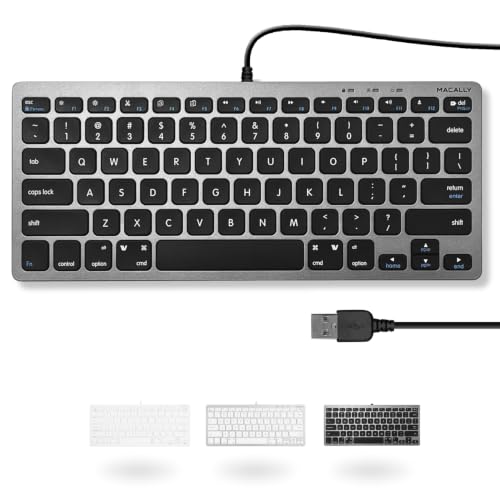
Macally Small USB Wired Keyboard
About this pick
The Macally Small USB Wired Keyboard has 78 scissor-switch keys and 13 shortcut keys for cut, copy, paste and iTunes on a Mac, and multimedia hotkeys on Windows. It uses a 4 foot 7 inch cable and is plug and play.
It is the simplest option: no battery, no pairing, and no software. Against the wireless Macally it costs less to own over time but is tethered.
It suits a fixed Mac desk where reliability matters. If you want to move the keyboard, pick a wireless one.
Best for: a fixed Mac desk where reliability matters
Check price on AmazonPros
- +Plug and play
- +No battery to charge
- +Shortcut keys for Mac
- +Compact 78-key layout
Cons
- −Wired only
- −Plain design
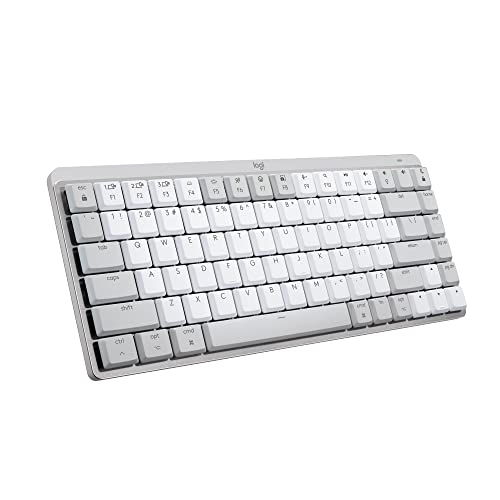
Logitech MX Mechanical Mini for Mac
About this pick
The MX Mechanical Mini for Mac is a low-profile wireless keyboard with a Mac key layout, Tactile Quiet switches and smart backlighting that lights keys as hands approach. It is described as compact with a minimalist form and can connect to multiple devices through Logi Options+.
It is the most expensive pick and the quietest of the mechanical options. Compared with the NuPhy Air75 V2, it gives up customization for polish and Mac-native keys.
Choose it if you want a premium mechanical feel in a Mac-first design. If budget is tight, the NuPhy is cheaper.
Best for: a premium quiet mechanical board for a Mac
Check price on AmazonPros
- +Mac-native key layout
- +Quiet tactile switches
- +Backlight adapts to hands
- +Low-profile body
Cons
- −Costs the most of this group
- −Limited switch choices
How We Evaluated These Small Keyboards for Mac
Each pick was assessed across 5 criteria weighted for real-world use.
Mac key mapping
We checked for Command and Option labels, Mac shortcut keys and macOS compatibility stated on each listing.
Compact footprint
Boards without a number pad were prioritized, and dimensions were noted where given.
Connection and battery
Bluetooth, dongle and wired options were compared, along with rated battery life.
Typing feel
Scissor, low-profile mechanical and standard mechanical switches were compared as described.
Value and support
Price bucket, warranty terms and brand track record were weighed together.
How to Choose the Right Small Keyboards for Mac
By System Setup
| Your setup | Pick from this guide |
|---|---|
| Mac only, want it to just work | Apple Magic Keyboard |
| Mac and iPad only, backlit | ProtoArc K90-A |
| Mac plus occasional PC | Macally Wireless Bluetooth Keyboard for Mac |
| Fixed Mac desk, wired | Macally Small USB Wired Keyboard |
| Mechanical typing | NuPhy Air75 V2 or Logitech MX Mechanical Mini for Mac |
By Budget
| Budget | Pick from this guide |
|---|---|
| $25 to $50 | ProtoArc K90-A, Macally Wireless Bluetooth Keyboard for Mac or Macally Small USB Wired Keyboard |
| $50 to $75 | NuPhy Air75 V2 |
| $75 to $100 | Apple Magic Keyboard |
| $100 to $150 | Logitech MX Mechanical Mini for Mac |
Scissor vs Mechanical Keys
Scissor keys are shallow and quiet, mechanical keys offer feedback and options.
Scissor
Matches the feel of a MacBook. The Apple Magic Keyboard, Macally boards and ProtoArc K90-A are scissor-style and are good for quiet shared rooms.
Mechanical
Gives key feedback and a longer life. The NuPhy Air75 V2 and Logitech MX Mechanical Mini for Mac are low-profile mechanical boards.
Most Mac users should choose scissor unless they type for hours.
By Warranty and Support
| Need | Pick from this guide |
|---|---|
| Up to two-year warranty | Macally Wireless Bluetooth Keyboard for Mac |
| Known platform maker | Apple Magic Keyboard |
| Software support | Logitech MX Mechanical Mini for Mac via Logi Options+ |
| Open firmware | NuPhy Air75 V2: QMK/VIA |
For MacBook Docking Setups Specifically
Look for
A keyboard that pairs quickly, charges over USB-C, and matches the MacBook's key layout so muscle memory transfers.
In this comparison
The Apple Magic Keyboard charges over USB-C and pairs automatically, and the ProtoArc K90-A copies the Mac layout with backlighting.
When to Spend More
Spend more if
You type a lot and want a quiet mechanical feel: the Logitech MX Mechanical Mini for Mac is the most polished pick.
Save if
You want a simple compact board: the Macally Small USB Wired Keyboard or Macally Wireless Bluetooth Keyboard for Mac are cheaper.
Frequently Asked Questions
Do I need a Mac-specific keyboard?
Not strictly, since most Bluetooth keyboards work on macOS. A Mac-specific layout saves remapping and gives you the correct shortcut keys, which makes it more comfortable.
How do I remap a Windows keyboard for Mac?
In System Settings under Keyboard, choose Modifier Keys and swap Option and Command. Some keyboards also have a hardware toggle to switch layouts.
Will a small keyboard work with my iPad?
Yes, most Bluetooth keyboards do, and models such as the ProtoArc K90-A and Macally wireless board list iPad compatibility.
Is the Apple Magic Keyboard worth the price?
It is worth it if you want a native layout, auto-pairing and a month-long battery. If you prefer mechanical keys or backlighting, other picks offer more.
Are mechanical keyboards good for Mac?
Yes. Boards like the NuPhy Air75 V2 and Logitech MX Mechanical Mini for Mac work well, but check that the legends and modifier keys match macOS.
How long do wireless Mac keyboards last between charges?
It depends on the model: Apple lists about a month, while the Macally wireless board lists up to two months. Backlit boards use more power.
Bottom Line
best overall: Apple Magic Keyboard - best native mac fit pick in this roundup.
See the full rankings above for all picks with pros, cons, and best-for summaries.
Browse on Amazon
All Prime-eligible options with current pricing.
Shop on Amazon →