
Will a Standing Desk Converter Fit Your Narrow Desk?

Affiliate Disclosure: We may earn a small commission on qualifying Amazon purchases at no extra cost to you. Full disclosure →
A standing desk converter can have a narrow-looking platform and still need more depth than your desk provides. The base, keyboard tray, lift path, and screen position may occupy different areas at different heights. Check the whole mechanism and the seated arrangement before treating a converter as a simple object placed on top of existing furniture.
Quick answer: Compare the converter’s documented minimum support requirements and movement envelope with the desk’s usable surface and load rating. Include the converter’s own weight, equipment, keyboard tray, monitor position, and cable travel. Check both fully lowered and raised states. Do not assume a tray may overhang or a base may be partly unsupported unless the exact product instructions permit it.
Start with the desk’s supported capacity
Find the furniture’s load and use information. Add the converter’s own weight to the equipment and other items the desk will support, following both products’ stated requirements. Do not treat a monitor platform’s equipment limit as the load placed on the underlying desk; the converter itself is part of that load.
Vari’s guidance specifically advises checking the existing desk’s capacity for the converter and belongings. Use that as a reminder to obtain the actual furniture specification, not as a universal limit or a recommendation for a particular product. If the desk’s suitability is unknown, resolve it before adding a heavy mechanism.
The converter versus full standing desk guide provides a category comparison. This article addresses the fit of a converter on a specific narrow surface, including the ordinary seated position that remains important after purchase.
Identify usable support depth
Measure the real desktop, excluding rounded, beveled, damaged, or obstructed areas where the product cannot be supported as required. Include a rear wall, monitor shelf, or raised lip. Compare the converter’s documented minimum desk dimensions and base placement, not only its upper platform size.
A keyboard tray may have a permitted overhang on a particular model, while the base still needs full support. Do not copy that arrangement to another product. Read the exact instructions and ask the manufacturer when the drawing leaves a question. A product photograph is not enough to authorize partial support.
Use a paper outline to compare obvious conflicts before buying. Mark the base separately from the keyboard tray and upper platform. The outline is a planning aid; it cannot establish structural suitability or approve a placement that the instructions do not support.
Trace the lift path
Some converters move mostly upward, while others also move forward or through another documented path. Check the mechanism’s full envelope, including handles and moving components. A platform that fits when lowered can approach a wall shelf, lamp, or seated person as it rises.
Keep clear of pinch points and follow the manufacturer instructions during adjustment. Do not put storage boxes or cables into moving regions simply because the space is empty at one height. Check the mechanism when loaded as permitted, using the specified adjustment method and assistance where required.
If the monitor has a rotating support, consider its movement separately. The portrait monitor clearance guide explains why final screen height is not the only measurement. Combining two adjustable devices requires both documented ranges to coexist.

Check the fully lowered typing position
A converter adds height even when collapsed. Compare the resulting keyboard and screen positions with your ordinary seated setup. If the keyboard becomes too high for comfortable work, raising the chair can create another problem at the feet or desk clearance. Do not assume every converter returns the desk to its original seated geometry.
Use official workstation guidance for general setup principles and your own ordinary observations for the task. This guide does not prescribe a medical posture or a treatment. If persistent discomfort occurs, seek appropriate advice rather than relying on a converter purchase to resolve it.
Include the keyboard tray’s usable width and depth, not just the main platform. A full-size keyboard and mouse may not fit together within the supported tray area. The low-sensitivity mouse space guide helps determine the actual unobstructed region required by your input routine.
Plan the screen and accessories
Verify the converter’s equipment limits, including any separate tray or accessory limits. A monitor arm or added riser changes the arrangement and needs explicit compatibility. Do not clamp an arm to an edge simply because it is physically accessible; the converter must support that attachment method.
Check screen position at both working heights. A laptop alone, a monitor on its factory stand, and a documented compatible monitor arm create different layouts. Include the camera, microphone, lamp, and papers if they are part of the actual task. Equipment left on the original desktop may become difficult to reach while standing.
The one-cable dock guide addresses host compatibility if a dock simplifies connections. Its physical placement still needs to follow its own instructions and avoid the converter’s moving parts. One host cable can simplify a routine without eliminating movement clearance.
Give cables enough supported travel
Trace power, video, USB, and accessory leads from their fixed points to the moving platform. Check the full documented height range without tension or snagging. A cable can be loose at the lowest position and taut near the top, especially if it passes behind a wall or through a fixed tray.
Keep cables out of the mechanism’s pinch zones. Use only supported management accessories and do not secure a lead across a moving joint. If a longer cable is required, verify its electrical capability for the device as well as its practical length.
For a dock on or near the converter, use the dock placement guide. The dock, supply, and removable storage may each have different operating and access needs. Do not place every item on the moving platform merely to keep the cable diagram short.

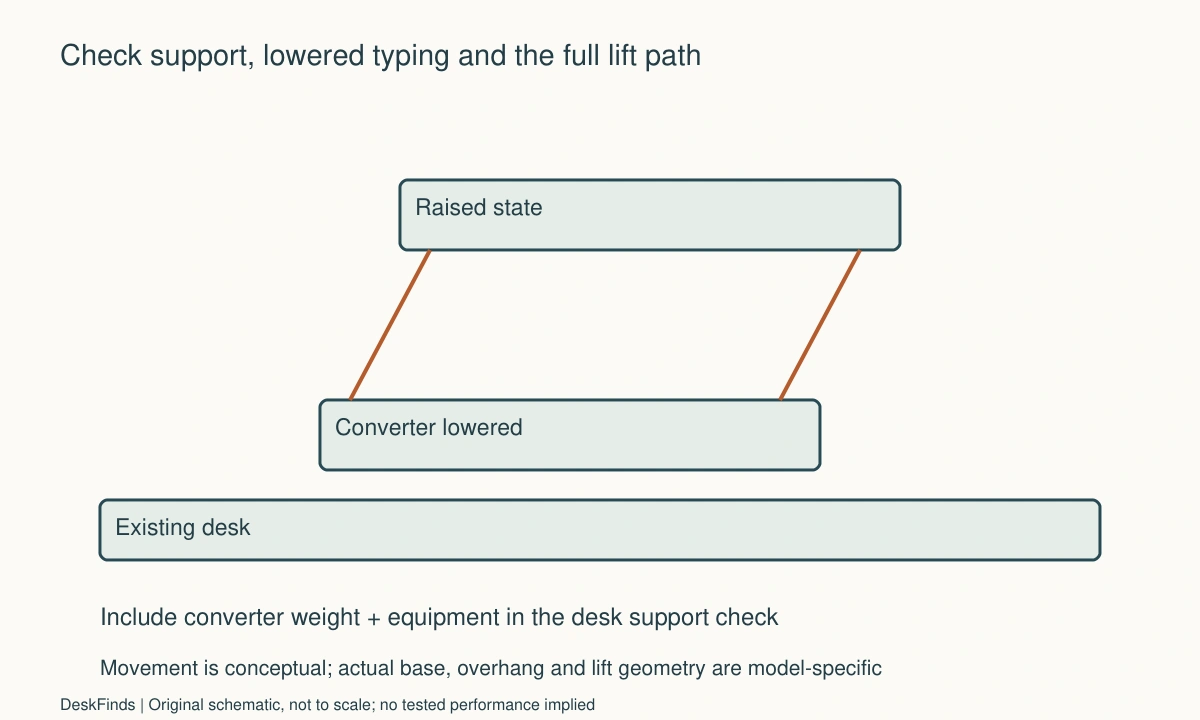
Worked example: the converter fit but the keyboard did not
Imagine a hypothetical worker with a narrow desk and one monitor. The upper platform dimensions appear compatible, and the worker wants to avoid replacing the desk. A paper outline of the complete converter reveals that the keyboard tray’s useful area is smaller than the worker’s normal keyboard-and-mouse arrangement.
The worker checks the lowered state first. The added keyboard height changes the seated setup, and the tray edge occupies space previously used for a notebook. The platform can hold the screen according to its specification, but that does not settle the input-device layout or the underlying desk’s combined load.
The worker compares another documented converter geometry, a smaller supported input arrangement that still meets actual needs, and a different workstation category. Each option is checked against furniture capacity and cable travel. The decision is not made by assuming that a tray can be extended with an improvised board or that a base can sit partly beyond the desk.
In this example, the best option is whichever completes both sitting and standing tasks within the product instructions. A different desk or user could reach a different conclusion. The scenario demonstrates the value of checking lowered typing height and tray area before purchase; it does not report a product test or promise a health benefit.
Account for the room around the desk
Standing changes where your body occupies the room and how you step away. Check the door, chair parking place, and route around the workstation. A converter does not move the desk itself, so the available floor space remains a constraint even if the platform rises easily.
If a chair mat is present, compare the carpet mat and doorway guide. Keep the floor route clear during the transition, and do not leave the chair in a position that blocks access to another person. A comfortable-looking standing screenshot does not describe the room when the chair is pulled out.
Keep drinks and loose objects away from moving areas as the instructions require. Before adjusting, understand which accessories move and which stay on the original desktop. A predictable transition is more useful than an arrangement that needs several unplanned items lifted out of the way each time.
Six fit decisions to document
Combined support
Record the desk’s relevant load information and the converter’s own weight plus permitted equipment. Check placement and any stated distribution requirements. A converter’s maximum equipment load is not the same as the total load on the furniture. If the desk specification is missing or the surface is unsuitable, resolve that uncertainty before ordering the mechanism.
Base and overhang
Compare the required support area with the usable desktop, including edges and obstructions. Note any overhang explicitly permitted by the selected model. Do not infer approval from another converter’s photo or a similar tray shape. A supported base is a prerequisite; fitting the upper platform in the room cannot compensate for an unsuitable foundation.
Moving envelope
Trace the complete documented path, including forward movement, handles, and clearance above the screen. Keep cables and stored items outside moving and pinch regions. A final raised position can fit while the transition does not. If a shelf or wall conflicts, revise the arrangement rather than operating the converter through only an improvised partial sequence.
Lowered work
Place the intended keyboard and mouse in the planned tray area and compare the fully lowered height. Include the real typing and pointing tasks. Do not assume a raised chair solves every mismatch; the rest of the seated workstation still needs to work. The converter should be assessed for the hours spent sitting as well as the periods spent standing.
Equipment attachment
Check screen bases, arms, lamps, and other accessories against the converter’s permitted attachments and separate limits. A clamp physically gripping an edge does not establish suitability. If a needed accessory is unsupported, compare another arrangement. Keep the installation instructions with the purchase so future additions do not silently change the approved setup.
Transition routine
Practice the documented adjustment with required clearance and appropriate assistance. Observe cable travel and where the chair is parked. If the routine requires repeatedly unplugging essential devices or moving loose objects out of the mechanism, simplify it. A converter is most useful when both positions and the transition between them fit the real desk and room.

Compare the converter with a simpler task change
A converter is useful when supported sitting and standing work at the existing desk is the actual requirement. If the main problem is only monitor height, cable clutter, or lack of paper space, another compatible accessory or layout change may address it with less weight and movement. Define the problem before deciding that height adjustment is the solution.
Compare a converter and any alternative as completed workstations. Include support capacity, input-device area, screen position, cables, and the floor space used during transition. A full standing desk has different furniture and room implications; a monitor riser does not provide the same task capability as a converter. Avoid treating unlike categories as interchangeable simply because they all raise something.
Keep health claims outside the purchase comparison unless supported by appropriate guidance. A height-adjustable product does not guarantee a comfortable arrangement or treat symptoms. Evaluate concrete fit and task requirements, and seek appropriate advice for persistent discomfort rather than assigning a medical benefit to the equipment.
A second scenario: the lift path met a wall shelf
Imagine a hypothetical user who measures a converter’s lowered platform on a narrow desk under a shelf. The base can be supported according to the furniture and converter requirements. The monitor also fits at the final height the user hopes to use, so the purchase initially appears straightforward.
The mechanism drawing reveals forward or upward movement that must be considered through the whole adjustment. The user adds the screen’s outer body, any camera, handles, and cable route to the moving envelope. A temporary position approaches the shelf even though the chosen final platform height looked acceptable in the first sketch.
The user does not plan to operate the mechanism through an undocumented partial route or stop it against the shelf. A different permitted location, another documented converter geometry, or a different workstation category is compared. Each alternative includes the fully lowered typing position and the total load on the original furniture.
The cable path is checked from fixed outlets and equipment to the moving surface. A dock left on the original desk may simplify some leads while requiring appropriate slack in others. Putting the dock on the converter may change load, access, and operating placement. Neither option is assumed superior without checking the exact equipment.
The hypothetical outcome is a supported arrangement with a clear transition, or a decision not to use a converter in that location. The example does not claim a particular mechanism was tested or that all converters move in the same direction. It demonstrates why the product’s movement drawing belongs in a fit check before purchase.
Ask for the dimensions that product photos omit
Request the minimum supporting surface, base outline, lowered and raised dimensions, lift path, keyboard-tray area, and any stated overhang conditions. Include the desk model and relevant capacity information. A reply about the top platform width does not answer whether the base can be supported on your furniture.
Ask how the intended monitor and accessories may be attached. A clamp-on arm, lamp, or microphone support can change the assembly. Do not assume the edge is suitable because it accepts a clamp physically. If the manufacturer offers a compatible accessory, use its stated installation and limits rather than extrapolating to a different product.
During a supported trial, keep the first arrangement simple. Add only the equipment needed for the essential task, then review optional items. This makes clearance and cable issues easier to understand and avoids turning the platform into a storage shelf. Retain the documentation and purchase record until both work positions and the transition have been checked in ordinary use.
A clear acceptance statement names the actual desk, converter, equipment, and required states. It is more informative than saying the product fits small desks generally. Narrow surfaces vary in usable depth, edge shape, capacity, and surrounding furniture, so the completed arrangement is the meaningful unit of comparison.
Sources and scope
- Vari FAQ - Supports checking the existing desk capacity and model-specific converter conditions; no universal overhang is authorized.
Editorial note: This is a research-based planning guide, not a hands-on product review. All worked scenarios are hypothetical. Measurements and compatibility must be confirmed for the exact equipment. Photography supplies context, not proof of a tested arrangement.
Photos are illustrative and come from free-license libraries such as Unsplash; diagrams are original to DeskFinds.