
6 Best 65% Keyboards for Compact Desks in 2026
Six 65% keyboards with dedicated arrow keys and about 68 keys, compared for compact desks. Wired and wireless picks, hot-swap boards and budget options.

New to Amazon Prime?
Get fast, free shipping on every pick in this guide, plus Prime Video and exclusive deals.
Try Prime Free


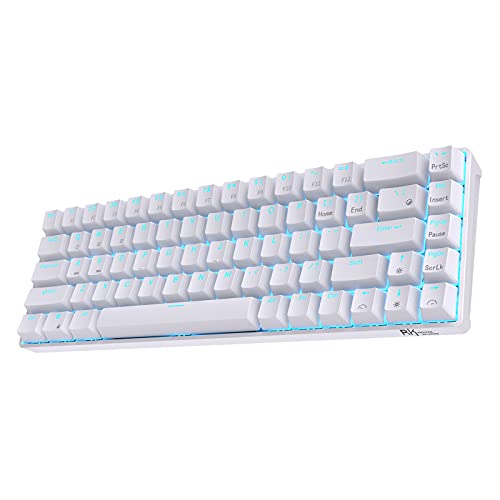


At a Glance
The 65% layout is the compromise that survives most desk setups. It removes the number pad, the function row and most of the navigation block, but it keeps four dedicated arrow keys and usually a few keys for Delete, Page Up and Page Down. That is why people who find 60% boards too fiddly often end up on a 65% one.
This list sticks to boards that really have the 65% shape (about 66 to 68 keys with arrows) and ranks them by how well each fits a small desk: connectivity, build, switch options and what the board expects you to put up with. Where a listing mislabels its layout, we say so rather than repeat the claim.
6 Criteria to Look For Before Buying a 65% Keyboards for Compact Desk
Key buying criteria so you get the right fit the first time.
Arrow keys and what else is cut
The defining feature of a 65% board is the dedicated arrow cluster, and most also keep Delete, Page Up and Page Down. What is removed is the function row, so volume, brightness and F-key shortcuts move to an Fn layer. Check the listing photo to see which navigation keys survive, because brands cut different ones.
Hot-swap sockets versus soldered switches
A hot-swap board lets you pull switches out and replace them without soldering, while a soldered board makes any switch change a repair job. This matters because switch feel is personal, and a wrong first pick can only be fixed on a hot-swap board. Search the listing text for 'hot-swappable' and 'supports 3-pin and 5-pin switches' instead of trusting the word 'customizable'.
Case material and weight
Aluminum cases add stiffness and weight, so the keyboard stays put and sounds fuller, while plastic is lighter but hollow. If you carry the board often, a metal case can add a noticeable amount to a bag. Look for stated materials such as 'anodized aluminum' and, if listed, the weight in pounds or grams.
Wireless modes and device slots
Bluetooth is slower than a 2.4GHz dongle, but it can link several devices and needs no port. If you use a laptop and a tablet, three Bluetooth slots avoid constant re-pairing. Look for the exact count of Bluetooth devices and whether the dongle stores inside the board.
Key remapping and firmware support
Because the Fn layer replaces missing keys, being able to remap them matters more on a 65% board than on a full-size one. QMK/VIA lets you rewrite keys in a browser, while brand software is often limited to a few layers. Check whether the listing says QMK, VIA or driver software and which operating systems it supports.
Honest layout labeling
Some listings call 68-key boards 60% or TKL, and others call 75% boards 65%. This matters because the wrong layout can leave you without arrows or a function row. Count the keys and cross-check with the photo, since the title can be unreliable.
6 Best 65% Keyboards for Compact Desks in 2026
OOCTPK Chilkey Foxy65
About this pick
The Foxy65 is a 65% board in an aluminum case with tri-mode connection (Bluetooth 5.0 for up to three devices, 2.4GHz, or USB-C), a gasket structure, a 1.2mm flex-cut PCB and four layers of poron dampening. It also has a programmable volume knob, hot-swappable sockets for 3-pin and 5-pin switches, and PBT keycaps.
Against the YUNZII AL68 it gives up QMK/VIA software but costs a bit less, and against the plastic-bodied RK68 it adds the metal case and the gasket feel. It is the rare board here that does not make you pick between build quality and wireless.
It is the pick for a long-term daily keyboard. The one caution is that a newer brand makes it worth checking the return window before you commit.
Best for: a daily-driver 65% board that handles both desk and laptop
Check price on AmazonPros
- +Metal case feels solid
- +Hot-swap sockets for any 3-pin or 5-pin switch
- +Three Bluetooth device slots
- +PBT keycaps resist shine
Cons
- −Newer brand, shorter track record
- −Heavier than plastic boards
YUNZII AL68
About this pick
The YUNZII AL68 is a 68-key board made from anodized aluminum, with tri-mode wireless, a gasket mount, south-facing RGB and double-shot PBT keycaps. Its big differentiator is full QMK/VIA support, so you can remap any key, build macros and change lighting in a web app without installing special software.
One listing quirk is worth flagging: the bullet text calls it a 60% keyboard, but 68 keys and arrows describe a 65% layout. Next to the Foxy65 it matches on build, and the extra value is the programmable firmware.
Choose it if you want to remap keys, for example to move Fn or add a dedicated shortcut, and enjoy tuning. If you never open a configurator, the Foxy65 is simpler.
Best for: tinkerers who want to remap keys and macros
Check price on AmazonPros
- +Full QMK/VIA remapping
- +Aluminum case with gasket mount
- +Double-shot PBT keycaps
- +Works wired or wireless
Cons
- −Listing mislabels it as 60%
- −Software adds a learning curve
Razer Reclusa X Mini
About this pick
The Razer Reclusa X Mini is a 65% hot-swappable board that ships with Razer Orange Tactile switches (3rd generation), a PPS plate, custom stabilizers and dual-layer silicone dampening. The keycaps are double-shot ABS with fade-resistant legends, and each key has Chroma RGB with south-facing LEDs.
It is a wired board with no wireless, which is the clear trade against the Foxy65 and the AL68. In return you get a recognizable brand and a tactile switch that is quieter than a clicky one.
It suits a desk where you want a known name and a tactile feel without a battery. Skip it if you need to pair with a phone or tablet.
Best for: wired setups where a known brand and tactile switches matter
Check price on AmazonPros
- +Tactile switches with moderate noise
- +Dual-layer silicone dampening
- +Per-key RGB works with other keycaps
- +Brand with a support network
Cons
- −Wired only
- −ABS keycaps shine over time
RK ROYAL KLUDGE RK68
About this pick
The RK68 is a wireless 65% board with 68 keys, arrows and a hot-swappable socket that takes 3-pin or 5-pin switches. It offers Bluetooth 5.0 for three devices plus 2.4GHz, a quiet linear red switch and 20 backlight modes, with remapping available through software.
It is the lowest-cost way here to get wireless and hot-swap together. Compared with the aluminum Foxy65 it has a lighter plastic frame and plainer sound, which is the usual price of staying under about $50.
Pick it as a first 65% mechanical board that can still go in a bag. The caveat is that the case is hollower than the metal boards above.
Best for: a first wireless 65% board on a limited budget
Check price on AmazonPros
- +Wireless with 2.4GHz and Bluetooth
- +Hot-swap sockets at a low cost
- +Arrow keys kept
- +Software for key remapping
Cons
- −Plastic case sounds hollow
- −Lighting only in one color
HyperX Alloy Origins 65
About this pick
The HyperX Alloy Origins 65 is a compact 65% wired board with linear red switches and a USB-C connection. The listing is thin on detail, so what you can rely on is the layout, the switch type and the cable setup rather than a long feature list.
It lacks hot-swap sockets in the specification we can confirm, so its place here is as a straightforward plug-and-play board from a known gaming brand. Against the Razer Reclusa X Mini, it has fewer documented features and no tactile option.
Choose it if you want a no-fuss wired 65% board and you trust the brand. If you want to swap switches, look at the Razer or any wireless pick above.
Best for: a simple wired 65% board from an established brand
Check price on AmazonPros
- +Compact 65% footprint
- +Plug-and-play USB-C
- +Known gaming brand
- +Mechanical switches
Cons
- −Thin specification on the listing
- −No wireless
Geeky GK65 SE
About this pick
The Geeky GK65 SE is a 68-key wired 65% board with soldered mechanical switches, multicolor RGB, a detachable 5-foot USB-C cable and lubricated stabilizers. The switches are soldered, so unlike the other picks they cannot be changed later.
It is the cheapest true mechanical 65% board in this list, and the trade is clear: you give up hot-swap sockets, wireless and any premium materials to stay under about $25.
It is a good fit for a spare desk or a first try at the 65% layout. Do not buy it expecting a custom feel.
Best for: a cheap first mechanical 65% board
Check price on AmazonPros
- +Lowest price of the group
- +Detachable cable
- +Pre-lubed stabilizers
- +RGB with software
Cons
- −Switches cannot be swapped
- −Wired only
How We Evaluated These 65% Keyboards for Compact Desks
Each pick was assessed across 5 criteria weighted for real-world use.
Layout fidelity
We checked that each board has dedicated arrow keys and about 66 to 68 keys, and flagged listings that mislabel the layout.
Build and materials
Case material, plate and dampening layers were compared, since they determine weight, rigidity and sound.
Wireless and wired options
Number of Bluetooth slots, dongle support and detachable cables were scored for flexibility on a small desk.
Customization depth
Hot-swap sockets, QMK/VIA support and key remapping were weighed against the price.
Documentation quality
Boards with thin listings were marked down for confidence, since specs we cannot confirm are not counted.
How to Choose the Right 65% Keyboards for Compact Desks
By Priority
| Your priority | Pick from this guide |
|---|---|
| Best all-round daily board | OOCTPK Chilkey Foxy65: aluminum, tri-mode, hot-swap |
| Remap keys and macros | YUNZII AL68: QMK/VIA firmware |
| Tactile switches, wired, known brand | Razer Reclusa X Mini |
| Wireless on a tight budget | RK ROYAL KLUDGE RK68 |
| Cheapest mechanical option | Geeky GK65 SE |
By Budget
| Budget | Pick from this guide |
|---|---|
| Under $25 | Geeky GK65 SE: soldered switches, wired |
| $25 to $50 | RK ROYAL KLUDGE RK68 for wireless, Razer Reclusa X Mini for wired tactile |
| $50 to $75 | OOCTPK Chilkey Foxy65 or YUNZII AL68; HyperX Alloy Origins 65 for plain wired |
Aluminum vs Plastic Case
The case sets weight, rigidity and how hollow the board sounds.
Aluminum
Adds weight and removes flex, so keystrokes sound fuller and the board does not slide on a desk. The Foxy65 and the AL68 use aluminum, which is why they sit at the top of the list.
Plastic
Lighter and cheaper, easier to carry in a bag. The RK68, Razer Reclusa X Mini and Geeky GK65 SE are plastic-bodied in this comparison, and their sound depends more on the foam inside.
Choose aluminum for a fixed desk, plastic if you carry the board.
By Connection Need
| Need | Pick from this guide |
|---|---|
| Pair with phone and laptop | OOCTPK Chilkey Foxy65: three Bluetooth slots |
| Lowest latency for gaming | Razer Reclusa X Mini over a wired cable |
| Wireless but cheap | RK ROYAL KLUDGE RK68 |
| Any board that keeps one cable | Geeky GK65 SE with its detachable cable |
For Laptop Users Specifically
Look for
Bluetooth with at least two or three device slots, a quick-switch key, and a size that fits in front of a laptop stand.
In this comparison
The OOCTPK Chilkey Foxy65 and YUNZII AL68 list three Bluetooth device options, and the RK68 lists three as well, so each can link a laptop, tablet and phone.
When to Spend More
Spend more if
You want a metal case and software control: the YUNZII AL68 and OOCTPK Chilkey Foxy65 both bring aluminum and tri-mode wireless.
Save if
You want to test the layout first: the Geeky GK65 SE or RK68 let you try 65% without a big commitment.
Frequently Asked Questions
What does a 65% keyboard keep that a 60% board loses?
A 65% board has dedicated arrow keys and usually Delete, Page Up and Page Down. A 60% board drops these, so you reach arrows through an Fn layer. For anything that needs frequent cursor movement, the extra column is the main reason to choose 65%.
How many keys does a 65% keyboard have?
Most 65% boards have between 66 and 68 keys, depending on the brand's choices for the right-hand column. The boards in this guide list 65 to 68 keys, so check the exact number on the listing.
Is a 65% keyboard good for gaming?
Yes, it is a popular size for gaming because it leaves more room for mouse swings while keeping arrows. If your game needs function keys, they will sit on an Fn layer and be less convenient.
Are wireless 65% keyboards reliable?
Bluetooth and 2.4GHz modes both work well for everyday typing. For competitive gaming, use the dongle or the cable because Bluetooth adds more delay. Keep an eye on battery life if you run the RGB.
Can I use a Windows 65% keyboard on a Mac?
Most boards work with macOS after switching a mode key or toggle. The key positions for Command and Option may be reversed from what you expect, so a board with Mac keycaps or a remapping tool is easier.
What should I do if the board has no function row?
Learn the Fn layer shortcuts for volume and brightness, or remap them with the board's software. Some boards have a knob that does volume without a combination.
Bottom Line
best overall: OOCTPK Chilkey Foxy65 - best overall pick in this roundup.
See the full rankings above for all picks with pros, cons, and best-for summaries.
Browse on Amazon
All Prime-eligible options with current pricing.
Shop on Amazon →