
6 Best 60% Keyboards for Tiny Desks in 2026
Six 60% keyboards of about 61 keys compared for tiny desks and travel, from a budget membrane board to wireless and magnetic-switch options for gamers.

New to Amazon Prime?
Get fast, free shipping on every pick in this guide, plus Prime Video and exclusive deals.
Try Prime Free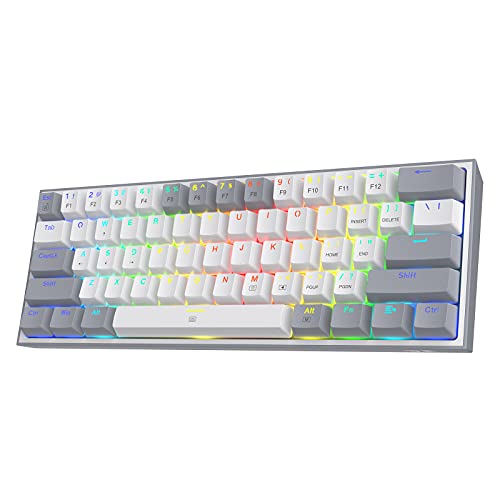


At a Glance
A 60% keyboard is the smallest layout most people can type on all day. It drops the arrows, the function row and the number pad, leaving about 61 keys in a board that can slide into a backpack. The price of that size is an Fn layer: arrows, F-keys and navigation sit behind a modifier, and you need to be ready for that before you buy.
We looked for real 60% boards and put them in order of how well they handle the trade-off: wired and wireless options, switch type, and how much the listing documents. One pick, the DIERYA DK63, adds arrows to a 60% footprint, and we call that out so you know exactly what you are getting.
5 Criteria to Look For Before Buying a 60% Keyboards for Tiny Desk
Key buying criteria so you get the right fit the first time.
Fn-layer arrows and shortcuts
A strict 60% board has no arrow keys, no function row and no navigation keys, so arrows live on an Fn layer, commonly under I, J, K and L or the bottom row. This matters because moving the cursor can feel slow until you learn it. Check the product photos for the legends printed on the front or side of the keycaps, and confirm whether the software lets you remap them.
Switch type and replaceability
Mechanical switches can be linear, tactile or clicky, optical switches use light, and magnetic switches measure travel with a sensor. Hot-swap boards let you change switches without soldering. Look for 'hot-swappable' on the listing and, for magnetic boards, whether actuation can be set in software.
Wireless modes and battery
A 60% board is the easiest layout to carry, so wireless is useful, but a small case holds a small battery. Quoted battery life is usually measured with lighting low. One pick here states about 8 hours at maximum backlight, a useful number to compare.
True 60% versus near-60% layouts
Some listings call 63-key and 68-key boards 60%, which changes whether arrows exist. This matters because the wrong layout can leave you without the keys you need. Count the keys: a strict 60% board has about 61, and a 65% board has about 66 to 68.
Case material and typing angle
A small case can flex, which changes the sound. Aluminum or thick plastic stays quieter. Some boards include a tilt, such as 8 degrees, and adjustable feet can help if your wrists dislike a flat surface. Look for a stated material and for kickstand legs in the images.
6 Best 60% Keyboards for Tiny Desks in 2026
Redragon K617
About this pick
The Redragon K617 is a wired 61-key board with a hot-swappable socket that accepts almost any 3-pin or 5-pin switch, stock red linear switches rated for 50 million keypresses, and up to 20 lighting modes. Software lets you design lighting and set macros, and the white and grey colorway stands out from the usual black.
Against the Razer Huntsman Mini it is much cheaper and gives you hot-swap sockets that the Razer does not. Against the wireless RK61 it has no battery to charge, which keeps the desk cleaner and the board lighter.
It is the pick for a first 60% mechanical board where the buyer wants room to experiment with switches. If you need to pair with a phone or tablet, look at the RK61.
Best for: first-time 60% buyers who want to experiment with switches
Check price on AmazonPros
- +Hot-swap at a low cost
- +Quiet red linear switches
- +Macro and lighting software
- +No battery to manage
Cons
- −Wired only
- −No arrow keys without the Fn layer
RK ROYAL KLUDGE RK61
About this pick
The RK61 is a 61-key board with three modes: 2.4GHz wireless, Bluetooth and USB wired. It uses a hot-swappable red linear switch, has 18 RGB effects plus 8 single-color modes, and comes with an extra 4.7-foot coiled cable. An 8-degree tilt is built into the case.
Compared with the Redragon K617 it adds wireless and a coiled cable for a similar price tier, so the trade is battery management in exchange for freedom to move. Against the DIERYA DK63 it has fewer keys but a stricter 60% footprint.
Pick this if you want a true 60% board that can also pair with a tablet or laptop. The honest caution is that battery life depends heavily on RGB use, so plan to charge it weekly if you leave lighting on.
Best for: a wireless 60% board for desk and travel
Check price on AmazonPros
- +Three connection modes
- +Hot-swap sockets
- +Extra coiled cable in the box
- +Many lighting effects
Cons
- −Battery drains with RGB
- −No arrow keys without the Fn layer
DIERYA DK63
About this pick
The DIERYA DK63 is a compact board that keeps the 60% footprint but adds dedicated arrow keys, giving 63 keys in total. It connects over 2.4GHz, Bluetooth 5.0 or wired USB, uses a custom 45g linear red switch quoted at about 40dB, and has a 3000mAh battery that the listing rates at roughly 8 hours with maximum backlight.
This is the pick that most directly addresses the biggest 60% complaint, because you do not have to reach for an Fn layer to move the cursor. The trade against a strict 60% is that two extra key columns make the board slightly wider.
Choose it if you want the compact footprint but you edit text or spreadsheets, where arrows matter. A strict 61-key purist would prefer the RK61.
Best for: editing text and spreadsheets without an Fn layer for arrows
Check price on AmazonPros
- +Dedicated arrow keys
- +Low-noise linear switch
- +Three connection modes
- +18 RGB lighting modes
Cons
- −Slightly larger than a strict 61-key board
- −Battery life depends on lighting
Razer Huntsman Mini
About this pick
The Razer Huntsman Mini is a wired 60% board with Razer Linear Optical switches, which register keypresses with a beam of light and have an actuation distance 15 to 30 percent shorter than other mechanical switches, according to the listing. It has an aluminum top frame, oil-resistant double-shot PBT keycaps and per-key Chroma RGB.
It costs noticeably more than the Redragon K617 and does not offer hot-swap sockets, so the money goes to materials, optical switches and the Hypershift remapping system. It also has no wireless.
It suits a competitive gamer or anyone who wants a sturdy, premium-feeling board and will not change switches. Budget buyers can get the same layout for much less.
Best for: gamers who value fast actuation and a solid frame
Check price on AmazonPros
- +Fast optical switches
- +Aluminum top frame
- +Double-shot PBT keycaps
- +Per-key lighting that syncs with games
Cons
- −Wired only, no hot-swap
- −Costs more than similar boards
AULA WIN60 HE
About this pick
The AULA WIN60 HE uses Hall Effect magnetic switches with adjustable actuation, which means you set how far a key travels before it registers. Its rapid-trigger step is listed as 0.02mm, a feature that lets a key reset almost immediately, popular in games such as Valorant and CS2.
It is a wired 60% board with RGB, PBT keycaps and hot-swappable magnetic switches. Compared with the Redragon K617 it is aimed at competitive play rather than typing comfort, and a magnetic switch can feel different from a normal mechanical one.
Choose it if rapid response in shooters is the main goal and you want adjustability. Skip it if you want an ordinary typing board or wireless.
Best for: competitive FPS players who want an adjustable switch
Check price on AmazonPros
- +Adjustable actuation point
- +Rapid trigger for FPS games
- +Compact 60% footprint
- +PBT keycaps
Cons
- −Wired only
- −Aimed at gaming, not typing comfort
DGG K60
About this pick
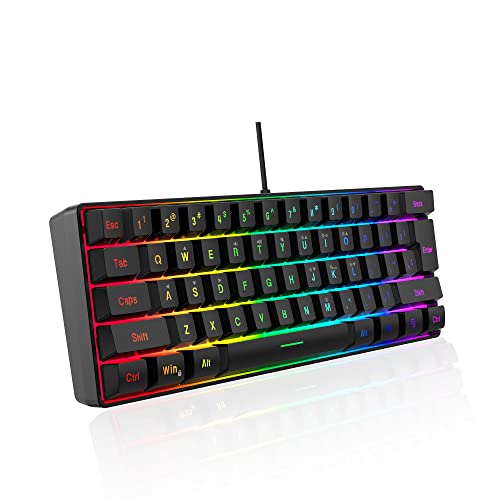
The DGG K60 is a 61-key wired board that uses a membrane design with silicone beneath the keycaps, giving a soft feel that the listing describes as close to a mechanical one. It has five backlight effects, adjustable brightness and speed, and plug-and-play compatibility with Windows and macOS.
This is not a mechanical board, which is the key difference from the other five. Against the Redragon K617 you give up switch quality and hot-swap in exchange for a much lower price and a quieter touch.
It is a sensible test of the 60% layout, or a travel spare you will not mind losing. Anyone who expects a clicky feel should look elsewhere.
Best for: trying the 60% size cheaply or carrying a spare
Check price on AmazonPros
- +Lowest cost here
- +Quiet keystrokes
- +Plug and play
- +Compact for travel
Cons
- −Not mechanical
- −Feels mushy next to switch boards
How We Evaluated These 60% Keyboards for Tiny Desks
Each pick was assessed across 5 criteria weighted for real-world use.
Strict 60% layout
Boards were checked against the 61-key standard, and the one board with added arrows is labeled so you can compare it fairly.
Fn-layer usability
We noted how each board handles arrows and F-keys, including whether software remapping is available.
Switch technology
Linear, membrane, optical and magnetic switches were compared on feel, noise and replaceability.
Portability
Weight, wireless options and cable design were weighed for bag use.
Price tier fit
Each pick was judged on what it gives you relative to its price bucket, with less weight on lighting extras.
How to Choose the Right 60% Keyboards for Tiny Desks
By Main Use
| Your situation | Pick from this guide |
|---|---|
| First 60% board, want to experiment | Redragon K617: hot-swap sockets at a low cost |
| Desk plus tablet or laptop | RK ROYAL KLUDGE RK61: 2.4GHz and Bluetooth |
| Need arrow keys | DIERYA DK63: 63 keys with arrows |
| Competitive FPS play | AULA WIN60 HE: rapid trigger |
| Premium build, wired | Razer Huntsman Mini |
By Budget
| Budget | Pick from this guide |
|---|---|
| Under $25 | DGG K60: membrane, quiet |
| $25 to $50 | Redragon K617 for wired, RK61 or DIERYA DK63 for wireless, AULA WIN60 HE for gaming |
| $50 to $75 | Razer Huntsman Mini: aluminum frame and optical switches |
Membrane vs Mechanical vs Magnetic
The switch technology matters more than the 60% label for how the board feels day to day.
Mechanical or optical
Gives distinct key feedback and lasts longer. The Redragon K617, RK61, DIERYA DK63 and Razer Huntsman Mini use mechanical or optical switches; the first three are hot-swap or user-friendly choices.
Membrane or magnetic
The DGG K60 is membrane for a soft, quiet feel at a low price, while the AULA WIN60 HE uses magnetic Hall Effect switches for adjustable actuation, best for gamers.
Most buyers who type a lot should pick mechanical; choose magnetic only if you will use the rapid-trigger settings.
By Arrow Key Needs
| Need | Pick from this guide |
|---|---|
| Arrow keys always visible | DIERYA DK63 |
| Happy with an Fn layer | Redragon K617 or RK ROYAL KLUDGE RK61 |
| Remap arrows to a custom layer | Razer Huntsman Mini with Hypershift |
| Gaming only, WASD focus | AULA WIN60 HE |
For Travel and Bag Carry Specifically
Look for
A wireless mode, a detachable cable, and a plain case that can take a few knocks in a backpack.
In this comparison
The RK ROYAL KLUDGE RK61 ships with an extra coiled cable and three connection modes, and the DGG K60 is cheap enough that damage is not painful.
When to Spend More
Spend more if
You want a sturdy case and fast actuation: the Razer Huntsman Mini has an aluminum top frame and optical switches.
Save if
You are still deciding on 60%: the DGG K60 or Redragon K617 give you the layout for far less.
Frequently Asked Questions
Is a 60% keyboard good for typing?
Yes, once you learn the Fn layer for arrows and navigation. The main keys are the same size as on a full-size board, so touch typing is unaffected. If you edit text all day, a 65% or 63-key board may be less frustrating.
How many keys does a 60% keyboard have?
A strict 60% board has about 61 keys. Some versions add arrows and reach 63, and 65% boards reach 66 to 68. Always count before ordering.
Are 60% keyboards good for gaming?
They are popular for gaming because they leave more room for a mouse and bring WASD nearer the center of the desk. If your game uses a lot of function keys, you will need the Fn layer or a different layout.
Can I use a 60% keyboard with a Mac?
Yes, most 60% keyboards work on macOS, though some features may require software on Windows. Check that the Command and Option keys are mapped as you expect, or use a remapping utility.
Should I choose a wired or wireless 60% keyboard?
Wired is simpler and never needs charging, while wireless frees the desk and can pair with a tablet. Two boards here, the RK61 and DIERYA DK63, offer both, so you can switch based on the situation.
What is a magnetic-switch keyboard?
It uses sensors to measure key travel, so you can set where the key actuates and enable rapid trigger. It is mostly useful for competitive shooters and less for office typing.
Bottom Line
best overall: Redragon K617 - best overall value pick in this roundup.
See the full rankings above for all picks with pros, cons, and best-for summaries.
Browse on Amazon
All Prime-eligible options with current pricing.
Shop on Amazon →