
How to Check a Three-Device Charger for Your Phone, Watch, and Earbuds

Affiliate Disclosure: We may earn a small commission on qualifying Amazon purchases at no extra cost to you. Full disclosure →
Three charging zones do not mean three arbitrary devices will work. A stand may support a particular phone family, a specific watch charging system, and only earbuds cases with a compatible wireless function. Check each zone against the actual device before judging whether the combined station saves useful space.
Quick answer: Make a separate compatibility row for the phone and case, watch and band, and earbuds charging case. Verify the exact stand’s supported devices, supply, cable, and simultaneous-use conditions. Check access to every zone with all devices loaded. A product described as three-in-one is not a universal charger for any phone, watch, and earbuds combination.
List the exact three devices
Record model names and generations, including the earbuds case variant. The earbuds themselves may be identical while their cases have different charging capabilities. For the watch, include the band or bracelet used at night, because its shape can affect access and how the watch sits.
Keep current devices separate from hypothetical upgrades. A future phone may be worth checking if the purchase is planned, but an unspecified future watch should not justify an unsupported compatibility assumption. Choose the stand for a documented combination you can actually use.
The magnetic charger case guide covers the phone interface in more detail. The multi-device station adds separate watch, earbuds, and shared-power questions rather than making those phone checks unnecessary.
Read compatibility by charging zone
Look for a model-specific table rather than a general product-family headline. Belkin’s three-in-one products illustrate how a stand can name phone, watch, and earbuds compatibility separately. Use the actual model and revision; do not transfer one stand’s supported devices or charging claims to another.
A magnetic phone zone, a watch puck, and a flat earbuds area are not interchangeable surfaces merely because all are part of one base. Use each zone only for the devices and conditions specified. Do not add a spacer, adapter, or improvised magnetic ring to imitate a listed device.
If one device is unsupported, compare a two-device stand plus its original charger or a suitable separate arrangement. A partially integrated setup can still simplify the desk. It is better than buying a three-zone product with one zone that cannot serve the device you own.
Check the earbuds case, not just the earbuds name
Confirm that the actual case supports the proposed wireless charging method. Include any protective cover or attached clip if it normally remains on the case. A cover can change contact or placement, and a case that charges by cable does not automatically have wireless capability.
Check the indicator and the supported placement method in the instructions. Do not assume a case is charging because it sits in the outlined recess. If the lid must open while on the base, include that clearance; otherwise, define a simple removal routine before opening it.
Keep metal keys, coins, and unrelated accessories out of charging areas as directed. A flat zone can look like a convenient small-object tray, but its electrical role matters. Give loose items another suitable location so the charging station’s intended surfaces stay clear.
Include the watch band and removal route
A closed bracelet or stiff band can need more room than an open soft strap. Check the stand’s intended watch position with the actual band in place. Do not force the band around another charging zone or let it pull the watch away from its supported contact.
Check whether the watch can be placed and removed with the phone already loaded. A compact arrangement may become awkward when one hand must reach behind a large phone. Include the space needed to grasp the device without pulling on the station’s power cable.
If the station is used on a bedside surface, the desk clock visibility guide offers a related comparison for time display. A watch or phone screen feature should be checked separately from charging; the station does not guarantee the desired clock behavior.
Verify the complete power arrangement
Read the required supply and cable, whether they are included, and the documented behavior with multiple zones active. A total power number does not automatically describe the power delivered to each device. Avoid adding output claims together without the manufacturer’s actual allocation information.
Use the specified regional product and electrical arrangement. Do not connect a random supply solely because its plug fits or its headline wattage is larger. If an alternative source is supported, check what functions or modes it provides for the actual station.
For a desk-edge power accessory, see the clamp power station fit guide. The upstream power product and the wireless station have separate functions and limits. Organizing them neatly does not establish electrical compatibility between arbitrary parts.
Measure all devices loaded
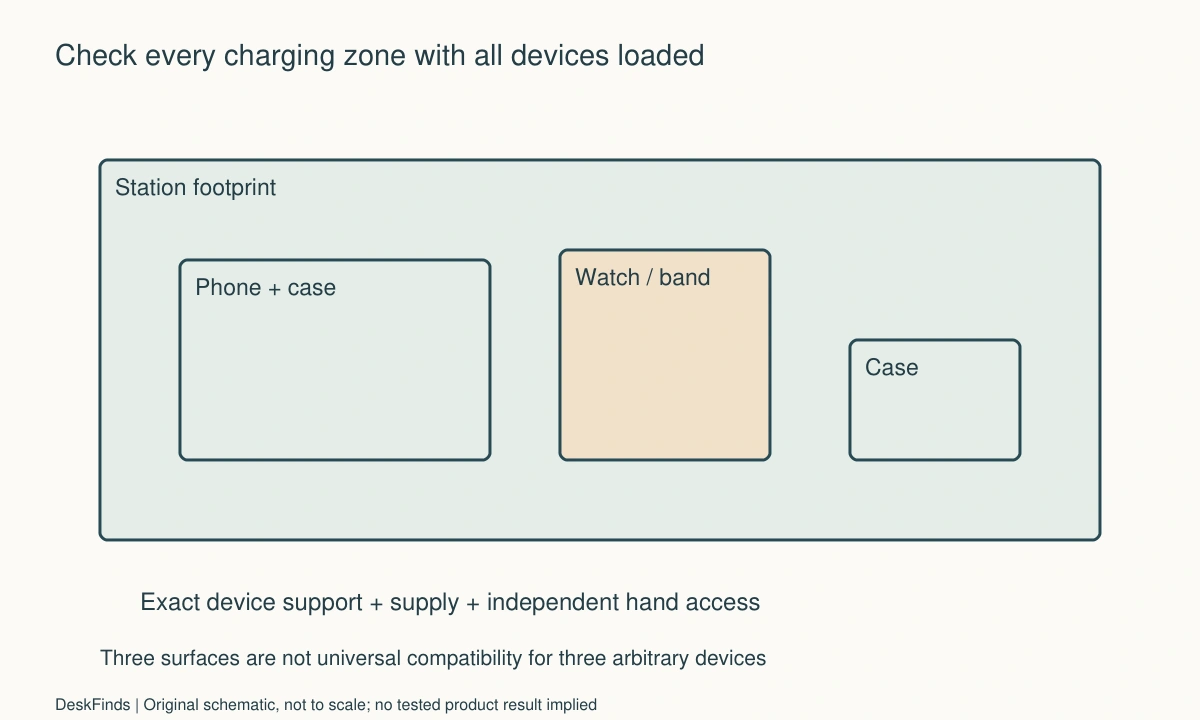
Outline the base, phone in the intended orientation, watch and band, earbuds case, power plug, and hand access. The loaded footprint can extend well beyond the base. A horizontal phone may cover another zone even when the empty station looks compact.
Check the camera bump and phone case against the stand’s documented contact. Keep the earbuds lid, watch band, and phone removal route distinct. A station should not require rearranging all three devices every time one is needed unless that handling is acceptable and supported.
For a wired phone alternative, compare the landscape stand guide. One separate device may preserve better access in a narrow location than a fully integrated station, depending on the actual devices and routine.
Worked example: the earbuds case was the missing capability
Imagine a hypothetical buyer with a compatible phone and watch who selects a three-device stand. The earbuds are named in broad marketing language, so the buyer assumes the third zone will work. The actual case variant, however, still needs its own compatibility confirmation.
The buyer checks the case model and manufacturer information before ordering. If the case lacks the required wireless function, a charging stand cannot add it. The buyer compares keeping the case’s supported cable arrangement with choosing another documented station or upgrading only when there is an independent reason.
The complete desk outline includes the separate case cable if that plan is retained. A two-zone station plus a clear cable location may serve the actual task better than an unused third pad. The decision is based on working functions rather than the number printed in the product name.
The hypothetical example does not identify a defective charger or claim a particular case was tested. It shows why the charging case must appear as its own device in the buying checklist, instead of being inferred from the earbuds brand alone.
A second scenario: compact zones made daily removal awkward
Consider a hypothetical user whose three devices are all documented as compatible. The station fits on a narrow shelf when empty, and each device can be placed correctly. With the large phone in landscape, however, reaching the watch and opening the earbuds case becomes inconvenient.
The user checks other permitted phone orientations and the station’s removal sequence. The arrangement is not forced by bending a watch band or shifting a case off its charging area. A different supported location or product geometry is compared with a less integrated charging plan.
The user also considers the order of ordinary departures. If the phone leaves first every morning, access behind it may be acceptable; if the watch is frequently retrieved during the day while the phone stays, it may not be. The acceptance decision follows the real routine, not a generic claim that fewer bases always means less clutter.
The final hypothetical layout may use slightly more visible surface but provide better independent access. No charging-speed or thermal advantage is inferred from spacing alone. The example demonstrates that electrical compatibility and practical loaded access are separate achievements.
Compare integration with service and travel
An integrated station can reduce loose parts at home, but replacing one unsupported function may mean replacing the whole unit. Separate chargers can be less visually uniform while easier to assign to travel or another device. Compare the actual ownership and use plan rather than declaring one category universally better.
If the station folds, check its documented packed state, cable storage, and protection. A compact travel shape does not describe the deployed footprint. Do not pack it with devices attached unless that is explicitly supported, and keep connectors from being loaded inside a tight bag.
Keep the exact product, supply, and compatibility information together. When a phone, case, watch band, or earbuds case changes, review the affected zone. One unchanged device working correctly does not verify a new combination elsewhere on the same base.
Six checks for a three-zone station
Phone assembly
Record the phone generation, normal case, attachments, and intended orientation. Check the exact station’s supported interface and required clear surface. A magnetic attachment alone does not establish charging. If an accessory must be removed, include its appropriate storage location and handling in the arrival and departure routine.
Watch assembly
Verify the watch model and charging system, then check the actual band in the intended position. Include placement and removal with the other devices loaded. A stiff bracelet can change practical access even when the watch itself is compatible. Do not force the band around another zone or use it to support the watch.
Earbuds case
Identify the case variant and its supported charging capability, including any protective cover. Check the intended indicator and placement method through the instructions. A case resting on the base is not proof of charging. If opening the lid requires removal, decide whether that action suits the ordinary routine before accepting the station.
Shared supply
Use the documented cable and power source for simultaneous operation. Distinguish total input, zone output, and supported charging modes. A larger adapter rating is not a universal upgrade. If an alternative supply is considered, obtain confirmation of the actual functions it supports rather than assuming every zone behaves identically.
Loaded access
Measure the phone, watch band, earbuds case, base, plugs, and hand routes together. Check each device independently while the others remain in their ordinary positions. A small empty footprint can conceal a large practical access area. Compare another permitted orientation or location before forcing an awkward arrangement into a narrow shelf.
Change and reset
Follow the station’s ordinary placement, removal, and storage instructions. Keep charging zones clear of unrelated objects and retain compatibility information for future device changes. A three-device setup succeeds when every actual device charges through a documented path and can be retrieved predictably, not merely when all three objects fit on the base at once.
A loaded-access footprint example
Imagine a hypothetical station whose base is 180 mm wide. A phone in the intended landscape position extends the loaded outline to 205 mm, while the watch band needs room behind the base and the earbuds lid has its own opening route. The numbers describe invented planning objects; they are not dimensions for a named product or a recommended clearance.
A shelf with 190 mm of free width may therefore fit the empty base while conflicting with the loaded phone. The appropriate response is another permitted orientation, location, or product-not forcing the phone against a side wall or moving it away from its documented charging contact.
Draw hand routes separately from static outlines. Being able to place all three devices once does not prove each can be retrieved while the others remain. A station can be electrically compatible and still need more practical access area than its base dimensions suggest.

Compare one station with a partial combination
Price the actual working plan. An integrated three-zone unit may reduce loose parts when every device is supported and accessible. A two-zone stand plus one original charger can be more practical if the third device uses a different system or leaves the room often. Separate chargers can also serve travel roles without requiring the whole station to move.
Do not count an unused zone as a benefit merely because it is included. Conversely, a supported future device may be worth considering when its purchase is genuinely planned. Keep current compatibility and future assumptions visibly separate so a possible upgrade does not conceal a present mismatch.
Include the supply and cable in both options. A stand sold without the necessary adapter can have a different completed cost and footprint. A larger total power claim is not a substitute for the model-specific simultaneous-use information required by the actual devices.
Check the order of ordinary retrieval
Write a typical morning sequence: perhaps the watch leaves first, the earbuds next, and the phone remains. Another person may retrieve the phone repeatedly during the day while the watch stays. Those sequences can favor different layouts even when the same three objects fit on the base.
Use the intended placement and removal methods. Do not bend a stiff watch band, open a case against another device, or slide a phone off its permitted charging position to make the routine work. If the order matters, decide whether that dependence is acceptable for the people using the station.
For a shared room, keep ownership and supported device combinations clear. A charging zone is not automatically suitable for another person’s watch or earbuds case. The station should not invite uncertain substitutions merely because a surface looks similar or a magnet attracts a device.
Make changes visible in the record
A new earbuds case, protective cover, watch bracelet, or phone case can alter a previously useful arrangement. Recheck the relevant zone and loaded access without assuming every other result has changed. This keeps the review focused while preserving the distinction between the electrical interface and physical handling.
Retain the exact model and revision information with any compatibility confirmation. If software display behavior is part of the goal, record that separately from charging. A phone showing a bedside clock is not evidence that the watch zone supports a particular model, and a working watch charger does not verify the earbuds case.
The practical acceptance statement should name all three assemblies and the supply. That is more useful than saying the product charges everything. It gives the user a clear starting point when the station is moved, shared, or updated later.
Sources and scope
- Belkin three-device charging example - Specific compatible-device and supply information; no feature or charging rate is generalized across all three-in-one stands.
Editorial note: This is a research-based planning guide, not a hands-on product review. All worked scenarios are hypothetical. Measurements and compatibility must be confirmed for the exact equipment. Photography supplies context, not proof of a tested arrangement.
Photos are illustrative and come from free-license libraries such as Unsplash; diagrams are original to DeskFinds.