
How to Check a Magnetic Wireless Charger With Your Phone Case
Affiliate Disclosure: We may earn a small commission on qualifying Amazon purchases at no extra cost to you. Full disclosure →
A phone can attach magnetically to a holder without charging, and a wireless charger can supply power without providing a secure magnetic attachment. Adding a case introduces another compatibility question. Treat attachment, charging, and viewing position as separate requirements rather than assuming a familiar magnetic ring guarantees all three.
Quick answer: Verify the exact phone, charger, case, and required power supply through their manufacturers’ compatibility information. Check permitted placement and orientation with no foreign material between charging surfaces. Confirm charging in ordinary supported use and check removal without pulling the stand or cable. A case described as magnetic is not automatically compatible with every charger, phone, or desired charging mode.
Separate the three functions
Write whether you need charging, a supported viewing position, or both. A magnetic mount can be a holder only. A charger may need a compatible separate stand, and a stand advertised for a charging puck may not include the puck or power adapter. Read the contents and functions explicitly.
The MagSafe and standard mount comparison helps distinguish attachment categories. For ordinary wired viewing, compare the landscape charging-clearance guide. Neither connector shape nor magnetic attraction proves the electrical part of the arrangement.
List the exact device generation and case model. Similar phone names can conceal different capabilities, while a case revision can change thickness, materials, or camera clearance. Ask about the complete combination rather than whether the charger works with phones generally.
Check the charger and supply as a pair
Read the charger’s required adapter, cable, and supported host conditions. Apple’s MagSafe guidance gives model-specific setup requirements and calls for a clear charging surface. Do not transfer a power recommendation from one charger revision or charging mode to every wireless product.
A USB-C port physically accepting the plug does not establish the desired power behavior. Check the documented supply requirement and any stated effect of using another supported source. Avoid describing a lower observed charging rate as a defect before confirming the complete supported arrangement.
If a multi-device base is being considered, use the three-device charging compatibility guide. Its power allocation and device compatibility may differ from a single-phone charger, even when the phone attachment looks similar.
Inspect the case and attached accessories
Check the case maker’s wireless and magnetic compatibility statements for the exact phone. Include wallets, grips, metal plates, card holders, or other attachments normally used. Follow the charger and accessory instructions about removal before charging; do not assume every attachment can remain between the phone and charging surface.
Do not add an arbitrary metal ring or plate to imitate a compatible case. A mounting accessory is not necessarily a charging accessory. If a manufacturer provides an approved addition, use its exact placement and conditions rather than extrapolating from its appearance.
Keep sensitive cards and other objects away as directed by the equipment guidance. A desk charger should have a clear intended surface, not become a tray for coins, clips, keys, or loose accessories. Organization should make correct placement easy instead of hiding the charging interface beneath daily clutter.
Check alignment in the real orientation
Use only the documented attachment and charging positions. A magnetic system may help alignment when the complete combination is supported, but it does not make every off-center or sideways position appropriate. Check whether portrait and landscape are permitted for the actual product.
Look at the phone body and camera bump relative to the charger and stand. The phone can appear attached while resting against another part of the structure. Do not force the device flatter or use the cable to hold it in position. Resolve physical interference through compatibility information or another suitable product.
If a clock-style display is part of the goal, verify the phone’s supported software behavior separately. A charger does not create a missing application feature. The small-room desk clock guide offers a separate-device comparison when time visibility is the real task.
Evaluate the complete stand footprint
Outline the base, charging head, loaded phone, power plug, and cable route. Include the room needed to grasp and remove the phone. A compact base can still need considerable width when the phone is horizontal or has a large case.
Keep the setup outside the mouse sweep and ordinary writing area. If the phone is frequently lifted, choose a position that does not require reaching over a cup or through monitor cables. A stand that is pleasant to view can still be awkward to retrieve from on a crowded desk.
Do not assume a heavier base or a stronger magnet is always better. The phone must be removable through the product’s intended action without shifting other equipment. Compare the supported routine rather than trying to estimate a pull force through an improvised test.
Observe charging without inventing a benchmark
After confirming documented compatibility, use the product in the intended arrangement and check the phone’s charging indication. Keep the relevant supply and case consistent. If behavior is unexpected, follow official troubleshooting and note the configuration instead of changing several components together.
A short battery-percentage observation is not a controlled charging-speed test. Device activity, battery state, software, and operating conditions can affect what you see. Do not promise a particular time or rate from a brief desk trial, and do not assign a universal safe temperature by touch.
If the product shows warnings or abnormal behavior, follow the manufacturer’s response. Do not cover it, add improvised cooling, or defeat a protective function to preserve the setup. A tidy placement is useful only within the device’s documented operating conditions.
Worked example: attachment did not establish charging compatibility
Imagine a hypothetical user with a magnetic phone case and a new desk holder. The phone attaches, so the user assumes that adding a charging puck to the same arrangement will provide the desired wireless charging mode. The case and holder information, however, do not establish that complete combination.
The user records the phone generation, case, puck, stand, cable, and supply. Each required function is checked separately: supported attachment, supported charging path, and usable viewing position. A reply about the holder’s magnetic fit is not treated as an answer about the charger’s electrical compatibility.
The user compares a documented integrated charging stand with the separate-parts plan. The integrated product may simplify compatibility, but its phone and case requirements still need review. The separate plan remains an option only when the relevant interfaces are supported.
The hypothetical outcome is a clear purchase list with no missing supply or assumed function. No charging speed or magnetic retention result is claimed. The example shows why a phone remaining on a mount is not proof that the desired charging arrangement has been verified.
A second scenario: a daily wallet changed the routine
Consider a hypothetical worker whose case carries a removable wallet or another accessory. The desk charger is otherwise compatible, but the charging instructions require a clear interface and the attachment must be handled appropriately. The worker initially overlooks where the removed accessory will go.
The worker adds a suitable non-charging storage location and includes removal in the arrival routine. The accessory is not placed on the charging base beside the phone unless that storage role is expressly supported. The setup remains distinguishable from a general tray for metal objects and cards.
The worker compares that routine with a supported wired charging stand that may suit the same reference task. The choice is not based on which arrangement has fewer visible connectors alone. It includes the number of daily handling actions, case compatibility, and whether the phone remains easy to retrieve.
The final hypothetical plan may favor either method. Its value is that the normal case accessory no longer becomes an unexamined layer in the charging path. The example does not claim that all wallets or cases behave alike; the exact manufacturer’s instructions decide what remains attached and how it is stored.
Ask a focused compatibility question
Send the full phone and case models, charger revision, intended stand, supply, and required orientation. Ask which functions are supported and whether any attachment must be removed. If a particular charging mode is essential, name it rather than asking whether the product charges the phone at all.
Keep the answer with the order and compare the delivered components with it. A cable or charger revision change can matter. Do not fill a missing detail with the most favorable assumption, especially when a product image does not show whether the supply or puck is included.
If the answer remains unclear, choose a better-documented combination or another charging method. An ordinary supported wired arrangement can be a complete solution to desk power and viewing needs. Magnetic attachment is a feature to evaluate, not a requirement that every desk must satisfy.
Six checks for the completed setup
Exact devices
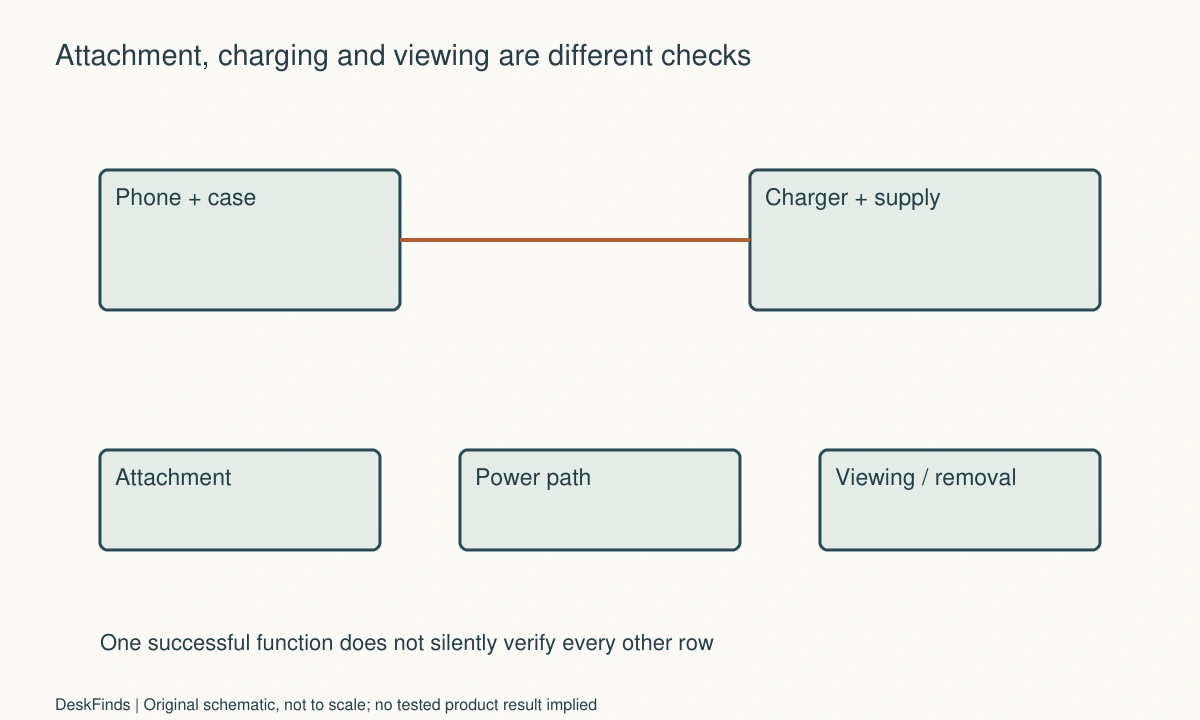
Record phone generation, case, charger, stand, and attached accessories. Verify them as a combination rather than relying on a general magnetic label. A successful bare-phone fit does not confirm case-on use. Keep attachment, power, and viewing as separate acceptance rows so one visible success does not silently establish the others.
Power path
Use the charger maker’s documented cable and supply arrangement for the intended function. Check whether the required adapter is included. A matching USB-C connector is not sufficient evidence. If the charging behavior differs from expectations, preserve the configuration details and follow official guidance rather than buying random higher-rated adapters on speculation.
Clear interface
Follow instructions for cases, wallets, grips, cards, and foreign objects. Do not add arbitrary metal parts or stack accessories between charging surfaces. Give removed items a suitable separate destination. The desk layout should support the correct routine, so the charging surface remains identifiable and does not become a catch-all for small objects.
Supported orientation
Check the loaded phone in the permitted portrait or landscape state, including camera-bump and stand interference. Verify any desired software display separately. A phone attaching sideways does not establish that every charging or viewing function is supported there. Resolve uncertainty through the exact product information before relying on the arrangement daily.
Access and removal
Outline the phone, base, cable, and ordinary hand route beside the real keyboard and mouse. Lift the device only through the intended action. Do not deliberately yank it to estimate retention or use cable tension as support. If removal regularly shifts the whole setup, compare another documented position or suitable product.
Ordinary operation
Check charging indication and the actual task under supported conditions. Avoid presenting a short observation as a speed, efficiency, or thermal benchmark. Keep a record for restoring the setup and follow manufacturer guidance for warnings or abnormal behavior. The useful result is a compatible, accessible charging routine with the case and accessories you actually use.
Build a compatibility matrix before buying
Make separate columns for phone, case, charger, stand, cable, supply, and required orientation. Then make rows for attachment, charging, viewing, and removal. Fill each row with the relevant official confirmation or an unresolved question. A green answer in the attachment row should not automatically fill the charging row.
This matrix is especially useful when a stand accepts a separate charging puck. Check whether the puck and adapter are included and whether the stand supports the exact revision. A product image showing all parts together does not establish the contents of the box or every compatible combination.
For a hypothetical comparison, one option might require three separately verified components while another integrated product documents the desired assembly. The integrated option is not automatically better, but clearer compatibility can reduce uncertainty. Compare the complete cost, loaded footprint, and actual functions rather than the stand price alone.
Make the case change a controlled comparison
If the manufacturer’s troubleshooting procedure calls for an appropriate case-related check, follow that procedure while keeping charger, supply, and device state consistent. Record exactly which assembly was used. A result without the case does not establish that the normal case is supported, and a different supply should not be introduced in the same step without noting it.
Do not attach an arbitrary ring or plate to turn an unsupported case into a presumed compatible one. If a specific approved accessory exists, verify its placement and conditions. Physical attraction, an on-screen indication, and the desired charging mode remain different observations.
Keep removed accessories in an appropriate separate place. A desk setup that requires moving a wallet or grip should make that action clear and repeatable, rather than encouraging the item to be left on an active charging surface.
Compare the departure action, not just the parked view
A charging stand often looks most successful when the phone is centered and still. In ordinary use, the phone is lifted for a call or carried away. Check the supported removal method with the rest of the desk present, without deliberately pulling against the mount to estimate force.
If the station shifts into a cable or another device during removal, another supported position or product geometry may be preferable. A larger base can use more surface but provide a different intended handling arrangement. The point is not maximum magnet strength; it is a documented attachment that the user can operate predictably.
If several people share the location, check each phone-and-case combination separately. Similar exterior dimensions do not establish identical charging capability. A short visible identifier can help distinguish compatible leads or positions without making the station a communal tray for unrelated metal objects.
Keep performance claims proportional to the evidence
A phone indicating charging in a supported arrangement is useful acceptance evidence for that function. It is not a controlled measurement of efficiency, maximum speed, or long-term battery effect. Avoid converting a brief percentage change into a product comparison unless a proper documented method supports that conclusion.
Likewise, touch alone cannot establish an acceptable operating temperature. Follow the maker’s conditions and response to warnings or abnormal behavior. Do not cover the unit or add an improvised cooling arrangement to bypass a limitation.
The final record should state which complete assembly was confirmed and which ordinary task was observed. That is valuable information without a universal endorsement. When a phone, case, puck, or adapter changes, revisit the affected row rather than inheriting every previous result automatically.
Sources and scope
- Apple MagSafe setup guidance - Model-specific supply, charging-surface and accessory guidance; magnetic attachment is not treated as universal charging compatibility.
Editorial note: This is a research-based planning guide, not a hands-on product review. All worked scenarios are hypothetical. Measurements and compatibility must be confirmed for the exact equipment. Photography supplies context, not proof of a tested arrangement.
Photos are illustrative and come from free-license libraries such as Unsplash; diagrams are original to DeskFinds.