
How to Set Up a Document Scanning Station You Can Pack Away
Affiliate Disclosure: We may earn a small commission on qualifying Amazon purchases at no extra cost to you. Full disclosure →
A compact scanner can occupy little space while closed and still need a clear paper path, a staging area, and somewhere to review the result. If you work at a dining table or shared desk, the station should be easy to deploy and put away without mixing unscanned originals with completed work. Plan the workflow before choosing the smallest device body.
Quick answer: Check the scanner’s supported document types and operating footprint, then reserve separate places for incoming originals, reviewed originals, and exceptions. Keep the complete paper path clear and supported as instructed. Verify the saved file before deciding what happens to the original. Pack the scanner only after completing its documented shutdown, disconnection, and storage steps; do not equate a successful scan with permission to discard a document.
Define the documents before the scanner
List the material you actually scan: loose office pages, receipts, cards, photos, bound pages, or valuable originals. These are different handling requirements. A small sheet-fed scanner may be convenient for suitable loose pages but inappropriate for an original that its instructions exclude.
Epson’s loading guidance for specific portable scanners, for example, warns against feeding certain valuable originals directly and gives model-specific handling instructions. Use the manual for the selected device rather than assuming every paper object can pass through any scanner. A carrier sheet is only an option when the exact device and document are documented as compatible.
Record the largest ordinary document, the most fragile item, and the typical batch size. Those facts help distinguish a portable single-sheet device from a scanner with a feeder, a flatbed, or another capture method. The purchase should match the document task, not simply the narrowest storage footprint.
Separate closed dimensions from operating space
Measure the scanner in the state used for scanning, including extended trays and the required entry and exit route. A long page can need more room than a standard sheet. Include the hand position needed to load and retrieve originals without bending them against another object.
Keep the paper path clear of cables, cups, keyboards, and loose stationery. A scanner placed at the edge of a table may fit physically while leaving an emerging page unsupported in a way the instructions do not permit. Follow the manufacturer’s loading and support directions for the exact model and document.
The small printer station guide is a related paper-path planning resource for related paper-path planning. For a general desk arrangement, desk organizer types helps distinguish staging trays from permanent storage. Neither substitutes for the scanner’s operating footprint.
Create three physical zones
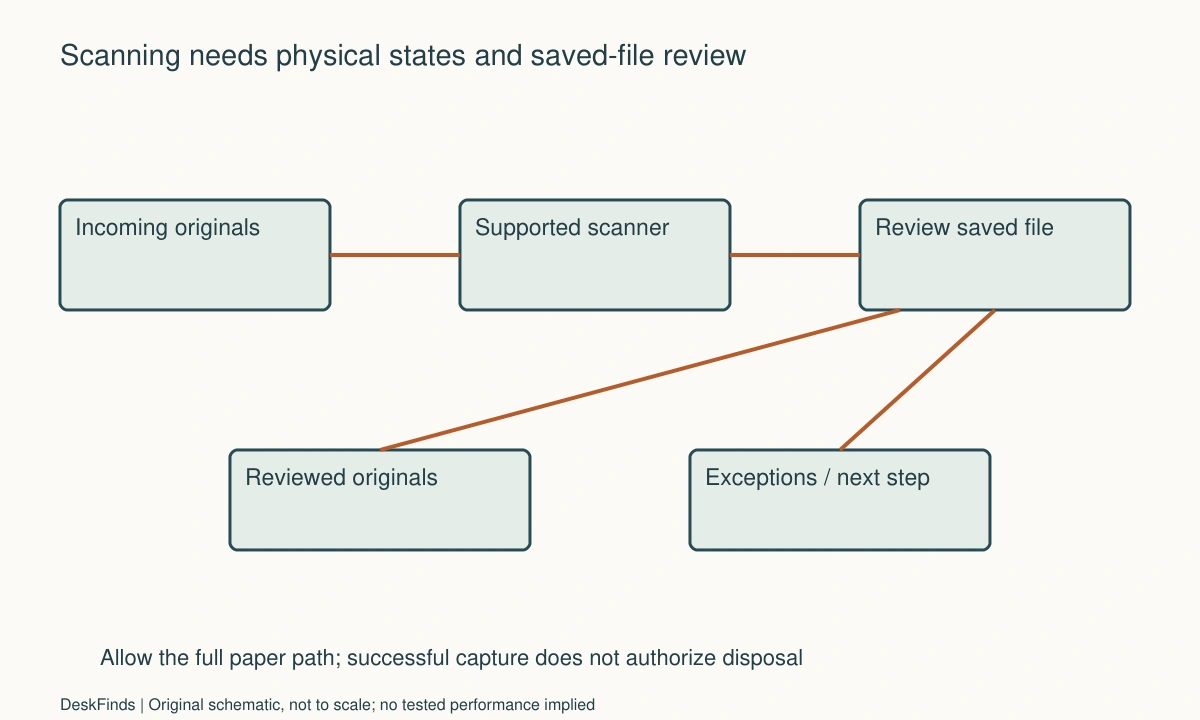
Use a clear incoming zone for documents not yet processed. Use a completed zone only after the file has been reviewed and saved as intended. Keep an exceptions zone for jams, uncertain quality, unsupported originals, or documents needing another decision. Those distinctions prevent an interrupted session from turning into a guessing exercise.
The zones can be simple suitable trays or folders; they do not need a large organizer. Label them in ordinary language and keep confidential content out of view in a shared room. A tray’s location is not access control, so follow organizational requirements for sensitive records.
If the desk has no drawers, use the paper inbox guide for an adjacent paper-workflow decision. The key principle here is that a document should move between clearly named states rather than circulating through an undifferentiated paper pile.
Keep capture and verification separate
A scanner producing a file is the beginning of the digital result, not the end. Check that all intended pages are present, correctly oriented, legible, and saved to the intended location. Include reverse sides when needed and supported. A preview of the first page does not confirm the rest of the batch.
If searchable text matters, check the relevant text in the saved result. Optical character recognition can require review, especially for names, amounts, dates, and unusual layouts. Do not make an unchecked extracted value the basis of a financial or legal action. Use the original and the appropriate professional process where accuracy has consequences.
Avoid scanning important documents into an unfamiliar cloud destination simply because it is the default button. Confirm the destination, access permissions, and any organization’s policy. This guide does not prescribe a retention period or certify that a digital copy can replace an original in every situation.
Use a file name you can recognize later
Choose a consistent, restrained naming method appropriate to the records. It might include a date, category, and a non-sensitive identifier. Keep the convention short enough to apply during an ordinary session. Avoid exposing private account numbers or client details in visible names unless your policy requires and protects them.
Decide where the reviewed file belongs before scanning a large batch. A temporary folder can be useful when it is clearly identified and cleared through a deliberate review step. It becomes a problem when every session adds files with generic names that no one can distinguish later.
Keep backup and security requirements separate from the scanner purchase. A neat file name does not create a backup, and a portable SSD is not automatically an appropriate sole destination. The SSD placement guide covers physical handling if one is used, not the adequacy of the underlying records system.
Design the pack-away sequence
Finish the current batch, resolve or label exceptions, and verify the saved results. Follow the scanner’s documented shutdown and disconnection procedure. Fold trays only as instructed and protect the device in its intended storage arrangement. Do not pack it with a rigid connector protruding where it can be loaded inside a tight case.
Store compatible cables and accessories together without bending them sharply or placing heavy objects on the scanner. Keep a small deployment record if the same station is rebuilt often. It can name the cable, software, output location, and physical zones without containing confidential document content.
If the host connection goes through a hub, use the USB connection isolation guide as a general method when appropriate, while following scanner-specific support first. A cable issue and a paper-handling issue need different observations and should not be described as one generic scanner failure.
Worked example: the smallest body needed a larger paper route
Imagine a hypothetical freelancer who wants to scan receipts and occasional office letters at a dining table. The preferred scanner fits in a narrow drawer. The buyer initially treats that closed width as proof that the device will suit the table’s spare corner.
The operating instructions reveal the entry and exit path needed for the actual documents. With the laptop, cup, and paperwork in place, the spare corner does not provide that route. The buyer outlines the scanner’s working state and adds separate incoming, completed, and exception folders. The practical station is larger than the closed device, but it can still be deployed deliberately for a short session.
The freelancer also identifies a few originals that the portable scanner is not intended to handle directly. Those are routed to another appropriate capture method instead of being forced through to preserve one-device simplicity. The setup includes reviewing every saved batch before moving papers into the completed folder.
In this hypothetical plan, the dining table is cleared for the session and reset afterward. The station’s value is its repeatable workflow and compact storage, not an assumption that the scanner can operate inside the same tiny footprint in which it is stored. No scanning speed, accuracy, or paper-safety result is claimed for an unnamed product.
Make interruptions recoverable
If you must stop midway, keep unprocessed originals separate from reviewed ones and name the incomplete digital batch clearly. Do not rely on remembering the last page after a phone call. An exceptions folder should include enough context to resume without treating an uncertain scan as complete.
For double-sided documents, use the supported method and verify both sides. For a mixed batch, follow the device’s document preparation and loading guidance. Remove prohibited fasteners or unsuitable items only as directed, and do not feed originals outside the permitted specifications.
When the scanner is shared, agree on who clears temporary files and how documents are returned. A communal device does not imply communal access to every output folder. Keep the physical reset and digital access rules aligned with the people and records involved.
Six decisions for a compact station
Document compatibility
Record the ordinary page sizes, material types, batch volume, and any valuable or fragile originals. Compare them with the scanner’s instructions before ordering. If an item is excluded, plan another appropriate method. Do not assume a carrier sheet or a gentler feed setting makes every original suitable; compatibility must come from the actual product guidance.
Working footprint
Outline the deployed device, trays, cable exits, and complete paper route for the documents you use. Include the hand space needed for loading and retrieval. Closed dimensions describe storage, not operation. If the available corner cannot support the process, compare a temporary cleared area rather than operating with pages bent around other equipment.
Physical states
Assign incoming, reviewed, and exception locations. Keep them distinct when the session is interrupted. Use suitable folders or trays without making confidential papers visible to unrelated people. A compact station can remain orderly with only a few named zones, provided each zone corresponds to a clear action rather than becoming another indefinite storage pile.
Digital verification
Check page count, orientation, legibility, destination, and any required searchable text in the saved file. Review consequential values against the original. A successful capture message does not prove every page is complete or accurate. Keep the verification step separate from the decision about retaining or disposing of originals, which may require other guidance.
Storage and departure
Follow shutdown, disconnection, folding, and protective-storage instructions. Keep the correct cables identifiable and avoid loading connectors inside a case. Check where incomplete papers and temporary files remain after packing. A station is not fully reset if the hardware is away but the next person cannot tell which documents still need processing.
Recovery next session
Keep a short non-sensitive deployment note naming the software, intended destination, cable, and paper zones. Start the next session by checking those settings rather than assuming the previous user’s defaults are appropriate. The goal is a process that can be rebuilt predictably on a shared surface while respecting the documents and the scanner’s supported use.
Compare scanner size with session size
A small scanner can be appropriate when the documents are compatible and batches are modest. A larger feeder model may change the handling routine for another workload, but it also needs its documented operating and storage footprint. Compare the actual weekly task rather than selecting the smallest body or the highest advertised speed in isolation.
Include preparation and review time in the workflow without inventing a measured rate. Straightening suitable originals, separating unsupported items, verifying pages, and filing results can matter as much as the capture step. A product’s laboratory speed claim does not describe the complete session at a shared dining table.
If only a few documents are captured occasionally, compare another appropriate supported capture method before buying dedicated hardware. Check document quality, privacy, and original-handling requirements. The point is not to recommend one method for every record, but to choose equipment only after the material and process are understood.
A second scenario: the session stopped halfway through a batch
Imagine a hypothetical household scanning a mixed set of routine papers on a shared table. A phone call interrupts the session. Without distinct physical states, the scanned and unscanned sheets would remain in one pile, and generic file names would make it difficult to determine what was completed.
The household uses incoming, reviewed, and exception folders. Only pages whose saved files have been checked move to reviewed. An interrupted digital batch is named clearly in an appropriate location, and a short non-sensitive note records the remaining task. The scanner is shut down or paused according to its instructions before the table is needed for another purpose.
When the session resumes, the user checks the intended destination and application settings rather than assuming they are unchanged. The reviewed folder is not fed again merely because it sits nearest the scanner. Exceptions are handled separately, including any original outside the device’s permitted specifications. The workflow avoids making memory the only link between the physical and digital states.
The household also keeps the decision about originals separate. A reviewed file does not automatically authorize disposal. Relevant retention, legal, organizational, or personal requirements are followed through the appropriate process. No universal retention period is inferred from the scanner’s software or a tray label.
This hypothetical example illustrates recoverability, not a guarantee of error-free scanning. A small number of clear states can help a compact station remain understandable when it is interrupted and packed away. The useful equipment choice supports that routine rather than requiring the table to remain permanently occupied.
Make quality checks specific to the document
For a multipage record, check completeness and order. For a receipt, inspect dates and amounts. For searchable output, verify the text you will actually need to retrieve or use. For an unusual original, confirm that its capture method is permitted before feeding it. These checks should follow the task rather than a single generic scan-success message.
Avoid overprocessing an original to chase a perfect image. Follow the scanner’s preparation, cleaning, and maintenance guidance, and seek support when a permitted document produces a recurring problem. Do not force a jammed or unsuitable item through an improvised route. The original’s condition and the device’s limits take priority over completing the batch quickly.
Keep a small non-sensitive sample for checking ordinary software settings after a change, if appropriate. It can help confirm destination and output behavior without exposing private records during troubleshooting. Do not present that check as a calibration or certification unless the manufacturer provides a specific procedure with that meaning.
At the end, make the reset visible: hardware stored correctly, incoming papers still identifiable, reviewed files in the intended location, and exceptions assigned a next step. A compact station has fulfilled its purpose when it can be put away without leaving uncertainty about what was captured and what still needs attention.
Sources and scope
- Epson original-loading guidance - Specific document restrictions and paper-handling requirements; no retention rule is inferred.
Editorial note: This is a research-based planning guide, not a hands-on product review. All worked scenarios are hypothetical. Measurements and compatibility must be confirmed for the exact equipment. Photography supplies context, not proof of a tested arrangement.
Photos are illustrative and come from free-license libraries such as Unsplash; diagrams are original to DeskFinds.