
Will a Desktop Privacy Panel Fit Beside Your Monitor Arm?
Affiliate Disclosure: We may earn a small commission on qualifying Amazon purchases at no extra cost to you. Full disclosure →
A desktop privacy panel can occupy the same rear edge that a monitor arm needs. Even when their visible parts clear each other, the clamps, underside hardware, cables, and adjustment paths can conflict. Plan the panel and arm as two complete assemblies rather than comparing only panel width with desk width.
Quick answer: Verify the panel’s mounting method and the desk’s suitability, then outline the full clamps, panel, monitor arm, screen movement, and cable routes. Check useful visual coverage from the intended viewpoints and preserve ordinary reach and controls. Do not assume a privacy panel provides sound isolation, supports attached equipment, or can share a clamp with another accessory unless the exact documentation says so.
Define the view you want to interrupt
Identify who needs visual separation and from which ordinary position. A seated neighbor, a doorway view, and a video-call background are different sight lines. A panel that blocks one may leave another unchanged. Write the actual goal before selecting height or material.
Keep visual privacy separate from information security and sound control. A panel does not establish compliance with workplace policy or prevent every view of a screen. If sound is the issue, use the acoustic treatment and soundproofing guide to distinguish those separate concepts.
For a full-room divider, compare the small-office room divider guide. A desktop panel has a different support, coverage, and access problem. The smaller footprint does not make the two categories interchangeable.
Verify the panel’s attachment requirements
Read the exact panel’s desktop thickness, material, edge, and mounting conditions. VIVO’s clamp-on panels illustrate model-specific interface information and assembly instructions. Use the selected product’s limits, not another panel’s range or a general claim that the kit fits desks.
Measure the actual intended edge, including bevels, curves, underside braces, cable trays, and drawers. A nominal top thickness may not describe the clamping surface available. Confirm the furniture permits the method and any drilling or permanent attachment is authorized where relevant.
Do not add blocks, substitute screws, or stack clamp hardware to bridge an unsuitable edge. If the mounting point cannot meet the documentation, compare another supported location or panel design. A panel looking light or soft does not approve an improvised installation.
Draw both clamps at full size
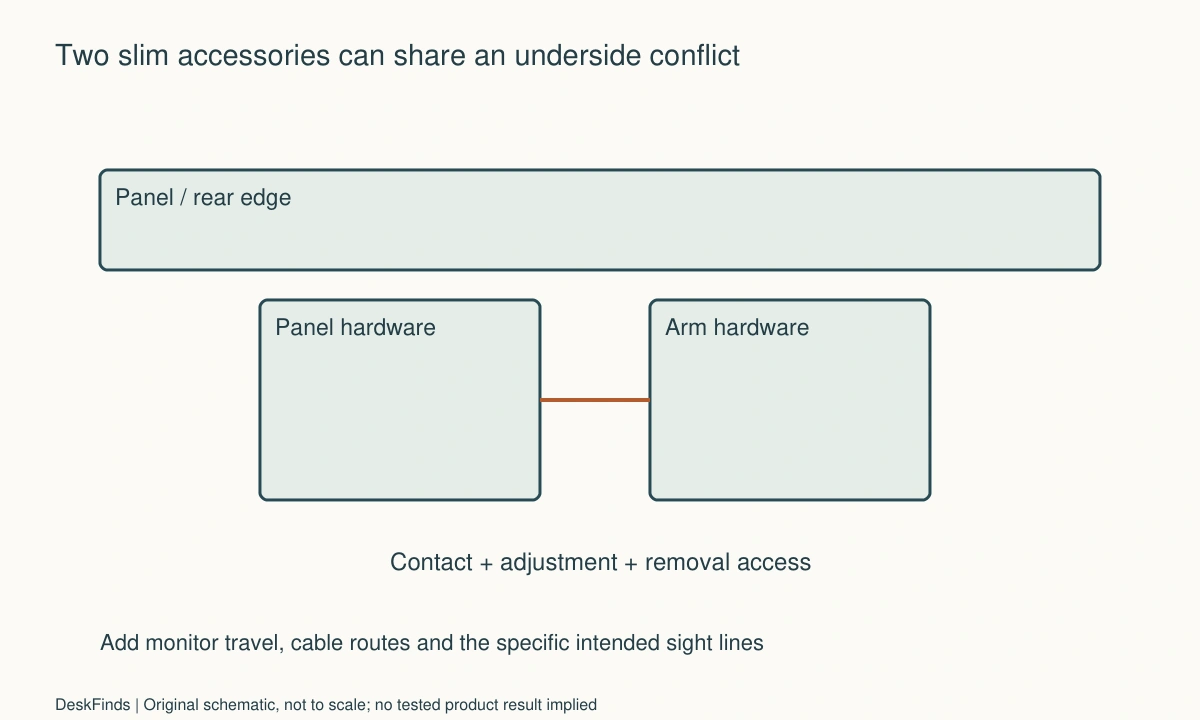
Outline the panel’s complete hardware above and below the desktop. Add the monitor arm’s base, screw or lever, required contact area, and adjustment access. Two slim vertical pieces can conceal bulky overlapping assemblies underneath.
Leave room for the supported installation and removal sequence. A clamp that can be placed before another accessory is installed may become inaccessible afterward. Plan future service without assuming the whole workstation can be dismantled casually each time a cable or screen changes.
The clamp power-strip guide addresses another edge competitor. Include every relevant accessory in one underside sketch so the available mounting region is not promised separately to several products.
Trace monitor and arm movement
Check the monitor arm’s documented reach, height, rotation, and other adjustments you actually use. Include the screen’s outer body and attached accessories. A panel can clear the arm in one position while meeting the display or cables during another ordinary adjustment.
Do not use the panel as a movement stop or let a screen rest against it unless that is expressly intended. Keep the monitor supported by its own compatible assembly. A soft panel surface does not make repeated contact an acceptable clearance strategy.
For a limited rear space, compare the monitor arm and stand guide. A different supported screen arrangement may sometimes simplify the panel layout, but it requires its own load and furniture checks rather than being assumed a free change.
Check useful coverage, not maximum height alone
Use the actual seated or standing viewpoints relevant to the goal. Include gaps beneath or beside the panel, screen height, and ordinary body movement. A taller panel may improve one sight line while blocking room light, conversation, or useful reach.
If the material is translucent or patterned, check what privacy function the manufacturer actually claims. Do not infer that every frosted-looking surface hides text at every distance. Avoid promising a security outcome from a general visual barrier.
For a camera background, use the whiteboard and camera-view guide as a related framing example. The actual application crop and movement matter; a panel behind the desk is not automatically sufficient coverage for the camera’s whole view.
Preserve cables, ports, and controls
Trace each lead from the monitor and arm to its destination. The panel can reduce access to a rear port or force a cable through a narrow gap. Leave appropriate relaxed movement and do not pinch leads between clamps or panel edges.
Check monitor controls, dock access, lamp adjustment, and any outlet or switch behind the desk. A visual barrier should not make ordinary service depend on pulling cables blindly. Give frequently touched connections a supported accessible location.
Do not hang a power strip, lamp, storage basket, or other equipment from the panel unless the exact product provides for that attachment and load. A magnetic or fabric surface is not automatically a general accessory mounting system. Keep each device’s support role explicit.
Worked example: the hidden hardware overlapped
Imagine a hypothetical user buying a rear privacy panel for a desk with a monitor arm. The panel width matches the desktop and its top edge clears the screen in the normal position. The first plan omits the panel clamps and monitor-base hardware below the surface.
A full-size underside sketch reveals that both products need the same contact and adjustment area. The user compares another documented clamp location and checks the resulting panel coverage and screen movement. The clamps are not stacked, partly engaged, or altered to force both products onto one point.
A different panel design or supported monitor arrangement is also compared. Each option includes future removal and cable access. The user does not treat a successful installation order as proof that later service remains practical.
The hypothetical result is a layout in which both assemblies meet their own conditions, or a decision to choose another approach. No structural or privacy test is claimed. The example demonstrates why a clear above-desk view can conceal a complete mounting conflict beneath it.
A second scenario: more coverage reduced useful reach
Consider a hypothetical shared table where a taller panel seems to provide better visual separation. With the panel outline in place, one user can no longer reach a shared control or see a colleague during a routine task. The panel serves one goal while disrupting another.
The users define the actual sight line that needs interruption and compare supported heights and positions. They do not assume maximum coverage is always desirable. A smaller panel, a different seat arrangement, or an appropriate screen-specific privacy method may address the concrete need more simply.
The users also check screen movement and the room’s ordinary light. A panel chosen for one seated position may be insufficient when another person stands or may block more than intended. Claims remain limited to the observed visual arrangement rather than universal confidentiality or sound isolation.
The final hypothetical plan includes a shared reset and an accessible service route. It does not rely on bending the panel or moving a monitor outside its supported range. The useful outcome is a visual boundary that coexists with the table’s real tasks and users.

Compare a panel with another privacy method
A desktop panel can help define a workspace, while a monitor privacy filter addresses a different view of a screen. A room divider changes another part of the space. Compare the actual target and each product’s documented function rather than treating privacy as one feature shared equally by every barrier.
If speech or call noise is the main complaint, do not buy a visual panel based on an unsupported soundproofing assumption. The panel’s material, size, and any tested acoustic claims require their own evidence. A desk fit guide cannot certify an acoustic result from appearance.
Include installation permission, service access, and future monitor changes in the cost. A panel can remain useful through several setups only if its mounting and coverage still suit them. Keep the product instructions and layout record rather than inheriting the old arrangement automatically when equipment changes.
Six checks for a panel-and-arm desk
Visual requirement
Name the specific viewpoint and information or activity you want to separate. Check the actual product’s function and avoid treating a visual barrier as a security or sound-isolation guarantee. A useful requirement is narrower than maximum privacy: it describes the ordinary view that should change while preserving the tasks that must remain accessible.
Furniture attachment
Record the desktop material, thickness, edge shape, underside obstructions, and permitted mounting method. Apply the exact panel’s instructions and any furniture restrictions. A clamp opening alone is insufficient. Do not improvise blocks, screws, or shared hardware when the required contact surfaces cannot be provided.
Complete hardware
Draw panel and monitor clamps at their full dimensions above and below the top. Include installation, tightening, release, and service access. A layout that can be assembled only by making another clamp inaccessible deserves reconsideration. The visible poles and panel width do not describe the mounting footprint.
Screen envelope
Trace the documented arm and display movements used during ordinary work. Include the screen body, camera, and cables. Do not let the panel act as a stop or support unless intended. A clear static position is not proof that rotation, height changes, or movement toward another user will remain possible.
Access and routing
Keep ports, controls, supplies, and cable routes usable with relaxed supported movement. Avoid pinching leads or hanging unrelated equipment from the panel. If a frequently touched connection becomes hidden, revise its supported location. Visual separation should not make the desk difficult to maintain or encourage blind pulling on cables.
Shared reset
Check ordinary reach, room light, communication, and service needs for the actual users. Agree on a supported default state and recheck after equipment changes. A successful desktop panel fits the furniture and monitor assembly while providing the intended visual boundary, without assuming every higher panel or denser-looking material is automatically a better solution.
Draw an edge-allocation example
Imagine a hypothetical rear edge with a 700 mm usable region between other obstructions. One documented monitor-clamp assembly needs a 140 mm region, while a candidate panel clamp and its adjustment access need another 120 mm. A simple subtraction leaves 440 mm, but only if the actual shapes and required positions do not overlap. These invented values are not limits or clearances for real products.
The panel’s mounting points may be fixed relative to its width, and the monitor arm may need a particular location to serve the screen. You cannot freely distribute the two abstract rectangles if the product geometry does not permit it. Place the actual dimensioned assemblies on the same sketch, including underneath hardware.
Add removal and service routes next. A clamp can fit in its final position while requiring an inaccessible lever or screw after another accessory is installed. The plan should not depend on a one-time installation order that makes routine maintenance impractical. Obtain a supported sequence or compare another layout.
Check more than one sight line
A seated neighbor’s ordinary view, a doorway view, and the camera’s view are different requirements. Mark the relevant positions and check what the exact panel changes. A higher panel can improve one visual boundary while interfering with screen movement, light, or conversation elsewhere.
Keep claims limited to the actual task. A gap that hides a note from one seated position is not a general confidentiality guarantee. A dense-looking material is not evidence of sound isolation. If the workplace or contents have specific security requirements, follow the relevant process rather than assigning that role to an ordinary desk divider.
For a camera background, check ordinary crop and user movement in the real application. A static preview can miss what appears when the person stands or shifts. Do not stretch a panel outside its supported mount or attach another unsupported sheet merely to fill the frame.
Compare three ways to resolve a conflict
Moving the panel can change coverage and mounting-point access. Moving the monitor arm can change reach and cable travel. Choosing another panel or monitor support can change both cost and compatibility. Compare these as completed documented arrangements rather than treating any one change as automatically free of consequences.
If the original screen position serves the primary task well, avoid compromising it solely to preserve a particular panel purchase. If the visual boundary is essential, give it an explicit requirement and compare a support arrangement that genuinely allows both. The shortlist should follow the real priorities, not the order in which accessories were bought.
A freestanding desktop boundary may avoid a clamp conflict where suitable, but it brings its own footprint and support conditions. Do not assume a wall panel or room divider can be repurposed on the desk. Each product should serve the role and orientation its documentation provides.
Plan equipment changes before adding attachments
A new camera, light bar, larger monitor, or different arm can change the space above and behind the screen. Recheck the affected movement and cable routes with the panel installed. A previous clear position is not proof that another display’s corners and connectors will remain clear.
Do not use the panel as a general storage support unless the exact accessory and load are documented. An added basket or power strip can change the assembly and create a cable or reach conflict. Keep every object’s support responsibility explicit rather than assuming the panel can absorb whatever no longer fits on the desktop.
Retain the mounting instructions and a private underside sketch. Label the relevant adjustment and release points so another user can understand the layout without trial and error. A useful visual boundary should not make future cable replacement depend on blind pulling behind an inaccessible screen.
Define acceptance in practical terms
A completed record can say that the specified panel and arm fit the documented desk interfaces, provide the intended visual boundary from named viewpoints, and preserve ordinary screen adjustment and access. That is more informative than a broad claim of total privacy or universal desk compatibility.
If any required condition remains unresolved, keep it visible and obtain confirmation or choose another supported arrangement. A small surface-saving benefit should not depend on improvised hardware, unverified acoustic claims, or a workstation that cannot be serviced. The panel succeeds when the visual goal and the desk’s real tasks can coexist predictably.
Sources and scope
- VIVO desktop privacy-panel example - Specific clamp-panel interface example; no universal desk range, security outcome or acoustic performance is claimed.
Editorial note: This is a research-based planning guide, not a hands-on product review. All worked scenarios are hypothetical. Measurements and compatibility must be confirmed for the exact equipment. Photography supplies context, not proof of a tested arrangement.
Photos are illustrative and come from free-license libraries such as Unsplash; diagrams are original to DeskFinds.