
6 Best Mechanical Keyboards Under $100 for Home Office and Gaming (2026)
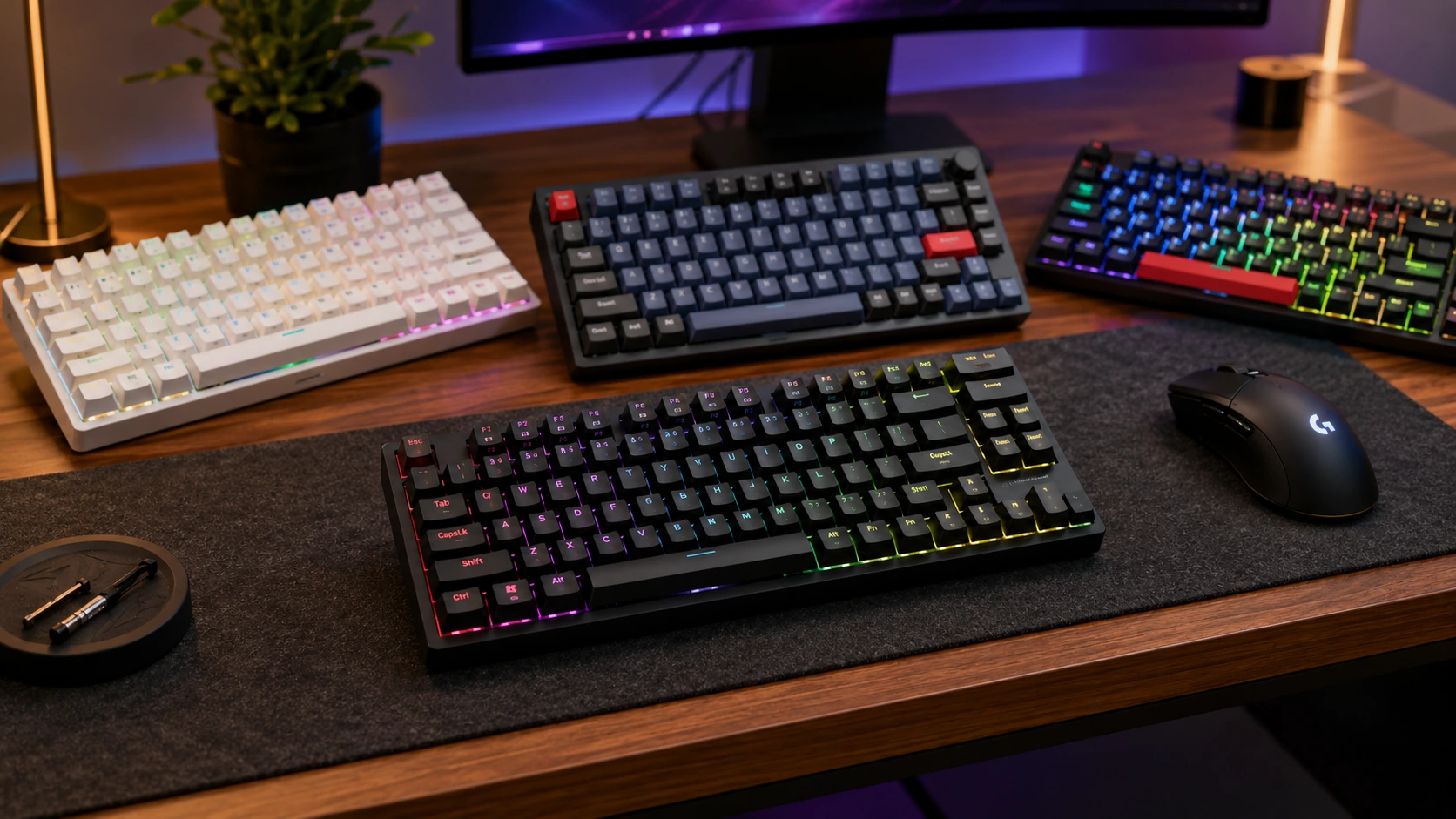
Under $100 in 2026 covers the full range of practical mechanical keyboard features - from the $29 Redragon K552 as a proven entry-level first keyboard, to gasket-mount PBT boards with QMK/VIA and hot-swap at $84. The meaningful decisions are form factor, switch type, gasket vs tray mount, and wired vs wireless - not brand. This guide covers six keyboards that represent the best value at each price point.
Quick Picks
| Pick | Keyboard | |
|---|---|---|
| Best Full-Size Wireless with Display | EPOMAKER X Aula F108 PRO Wireless Gaming Keyboard with Screen | Check price |
| Best Retro Typewriter-Style Design | YSCP Typewriter Style Mechanical Gaming Keyboard, Blue Switch | Check price |
| Best Pre-Lubed Hot-Swap Under $100 | ASUS ROG Strix Scope II X Wired Mechanical Gaming Keyboard | Check price |
| Best Budget Under $35 | Redragon K552 | Check price |
| Best Value Wired Under $50 | Keychron C3 Pro | Check price |
| Best TKL with PBT Keycaps | Akko 3087 Horizon DS | Check price |
| Best Wireless Mechanical Keyboard | RK Royal Kludge RK84 | Check price |
| Best Overall Wired Under $100 | Keychron V1 | Check price |
| Best Wireless with Premium Features | Epomaker TH80 Pro | Check price |
Under $100 in 2026 covers the full range of practical mechanical keyboard features: from the $29 Redragon K552 (first-keyboard standard) to the Keychron V1 with double-gasket mount, PBT keycaps, QMK/VIA, and hot-swap at $84. The meaningful decisions are form factor, switch type, gasket vs tray mount, and wired vs wireless - not brand.
For the rest of your desk setup, see the best standing desk under $200 and the best monitor arm under $100.
Before You Pick: 4 Things That Matter More Than Brand
1. Keyboard Layout and Desk Space
| Layout | Keys | Width | Best desk width |
|---|---|---|---|
| Full 100% | 104 | ~17.5" | 48"+ |
| TKL 87% | 87 | ~14" | 40"+ |
| 75% | 84 | ~12.5" | 36"+ |
| 65% | ~68 | ~11" | 36"+ |
A TKL keyboard at 14 inches wide leaves 26 inches of clear space on a 40-inch desk - enough for a mouse, notepad, and a small monitor stand. A 75% at 12.5 inches leaves 27.5 inches on the same desk. For desks 36-40 inches wide, the 75% layout is the practical choice: it retains the F-row and dedicated arrow keys while being narrower than TKL.
2. Switch Type: Linear, Tactile, or Clicky
| Type | Feel | Sound | Best for |
|---|---|---|---|
| Red (linear) | Smooth, no bump | Quiet | Gaming, fast typing, quiet offices |
| Brown (tactile) | Bump, no click | Moderate | Work + gaming, most home offices |
| Blue (clicky) | Bump + audible click | Loud | Typing satisfaction - NOT for calls |
Blue switches are audible on video calls even with noise suppression active. If any part of your work involves video calls, Brown or Red switches are the appropriate choice. Blue switches are designed for typing satisfaction in solo environments.
3. Gasket Mount vs Tray Mount
Tray mount means the PCB is screwed directly to the plastic case. Every keystroke transmits vibration directly through the case to the desk surface - louder typing sound and a harder, harsher feel. Gasket mount means the PCB sits on silicone or rubber gaskets between the top and bottom case halves. The result is a softer, bouncier typing feel with less noise transmission. The Keychron C3 Pro at $40 is the lowest price gasket mount option in this guide. For users typing 4+ hours daily, the $15-20 premium for gasket mount is worth it.
4. PBT vs ABS Keycaps
ABS plastic develops a greasy, shiny surface in 6-12 months of daily typing use. The shine is permanent - cleaning does not remove it. PBT is a harder plastic that retains its texture through years of use. Double-shot PBT legends are a second layer of plastic molded into the keycap, not ink or dye - they cannot fade or wear off regardless of how many keystrokes. Boards with hot-swap sockets allow keycap replacement for $25-40 in 15 minutes without tools.
6 Best Mechanical Keyboards Under $100
EPOMAKER X Aula F108 PRO Wireless Gaming Keyboard with Screen
Why it works
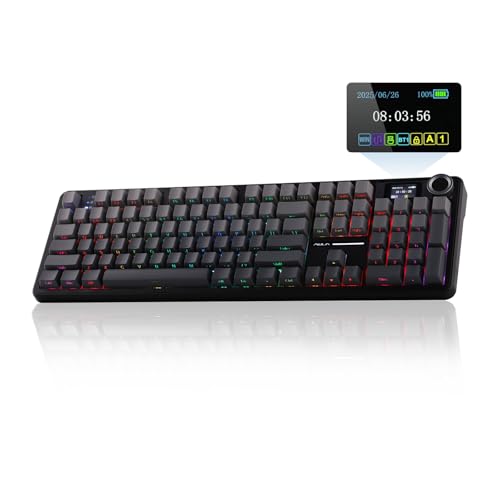
The Aula F108 Pro is the only full-size, 104-key option in this guide, which matters for buyers who rely on a dedicated number pad for spreadsheet or accounting work rather than the TKL and 75% layouts the rest of this list favors. An 8000mAh battery is roughly double the capacity of the RK84's 4000mAh cell, and the built-in screen displays battery level, connection mode, and basic customization feedback without needing companion software running in the background. Hot-swappable sockets and a knob for quick volume or media control round out the feature set at just under $90. Triple connectivity (Bluetooth, 2.4GHz, and wired) covers most desk setups, and the RGB backlighting is fully programmable through the board's own controls. The main tradeoff against the 75% and TKL boards elsewhere in this guide is desk footprint: a full-size 104-key layout takes up several extra inches of desk width that a TKL or 75% board would free up.
Trade-offs
- · Full-size 104-key layout takes up more desk width than the TKL or 75% boards elsewhere in this guide
- · 8000mAh battery and screen add weight versus the more compact wireless options
- · Verify current listing for exact switch options included at time of purchase
Skip if: Desk space is tight. The RK Royal Kludge RK84 (75% layout) or Keychron C3 Pro (TKL) reclaim several inches of desk width if a number pad is not required.
Check price on AmazonPros
- +Full-size 104-key layout with dedicated number pad, the only one in this guide
- +8000mAh battery, roughly double the capacity of the RK84
- +Built-in screen for battery and mode feedback
- +Hot-swappable switches and triple connectivity under $90
Cons
- −Largest footprint in this guide, not suited to tight desks
- −Heavier than the compact wireless options due to the battery and screen
- −Confirm current switch options on the listing before ordering
YSCP Typewriter Style Mechanical Gaming Keyboard, Blue Switch

Why it works
This is the only board in this guide built around a typewriter aesthetic, with round retro-profile keycaps and an RGB backlit case designed to stand out visually rather than to chase gasket-mount comfort or hot-swap flexibility. At under $40 it undercuts every other option on this list on price, which makes it a reasonable pick for buyers who want the mechanical-keyboard look and feel for a desk display or lighter-use setup without spending $50 or more. Blue switches mean an audible click on every keystroke, the same tradeoff flagged elsewhere in this guide's FAQ for anyone sharing a room or taking video calls. The tray mount and lack of hot-swap keep this firmly in budget-novelty territory rather than a daily-driver upgrade pick, but for the specific retro-look use case it fills a niche none of the other picks in this guide address.
Trade-offs
- · Blue switches click audibly on every keystroke, noticeable on video calls or in shared rooms
- · No hot-swap, switch changes require soldering
- · Tray mount gives a harsher, louder typing feel than the gasket-mount picks in this guide
Skip if: You want a quieter switch for calls, or hot-swap flexibility. The Keychron C3 Pro at a similar price point adds both gasket mount and hot-swap.
Check price on AmazonPros
- +Lowest price in this guide at under $40
- +Distinctive retro typewriter-style round keycaps and case design
- +RGB backlighting included
- +Full-size 104-key layout with number pad
Cons
- −Blue switches are loud, not ideal for calls or shared spaces
- −No hot-swap, soldering required to change switches
- −Tray mount, harsher feel than gasket-mount alternatives in this guide
ASUS ROG Strix Scope II X Wired Mechanical Gaming Keyboard
Why it works
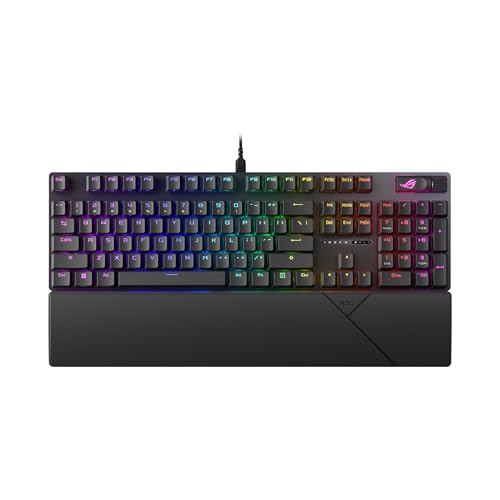
The ROG Strix Scope II X pairs factory pre-lubed ROG NX Snow V2 linear switches with hot-swap sockets and PBT keycaps, a combination that puts it near the top of this guide's feature list for buyers who want a full-size wired board with a premium switch feel out of the box. Pre-lubed switches mean smoother keystrokes without the aftermarket lubing process some enthusiasts do themselves on cheaper boards, and the gasket-mounted design with sound dampening foam is aimed at reducing the hollow, clacky resonance common on tray-mount boards at this price. At just under $95, it is priced close to the ceiling of this guide's under-$100 range, competing directly with the Keychron V1 and Epomaker TH80 Pro for the higher end of the budget. The full-size 100% layout, rather than the 75% layout of the V1 and TH80 Pro, is the deciding factor for buyers who need a dedicated number pad and are willing to trade the smaller footprint for it.
Trade-offs
- · Full-size layout takes up more desk width than the 75% Keychron V1 or Epomaker TH80 Pro
- · Wired only, no wireless option on this model
- · Priced near the top of this guide's under-$100 range
Skip if: Desk space is tight or a number pad is not needed. The Keychron V1 (75%) offers double-gasket mount and QMK/VIA in a smaller footprint for a similar price.
Check price on AmazonPros
- +Pre-lubed ROG NX Snow V2 linear switches, smoother out of the box than unlubed alternatives
- +Hot-swap sockets with PBT keycaps
- +Gasket-mounted with sound dampening foam
- +Full-size 100% layout with dedicated number pad
Cons
- −Full-size footprint, larger than the 75% picks elsewhere in this guide
- −Wired only
- −Near the top of this guide's price range
Redragon K552
Why it works
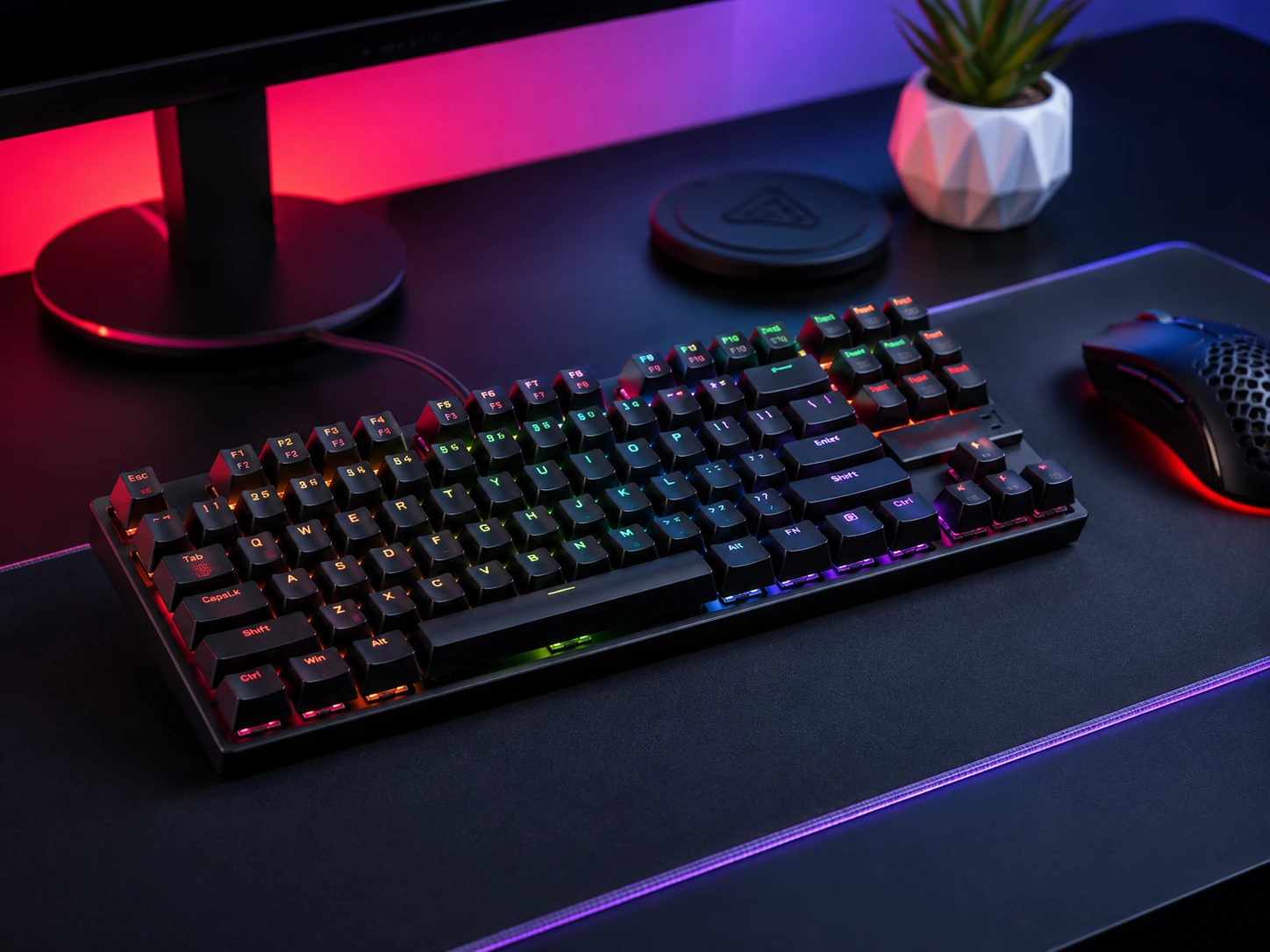
The Redragon K552 has been the standard entry-level mechanical keyboard on Amazon since 2015. Tens of thousands of verified reviews. Metal top frame adds rigidity unusual at this price. Outemu switches are Cherry MX-compatible - keycap replacements work without modification. For a first mechanical keyboard under $35 with a proven track record, no competing option has more documented reliability.
Trade-offs
- · Tray mount - each keystroke vibrates directly into the case, louder and harsher feel than gasket
- · Non-hot-swap - switch replacement requires soldering
- · ABS keycaps develop sheen with extended use
- · No RGB, single-color LED only on many variants
Skip if: Budget allows $40-50. The Keychron C3 Pro adds gasket mount, hot-swap 3/5-pin, QMK/VIA, and RGB for $12 more - the feature gap is significant.
Check price on AmazonPros
- +Under $35 - lowest price in guide
- +Proven since 2015 - tens of thousands of reviews
- +Metal top frame for rigidity
- +Cherry MX-compatible switches and keycaps
- +Best first mechanical keyboard at this price
Cons
- −Tray mount - harsh feel and louder
- −No hot-swap - soldering required to change switches
- −ABS keycaps shine over time
- −Limited features vs $40+ options
Keychron C3 Pro
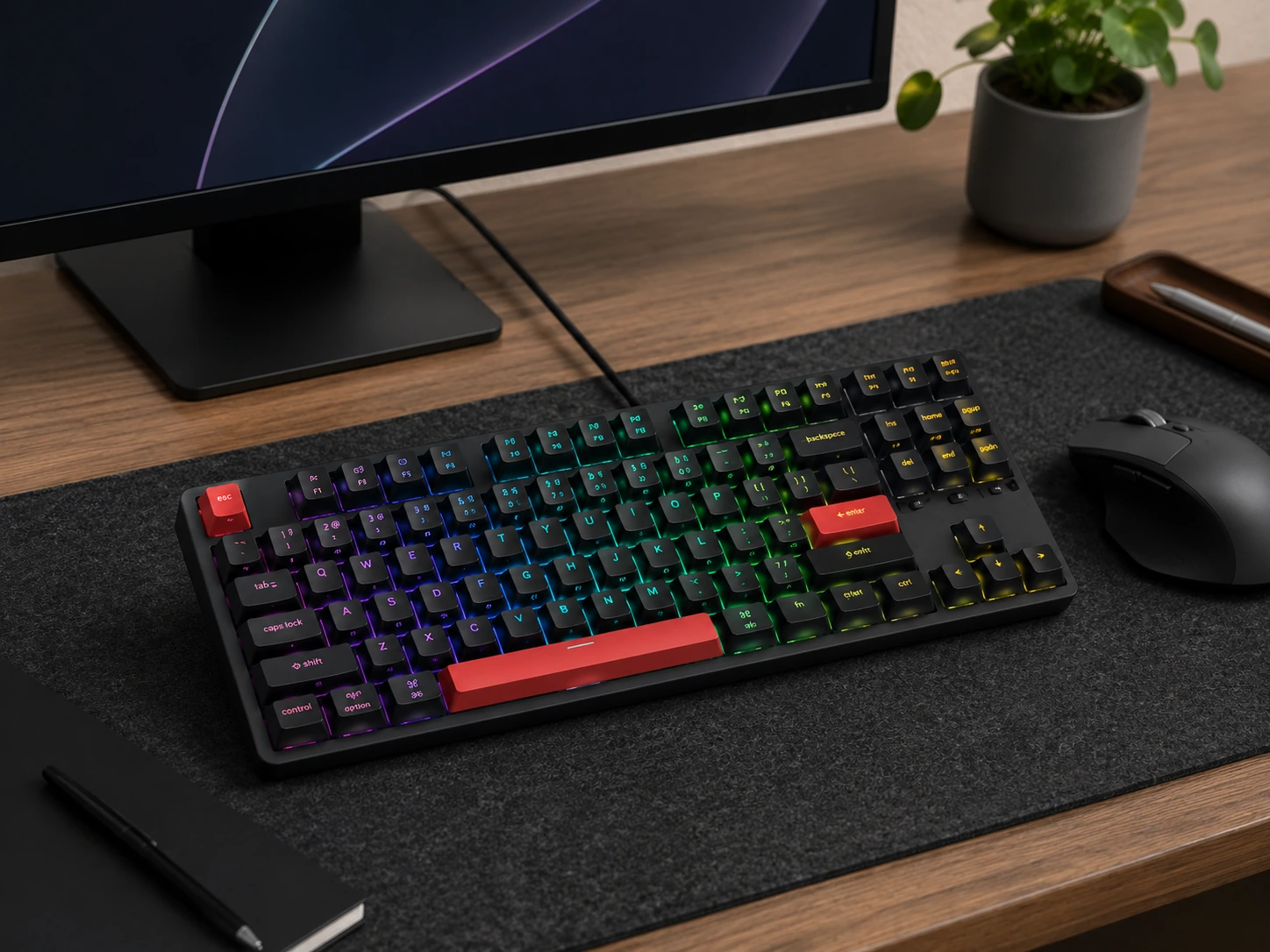
Why it works
Gasket mount, QMK/VIA programmability, and hot-swap 3/5-pin socket at $40 - a feature set that cost $120+ three years ago. QMK/VIA lets you remap any key using a free browser interface in under 5 minutes - changes persist on the keyboard. Hot-swap means switching from Blue to Brown costs $15-25 in replacement switches and 15 minutes, no soldering. The benchmark for budget mechanical keyboards in 2026.
Trade-offs
- · ABS keycaps - develop shiny surface in 6-12 months with heavy use
- · TKL layout only - no compact 75% option in C3 Pro line
- · Wired only - no wireless option in C3 Pro
Skip if: You need wireless. The RK Royal Kludge RK84 at $60-70 adds triple-mode wireless (BT 5.0 + 2.4GHz + USB-C) for $20 more.
Check price on AmazonPros
- +Gasket mount at $40 - softer typing feel
- +QMK/VIA programmable - remap any key in browser
- +Hot-swap 3/5-pin at $40 - switch changes without soldering
- +USB-C detachable cable
- +Keychron brand reliability
Cons
- −ABS keycaps - shines over time
- −Wired only
- −TKL 87% only - no 75% option
Akko 3087 Horizon DS
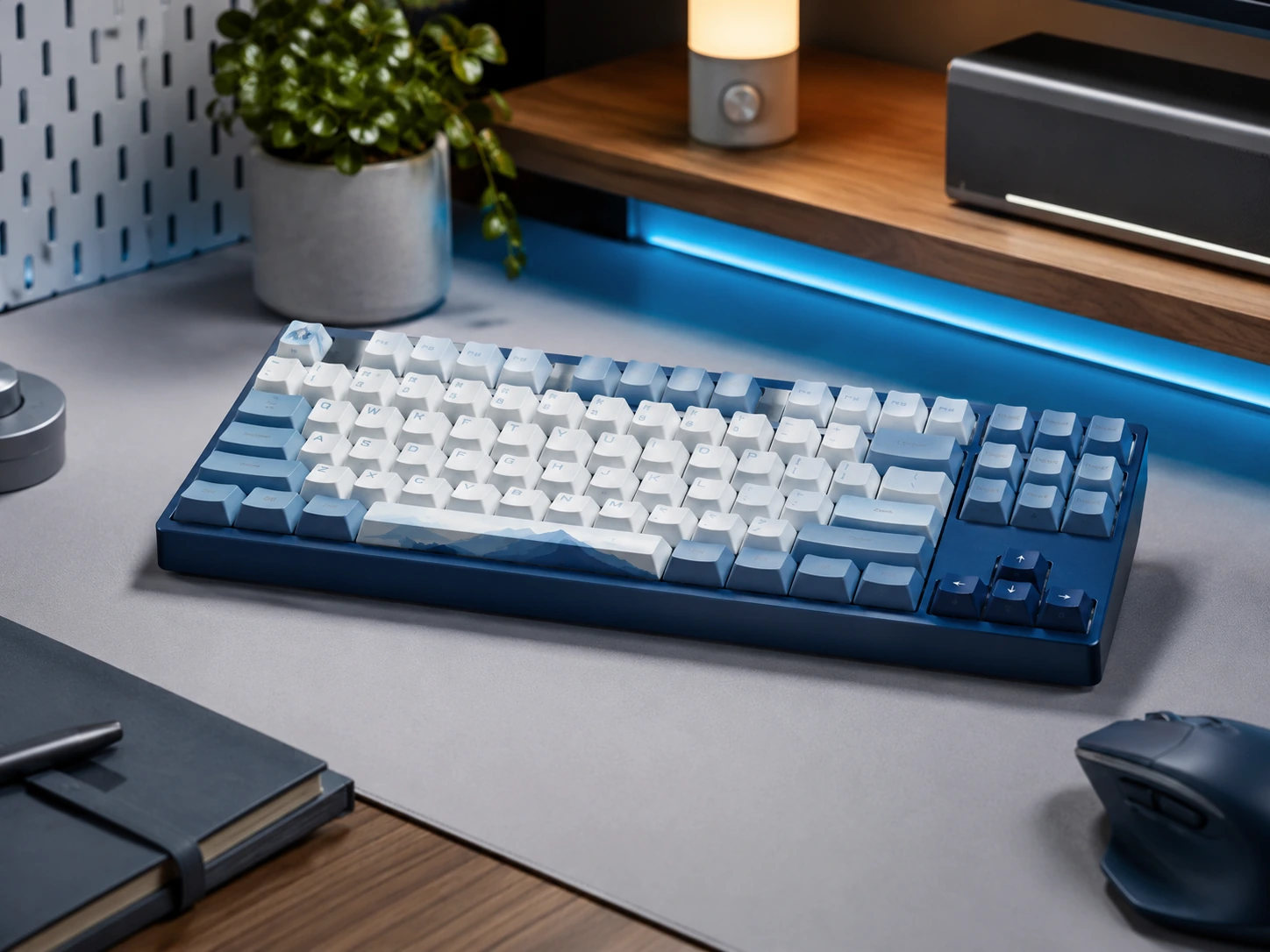
Why it works
Cherry-profile PBT double-shot keycaps ship with the board - aftermarket equivalents cost $40-60 separately. Akko CS switches come factory pre-lubed, delivering a smoother feel than the Outemu switches found in most boards at this price. Detachable USB-C cable means a damaged cable is a $5 replacement rather than a repair. The Horizon colorway (blue gradient) is a distinctive aesthetic option.
Trade-offs
- · Tray mount - harsher feel than gasket
- · No hot-swap - soldering required for switch changes
- · Higher price than C3 Pro without adding hot-swap or wireless
Skip if: Hot-swap compatibility is important. The Keychron V1 at $69-84 adds gasket mount and QMK/VIA to PBT keycaps for $15-30 more.
Check price on AmazonPros
- +PBT double-shot keycaps included - legends never fade
- +Pre-lubed Akko CS switches - smoother factory feel
- +Detachable USB-C cable
- +Distinctive Horizon colorway
- +Cherry-profile legends
Cons
- −Tray mount
- −No hot-swap
- −Higher price than C3 Pro without wireless or hot-swap
RK Royal Kludge RK84
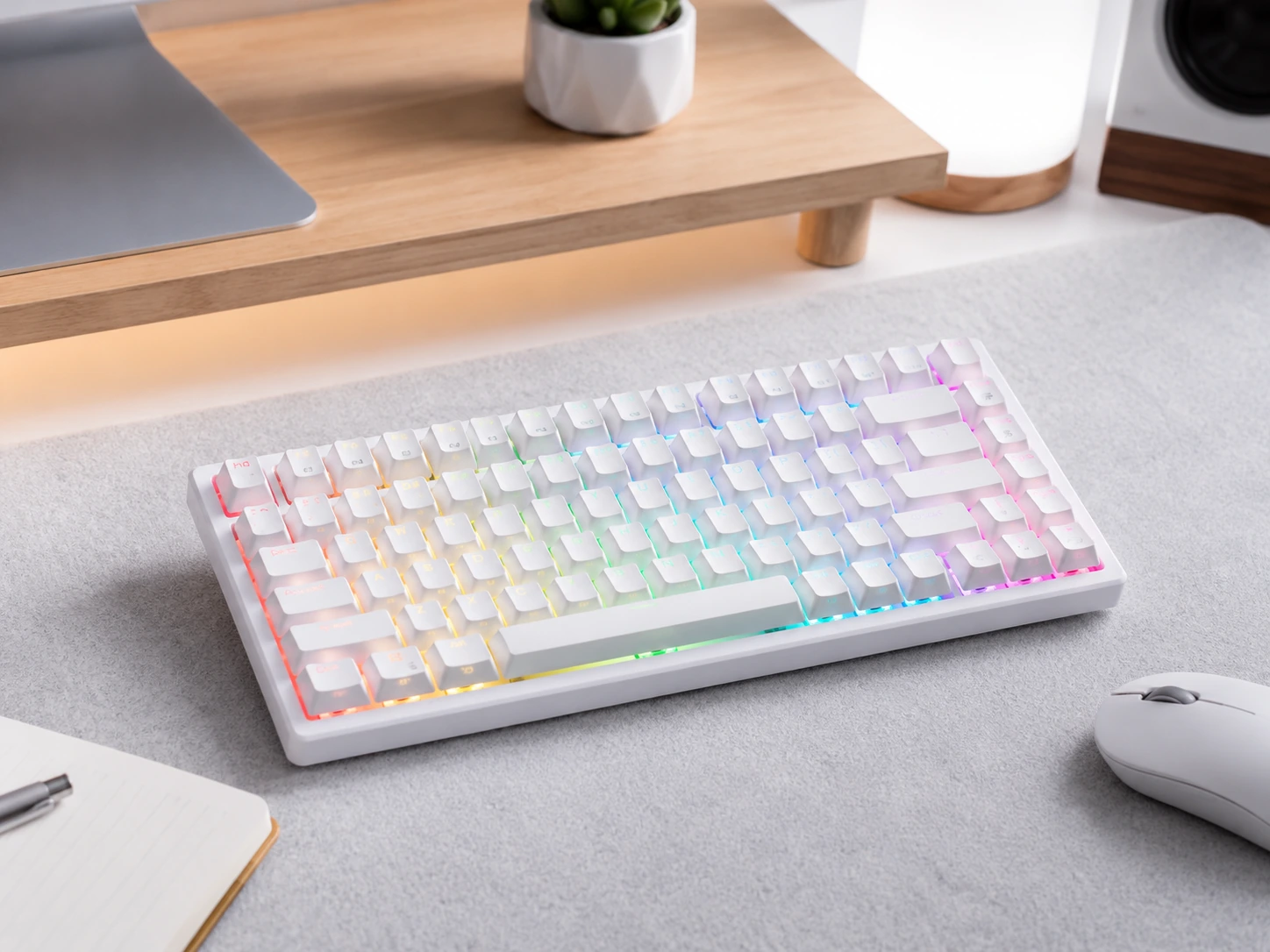
Why it works
Triple-mode wireless (BT 5.0, 2.4GHz, and USB-C) with Bluetooth pairing for 3 devices simultaneously. 4000mAh battery provides 3-6 months of daily use with backlight off, or 1-3 weeks with RGB. The 75% layout retains the F-row and dedicated arrow keys while being 1.5 inches narrower than TKL - the best office compromise for cable-free desks. Hot-swap on a wireless board at this price is uncommon.
Trade-offs
- · Tray mount - harsher feel than gasket
- · ABS keycaps - shines over time
- · No QMK/VIA - proprietary remapping software only
- · 2.4GHz dongle required for fastest wireless response
Skip if: Wired is acceptable and gasket mount or QMK/VIA matters most. The Keychron C3 Pro at $40-50 or V1 at $69-84 are better for typed-feel and programmability.
Check price on AmazonPros
- +Triple wireless (BT 5.0 + 2.4GHz + USB-C) with 3-device BT pairing
- +4000mAh battery - months of use without backlight
- +75% layout - compact but keeps F-row and arrows
- +Hot-swap 3/5-pin on wireless board at $60-70
- +Clean desk - no cable required
Cons
- −Tray mount
- −ABS keycaps shine over time
- −No QMK/VIA
- −Needs 2.4GHz dongle for lowest latency
Keychron V1
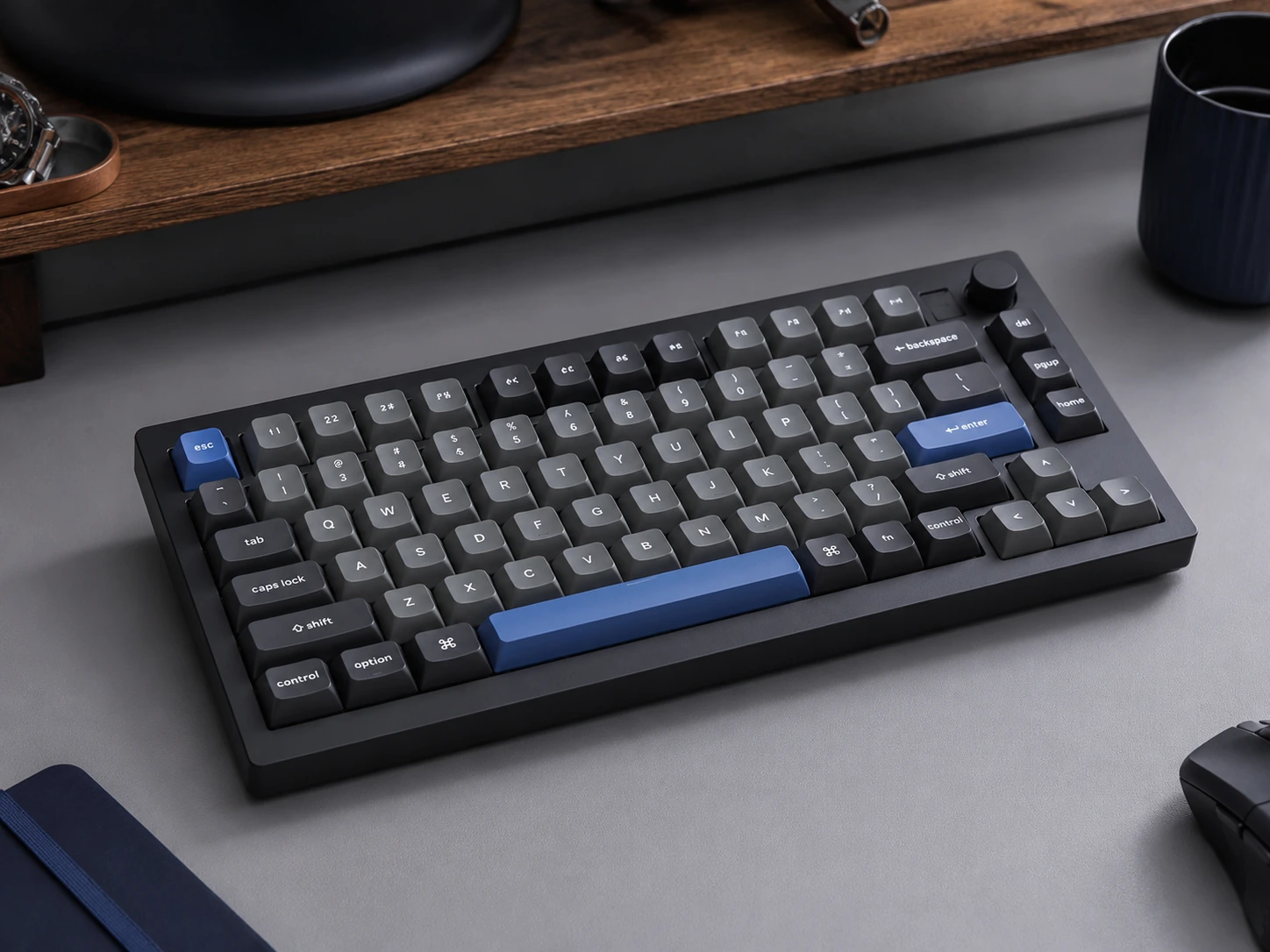
Why it works
Double-gasket mount, PBT double-shot keycaps, QMK/VIA programmability, and hot-swap 3/5-pin sockets in a 75% form factor. Double-gasket is two layers of silicone dampening - softer and bouncier typing feel than single-gasket designs. The difference is most apparent during 1-2+ hour typing sessions. PBT double-shot legends are a second layer of plastic, not ink or dye - they cannot fade. Most recommended wired mechanical keyboard under $100 for home office daily use.
Trade-offs
- · Wired only - V1 Max adds wireless at ~$109
- · Highest price wired option in guide at $69-84
- · Red/Brown switches only in standard V1 (Blue in separate V1 Blue variant)
Skip if: You need wireless. The Epomaker TH80 Pro at $75-90 or RK Royal Kludge RK84 at $60-70 add triple-mode wireless.
Check price on AmazonPros
- +Double-gasket mount - softest typing feel in guide
- +PBT double-shot - legends never fade
- +QMK/VIA programmable - best key customization
- +Hot-swap 3/5-pin
- +75% layout - compact with full F-row and arrows
Cons
- −Wired only (V1 Max ~$109 for wireless)
- −Highest wired price at $69-84
- −Red/Brown switch options only in V1 (Blue is separate model)
Epomaker TH80 Pro
Why it works
Adds three features the RK84 lacks: PBT double-shot keycaps, a physical volume knob, and south-facing RGB LEDs. South-facing LEDs shine through the front of keycaps rather than directly into the user's eyes - more visible legends under the light. Silicone dampening foam reduces hollow resonance. Gateron Pro switches are factory pre-lubed. For wireless buyers who want PBT keycaps plus volume knob plus best feature set under $100, this is the pick.
Trade-offs
- · Not a true gasket mount - PCB + silicone foam is softer than tray but not as soft as double-gasket
- · Higher price at $75-90 than RK84
- · No QMK/VIA - proprietary remapping only
- · Slightly less hot-swap compatible switch brand variety than Keychron
Skip if: Wired use only and QMK/VIA matters. The Keychron V1 at $69-84 has better typing feel and full QMK/VIA without wireless premium.
Check price on AmazonPros
- +PBT double-shot + wireless - rare combination under $100
- +Physical volume knob
- +South-facing RGB - better keycap illumination
- +Silicone foam dampening
- +Gateron Pro pre-lubed switches
Cons
- −Not true gasket mount
- −No QMK/VIA
- −Higher price than RK84
- −Limited Gateron Pro hot-swap variety
Full Comparison: All 6 Keyboards
| Keyboard | Layout |
|---|---|
| EPOMAKER X Aula F108 PRO Wireless Gaming Keyboard with Screen Best Full-Size Wireless with Display | Full-size 104-key |
| YSCP Typewriter Style Mechanical Gaming Keyboard, Blue Switch Best Retro Typewriter-Style Design | Full-size 104-key |
| ASUS ROG Strix Scope II X Wired Mechanical Gaming Keyboard Best Pre-Lubed Hot-Swap Under $100 | Full-size 100% |
| Redragon K552 Best Budget Under $35 | TKL 87-key |
| Keychron C3 Pro Best Value Wired Under $50 | TKL 87-key |
| Akko 3087 Horizon DS Best TKL with PBT Keycaps | TKL 87-key |
| RK Royal Kludge RK84 Best Wireless Mechanical Keyboard | 75% 84-key |
| Keychron V1 Best Overall Wired Under $100 | 75% 84-key |
| Epomaker TH80 Pro Best Wireless with Premium Features | 75% 80-key |
Which Keyboard for Which Desk Size
| Desk width | Best layout | Recommended pick |
|---|---|---|
| Under 36" | 65% or 60% | Upgrade to Keychron K6 Pro |
| 36-40" | 75% | Keychron V1 or RK84 |
| 40-48" standard | TKL or 75% | Any in this guide |
| 48"+ | Any | Personal preference |
Desk space math: a TKL keyboard (14 inches wide) on a 40-inch desk leaves 26 inches for mouse, monitor stand, and peripherals. A 75% keyboard (12.5 inches wide) on the same desk leaves 27.5 inches. For desks under 36 inches, neither TKL nor 75% keyboards in this guide are the right fit - a 65% or 60% layout is worth considering instead.
Frequently Asked Questions
What is the best mechanical keyboard under $100 for home office work?
Keychron V1 ($69-84) for wired use - double-gasket mount, PBT keycaps, QMK/VIA, and hot-swap make it the most complete wired option. For wireless, the RK Royal Kludge RK84 ($60-70) is the most complete triple-mode wireless pick, or the Epomaker TH80 Pro ($75-90) adds PBT keycaps and a volume knob.
What mechanical keyboard should I buy under $50?
Keychron C3 Pro ($40-50). Gasket mount, QMK/VIA programmability, hot-swap 3/5-pin, and USB-C detachable cable at $40. The only trade-off is ABS keycaps that will develop a sheen over 6-12 months. No other keyboard at $50 or under offers this combination of features.
Is the Redragon K552 still worth buying in 2026?
For a first mechanical keyboard under $35, yes - it has the longest track record at this price and metal construction. For $12 more, the Keychron C3 Pro adds gasket mount, hot-swap, QMK/VIA, and RGB. If the budget is hard-capped at $35, the K552 is a solid choice. If $40-50 is possible, the C3 Pro is a more capable keyboard.
Are Blue switches good for home office use?
Blue switches produce an audible click on every keystroke - clearly audible to other participants on video calls even with noise suppression active. Brown (tactile bump, no click) or Red (smooth linear, no click) are more appropriate for home office and shared spaces. Blue switches are designed for typing satisfaction, not office environments.
What is QMK/VIA and do I need it?
QMK is open-source keyboard firmware. VIA is a browser-based graphical interface to remap any key without programming. Common uses: Caps Lock to Escape, media controls on an Fn layer, macro keys. Takes 5 minutes, changes persist on the keyboard through battery cycles and USB reconnects. Keychron C3 Pro and V1 include QMK/VIA. RK84 and Epomaker TH80 Pro use proprietary remapping software only.
Browse mechanical keyboards under $100 on Amazon
All Prime-eligible. Budget, wired, and wireless mechanical keyboards compared.
Shop on Amazon →Related Guides
Best Standing Desk Under $200
Best Monitor Arm Under $100
Standard Desk Height Guide
Ultrawide vs Dual Monitor
Last updated: June 2026. Verify current Amazon prices before purchasing.