
How to Build a Video-Call Background in a Room With No Blank Wall
Affiliate Disclosure: We may earn a small commission on qualifying Amazon purchases at no extra cost to you. Full disclosure →
A shared room may have no wall that is both clear and available behind the desk. Bookshelves, wardrobes, beds, and doorways can all enter the frame. The best background is not necessarily a new large panel; first find out what the camera actually needs to show.
Quick answer: Set the useful desk and camera position, inspect the frame in the real meeting application, and choose between an existing orderly background, a supported portable screen, a properly installed curtain, or suitable software effects. Check storage, stability, access, lighting, and privacy independently. Virtual backgrounds are visual tools, not reliable protection for confidential information.
Start from the work position
Place the screen and inputs where you can work normally. Then preview the camera at the intended height and distance. Do not rotate the workstation into an awkward position just to imitate a blank-wall setup.
List what actually appears in the frame. A large room problem can become a smaller framing problem once unnecessary wide-angle coverage is removed. Check normal chair movement so the solution does not depend on remaining perfectly still.
Use the existing background deliberately
An orderly shelf or a quiet portion of the room can be appropriate. Remove confidential papers, visible passwords, and distracting personal details from the camera view. Check reflective surfaces that may show another screen or doorway.
Avoid buying decorative objects merely to fill every visible space. A few stable items can be easier to maintain than a styled display requiring daily rearrangement. The room should remain useful to the people living in it.
Compare a folding screen
Measure the deployed panel arrangement and base, not just total flat width. Check the maker’s stable-use and storage instructions. A narrow screen placed strategically may cover the frame without dividing the whole room.
Test from the camera rather than only from the doorway. A gap between panels can expose the very area you wanted to hide. The room-divider guide covers the broader room and stability checks.
For stable physical separation, use small-room divider planning.
Compare a collapsible backdrop
A pop-up or stand-supported background has an opening footprint, support system, and folded handling routine. Read its instructions before buying, especially if a spring frame or large stand is involved. It needs enough clear space to deploy and store as designed.
Check whether the material hangs or tensions in the intended orientation. Do not improvise attachment to a monitor, lamp, or unstable shelf. A photographic support should carry the load in the manner its maker specifies.
Compare a curtain
A curtain needs a suitable installed support or a documented freestanding system. Check permission, wall or ceiling construction, hardware, and the path of doors or vents. A convenient gap is not automatically a suitable fixing location.
Include the gathered curtain when open and the closed panel during calls. The background should not block a required route or cover heat-producing equipment. Fabric choice affects light and appearance, but a heavy curtain is not automatically soundproofing.
Evaluate software effects
Blur or replacement can reduce visual distraction, subject to the platform and device. Check performance with hands, hair, movement, objects, and changing light. A clean still preview may not represent an active meeting.
Do not depend on an effect to conceal information that must remain private. A transient failure or unprocessed preview can expose the underlying room. Put sensitive material out of the real camera view regardless of the selected effect.
Light the person and background separately when needed
A background can appear uneven or translucent under strong light. Check the actual material and room lighting rather than expecting a product color to reproduce exactly on camera. Avoid placing lights against fabric contrary to their instructions.
The face still needs usable illumination. A backdrop does not fix a backlit face or reflections in glasses. Change one light or position at a time and judge the complete frame in the meeting application.
Plan the reset before buying
List what moves before a call and where it returns afterward. A stand that fits while deployed may have no safe stored destination. A curtain may be easier to reset but need an installation you cannot make in a rental.
Check handling weight and folding process, especially when you work alone. Do not choose a product from folded diameter alone if unfolding it requires more room than the household can provide. Keep packaging and instructions during the trial.
Example: a small visual boundary beats a full-room screen
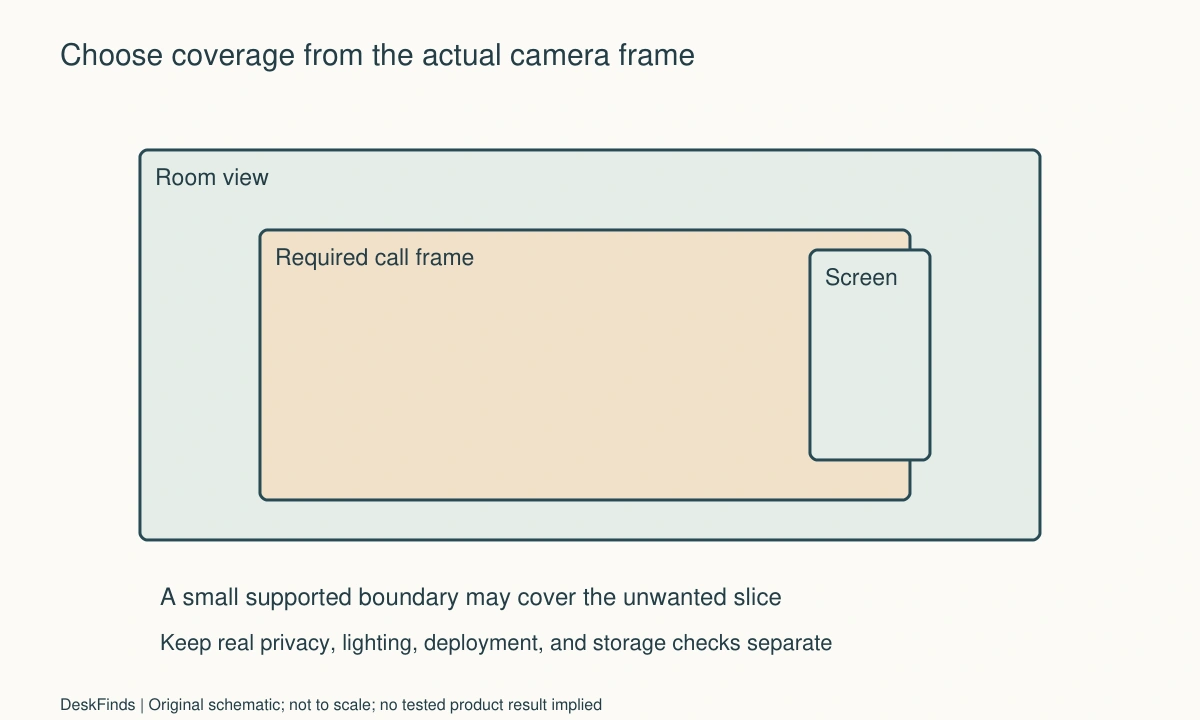
Imagine a desk facing a bookshelf with a bed and doorway visible to one side behind the user. The initial plan is a large screen across the room. The camera preview shows that only one narrow slice needs covering after an appropriate supported crop.
The user tests an existing shelf arrangement and a smaller screen position. The screen clears the frame but its foot blocks the chair’s exit, so another location is tried. A usable final position hides the unwanted area without obstructing the doorway.
Software blur is kept as an optional visual effect, while private documents are removed physically. The household no longer depends on a digital cutout to protect them. The screen has a defined storage position so call preparation does not leave furniture in the walkway.
Select by the whole routine
| Option | Additional requirement |
|---|---|
| Existing room view | Ongoing tidiness and privacy inspection |
| Folding screen | Stable deployed footprint and safe storage |
| Collapsible backdrop | Supported deployment, handling, and reset space |
| Curtain | Suitable installation and operating path |
| Software effect | Device support and realistic movement test |
See green screen versus virtual background for the production distinction. For camera coverage, use tight-space webcam planning. The useful background serves the call while allowing the room to return to ordinary life afterward.
Build a background around the live frame
Begin with a clean preview containing no private information. Mark the frame boundaries relative to room features and include the user’s ordinary movement. This turns a vague wish for a professional room into a concrete coverage problem. You may need to hide one side of a bed or doorway rather than cover the entire wall. A smaller requirement can preserve more floor area and simplify daily setup.
Compare the real room without software effects first. That reveals what is visible if blur or replacement does not apply, fails during movement, or is disabled in another application. Keep sensitive material physically outside the view. A visual effect can be an aesthetic choice while information handling remains a separate requirement. Do not treat a convincing still background as proof that the underlying room can safely contain confidential displays.
For physical products, include both sides of the operation. A folding screen needs a supported angle and base; a collapsible backdrop needs deployment and handling room; a curtain needs suitable fixings or a documented freestanding support. The material’s visible width is only part of the product. The room must accommodate its support, movement, storage, and the person working in front of it.
Lighting can change the required purchase. A translucent panel may show silhouettes under backlighting, a glossy surface may reflect a lamp, and a textured material may look different in the actual call. Check normal day and evening conditions before assuming the product photograph will reproduce on camera. Keep lights used with the clearances and supports their instructions require, especially near fabric.
A useful background also has an endpoint. If it is temporary, give it a protected stored location and a repeatable reset. If it is permanent, verify access to furniture, windows, switches, and required routes. Do not let a call-only visual improvement gradually turn into a barrier that makes the whole room difficult to use.
Review the final frame after adding normal work objects back to the desk. Microphones, task lamps, notes, and another occupant’s movement can change the result. The chosen solution should support ordinary meetings, not only an empty-room photograph taken at one carefully selected angle.
Worked comparison: existing shelf, screen, or software effect
Imagine a user with a shelf behind the desk, a bed to one side, and a door in the remaining background. The first plan is a full photographic stand and fabric backdrop. Before ordering, the user previews the actual camera mode and defines the required solo-call frame.
The shelf itself looks suitable after private papers and a few distracting items are moved to proper storage. Only one side of the frame needs a boundary. A supported crop reduces the required coverage further while leaving enough room for normal head and hand movement.
A small folding screen is compared with the large backdrop. The screen can cover the unwanted side, but its deployed foot initially overlaps the chair’s exit route. The user tests another supported position rather than flattening the screen or omitting its base. The large backdrop is still possible, but its deployment and storage would require more room and effort.
Evening lighting reveals a silhouette through the first screen material. The user checks an opaque option and appropriate light placement. No lamp is pushed against fabric to improve the image. The camera preview is repeated with the room in its ordinary nighttime state.
Software blur is then tested with hands, hair, and a notebook raised during a call. The user treats it as optional decoration and leaves sensitive material outside the real frame. A failure of the effect would therefore be inconvenient rather than an information-handling emergency.
The stored screen has a defined supported destination away from the door and a route that does not require moving the bed. Setup and reset are rehearsed after a normal work session. The user discovers one accessory cable would catch the screen during removal and reroutes it appropriately.
The final background uses the existing shelf and a smaller physical boundary, with optional software styling. It is cheaper in room footprint than the original full stand, but that is a result of this framing brief rather than a rule that everyone should use a screen. The useful decision came from real coverage, support, light, privacy, and daily handling together.
For light around the person and background, review backdrop lighting.
Make the reset visible on the buying sheet
Add a column for setup and another for storage beside appearance and price. List the actual actions: move a screen, open a support, hang fabric, adjust lighting, or restore the room. A background can look excellent during a call and still be a poor daily purchase if the reset has no practical endpoint.
For a shared room, agree who can move the background and what must remain accessible. A wardrobe or bed should not become unavailable for long periods without an explicit workable routine. Keep required exits and equipment access clear at all times, not only when the user remembers to fold a panel away.
Inspect material care and long-term handling. A fabric may crease, attract visible marks, or require a particular cleaning method. A folding frame or stand has its own instructions and replacement parts. Do not assume every background can be washed, ironed, or leaned in the same way. Choose a system whose ordinary care fits the room and user.
An existing shelf may remain the simplest option after privacy and framing are addressed. Keep visible objects stable and avoid adding decorative clutter that must be repositioned each meeting. A restrained real background can be professional without resembling a studio. The relevant standard is whether it supports the communication and work, not whether every available surface is styled.
Check after a representative week. If the background repeatedly stays deployed because storing it is awkward, revisit the size or format. If software effects are essential to hide sensitive material, fix the physical information-handling problem. The final solution should remain useful when a call runs late, another person enters, or the room returns to ordinary household use.
Your practical comparison worksheet
Use the following checks with the actual people, objects, and room in your plan. Record a measured value, an observed task result, or the exact product information that answers each point. Keep unresolved details separate from confirmed ones. A result about one feature should not silently establish another: physical fit, ordinary use, support, and care may require different evidence. Work through the checks before ordering, then repeat the relevant actions with the delivered item while the return terms apply. The worksheet is a planning aid rather than a product test or approval for an improvised installation.
1. Actual frame
Preview the camera in the intended app with the normal seat, mode, and ordinary movement; identify the exact unwanted area.
Solve that coverage problem before buying a wall-sized product. A smaller supported boundary may be enough after appropriate framing.
2. Existing objects
Check shelves, pictures, windows, doors, reflective surfaces, and any visible private papers or screens.
Keep sensitive information outside the real view. Styling and software effects do not replace appropriate physical handling of confidential material.
3. Screen footprint
Measure panel angles, feet, stability requirements, and useful deployed coverage from the camera viewpoint.
Do not compare flat widths alone or flatten a screen beyond instructions. Preserve chair and room routes while obtaining the required boundary.
4. Backdrop deployment
Read the support and opening method for collapsible frames or stands, including handling, weight, and folded storage.
Give the product space to deploy as designed. Do not attach it to a monitor or lamp merely because those objects are nearby.
5. Curtain system
Check permission, fixing suitability, support loading, gathered shape, and the curtain’s open and closed paths.
Use a proper installed or documented freestanding system and keep required ventilation, heating clearances, and access unobstructed.
6. Software effect
Test supported blur or replacement with normal movement, hands, objects, and the actual device and call mode.
Use it as a visual tool with realistic limits. Do not rely on it to conceal information that must remain private under all conditions.
7. Lighting
Compare the face and background under ordinary day and evening conditions, including silhouette, reflection, and material appearance.
Keep lights and fabric in supported positions. A product color or daytime still image does not establish the final call appearance.
8. Reset
Rehearse setup and storage with ordinary desk equipment and household belongings present.
Choose a routine with a real endpoint. A background that has no safe stored destination can become a permanent obstruction after the meeting ends.
Sources and scope
- Zoom virtual background guidance - Feature setup reference; software effects are not treated as a guarantee that private information stays hidden.
Editorial note: This is a research-based planning guide, not a hands-on product review. Worked examples are hypothetical. Follow the exact product instructions and resolve compatibility, installation, and care questions before relying on the arrangement.