
How to Choose a Lap Desk for Laptop Work on a Sofa

Affiliate Disclosure: We may earn a small commission on qualifying Amazon purchases at no extra cost to you. Full disclosure →
A lap desk can provide a working surface away from a normal desk, but the laptop, support, and seat must still work together. A large top is not enough if the mouse area is unusable, the tray does not rest as intended, or there is nowhere to put it when you stand. Start with the laptop’s operating instructions and the actual sofa position.
Quick answer: Confirm that the laptop may be used on the proposed stable, ventilated support, then compare the lap desk’s usable top and intended base with your laptop, input devices, and seated space. Include cable exits and a clear landing place before standing. A lap desk does not automatically make every sofa or soft-surface arrangement suitable, and it should not be used to override the computer maker’s restrictions.
Establish the laptop’s required support
Read the exact computer’s operating guidance. Apple’s fan guidance, for example, distinguishes a hard, flat surface from soft materials that can affect ventilation. Use the instructions for your own machine rather than assuming every laptop has the same vent positions or permitted use.
Identify the underside feet, intake and exhaust areas, and any requirements around the keyboard or enclosure. The lap desk must support the device through the intended contact surfaces without covering required openings. A soft cushion beneath the lap desk is a separate component from the hard surface beneath the computer.
Do not treat a product described as cooling as proof of compatibility. A built-in fan, mesh top, or metal panel can have its own requirements and does not authorize an otherwise unsupported arrangement. If the laptop’s instructions rule out the intended use, choose another supported working location.
Measure the usable top
Record the laptop’s actual width and depth, including protrusions relevant to support. Compare those with the lap desk’s clear surface, excluding raised lips, phone slots, cup recesses, and other features that cannot carry the computer as intended. A nominal diagonal range can hide a poor fit for an unusually deep or thick device.
Check the loaded screen angle in the permitted arrangement. The display may open behind the top’s edge or approach a backrest. Do not allow a rigid cable or furniture surface to limit the hinge unexpectedly. The laptop should remain supported without balancing against another object.
For a legged product rather than a cushioned lap desk, compare the folding tray fit guide. Its base footprint and load path are different, so do not transfer a fit conclusion between the two categories.
Reserve real input space
If you use a mouse, include its body, hand, and ordinary movement. A small printed mouse zone may be suitable for one task and restrictive for another. Check it with the keyboard where it belongs rather than shifting the laptop partly off the support to create room.
The mouse pad sizing guide explains why settings and actual tasks matter more than a universal pad dimension. On a lap desk, the available region can be especially limited. A trackpad-only task may need less width, but that is a workflow choice rather than evidence that the same top suits every user.
Include a notebook only if there is suitable supported space for it. If paper work is essential, compare separate deliberate states or return to a conventional desk. Trying to keep a large laptop, mouse, notebook, phone, and drink on one small tray can create conflicts no accessory feature can remove.

Check the sofa position and base
Measure the intended seat with the cushions in their normal state. A deep sofa, narrow armchair, and recliner can support a lap desk differently. Use the product only in the positions and on the support conditions its instructions permit. Do not wedge it between furniture arms to imitate a stand.
Check whether the base sits as intended when you are in your ordinary position. Include the actual clothing or blanket only if that does not conflict with the laptop and support instructions. Do not place a powered laptop or supply under bedding or soft materials to conceal cables.
Keep observations concrete: the tray tilts, the top approaches an armrest, or the mouse has no room. Avoid assuming that a cushioned product guarantees comfort for long sessions or prevents a health problem. Persistent discomfort calls for appropriate advice, not simply a larger accessory.
Plan power and other leads
Trace each cable from the device to its fixed destination. Allow ordinary movement without tension, but keep loops out of the route used to stand or walk. Do not leave a power supply hanging from a lead or buried in cushions. Follow its own operating instructions as well as the laptop’s.
Decide whether the supported task can be done on battery, if appropriate for the computer and routine. That can reduce a cable crossing, but it does not solve physical support or guarantee enough runtime. Avoid buying an arbitrary extension or charger solely to reach a sofa position without checking the documented electrical arrangement.
For a charging phone on the same surface, use the phone stand cable-clearance guide. The extra plug and lead can occupy more useful space than the stand body, and the phone should not be balanced against the laptop screen.
Give the loaded tray a landing place
Before starting, identify where the lap desk will go when you stand. The destination must support the loaded assembly as intended, or you must remove items through a clear appropriate sequence first. A narrow side table may fit the empty tray but not a laptop with the screen open.
Keep the route clear of people, pets, and loose objects. Do not lift the loaded arrangement by a fragile feature or carry it in a way the product does not support. A tray intended to rest on the lap is not necessarily a serving tray designed to carry all equipment around the room.
If the room has no practical landing place, that is a meaningful reason to revise the setup. The ability to stop working safely and predictably is part of fit, not an inconvenience to solve after the first interruption.
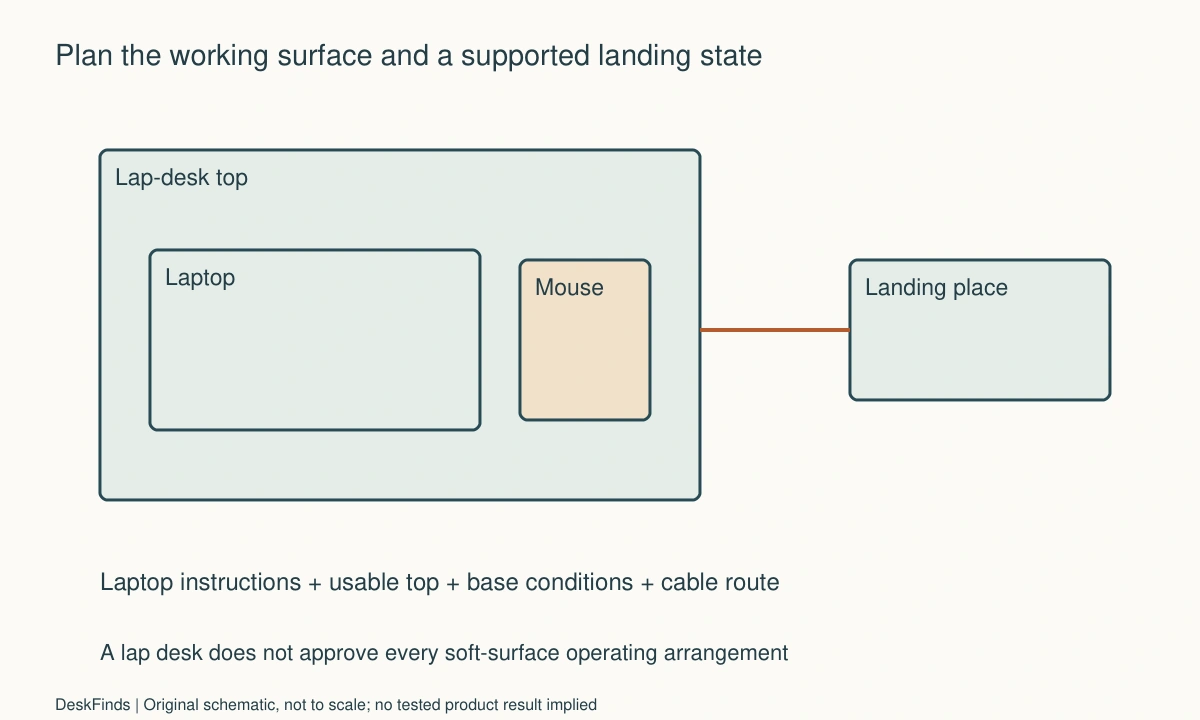
Worked example: the mouse area disappeared when the laptop was supported
Imagine a hypothetical user who wants to review documents from a sofa with a wide laptop and mouse. The lap desk listing includes both a laptop zone and a mouse zone. The user initially compares only the top’s total width with the laptop’s advertised screen size.
The actual laptop body and required support position use more of the top than expected. A raised feature limits where the feet can sit, and the remaining mouse region is smaller than the user’s normal movement. The user does not slide the laptop partly beyond the top to preserve the mouse area.
A larger compatible support is compared with a trackpad-based short task and a conventional desk arrangement. The sofa width, base support, and landing place are included in each option. The larger top is only useful if it can rest and be handled within the product’s intended use.
The final hypothetical decision may keep the sofa setup for brief reference tasks and use the normal desk for mouse-heavy work. That is a complete task-based choice, not a failed attempt to make one accessory do everything. No runtime, cooling, or comfort benefit is claimed for an unnamed product.
A second scenario: the interruption was the main problem
Consider a hypothetical student whose lap desk works while seated but has no defined place when a doorbell rings. The student repeatedly balances it on a sofa arm or leaves the laptop on a soft cushion while moving the support. Those are not suitable substitutes for a planned transition.
The student outlines a supported landing area and a short sequence for stopping work. Cables are checked from their fixed points to that destination, and loose stationery receives a separate container. If the tray must be unloaded before moving, that action is included rather than assuming the whole assembly is portable while loaded.
The student also checks whether another seat or conventional side workstation provides a more practical arrangement. A product’s ability to fold or fit in a closet does not settle how it is handled during an interruption. The decision includes both use and temporary parking.
In this hypothetical case, changing the room arrangement may be more useful than buying a lap desk with more compartments. The goal is a supported surface and a predictable way to put it down. Accessory storage features cannot replace a suitable landing location or the laptop’s operating requirements.
Compare the complete occasional workstation
Include the top, base, laptop, mouse if needed, cables, supply, and landing destination. A low price or small folded size is not the whole comparison. If the setup needs another table and several routing accessories, compare that total with using an existing supported desk.
A lap desk can still be worthwhile for a clearly defined task. Keep that task narrow enough to assess: reading a document, typing a short response, or using an application with the available input area. Do not claim that a single product turns every soft seat into a full office.
Check return terms and the delivered dimensions while the product remains unmodified. If it does not support the intended assembly, use the seller or maker’s process rather than adding wedges, cutting features, or placing a powered laptop on an unsuitable surface to make the purchase appear successful.
Six checks before regular use
Computer instructions
Record the exact laptop’s support and ventilation requirements. Check the proposed top and surroundings against them. A lap desk’s marketing name does not override a restriction in the computer manual. If the intended seat or operating state is unsupported, choose another location rather than interpreting a hard panel as automatic approval for every soft-surface use.
Clear surface
Measure the usable top after excluding lips, slots, and recesses. Place the laptop’s relevant support points within the intended area. Include its normal open-screen state and plug bodies. A diagonal-size claim is a starting point for a shortlist, not proof that the complete body and connected accessories fit on the actual product.
Input task
Check typing and the actual mouse or trackpad routine. Keep the laptop fully supported while doing so. If paper or a phone is needed, give it a separate suitable area. Do not count surface occupied by stationary objects as available movement space, and do not make a cramped layout appear adequate by changing several settings at once.
Seat and base
Use the product in its documented position on the actual seat arrangement. Check tilt, furniture interference, and whether the base rests as intended. A cushion or armrest can change the support conditions. If the result is unstable or awkward, revise the location or product rather than wedging it into place with unrelated objects.
Cable route
Trace power and accessory leads in both working and landing states. Keep the supply supported and clear as instructed. Avoid loops across a walking route or a connector pulled by ordinary movement. A cable that reaches is not necessarily a useful route; the user must also be able to stop, stand, and put the equipment down appropriately.
Stop and store
Practice the supported sequence for ending the task, disconnecting where required, and placing or storing the equipment. Include a real landing destination before starting regular use. The setup is complete when it works during an interruption as well as while seated, without balancing a loaded tray or leaving the laptop on an unsuitable soft surface.
Calculate usable top area before counting features
Suppose a hypothetical lap desk has a 560 mm wide top, but a fixed side feature occupies 45 mm and the intended laptop needs 360 mm of correctly supported width. Subtracting leaves 155 mm before considering hand movement and the actual separation between zones. That remainder is not a universal mouse-area recommendation. It is an invented example showing why the clear working surface can be smaller than the advertised top.
Draw the laptop in its required support position and add the mouse body and ordinary movement. If the real mouse task cannot fit, do not slide the laptop beyond the intended surface to recover width. Compare a suitable larger product, another input method appropriate to the task, or a conventional workstation.
Depth deserves the same treatment. A raised front lip and a phone slot can reduce where the laptop’s feet may rest. Check the actual contact points and plug bodies rather than assuming a screen-size range describes the whole computer. The support and ventilation requirements remain the deciding conditions.
Compare the length of the task with the handling burden
An occasional short reference task may justify a simple supported setup that is put away immediately. A task requiring repeated paper changes, precise mouse work, or frequent standing can expose more limitations. Do not use a short successful typing check to claim the same arrangement suits an entire workday.
Count arrival and interruption actions: retrieve the support, place the computer appropriately, route power, position input devices, and identify the landing destination. If the setup needs several improvised temporary surfaces, the sofa may not be the most useful work location for that task. More compartments on the lap desk will not necessarily address that constraint.
Keep the comparison concrete and nonmedical. The relevant observation may be that the tray approaches an armrest or that the mouse cannot complete its ordinary route. Avoid interpreting those observations as a diagnosis or promising that another cushion design will resolve persistent discomfort.
A useful question for the manufacturer
Provide the laptop body dimensions, relevant support requirements, intended seat arrangement, and whether the product will be used with a mouse. Ask about the usable hard surface and permitted base support, not only a maximum laptop diagonal. If moving the loaded assembly is essential, ask whether that action is intended and how it should be performed.
An answer about folded size does not establish the operating arrangement. If the maker cannot confirm the proposed use, keep it unresolved and compare another documented option. A conventional supported table can be a complete solution when the lap-based routine cannot be made practical within the instructions.
Sources and scope
- Apple fan and support guidance - Specific guidance distinguishing hard support and blocked ventilation for applicable Apple products; not approval for every lap desk or sofa.
Editorial note: This is a research-based planning guide, not a hands-on product review. All worked scenarios are hypothetical. Measurements and compatibility must be confirmed for the exact equipment. Photography supplies context, not proof of a tested arrangement.
Photos are illustrative and come from free-license libraries such as Unsplash; diagrams are original to DeskFinds.