
How to Choose an L-Shaped Desk for a Small Room
Affiliate Disclosure: We may earn a small commission on qualifying Amazon purchases at no extra cost to you. Full disclosure →
An L-shaped desk can separate computer work from paperwork, but it also occupies two directions at once. A return that looks efficient in a product photograph may block a wardrobe, trap a chair in a corner, or use floor space without providing reachable workspace.
Quick answer: Choose the seated position and return direction on a measured room plan before comparing desk models. Check both outer dimensions, the depth of each run, the inside knee opening, and the furniture and doors around the return. Confirm whether the exact model is reversible; similar-looking left and right versions are not interchangeable by assumption.
Define what the return is for
Give each part of the L a job. One run might hold a computer while the other carries a notebook and reference material. Alternatively, the return might hold equipment you rarely touch. Those uses require different reach, support, and cable arrangements.
If the return’s only purpose is to collect objects, a straight desk with separate storage may use the room more efficiently. Compare the L against that alternative before committing. Extra surface area is valuable only if you can use it without obstructing movement.
Identify left and right from a fixed viewpoint
Manufacturers may describe orientation differently. Look at the assembly drawing and identify the return from the intended seated position. Save a picture with a marked chair location instead of relying on a short label.
For a reversible model, check what actually moves. The desktop might swap sides while drawers, sockets, or a shelf remain constrained. Read the instructions for both arrangements and verify that your chosen version retains the features you want.
Draw the full footprint
Tape both desk runs on the floor, including the corner. Mark the outside depth and any projecting feet. Then place a chair in the intended working bay. The room test should include the whole L rather than two lines along the wall.
Check door swings and the path between the bed, entrance, and wardrobe. A return projecting into the room can act like a barrier. Leave the route usable when someone is seated, not just when the chair is tucked away.
Inspect the inside corner
Some corner desks offer a diagonal seating edge; others create a sharp internal angle. The place you sit affects knee space, monitor depth, and how far you reach to either side. Compare the actual opening between legs and pedestals.
A monitor placed deep in the corner may become too far away for comfortable reading, especially if its stand pushes it back. Place your screen and keyboard on a temporary surface or a full-size paper plan. Make sure the corner is useful rather than simply visually symmetrical.
Protect the main task position
Put the keyboard and main screen in a coherent working line. Do not divide them between runs so that typing requires a twisted torso. Secondary tasks can sit to the side, but frequently used controls should remain easy to reach.
If you use a pen tablet or large notebook, measure that active task rectangle. A compact L can have substantial total area while neither run is deep enough for the task. Surface area in square feet does not tell you the shape of the useful space.
Check frame and storage interference
Look below the desktop. A pedestal might occupy the exact place your knees need when you turn toward the return. A corner leg can stop the chair moving between the two runs. A rear brace may prevent a file cabinet from sliding beneath.
Inspect drawer opening paths too. The chair, nearby bed, and return edge can interfere with a drawer even when its closed box fits. Our under-desk storage guide provides alternatives when built-in storage consumes the working bay.
Plan both cable zones
An L creates the temptation to stretch chargers diagonally across the corner. Instead, map where power enters and how each device reaches it. Keep cables out of the chair’s turning route and retain access to plugs behind fixed storage.
For a height-adjustable L, check the whole connected arrangement through its intended motion. Separate desk sections that are not designed to rise together should not be tied into one cable or equipment arrangement that assumes they do.
Compare the assembly and delivery requirements
Large corner desks may arrive in several boxes. Confirm each package and the space needed to assemble the frame. An assembled L can be difficult to turn through a doorway even when each component would pass easily.
Check whether the desk can be disassembled for the next move. Do not assume repeatedly removing fasteners from composite panels is an unlimited process. Keep the instructions and hardware identification so the furniture can be rebuilt as intended.
Work through three buying decisions
| Intended use | More important than headline desk length |
|---|---|
| Laptop plus paperwork | Clear depth and width of the writing run |
| Two screens plus peripherals | Main work bay, monitor support, and cable access |
| Equipment on the return | Load rating, ventilation, and service access |
| Desk beside a wardrobe | Return projection and wardrobe operating space |
| Shared multipurpose room | Room route while the user is seated |
Suppose a 60-inch run fits one wall but the 48-inch return crosses the wardrobe’s opening zone. The desk fails that layout even though the two walls are long enough. A shorter return, opposite orientation, or straight desk may solve the actual conflict.
Make the final comparison with the chair in place
Repeat the taped layout while holding your normal notebook or laptop. Turn between tasks, stand, and walk out. Put a bag where it normally lands. The test should resemble an ordinary day, not an empty-room photograph.
Choose the smallest arrangement that provides the task separation you need without sacrificing access. For a direct alternative, compare our corner-versus-straight-desk guide. An L earns its footprint when both runs do useful work and the room still functions around them.
For two users, compare the broader two-person desk planning guide.
Three floor plans that change the buying decision
Return along the second wall
A wall-hugging L can preserve the center of a room, provided both wall runs are usable. Measure outlets, windows, and doors along each side. The inside corner should contain a practical task or transition area, not become a deep storage pocket that requires leaning across equipment.
Try the computer on the longer run and paperwork on the return, then reverse those roles. The better arrangement may depend on light direction and which hand handles documents. The longest wall does not automatically dictate the typing position.
Return projecting into the room
A projecting return can create separation between work and living space. It also needs a route around its end. Check that someone can pass while the desk user is seated and that the return does not create a dead end near a bed or entrance.
Look at the back finish and exposed cables. A desk designed to face a wall may have an unfinished rear panel or visible storage backs. Those are practical product-selection issues rather than reasons to hide cables in an inaccessible bundle.
Compact L beside a wardrobe
The return may fit beneath a window while crossing the wardrobe’s operating zone. Open doors and drawers during the floor mock-up. Check the seated chair as well as the desk outline. If the conflict occurs every morning, a shorter return or opposite configuration is worth more than an extra shelf.
A reversible model can help only if its frame and storage support the desired orientation. Confirm the instructions for the exact configuration and note whether electrical outlets or shelves end up on the useful side.
If the return sits near clothing storage, check wardrobe access.
A task-based surface comparison
Make paper rectangles for your keyboard, mouse movement, notebook, monitor base, and any drawing device. Arrange them on both proposed runs. Include the act of opening a binder or moving the mouse, rather than using only each object’s resting footprint.
This reveals a common mismatch: a desk with large total area but narrow individual runs. If your active notebook and keyboard cannot coexist where you need them, the extra return area may not solve the problem. Move the task, change the desk proportions, or reduce permanent equipment.
Do not treat the desk’s inside corner as free monitor depth without checking reach. A screen pushed into that corner may require larger text or a different support position. Try the viewing arrangement before mounting equipment or drilling cable holes.
Keep room layout and desk quality separate
A product can be well made and still be wrong for the room. Conversely, a perfect footprint does not establish construction quality, load capacity, or a suitable finish. Keep those comparisons in separate columns when shortlisting desks so a strong result in one area does not conceal a failure in another.
For a rental or frequent move, consider how many components must be dismantled and labeled. An L with integrated storage may be less flexible than a straight desk and independent cabinet. Judge that against the value of the second work surface in your actual routine.
Compare an L with two independent pieces
A straight desk and a separate low storage surface can sometimes provide the same task separation with more flexible room placement. Compare that arrangement with the L on the same floor plan. Include the gap between pieces, cable route, and chair turning space. Independent furniture is not automatically more efficient, but it may adapt better to a move.
If the return will carry a printer, measure the printer with paper trays open and access panels usable. An equipment platform that fits the closed machine may not allow ordinary printing or maintenance. Keep the return’s published loading and the device’s ventilation requirements separate from the room-layout question.
If the return will hold paperwork, test an open binder or the largest document you use. The front edge shape can matter when writing. A shallow side wing may be useful for storage but not for active writing with the body aligned comfortably. Describe its intended job honestly rather than calling all available surface equally usable.
Look at the joins between desktop sections. A seam beneath the mouse or writing area may affect the task. A desk mat can bridge some surface differences, but only when its shape and backing suit the desk. Do not assume a large mat makes an unsuitable joint or support arrangement acceptable.
When comparing prices, include delivery, assembly, and any necessary storage. A desk with built-in drawers may appear better value while consuming the knee bay you need. Score the candidates against the specific jobs of both runs and the room’s daily routes. The desk that wins should provide useful work positions rather than the most features in its product title.
Before ordering a large configuration, use the delivery-route checklist.
Worked example: when the return is the wrong length
Consider a small bedroom with one long wall, a wardrobe on the adjacent wall, and a desk used for computer work and handwritten notes. A large L-shaped model fits both wall lengths in the empty-room sketch. The buyer expects the return to hold paperwork and a printer.
The floor mock-up reveals that the return projects across the wardrobe’s standing zone. Shortening the main run would not change this conflict. The controlling dimension is the return’s projection, so the buyer compares a shorter return and the opposite orientation rather than simply choosing a smaller desk overall.
The opposite orientation keeps the wardrobe clear but puts the printer near the doorway. With its paper tray extended, the printer enters the room route. The buyer moves printing to a separate suitable storage surface outside the primary desk area. This allows the return to be judged for handwriting rather than for a closed printer’s footprint.
A notebook and reference binder are arranged at full size on the shorter return. They fit, but the desk’s pedestal occupies the knee position needed for writing. A model without that fixed pedestal becomes a better candidate even though it includes fewer drawers. Separate storage can be placed where it does not determine the user’s body position.
The buyer then checks the screen in the main run. Putting it deep in the inside corner makes it inconvenient to read, so the main typing position moves to a straight part of the desk. The return remains a secondary task area reached by a normal turn of the chair. Cable routing is updated to keep leads away from that turn.
The final purchase is based on a shorter return, a clear inside bay, and independent storage. It provides less headline surface area and fewer built-in features than the first model. Nevertheless, it better supports the two actual tasks and the wardrobe routine. This is why an L-shaped desk comparison should preserve the identity of each dimension and function. A generally smaller desk, an opposite return, and a different storage design solve different problems.
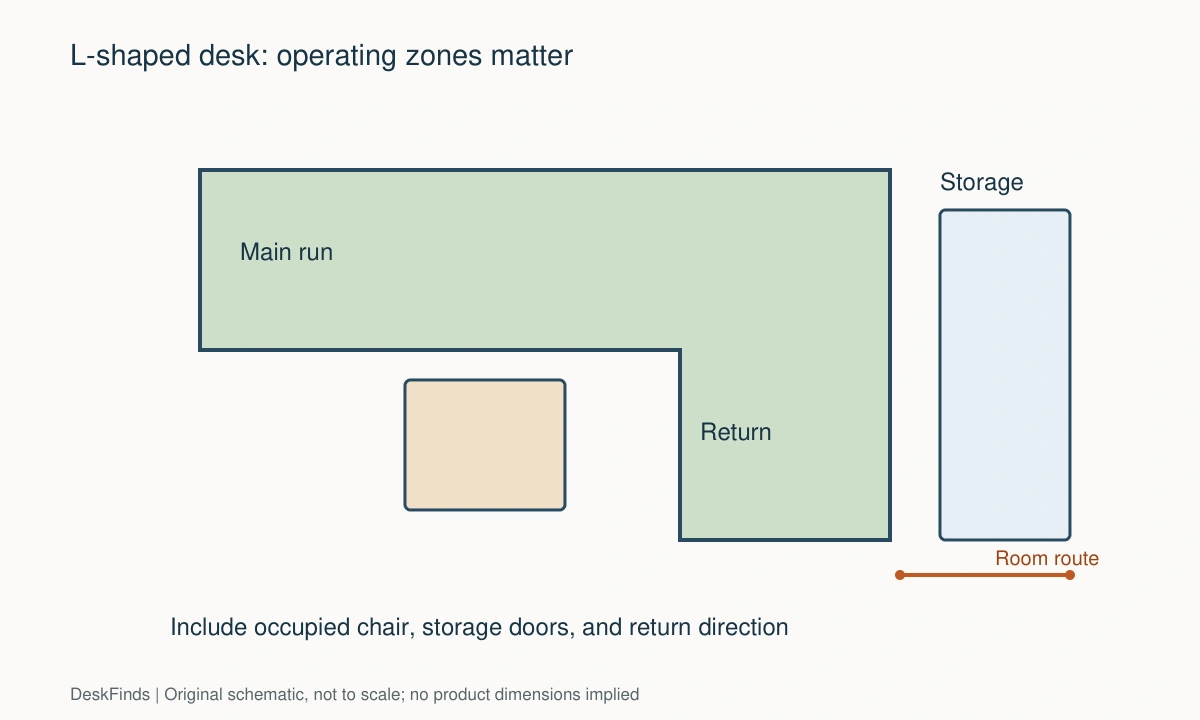
Your eight-point comparison worksheet
Use these checkpoints to compare the actual room, furniture, or device with a candidate product. Keep each result separate; a favorable overall impression cannot resolve a failed required function. Blank record fields are deliberate so you can use your own measurements rather than copying hypothetical examples.
1. Long run
Measure the entire available wall and identify interruptions at desktop and floor height, including radiators and trim.
Select from the usable run rather than the room’s nominal wall length; an obstacle can move the whole desk forward.
2. Return direction
Mark the chair location on the assembly diagram and label which side the return occupies from that viewpoint.
Obtain confirmation when product titles use ambiguous left or right wording, especially if drawers or sockets cannot swap sides.
3. Inside opening
Measure between supports where the chair and legs move from the main run toward the return.
A large outer footprint does not compensate for a corner leg or pedestal that blocks normal use of the second surface.
4. Task depth
Lay out the screen base, keyboard, notebook, and active mouse movement at full size on the intended working run.
Choose proportions that accommodate the actual task rectangle rather than comparing total surface area across differently shaped desks.
5. Door operation
Open room and storage doors through their normal travel while the taped return remains on the floor.
Change the orientation or desk size if the return enters a daily access zone; closed-door photographs cannot establish clearance.
6. Cable entry
Identify the power source and each device’s connection point on both runs, including routes below the corner.
Keep leads away from the turning chair and retain accessible plugs; a long desktop should not become a reason for diagonal floor cables.
7. Delivery and assembly
List every package and check where the frame is assembled and turned upright according to the instructions.
If the finished L cannot pass through the room door, confirm a feasible assembly process inside before placing the order.
8. Room route
Walk from entrance to bed and wardrobe with a chair occupied at the desk and ordinary belongings in place.
Prefer the arrangement that preserves daily circulation even if it has less desktop, because a blocked room route will recur every day.
Sources and scope
- OSHA: desk work-surface guidance - Reference for keeping frequently used equipment accessible; room layouts here are editorial examples.
Editorial note: This is a research-based planning guide, not a hands-on product test or a certification of a custom installation. Dimensions described as hypothetical are examples. Follow the exact product instructions and confirm unresolved compatibility before buying.