
Will an In-Line Document Holder Fit Between Your Keyboard and Monitor?

Affiliate Disclosure: We may earn a small commission on qualifying Amazon purchases at no extra cost to you. Full disclosure →
An in-line document holder puts reference material between the keyboard and monitor. That can be useful when you repeatedly copy from paper, but a shallow desk may have little spare depth in that exact area. The holder’s empty frame is only the starting point: loaded pages, its support ledge, and your hands also need room.
Quick answer: Outline the holder’s base, loaded document, and permitted tilt between your actual keyboard and screen. Check screen visibility, typing clearance, page turning, and access to monitor controls. Confirm the product’s document size and load requirements. A holder that fits empty may still block the lower screen or force the keyboard into an awkward position once a book or stack is added.
Start with the paper task
List what you read while typing: individual sheets, a multipage report, a bound catalog, or an open textbook. Measure the largest ordinary item and note whether you must write on it. Holding a page upright for reference is a different task from supporting it while you annotate.
Count how often the material changes. One reference sheet used all morning needs less handling space than a stack you turn through every few minutes. A line guide can help identify a row, but it also introduces a movement each time you change pages. Choose features around those actions rather than a general promise of a neater desk.
For category context, see desk organizer types. A document holder is not a permanent inbox: it should support the material currently used, while unprocessed and completed papers retain clear destinations elsewhere.
Measure the actual gap
Place the keyboard where you normally type and the monitor in its supported working position. Measure the clear depth between them, including the monitor base and any rear keyboard feet. Do not reclaim space by pushing the keyboard to the front edge before checking whether typing still works for you.
Mark the holder’s full base outline, not just the visible backplate. Include any adjustment feet or weighted support. Compare the usable surface with the product’s required support conditions. A base partly on a thick mat and partly on bare desk can be a different arrangement from the flat surface shown in the instructions.
The 3M DH640 illustrates an in-line format with an adjustable angle and a line guide. Its documented design helps frame the questions to ask, but another holder can have different geometry and limits. Use the actual model’s drawing and instructions rather than treating in-line as one standard size.
Add the loaded page envelope
Put the largest ordinary document into the outline. An open folder, curled sheet, binder spine, or book spread may extend beyond the holder itself. Check the top edge against the visible screen and the lower ledge against the keyboard and hands. Screen height, document tilt, and holder depth interact.
For a thick book, compare the textbook stand guide. A product intended for loose sheets may not provide a suitable ledge, retention method, or load support for a bound volume. A wide backplate does not establish book compatibility by itself.
Avoid forcing pages under a tight retainer or leaning an unsupported book against the screen. The holder should support the material through its intended method. If the document is valuable or fragile, use an appropriate handling approach rather than making it conform to an accessory chosen for ordinary office paper.

Check the lower screen and controls
Open the applications you actually use. The document may cover a toolbar, status area, taskbar, or part of a spreadsheet that matters. Do not assess visibility with an empty desktop. A small obstruction can be tolerable for occasional reference and intrusive when it hides a control used repeatedly.
Check monitor buttons and any front-facing ports or speakers. A holder can clear the active image while blocking a control beneath it. Include your hand route to those controls, especially if brightness or input selection changes often. An arrangement should remain serviceable without moving a loaded stack every time.
If the screen must move to make room, verify the monitor support’s own limits and ordinary viewing needs separately. A paper accessory should not turn a supported display position into an improvised one. Compare another holder angle or placement before buying a riser solely to rescue the first layout.
Keep typing and pointing usable
Type a short representative passage with the planned paper position. Check the space above the keyboard, the movement of your fingers toward the number row, and the route to the mouse. Do not judge fit only from the keyboard’s rectangular body; hands move beyond that outline during normal work.
The mouse pad size guide helps preserve the adjacent pointing area. A holder placed centrally can push a notebook or loose papers into that area, so give displaced items a defined supported destination. Gaining paper depth by losing mouse space may simply move the conflict.
If you annotate frequently, compare an intentional writing state with the reference state. Bring the paper to a suitable writing surface, then return it to the holder. Do not press on a holder that is not intended for writing. The paper-and-keyboard transition guide covers that related desk-state decision.
Plan page changes and line-guide use
Check how a page is inserted and removed with the monitor behind it. Some holders need room above the document; others use front or side retainers. Include the actual hand route and a place for the previous page. A holder can display one sheet well yet make a sequence of sheets inconvenient.
Read the line guide’s intended use. It may retain material, mark a line, or serve another documented role. Do not assume it can carry a heavy binder or hold a page under unusual tension. Check whether moving it obscures text you need and whether it remains easy to operate at the chosen angle.
Keep a small next-page area separate from the completed-paper area. The reference holder should not become a growing mixed pile. A simple folder beside the desk can be enough when the process is clear and the material is handled appropriately.
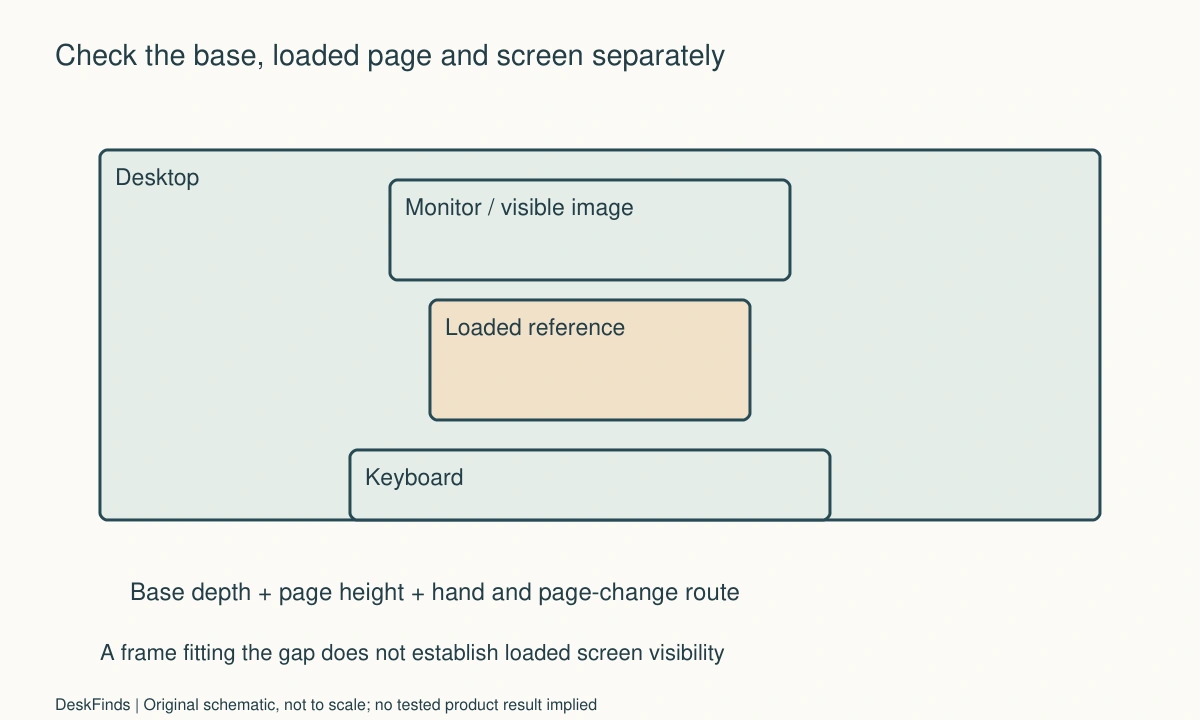
Worked example: the frame fit but the report hid the spreadsheet
Imagine a hypothetical worker entering figures from a printed report into a spreadsheet. The available depth accepts a compact holder’s base, so the first drawing looks successful. With the report loaded, however, its upper edge covers the bottom portion of the monitor where the active sheet’s tabs and controls appear.
The worker checks the holder’s permitted angles and the actual document height. Tilting the page changes both height and depth, so each supported option is drawn with the keyboard in its normal position. The worker does not simply raise the monitor without checking the support or push the keyboard to an unusable edge.
A side-reference holder is compared with the in-line option. The side arrangement uses some lateral space but preserves the required screen controls. The in-line arrangement may still work for shorter sheets or a different supported geometry. The decision is based on the actual report and application, not on whether the empty accessory can sit between two objects.
The worker also tests a page change using harmless material. The previous page needs somewhere to go, and the line guide must be moved without shifting the whole stack. These handling details become part of the acceptance record. No product is claimed to have improved speed or reduced strain in this hypothetical example.
A second scenario: reference and annotation needed different states
Consider a hypothetical student who reads a course handout while typing notes, then writes short answers on the handout. The student initially wants one steeply angled holder to serve both tasks. Its documentation supports display, but does not establish a writing surface for the intended pressure and position.
The student separates the actions. During typing, the handout sits in a supported reference position. During annotation, it moves onto a clear suitable writing area while the keyboard has a defined parking place. The transition includes the pen, next sheet, and completed sheet, rather than leaving them balanced on the monitor base.
A different product designed for the required interaction may also be compared, but it must fit the desk and support the material through its documented method. The student does not add a board extension or weight to turn a reference stand into an improvised writing desk. The accessory category follows the task.
The resulting plan can use two states without being cluttered. What matters is that each displaced item has a stable destination and the transition is short enough to repeat. If moving papers every few minutes becomes inconvenient, that observation justifies another supported layout or product comparison. It does not justify ignoring the holder’s intended use.
Compare before buying another accessory
A document holder is worth considering when repeated reference reading is the actual constraint. If the problem is an overflowing inbox, a holder may only display the overflow more prominently. If the problem is a book that will not stay open, book support and page retention need separate attention.
Price the complete arrangement, including any compatible accessory genuinely required. Do not assume a monitor riser, new keyboard, and holder are all necessary before outlining a simpler side placement. Conversely, a cheap holder that repeatedly blocks the screen may cost more effort than a better documented fit.
Keep benefit claims concrete: the reference sheet remains visible, page changes do not move the monitor, and the keyboard stays usable. Your own observation of those tasks is useful. It should not be presented as a medical benefit or a measured productivity gain without evidence.
Six observations for the delivered holder
Document compatibility
Record the document size, thickness, binding, and relevant weight or sheet capacity using the product’s requirements. Keep the actual material in the check. A holder that accepts a single flat sheet has not thereby passed a thick-report or book test. If the intended material is outside the documentation, obtain confirmation or choose another suitable support.
Base support
Check that the whole base rests as instructed on the intended surface, including any mat. Note monitor-base interference and adjustment-foot positions. Do not balance part of the holder on an unrelated object to make the outline fit. If the useful gap is smaller than the required footprint, compare another location rather than treating unsupported overhang as spare space.
Screen access
Open representative work and inspect the document’s top and side edges against the active image and controls. Include the loaded position at each supported angle you may use. A clear view of most of the screen is not sufficient if the hidden part contains a frequently used control. Record the specific obstruction so the next comparison addresses it.
Input movement
Type and use the mouse in ordinary supported positions. Check finger movement beyond the keyboard outline and the route around the holder’s ledge. Keep cables and papers out of the pointing area. If the keyboard must move for annotation, define its parking place and restore it afterward rather than making each transition an improvised rearrangement.
Paper sequence
Insert, reference, turn, and remove harmless sample pages using the intended retainers. Keep the previous and next pages distinct. A line guide should be used only as documented and should not become an improvised clamp for unsuitable material. Decide whether the handling frequency is practical before accepting a holder that works only for a static display.
Reset condition
At the end of the task, return papers to their appropriate action or storage destinations. Leave the holder ready for the next reference item, not as a permanent mixed stack. Keep its adjustment instructions accessible. A successful in-line arrangement is one that supports the document, preserves the screen and input tasks, and can be restored after the desk is cleared.

A measured example of the space budget
Suppose a hypothetical desk has 270 mm of clear depth between the keyboard’s normal rear edge and the nearest monitor-base obstruction. A candidate holder needs a documented 190 mm support footprint in the intended position. Subtracting leaves 80 mm, but that remainder is not automatically spare writing space. The loaded document, lower ledge, and finger movement still need checking. These invented dimensions illustrate the calculation; they are not a recommended clearance or a specification for a named holder.
Draw the support footprint and the loaded document as different outlines. If a permitted angle moves the page forward, update the page outline even when the base stays still. If it raises the top edge, compare that edge with the actual visible screen. A single depth subtraction cannot establish all three relationships.
Now suppose the user’s report is 305 mm high and a shorter reference sheet is 220 mm high. Those hypothetical materials can produce different screen obstruction on the same holder. Do not accept the larger task based on the shorter sheet’s result. Use the document that matters, including its binding or folder, while following the product’s stated limits.
Decide which conflict should change the shortlist
If the base does not have its required support, reject that location before evaluating convenience. If the base fits but a report hides a frequent screen control, compare another supported angle or side-reference position. If static viewing works but page changes are awkward, focus the next comparison on retention and hand access rather than buying a taller monitor support without a clear reason.
A separate issue arises when writing is frequent. A reference holder can be useful during typing and still be the wrong surface for annotation. Record how often the paper moves and where the keyboard goes. The better purchase may be a product designed for that interaction or a clearer two-state layout, rather than a stronger page clip.
Keep the comparison tied to one task at a time. A holder can be suitable for a single sheet and unsuitable for a heavy catalog without being generally good or bad. Write the actual supported material and workflow in the acceptance record so later users do not inherit an exaggerated compatibility claim.
Questions that resolve a missing dimension
Ask the maker for the base footprint in the intended angle, usable ledge depth, relevant material capacity, and the route needed to change pages. Include your document dimensions and monitor-base obstruction. A reply about backplate width does not answer whether the base can sit correctly in a shallow gap.
If the information remains incomplete, preserve the uncertainty in the shortlist. Do not round a measurement down or borrow a dimension from a similar-looking model. A clear side-reference arrangement can be a complete solution when the in-line geometry cannot be confirmed.
Sources and scope
- 3M DH640 product documentation - Specific in-line holder design and adjustments; no universal dimensions or comfort claim is inferred.
Editorial note: This is a research-based planning guide, not a hands-on product review. All worked scenarios are hypothetical. Measurements and compatibility must be confirmed for the exact equipment. Photography supplies context, not proof of a tested arrangement.
Photos are illustrative and come from free-license libraries such as Unsplash; diagrams are original to DeskFinds.