
How to Check Whether a Clamp-On Desk Fan Fits Your Setup

Affiliate Disclosure: We may earn a small commission on qualifying Amazon purchases at no extra cost to you. Full disclosure →
A clamp-on fan saves the space occupied by a freestanding base, but the fan head still needs room. Its clamp may conflict with a desktop brace, the head may approach a monitor, or the power lead may cross the chair route. Evaluate the mounted fan in its operating positions rather than comparing only clamp opening and blade diameter.
Quick answer: Confirm that the fan is designed for the proposed mounting surface and orientation. Check edge thickness, shape, underside access, loaded head clearance, controls, and the complete cable route. Include the documented pivot or oscillation range if the model provides it. A clamp physically gripping an edge does not establish that the furniture or operating arrangement is suitable.
Identify the actual mounting point
Read the fan’s instructions and the furniture’s relevant restrictions. Measure the intended edge where the clamp will sit, including a beveled underside, trim, apron, or nearby brace. Two locations along the same desk can offer very different usable contact areas.
Do not assume a fan clamp suits glass, hollow panels, a rounded bed rail, or a soft upholstered edge. Use the surfaces and orientations specified for the exact product. The Vornado Pivot Clip is an example of a fan category with model-specific product and care documents, not proof that any clip fan can mount anywhere.
If the surface is uncertain, compare a suitable freestanding location. Saving a small patch of desktop is not a reason to invent a mounting method. Avoid adding adhesive, screws, or improvised padding unless that arrangement is expressly supported by the relevant equipment instructions.
Measure the fan head in use
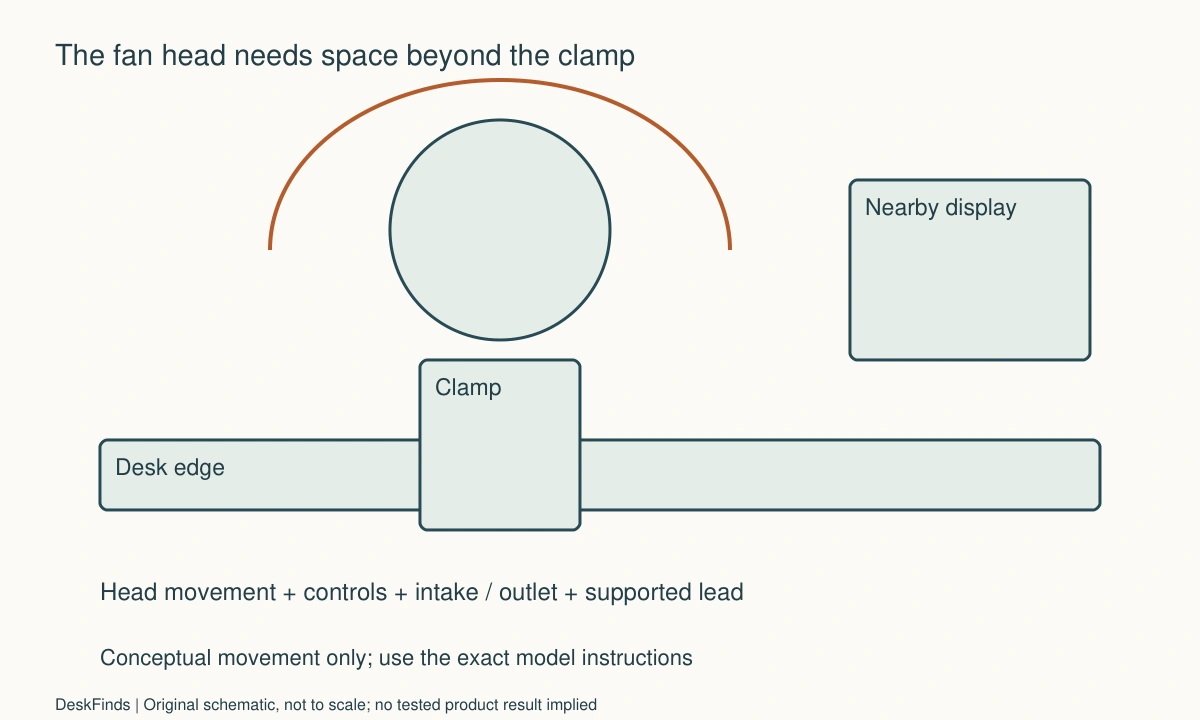
Outline the grille, housing, motor area, and controls, not just the blade size. Include the full documented adjustment range you intend to use. A head that clears a monitor while facing forward may approach it when pivoted toward another seat.
If the model oscillates, check that entire supported sweep. Do not assume a pivoting product automatically oscillates, or that an advertised range can be restricted by letting the grille touch furniture. Keep the fan clear as instructed and never use another object as a movement stop.
For a microphone nearby, see the fan-and-microphone placement guide. A mechanically suitable mounting point can still create unwanted recorded sound or direct airflow at the microphone. Physical fit and audio suitability need separate observations.
Keep airflow and controls accessible
Check the manufacturer’s required clearance around the fan’s intake and outlet. A location behind a monitor can look tidy while placing another object close to the grille. Do not cover the fan or pack materials around it to make the equipment disappear from view.
Find the speed switch, power control, adjustment lock, and any cleaning access. Decide whether you can reach them without leaning through a cable bundle or moving a display. A compact mount is less useful if its ordinary controls become inaccessible.
Use the desk fan airflow terminology guide to interpret a specification, then return to the actual placement. An airflow number does not prove that a fan aimed through a cramped gap will serve the intended person. Compare supported positions in the real room without making a claimed performance measurement.
Trace the power arrangement
Identify whether the fan uses mains power, a specified USB supply, a battery, or another documented source. A USB plug does not establish that any spare port is the correct supply. Follow the product’s power requirements and use the supported cable and adapter arrangement.
Support the cable so ordinary fan adjustment does not pull on either connector. Keep it clear of the fan head, moving furniture, and the chair’s path. Do not route it through a drawer pinch point or under a clamp in a way that damages the insulation.
The clamp-on power station guide covers a separate edge-mounted accessory. If both products use the same desk edge, allocate compatible mounting space and hand access to each. Do not stack clamps or assume one accessory can support the other.
Check interaction with the desk
Observe ordinary typing, writing, and monitor adjustment with a safe planning outline before purchase. A fan head can occupy the space used by a forearm or a lamp even when the clamp itself is behind the desk. Include standing up and reaching nearby storage.
If the desk changes height, check the supported cable route at both extremes and through the transition. The fan’s mount and the supply may move differently. A lead that reaches the raised position can still snag on a brace halfway through movement.
For sound transmitted through the surface, a desk-mounted fan may need a different location rather than an improvised isolation stack. Use the product only as documented. Do not place loose foam or soft material inside the clamp or beneath an unsupported mounting contact to imitate another fan’s design.
Worked example: the clamp fit but the head met the lamp
Imagine a hypothetical user with a small desk, a rear-mounted lamp, and a clip fan. The clamp’s stated opening includes the desktop thickness, so the user initially assumes the rear corner is suitable. A drawing of the loaded fan reveals that its head and control area occupy part of the lamp’s normal adjustment route.
The user adds the lamp’s documented movement and the fan’s intended pivot positions to the same outline. A different clamp location is compared, including underside braces and cable exits. The fan is not allowed to touch the lamp or monitor as a way to limit its movement.
A freestanding position on a nearby suitable surface is also considered. It may use more visible space but preserve access and operating clearance. The user checks the fan’s own instructions for that alternative rather than assuming a clip model can stand unsupported on its housing.
The final hypothetical choice is based on the complete operating envelope. The example does not claim a particular fan was tested for vibration, airflow, or stability. It shows why the mounted head and adjacent adjustable equipment belong in the same fit decision.
A second scenario: one fan served two seats
Consider a hypothetical shared room where two people use the same desk at different times. The intended airflow direction changes with the person and task. The first proposed location works for one forward-facing position but makes the controls awkward for the other user.
The users list the supported adjustment positions actually needed. They check the head’s clearance, control access, and relaxed cable route at each position. They do not assume the fan can be twisted indefinitely or mounted upside down because its clamp still closes. The exact product’s orientation and adjustment instructions remain the reference.
The users also agree on a default end-of-session state. The fan should not be left pointing at another person’s papers or in a position that blocks a lamp. If a change requires loosening the mount, the documented handling sequence and any need to support the fan are included.
The arrangement may favor another location or a different suitable fan category. The benefit is that both ordinary users can operate it within instructions, rather than one person inheriting an awkward leftover position. No claim is made that a shared mounting point provides equal cooling to every seat.
Compare clamp and base as completed layouts
A base fan needs a suitable surface, while a clamp fan needs a suitable edge and head envelope. Compare the total area and access required by each, including power and cleaning. An edge already occupied by a monitor arm, lamp, and cable tray may have less useful spare capacity than the desktop appears to have.
Do not rank products solely by the smallest clamp or the largest airflow claim. If the main constraint is controls, a visible base location may be easier. If the main constraint is a clear supported mounting edge, a documented clamp arrangement may help. The product should solve the identified spatial problem without creating another.
Keep maintenance in the plan. Follow the maker’s cleaning and disassembly guidance, disconnecting as required. A mounted location that makes routine care impossible may be inconvenient even when it fits during operation. Preserve a supported removal route and retain the instructions.
Six checks for a clamp fan
Surface compatibility
Record material, edge shape, thickness, and underside access at the actual mounting point. Compare them with the fan and furniture instructions. A clamp range alone does not approve every construction. If the edge is unsuitable or unclear, compare another supported location rather than relying on low fan weight or a tighter grip as proof of compatibility.
Loaded envelope
Measure the complete head and housing through the documented positions you will use. Include neighboring lamp and monitor movement. Do not stop a pivot or oscillating head against furniture, and do not assume every fan has both features. A successful empty-clamp fit is only the beginning of the operating-clearance check.
Intake and outlet
Keep the manufacturer’s required operating area clear around the fan. Check the final room state with books, papers, and bags present. A location that is open during setup may become covered later. Do not hide the fan inside an improvised enclosure or treat a narrow gap behind a monitor as automatically adequate.
Controls and care
Reach the intended switches and adjustment points without moving unrelated equipment. Check how the fan is removed or serviced according to its instructions. If ordinary operation requires leaning through cables, revise the placement. Small visible size should not come at the cost of inaccessible controls or an awkward maintenance route.
Power route
Use the specified supply and cable arrangement, with a relaxed path during adjustment and any desk movement. Keep the lead out of grilles, clamps, drawers, and walking routes. A port that accepts the connector is not necessarily the correct power source. Verify the electrical requirement separately from whether the fan can be mounted physically.
Daily reset
Practice the ordinary supported change of direction and end-of-session state. Include both users if the fan is shared. If a position repeatedly conflicts with papers or another accessory, revise the arrangement rather than relying on careful avoidance. The fan fits when its mount, operation, controls, cable, and reset can coexist with the real desk tasks.
A three-part clearance example
Suppose a hypothetical clamp fits a documented 30 mm desktop, but its lower adjustment hardware needs 75 mm of clear access behind the edge. A brace begins 55 mm from that edge. The thickness check appears favorable, yet the proposed point still has a 20 mm geometric conflict with the required hardware area. These invented measurements illustrate the comparison; they are not dimensions or limits for a real fan.
Next, draw the loaded head at every permitted direction you actually need. If its outer housing projects 160 mm into the desk region and a lamp’s ordinary movement uses part of that same region, the clamp’s successful fit does not solve the overlap. Compare the two complete movement outlines rather than subtracting only their static base widths.
Finally, trace the lead to its documented power source. A cable may have enough length for the working direction but become taut when the fan is pivoted or removed for care. Include those ordinary states before accepting the mounting point. Do not treat extra cable length as permission to route it through a pinch point or across a walking path.
Choose the next comparison from the failed check
If the surface or edge is unsuitable, compare another documented mounting method or location first. Buying a fan with a smaller head does not repair an incompatible clamp interface. If the clamp fits but the head interferes with a screen, compare supported geometry and neighboring equipment movement. If controls are inaccessible, a more reachable location may matter more than a larger airflow claim.
If the fan serves the room but creates unwanted call sound, keep that as a separate audio comparison. Do not insert arbitrary isolation material into the clamp or cover the fan in an attempt to solve it. A different supported microphone or fan position can be assessed through the related guide without changing the mounting conditions silently.
When the cable route fails, avoid selecting an electrical accessory only by reach. Confirm the fan’s actual supply requirements and supported arrangement. A base fan on another suitable surface may offer a simpler complete route than a clip product placed far from its appropriate source.
Include cleaning and seasonal storage in the purchase
A fan used daily may need routine care through the manufacturer’s method. Check how it is disconnected, removed, and accessed before mounting it behind a heavy monitor. A location that is convenient only on installation day can make ordinary upkeep unnecessarily difficult.
For seasonal use, give the removed fan a suitable storage place and keep its correct supply identifiable. The empty clamp or remaining mount, if intended to stay, should not project into an ordinary route. Use only the product’s documented folding or removal state rather than leaving a partly loosened assembly on the desk.
A shared desk can benefit from a simple position record. Name the supported mounting point and ordinary fan directions for each user, without implying identical airflow results. This helps another person restore the arrangement after cleaning instead of tightening a clamp somewhere that merely looks similar.
Information that makes a support question answerable
Send the exact fan and furniture models, surface material, edge dimensions, brace location, intended orientation, and the neighboring equipment outline. Ask about the specific unresolved interface or movement. A generic answer that the fan clips to desks does not settle a curved edge, an underside obstruction, or a proposed nonstandard orientation.
Keep a distinction between manufacturer confirmation and your own observation. Documentation may establish permitted use, while an ordinary trial shows whether control access and room tasks are practical for you. Neither should be inflated into a universal stability, cooling, or sound-performance claim. The completed record should explain the arrangement that was actually assessed.
Sources and scope
- Vornado Pivot Clip product and care-document links - Specific clip-fan category example; mounting and operation must follow the exact fan and furniture instructions.
Editorial note: This is a research-based planning guide, not a hands-on product review. All worked scenarios are hypothetical. Measurements and compatibility must be confirmed for the exact equipment. Photography supplies context, not proof of a tested arrangement.
Photos are illustrative and come from free-license libraries such as Unsplash; diagrams are original to DeskFinds.