
7 Best Webcams for Zoom and Teams Calls (2026)
Seven webcams for Zoom, Teams and everyday video calls compared on certification, autofocus, microphones and field of view, from budget 1080p to 4K.

New to Amazon Prime?
Get fast, free shipping on every pick in this guide, plus Prime Video and exclusive deals.
Try Prime Free




At a Glance
Almost any USB webcam will open in Zoom, so the real question is which one makes you look and sound good on a 40-minute call. The differences that show up in meetings are autofocus that stays on your face, a microphone that handles room echo, and a field of view that frames you without showing the whole room behind you.
The word certified also needs care. Zoom and Microsoft Teams both publish device programs, but most webcam listings only say works with Zoom or Teams, which is a compatibility claim, not a certification. In this guide we only describe a webcam as certified where its own listing states it, and call out the rest as compatible. Seven webcams are compared below on listing specs and buyer feedback, covering budget 1080p cameras up to 4K and tracking models.
6 Criteria to Look For Before Buying a Webcams for Zoom and Teams Calls (2026)
Key buying criteria so you get the right fit the first time.
Zoom and Teams certification
Certification means a platform or maker lists the device as validated for a service, while compatible only means it works as a normal USB camera. It matters if an employer's IT team requires approved hardware, or if you want fewer driver surprises. Check the listing for a specific sentence such as certified for Zoom, because a phrase like works with Zoom is only a compatibility claim.
Autofocus versus fixed focus
Autofocus adjusts sharpness as you move, while fixed focus is set for a range of distances. Fixed focus works if you sit at a steady distance, but it softens when you lean in or hold up an item. Look for the focus type in the specs, and for PDAF, which is a faster type, if you move a lot.
Field of view for your room
Field of view is how wide the camera sees, measured in degrees. A 73 to 78 degree view frames one person at a desk, while 90 degrees or more shows more of the room behind you. Check the degrees on the listing and match it to your desk, since a wide view is better for groups and worse for privacy.
Microphone quality and placement
Many webcams include two omnidirectional microphones, which capture sound from all around and can pick up room echo. They work well in quiet rooms at about one meter, and worse in noisy ones. Look for noise reduction wording and the stated pickup range, and consider a separate microphone if your room is echoey.
Resolution versus real call quality
Video calls compress the stream, so 4K does not always look sharper than 1080p during a call. The gain shows in recordings and screen sharing, and in dim light, where a larger sensor helps more than pixel count. Check for the sensor size and frame rate, not just the 4K label, and expect 1080p to be enough for most meetings.
Privacy cover and cable type
A physical lens cover is the only guaranteed way to block the camera between meetings. Cable type matters too, since USB-C cameras avoid adapters on modern laptops. Look for a built-in cover or shutter and a USB-A or USB-C connection that matches the port on your computer.
7 Best Webcams for Zoom and Teams Calls (2026)
Logitech C920e
About this pick
The Logitech C920e is a 1080p webcam with a 78 degree fixed field of view, built-in HD autofocus and automatic light correction. Two omnidirectional microphones pick up speech from about one meter away, and a sturdy clip fits laptops and monitors, with a 1/4 inch thread for a tripod. The listing states it is certified for Zoom and is TAA compliant, and says it works with Microsoft Teams and other popular calling apps.
Against the EMEET C960 4K below it, the C920e gives up resolution but gains the listed Zoom certification and an attachable privacy screen. Against the MX Brio above in price, it has a narrower feature set but costs far less, which is why it makes sense for a person who just needs reliable meetings.
Choose it if you want the safest answer for Zoom-heavy work, or if your employer asks for certified hardware. The caveat is that it is 1080p at standard frame rates, so it will not look as sharp on a large monitor as the 4K cameras here.
Best for: workers who need a dependable, certified camera for daily Zoom calls
Check price on AmazonPros
- +Listing states Zoom certification
- +Autofocus and light correction
- +Privacy screen included
- +Clip plus tripod thread
Cons
- −1080p only, no 4K
- −Fixed 78 degree field of view
EMEET C960 4K Webcam
About this pick
The EMEET C960 4K uses a 4K sensor, phase-detection autofocus (PDAF) and a 73 degree field of view, with dual omnidirectional microphones and a privacy cover. It connects over USB-A and works with Windows, macOS, Android TV and Linux, according to the listing, and the maker says it works with Zoom, Teams and Google Meet.
Compared with the Logitech C920e above it, you get higher resolution and faster focus for similar money, but the listing does not claim Zoom certification, only compatibility. Compared with the EMEET C960 1080P below it, you pay more for the 4K sensor and autofocus instead of fixed focus.
It is the best pick when you want a sharper image for screen sharing, recording or a larger monitor without spending near $200. Keep in mind that most video calls compress the stream, so the 4K benefit shows up more in local recording than on a call.
Best for: people who want a sharper image for recording and calls without paying premium prices
Check price on AmazonPros
- +4K sensor at a mid price
- +Fast PDAF autofocus
- +Narrower view hides your room
- +Privacy cover included
Cons
- −Compatible, not listed as certified
- −USB-A connector only
Logitech MX Brio
About this pick
The Logitech MX Brio is the premium option here: a 4K sensor at 30 frames per second or 1080p at 60, AI-enhanced image processing with auto exposure and white balance, and dual beamforming microphones with noise reduction. A Show Mode tilts the camera down so you can share notes on your desk, and a rotating cover blocks the lens. The listing states it is certified for Zoom, Microsoft Teams, Chromebook, Google Meet and Streamlabs.
Against the Logitech C920e, it adds 4K, a larger sensor and Show Mode for roughly three times the price. Against the Insta360 Link 2, it costs about the same but does not physically move, trading tracking for a sturdier brand-certified setup.
It is for people on video calls most of the day who want the broadest certified list and the best image processing. For occasional calls, the price is hard to justify over the C920e.
Best for: full-time remote workers who want the broadest certified list
Check price on AmazonPros
- +Certified for Zoom and Teams per listing
- +Show Mode for desk sharing
- +Built-in rotating lens cover
- +USB-C connection
Cons
- −Costs the most with Insta360
- −No physical tracking
NexiGo N930AF
About this pick
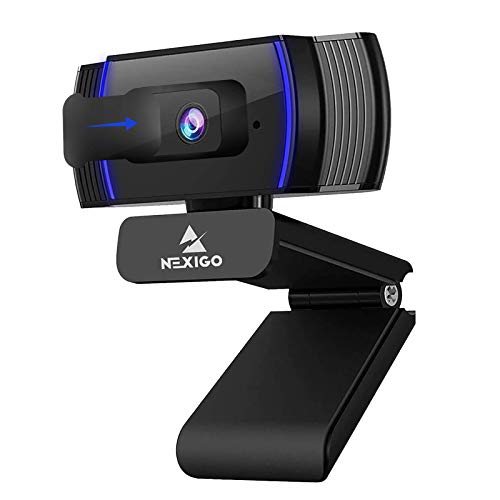
The NexiGo N930AF is a 1080p, 30 frames per second webcam with autofocus that works from about 7 centimeters. It has a noise-canceling microphone, a privacy cover, a folding design and a 6.5 foot USB cord. The listing says it is plug and play with no drivers required, and that it works with Zoom, Teams and Webex.
Against the EMEET C960 1080P below it, the NexiGo adds autofocus, which keeps you sharp if you lean in or hold up an item. Against the EMEET C960 4K above it, you lose 4K and the faster focus system but pay noticeably less.
It is the pick for budget buyers who want autofocus rather than fixed focus. The compromise is that the listing mentions compatibility rather than certification, so employers with strict hardware rules may want the C920e.
Best for: budget buyers who want autofocus and a privacy cover
Check price on AmazonPros
- +Autofocus at a low price
- +Privacy cover included
- +6.5 ft USB cord
- +No drivers required
Cons
- −Compatible, not listed as certified
- −1080p at 30fps only
EMEET C960 1080P Webcam
About this pick
The EMEET C960 1080P is a plain 1080p webcam with a 90 degree field of view and a five-layer anti-glare lens. It has fixed focus tuned for 11.8 to 118.1 inches, two omnidirectional microphones, automatic light adjustment, and comes with a USB-A connector plus an A-to-C adapter. The listing says it works with Zoom, Teams, FaceTime and Google Meet, and notes it does not support Windows Hello.
Against the NexiGo N930AF above it, you lose autofocus but pay less. Against the EMEET C960 4K, you give up 4K, PDAF and a narrower field of view, which is the real tradeoff: the 90 degree view shows more of your room than the 73 degree view.
It is the best pick when you want a cheap camera that is clearly better than most laptop cameras, and you sit at a fixed distance from the screen. If you move around or hold up items, choose an autofocus model.
Best for: fixed-distance desk users who want a low-cost 1080p upgrade
Check price on AmazonPros
- +Lowest price in this guide
- +Includes USB-C adapter
- +Anti-glare lens
- +Two built-in microphones
Cons
- −Fixed focus only
- −No Windows Hello support
Insta360 Link 2
About this pick
The Insta360 Link 2 is a 4K webcam with a one-half inch sensor, PDAF autofocus and a gimbal that physically pans and tilts to follow you. It adds gesture control, DeskView and Whiteboard modes, an AI noise-canceling microphone, and a privacy mode that tilts the lens down after about 10 seconds of inactivity. The listing says it works with Zoom, Teams and Twitch, and notes it is not compatible with ARM-based Windows or Windows Hello.
Compared with the Logitech MX Brio, it costs about the same but adds motion tracking instead of a certified list. Compared with every other pick, it is the only one that moves, which helps if you stand, gesture or share a whiteboard.
Choose it if you present or move around on calls. If you stay seated and want a certified camera, the C920e or MX Brio fits better.
Best for: presenters and teachers who move around during calls
Check price on AmazonPros
- +Follows you as you move
- +Gesture control and Whiteboard mode
- +Privacy mode tilts lens away
- +AI noise-canceling mic
Cons
- −Not listed as certified
- −Not for ARM Windows or Windows Hello
WyreStorm 4K Conference Webcam
About this pick
The WyreStorm 4K conference webcam is built for small meeting rooms. It has a 120 degree field of view, AI auto framing and presenter tracking, 5x digital zoom, USB 3.0 and dual AI noise-canceling microphones that capture voices from up to 5 meters. The title lists it as Zoom certified and Teams compatible, and it includes a physical lens cover.
Against a personal webcam like the C920e, the WyreStorm shows a whole table of people instead of one face. That wide view is a drawback for a solo desk, because it can show more of the room than you want.
It is the right choice for a shared desk or small meeting room where two to four people sit in frame. For a single person on a single desk, a narrower camera such as the EMEET C960 4K is a better fit.
Best for: small meeting rooms and shared desks with several people
Check price on AmazonPros
- +Zoom certified per listing
- +Wide view for small rooms
- +Auto framing for groups
- +Mics reach across a table
Cons
- −Too wide for a solo desk
- −Larger than personal webcams
How We Evaluated These Webcams for Zoom and Teams Calls (2026)
Each pick was assessed across 5 criteria weighted for real-world use.
Certification and compatibility
We separated cameras whose listings state Zoom or Teams certification from those that only say compatible, and we describe each accordingly.
Focus and image quality
We compared autofocus type, resolution and frame rate in the listing, favoring cameras that keep faces sharp during movement.
Audio capture
We looked at microphone count, pickup range and noise reduction, since call quality depends on clear speech as much as video.
Field of view and framing
We checked stated field of view and framing features, matching narrow views to solo desks and wide views to rooms.
Privacy and mounting
We noted privacy covers, mount types and cable options that decide how easily the camera fits a small desk.
How to Choose the Right Webcams for Zoom and Teams Calls (2026)
By Meeting Type
Match the camera to what you do in calls, not to the highest resolution on the shelf.
| Your situation | Pick from this guide |
|---|---|
| Daily Zoom calls with employer requirements | Logitech C920e |
| Mostly seated solo calls | EMEET C960 4K |
| Presenting, moving or teaching | Insta360 Link 2 |
| Group calls from a small room | WyreStorm 4K Conference Webcam |
| All-day video calls, broad compatibility | Logitech MX Brio |
By Budget
| Budget | Pick from this guide |
|---|---|
| Under $30 | EMEET C960 1080P |
| $30 to $50 | NexiGo N930AF |
| $50 to $75 | Logitech C920e or EMEET C960 4K |
| $100 to $150 | WyreStorm 4K Conference Webcam |
| $150 to $200 | Logitech MX Brio or Insta360 Link 2 |
Certified vs Compatible
Certified means the maker or platform lists the device as tested for that service, while compatible usually means it works as a standard webcam.
Certified per listing
The listing states Zoom certification or a broader certified list. In this guide, the Logitech C920e, Logitech MX Brio and WyreStorm 4K conference webcam say so.
Compatible only
The listing says it works with Zoom and Teams but makes no certification claim. In this guide, the EMEET C960 4K, EMEET C960 1080P, NexiGo N930AF and Insta360 Link 2 fall here.
Most home users do not need certified hardware, since compatible webcams work as standard cameras. Choose certified if your employer or IT team asks for it.
By Resolution and Focus Need
| Preference | Pick from this guide |
|---|---|
| Cheapest upgrade over a laptop camera, fixed seat | EMEET C960 1080P |
| Autofocus on a tight budget | NexiGo N930AF |
| Sharper screen-share and recording | EMEET C960 4K |
| Best processing in dim rooms | Logitech MX Brio |
| Automatic framing without touching the camera | Insta360 Link 2 |
For a Home Office Zoom Setup Specifically
Look for
A 75 to 90 degree field of view, autofocus, two microphones and a privacy cover, plus a clip that fits a monitor edge.
In this comparison
The Logitech C920e has a 78 degree view, autofocus, two mics and a privacy screen, and the EMEET C960 4K covers the same list with a 73 degree view.
When to Spend More
Spend more if
You are on calls most of the day, present often, or want broad certification. The MX Brio and Insta360 Link 2 add image processing and tracking.
Save if
You take a few calls a week from a fixed seat. The NexiGo N930AF or EMEET C960 1080P already beats a built-in laptop camera.
Frequently Asked Questions
What is the best webcam for Zoom?
The Logitech C920e is the safest pick, because its listing states Zoom certification, it has autofocus and light correction, and it costs well under the premium models. If you want a sharper image at a similar price, the EMEET C960 4K is a strong alternative.
What is the best webcam for Zoom and Teams?
The Logitech MX Brio lists certification for Zoom, Microsoft Teams, Chromebook and Google Meet, which is the broadest of the group. The Logitech C920e also says Zoom certified and works with Teams for less money.
What is the best webcam for video calls?
For most calls, a 1080p autofocus camera is enough. The NexiGo N930AF and Logitech C920e give clear video, while the EMEET C960 4K adds a sharper sensor. If you want tracking, the Insta360 Link 2 follows you around the room.
Do I need a certified webcam for Zoom?
No. Any compatible USB webcam works with Zoom, and certification mostly helps when an employer requires approved hardware. Check the listing for a direct certified statement, and treat works with Zoom as compatibility only.
Is 4K worth it for Zoom?
Usually not for the call itself, because calls are compressed. It helps for recordings, screen sharing and large monitors. A good 1080p webcam with autofocus is enough for most meetings.
How do I make my webcam look better on Zoom?
Put a light in front of you instead of behind you, set the camera at eye level, and keep the lens clean. Our guides on webcam lighting and webcam resolution explain these steps in more detail.
Bottom Line
best overall: Logitech C920e - best zoom-certified pick pick in this roundup.
See the full rankings above for all picks with pros, cons, and best-for summaries.
Browse on Amazon
All Prime-eligible options with current pricing.
Shop on Amazon →