
7 Best Keyboards with a Number Pad for Small Desks (2026)
Seven compact keyboards that keep a full number pad, from slim membrane and Bluetooth boards to a wireless mechanical one, compared for small desks.

New to Amazon Prime?
Get fast, free shipping on every pick in this guide, plus Prime Video and exclusive deals.
Try Prime Free




At a Glance
People who enter figures, run spreadsheets or log in with numeric codes tend to look for a keyboard with a number pad and then discover that most full-size boards are wide enough to push the mouse off the edge of a small desk. The better answer is a compact board that keeps the keypad and drops the empty space around it.
We evaluated seven keyboards that all include a full number pad, mixing slim membrane boards, wireless Bluetooth models, a wired scissor board, a Mac option and a wireless mechanical keyboard. Width on the listing, connection type, battery claims and typing feel were the main points of comparison. If you want mechanical-only or a smaller numpad-style layout, the linked guides below cover those directly with different picks.
6 Criteria to Look For Before Buying a Keyboards with a Number Pad for Small Desks (2026)
Key buying criteria so you get the right fit the first time.
Full number pad versus a shortened one
A full number pad has 17 keys including 0, enter, plus and minus, laid out like a calculator. Why it matters: some compact boards shorten the pad or hide it behind a function key, which slows data entry. Check the listing photo for the 0 key and the operator keys, not just the phrase with number pad.
Keyboard width and desk depth
Width decides how much room your mouse has. A compact keyboard with a number pad is typically 14 to 15 inches wide, against about 17 inches for a full-size one, and every inch matters on a 40 inch desk. Look for stated dimensions in inches and compare them to your free desk width.
Wireless type and battery
Bluetooth connects directly, while a 2.4GHz receiver uses a USB port and often has lower latency. Rechargeable cells avoid replacement batteries but cannot be swapped. Look for the connection type, the battery rating and whether the listing quotes hours of use, not just a phrase like long battery life.
Membrane, scissor and mechanical feel
Membrane keys are soft and quiet, scissor keys are low and stable, and mechanical keys each have a switch. Mechanical boards cost more and are louder, but you can often change the switches. Check the switch type in the listing and think about whether anyone shares your room.
Num Lock and key behavior
Num Lock decides whether the number pad types digits or acts as navigation keys. Boards that squeeze the numpad into a compact layout sometimes rely on function layers, and many listings do not say whether a Num Lock indicator light exists. Check the photo for a labeled Num Lock key, and read buyer feedback if you rely on it.
Operating system support
Some keyboards list only Windows, and Apple's keyboard targets Mac, iPad and iPhone. Check the listed systems, since Windows-only boards can lose media keys on Mac. Look for the operating system list in the description, and choose a multi-system board if you switch computers.
7 Best Keyboards with a Number Pad for Small Desks (2026)
Logitech K585 Slim Wireless Keyboard
About this pick
The Logitech K585 is a slim keyboard with a full number pad, 12 function keys that double as media shortcuts, and a built-in cradle that holds a phone or a 10 inch tablet in landscape. It connects over Bluetooth or the included 2.4GHz USB receiver, and Easy Switch lets you pair more than one device and flip between them. Customizable function keys are available through Logi Options+ software.
Against the Logitech K250 below it, the K585 adds the receiver option and the cradle at a higher price. Against the TECKNET, it gives up the rechargeable battery and the fourth device slot but has the better-known brand and software.
It is the best all-round pick for an office or study desk where you switch between a laptop and a phone or tablet. The caveat is that it uses replaceable batteries rather than a rechargeable cell, so plan for the occasional replacement.
Best for: people who split work between a computer, a phone and a tablet
Check price on AmazonPros
- +Phone and tablet cradle built in
- +Bluetooth and USB receiver options
- +Quiet, laptop-style typing
- +Customizable function keys
Cons
- −Uses replaceable batteries
- −Cradle fits 10 inch tablets at most
Logitech K250 Compact Bluetooth Keyboard
About this pick
The Logitech K250 is a compact Bluetooth keyboard that keeps a number pad, arrow keys and function key shortcuts. It uses deep-profile keys with an adjustable tilt leg, a spill-resistant design and replaceable batteries listed for 12 months of daily use. The listing says the plastic parts are at least 64 percent recycled, and that it is Bluetooth only, so there is no USB receiver.
Against the K585 above, you lose the receiver option and the cradle but pay less. Against the Perixx below it, you gain wireless at a similar price, which matters on a small desk where one fewer cable changes how tidy things look.
Choose it if you want a cheap, simple Bluetooth board for a laptop or tablet. The Bluetooth-only design means a desktop PC without Bluetooth will need an adapter.
Best for: a simple, low-cost wireless keyboard for a laptop or tablet
Check price on AmazonPros
- +Inexpensive Bluetooth board
- +Long battery life claim
- +Spill-resistant design
- +Adjustable tilt leg
Cons
- −No USB receiver option
- −Pairs fewer devices than others
TECKNET Rechargeable Multi-Device Keyboard
About this pick
The TECKNET keyboard offers four connection slots: three Bluetooth devices plus a 2.4GHz receiver. It has 110 scissor-switch keys with about 2mm of travel, a number pad, 12 hot keys and a built-in 500mAh rechargeable battery that the listing rates for up to 180 days based on two hours of daily use. It is spill-resistant and works with Windows, iOS, macOS and Android.
Against the Logitech K585, it adds a rechargeable battery and a fourth device slot, but has no phone cradle. Against the Logitech K250, it adds a receiver option, more device slots and a rechargeable cell, at a slightly higher price.
It is the pick for people who juggle several devices and do not want to buy batteries. The brand is less established than Logitech, so check the support terms in the listing.
Best for: multi-device users who want a rechargeable board
Check price on AmazonPros
- +Four connection slots
- +Rechargeable battery, no AAs
- +Low-profile scissor keys
- +Spill-resistant design
Cons
- −Less established brand
- −No phone cradle
Kisnt KN98 Wireless Mechanical Keyboard
About this pick
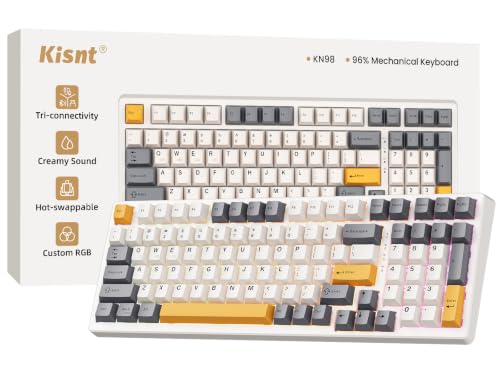
The Kisnt KN98 is a 99-key mechanical keyboard that measures about 15.3 by 5.5 inches and keeps a dedicated number pad, arrow keys and F1 to F12 row. It connects over USB-C, 2.4GHz or Bluetooth 5.0 with three channels, and the listing states latency of 2ms on USB, 5ms on 2.4GHz and 11ms on Bluetooth. A gasket mount and pre-lubed linear switches rated 45 to 50gf, plus hot-swap sockets, aim at a soft sound.
Against the AULA S99 below it, the KN98 uses mechanical switches and a larger 8000mAh battery rather than a membrane layout. Against the Logitech slim boards, it is thicker and louder, but it is the one pick in this guide that lets you change the switches.
Choose it if you want the feel of a mechanical keyboard without losing the number pad. The listing notes that some rarely used keys such as Print Screen move to function key combinations, so check the layout if you rely on them.
Best for: typists who want a mechanical board and still need a number pad
Check price on AmazonPros
- +Mechanical feel with a numpad
- +Three connection modes
- +Hot-swap switch sockets
- +Large 8000mAh battery
Cons
- −Some keys need function combos
- −Thicker than slim boards
AULA S99 Wireless Membrane Keyboard
About this pick
The AULA S99 is a 99-key, 96 percent layout membrane keyboard with Bluetooth 5.0, 2.4GHz and USB-C modes, RGB backlighting and a rotary knob for volume and lighting. The listing describes a creamy silicone structure, full-key macro programming and a foldable two-stage stand, with a one-year after-sales service.
Against the Kisnt KN98 above, it trades mechanical switches for a quieter membrane feel at a lower price. Against the Logitech boards, it adds backlighting and a knob, but it is wider and more gaming-styled.
Pick it if you want backlit wireless typing with a number pad under $50. If you type in a shared room, remember that a backlit RGB board can drain its battery faster, so keep the cable nearby.
Best for: backlit wireless typing at a low price
Check price on AmazonPros
- +Backlit with number pad
- +Three connection modes
- +Volume knob built in
- +Programmable keys
Cons
- −Gaming look may not suit offices
- −Backlight drains battery
Perixx PERIBOARD-213U Wired Compact Keyboard
About this pick
The Perixx PERIBOARD-213U is a wired USB scissor-switch keyboard measuring about 14.45 by 4.76 by 0.70 inches. It has an integrated number pad, 13 hot keys that work with the Fn key and F1 to F12, and chiclet-style keys with spacing to cut mistyping. The listing says the scissor keys are quiet.
Against the Logitech K250, it has no batteries or pairing and costs about the same, but it uses a cable. Against the AULA S99 and Kisnt KN98, it is thinner and quieter, but has no backlight or mechanical option.
It is the pick for a fixed desk where you want a slim number-pad board that always works. The listing lists Windows 7, 8 and 10 and later, so Mac users should check compatibility first.
Best for: a fixed desk that needs a slim, always-on keyboard
Check price on AmazonPros
- +Thin 0.7 inch profile
- +No battery to replace
- +Quiet scissor keys
- +Low price
Cons
- −Wired only
- −Windows compatibility listed
Apple Magic Keyboard with Numeric Keypad
About this pick
The Apple Magic Keyboard with Numeric Keypad is a wireless, rechargeable Bluetooth keyboard for Mac, iPad or iPhone. The listing describes an extended layout with document navigation keys, full-size arrow keys and a numeric keypad aimed at spreadsheets and finance work, with a battery that runs about a month or more between charges.
It is the most expensive keyboard here and the least flexible, since it targets Apple devices and lists macOS 10.12.4 or later, iPadOS 13.4 or later and iOS 10.3 or later. Against the Logitech K585, it costs far more and has no cradle, but offers the integrated Mac key layout.
Choose it if you work on a Mac and want the matching keyboard with a number pad. If you use Windows or switch between systems, one of the Logitech or TECKNET boards is a better value.
Best for: Mac users who want a matching number-pad keyboard
Check price on AmazonPros
- +Mac-matched key layout
- +Rechargeable, about a month of use
- +Full-size arrow keys
- +Works with iPad and iPhone
Cons
- −Costs the most here
- −Aimed at Apple devices
How We Evaluated These Keyboards with a Number Pad for Small Desks (2026)
Each pick was assessed across 5 criteria weighted for real-world use.
Number pad completeness
We checked that each board has a full number pad, not a half or fn-layer pad, and noted key counts stated in the listing.
Desk footprint
We compared stated width and depth, since the reason to choose a compact board is saving space.
Connection and battery
We looked at Bluetooth, receiver and wired options plus battery claims, noting when a board needs replaceable batteries.
Typing feel and noise
We compared membrane, scissor and mechanical designs as described, favoring quiet boards for shared rooms.
Value and support
We weighed price against features and listed warranty or support terms where they were stated.
How to Choose the Right Keyboards with a Number Pad for Small Desks (2026)
By Connection Need
How the keyboard connects decides how neat your desk looks and how many devices you can use.
| Your situation | Pick from this guide |
|---|---|
| One laptop, no dongle | Logitech K250 |
| Laptop plus phone or tablet | Logitech K585 |
| Three or four devices, no batteries | TECKNET Rechargeable Keyboard |
| Fixed desk, no pairing | Perixx PERIBOARD-213U |
| Mac, iPad and iPhone | Apple Magic Keyboard with Numeric Keypad |
By Budget
| Budget | Pick from this guide |
|---|---|
| Under $30 | Logitech K250 or Perixx PERIBOARD-213U |
| $30 to $50 | Logitech K585, TECKNET Rechargeable Keyboard or AULA S99 |
| $50 to $75 | Kisnt KN98 |
| $100 to $150 | Apple Magic Keyboard with Numeric Keypad |
Membrane vs Mechanical With a Number Pad
The typing technology changes both price and noise.
Membrane or scissor
Slim, quiet and cheaper, with a softer feel. In this guide, the Logitech K585, Logitech K250, TECKNET, AULA S99, Perixx and Apple boards fall here.
Mechanical
Each key has its own switch, which gives a distinct feel and lets you swap switches on hot-swap boards. In this guide, the Kisnt KN98 is the mechanical pick.
Most buyers should default to a slim membrane or scissor board, and choose the Kisnt KN98 only if they want mechanical feel.
By Layout Width
| Space concern | Pick from this guide |
|---|---|
| Thinnest board for a tidy desk | Perixx PERIBOARD-213U |
| Compact board with phone cradle | Logitech K585 |
| Smaller footprint with function row | Logitech K250 |
| Wider 96 percent layout with backlight | AULA S99 |
| Mechanical board in a compact width | Kisnt KN98 |
For Spreadsheet and Data Entry Specifically
Look for
A full number pad with a clear 0 key, arrow keys, and quiet, consistent key travel so you can type figures at speed.
In this comparison
The Logitech K585 and Perixx PERIBOARD-213U keep a full number pad with a slim profile, and the Apple board suits Mac finance work.
When to Spend More
Spend more if
You type many hours a day or want a specific feel. The Kisnt KN98 offers mechanical switches and the Apple board offers a matched Mac layout.
Save if
You want a simple number-pad board. The Logitech K250 and Perixx cost the least and still keep the keypad.
Frequently Asked Questions
What is the best keyboard with a number pad?
The Logitech K585 is the best all-round pick, with a slim body, a full number pad, Bluetooth and a USB receiver, and a built-in phone cradle. For a lower price, the Logitech K250 keeps the keypad in a compact Bluetooth board.
What is the best compact keyboard with a number pad?
The Perixx PERIBOARD-213U is about 14.45 inches wide and 0.7 inches thick, making it the slimmest here. The Logitech K250 is also compact and wireless.
What is the best compact keyboard with Num Lock?
Any board with a full number pad uses Num Lock to switch the pad between numbers and navigation. The Logitech K585 and Perixx have full keypads, but listings rarely mention a Num Lock light, so check the photo and buyer feedback.
Is a mechanical keyboard with a number pad worth it?
It is worth it if you type a lot and want a specific feel. The Kisnt KN98 offers a mechanical feel with a number pad and hot-swap sockets, though it is thicker and louder than membrane boards.
Can I use a wireless keyboard with a number pad on a laptop?
Yes, as long as the laptop has Bluetooth or a free USB port for a receiver. The Logitech K250 is Bluetooth only, while the K585 offers both Bluetooth and a receiver.
How do I save desk space with a number pad keyboard?
Pick a board around 14 to 15 inches wide, put the mouse close, and consider a keyboard tray. Our keyboard size chart shows the width of each layout.
Bottom Line
best overall: Logitech K585 Slim Wireless Keyboard - best overall pick in this roundup.
See the full rankings above for all picks with pros, cons, and best-for summaries.
Browse on Amazon
All Prime-eligible options with current pricing.
Shop on Amazon →