Amazon affiliate links - we earn a commission.Learn more
Buying Guideยท14 min readยทUpdated 2026-05-30

Best Desk Setup Accessories for a Cleaner, More Productive Workspace

The best desk accessories evaluated across lamps, monitor stands, laptop stands, cable trays, organizers, desk mats, footrests, USB hubs, and desk decor -- with honest trade-offs and direct Amazon links.

Jamie Cole, Lead Product Researcher
9 categories, 27 products evaluated
Best desk setup accessories

A good desk setup isn't about having the most expensive equipment -- it's about having the right accessories that remove friction from your daily workflow. The right lamp eliminates eye strain. The right cable tray removes visual noise. The right organizer means you stop hunting for things. Each of these is a small change that compounds over every work session.

We evaluated accessories across 9 categories and selected the best option in each, with honest trade-offs and two alternatives per pick. All products are available on Amazon with Prime shipping.

Quick Picks

CategoryBest Pick
Best Desk LampVoncerus LED Clamp Desk LampCheck price
Best Monitor StandBamboo Monitor Stand Riser with DrawerCheck price
Best Laptop StandLamicall Foldable Aluminum Laptop StandCheck price
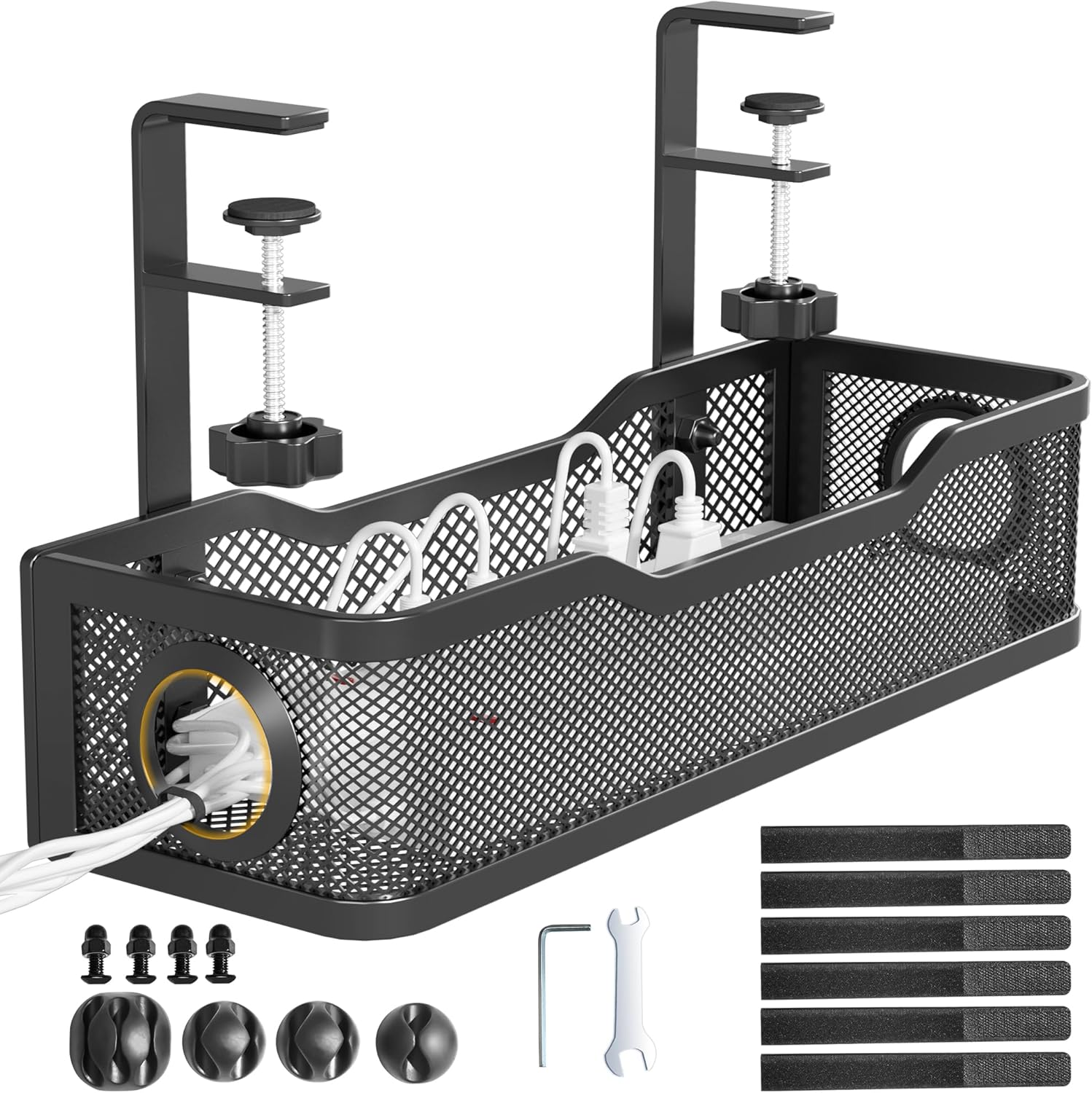
Best Cable Management TrayCinati Under-Desk Cable Management TrayCheck price
Best Desk OrganizerComix Mesh Desk Organizer with DrawerCheck price
Best Desk MatNordik Felt + Leather Desk Mat 35x17" -- BlackCheck price
Best Under-Desk FootrestComfiLife Memory Foam FootrestCheck price
Best USB HubAnker 7-Port Powered USB 3.0 HubCheck price
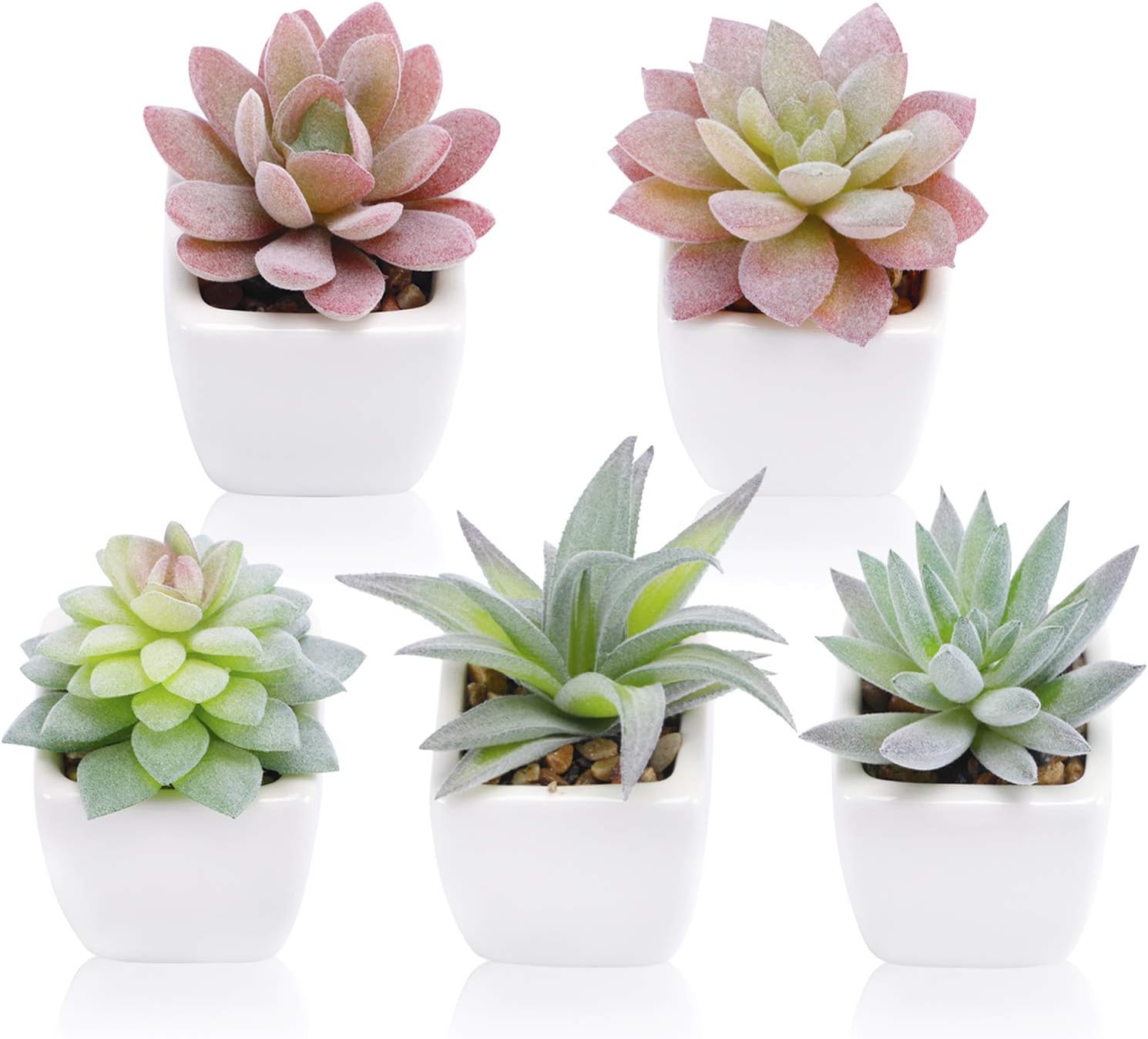
Best Small Plant or Decor PickFUNARTY 5pcs Artificial Succulents in Ceramic PotsCheck price

Best Desk Lamp

#1$25โ€“$35
Voncerus LED Clamp Desk Lamp

Style: Clamp mount, metal gooseneck + swing arm, USB-A powered

Reasons to Buy

  • +Clamp mount takes zero desk surface -- attaches to the edge
  • +10 brightness levels + 3 color modes (warm/neutral/cool)
  • +Metal swing arm holds position without drooping over time
  • +USB powered -- runs off any power strip or hub port

Reasons to Avoid

  • โˆ’Clamp requires desk edge 0.5"โ€“2" thick -- measure before buying
  • โˆ’USB only -- needs a USB port or power strip, not a standalone plug
Check price on Amazon

The Voncerus is our lamp pick because it solves the footprint problem that base-mount lamps can't. It clamps to the back edge of your desk and holds the light arm over your workspace -- the entire desk surface stays free. On a setup where real estate is tight, this is a meaningful difference compared to a lamp base that permanently occupies 4โ€“6 square inches.

The metal gooseneck + swing arm combination holds position reliably. Cheap plastic goosenecks droop within weeks; the Voncerus metal arm stays exactly where you position it after months of adjustments. Three color modes let you shift between warm reading light in the evening and neutral or cool white during focused afternoon sessions.

Also Consider

Lepro Clip-On LED Lamp

Budget option with same feature set at lower price

$18โ€“$28
ShineTech LED Clamp Lamp

Stepless (continuous) dimming instead of preset levels

$22โ€“$32

Best Monitor Stand

Bamboo Monitor Stand Riser with Drawer

Style: Bamboo platform, pull-out drawer, no assembly required

Reasons to Buy

  • +Bamboo finish looks premium and pairs with most desk setups
  • +Pull-out drawer adds hidden storage for cables, pens, small accessories
  • +22" wide platform fits ultrawide monitors without overhang
  • +No assembly -- open box, place, done

Reasons to Avoid

  • โˆ’Fixed height -- can't adjust elevation if 4.7" isn't right for you
  • โˆ’Bamboo can scratch if a rough object drags across it
Check price on Amazon

A monitor stand does two things simultaneously: raises your screen to a better ergonomic position and creates a full-width storage shelf underneath. The bamboo version hits both correctly -- the 22" platform is wide enough for most monitors, and the drawer underneath holds a wireless receiver, charger, or notebook out of sight.

At 4.7" of elevation, it brings the bottom of most 24โ€“27" monitors to approximately eye level for average seated height. If you currently have your monitor sitting flat on the desk with your neck angled down, this corrects that immediately. The bamboo finish is more durable than it looks -- the surface resists minor scratches and doesn't show fingerprints the way glossy plastic stands do.

Also Consider

Amazon Basics Metal Monitor Stand

Metal build, black finish, same drawer feature at similar price

$30โ€“$45
Epesoware Bamboo Monitor Stand 2 Drawers

Two drawers for more hidden storage capacity

$40โ€“$55

Best Laptop Stand

Lamicall Foldable Aluminum Laptop Stand

Style: Foldable aluminum, adjustable height, fits 10"โ€“17.3" laptops

Reasons to Buy

  • +Folds flat to under 0.4" -- fits in a laptop sleeve for travel
  • +Aluminum doesn't develop flex or wobble like plastic stands
  • +Compatible with 10"โ€“17.3" laptops and most tablets
  • +20,000+ ratings at 4.6 stars -- one of the most-reviewed laptop stands available

Reasons to Avoid

  • โˆ’Requires an external keyboard when laptop is elevated -- built-in keyboard angle becomes unusable
  • โˆ’Silver finish only in base version -- black costs slightly more
Check price on Amazon

The Lamicall is the default laptop stand recommendation because it solves the right problem -- screen height -- without creating new ones. When your laptop sits flat on a desk, the screen top is typically 4โ€“6" below where it should be for a comfortable seated position. The Lamicall raises it to the correct range and folds completely flat when you're done.

The aluminum construction is the key differentiator from budget plastic options. Plastic stands develop flex under laptop weight within months and eventually wobble noticeably during typing. Aluminum holds its structure indefinitely. The 20,000+ Amazon ratings make this one of the most validated laptop stands at this price point -- a rare combination of portable, durable, and inexpensive.

Also Consider

ivoler 6-Angle Aluminum Stand

6 preset angle positions, budget price

$18โ€“$28
LULULOOK 360ยฐ Rotating Stand

Full 360ยฐ rotation -- useful for showing screen to others

$35โ€“$50

Best Cable Management Tray

Cinati Under-Desk Cable Management Tray

Style: C-clamp mount, steel mesh, holds power strip + cables

Reasons to Buy

  • +C-clamp mount -- no drilling, attaches to desk edge in 5 minutes
  • +Steel mesh holds a full power strip + adapters off the floor
  • +Removes the entire cable pile from floor view -- immediate visual impact
  • +Fits desks 0.4"โ€“2.5" thick

Reasons to Avoid

  • โˆ’Open mesh means cables visible through it -- not fully hidden from below
  • โˆ’C-clamp requires adequate desk edge -- doesn't work on very thin edges
Check price on Amazon

The cable management tray is the most underrated desk upgrade on this list. Without one, your power strip, charger bricks, and cable tangle sit in a pile on the floor or desk surface. After 5 minutes with a clamp mount tray, all of that moves underneath the desk and out of sight. The visual change in your workspace -- and in video call backgrounds -- is immediate and significant.

The Cinati uses a C-clamp that doesn't require drilling and removes cleanly if you change desks. The steel mesh holds a standard 6-outlet power strip plus the brick adapters that normally pile up beside it. If your current desk setup involves a visible cord tangle anywhere, this is the first thing to fix.

Also Consider

AEONS 16" Cable Tray C-Clamp

Wider tray for larger power strips or more cables

$18โ€“$28
15.7" Steel Cable Tray Clamp

Budget option, same clamp mechanism

$15โ€“$25

Best Desk Organizer

Comix Mesh Desk Organizer with Drawer

Style: Steel mesh, 8 open compartments + 1 pull-out drawer

Reasons to Buy

  • +8 compartments handle every category of desk item (pens, scissors, cards, clips)
  • +Pull-out drawer conceals small items that don't need to be visible
  • +Mesh construction shows contents at a glance without opening
  • +6,000+ reviews at 4.4 stars -- strong track record for daily use durability

Reasons to Avoid

  • โˆ’Larger footprint than single-pen holders -- needs about 6"x4" of desk space
  • โˆ’Mesh can collect dust in compartments if items aren't moved regularly
Check price on Amazon

Desk organizers work only when they have a dedicated place for every item you actually use. The Comix 8-compartment design handles this correctly: separate sections for pens, scissors, a phone, sticky notes, and smaller accessories, plus a drawer for items you need to access but don't want visible (earbuds, small cables, a spare key). When everything has a home, the desk stays clear.

The steel mesh construction is more durable than plastic organizers at this price and shows contents without requiring you to open anything -- you see what's in each section immediately. At under $20, this is the starting point for desk surface organization before spending more on premium options.

Also Consider

EasyPAG Mesh Organizer 6 Compartments

Slightly smaller footprint if desk space is very tight

$18โ€“$25
STORi Clear Stackable Drawer Organizer

Clear acrylic -- see all contents at once, stackable for more storage

$20โ€“$30

Best Desk Mat

Nordik Felt + Leather Desk Mat 35x17" -- Black

Style: Felt + vegan leather surface, non-slip back, stitched edges, 35x17"

Reasons to Buy

  • +35x17" covers the full keyboard-and-mouse zone with a clean margin
  • +Felt + leather dual surface -- soft texture with smooth mouse tracking
  • +Non-slip backing -- doesn't shift during active typing sessions
  • +Stitched edges -- won't peel or fray like cheaper wrapped-edge mats

Reasons to Avoid

  • โˆ’Felt side absorbs light spills -- not fully waterproof like pure leather
  • โˆ’35x17" only -- no size options for very small or very large desks
Check price on Amazon

A desk mat does more than protect the surface -- it unifies the visual look of your setup, defines your working zone, and adds a layer of wrist comfort during long sessions. The Nordik Felt+Leather is our pick because it hits the right dimensions (35x17" fits any desk from 36" to 42" wide), has a backing that actually grips, and uses stitched edges that survive daily use without peeling.

The dual felt+leather surface is a practical choice: the felt side has a softer, warmer texture that looks clean in photos and is comfortable under your wrists, while the smooth areas provide consistent mouse tracking. The non-slip backing keeps everything in place during active typing -- a criterion that cheap desk mats almost universally fail after a few weeks.

Also Consider

Nordik Leather Desk Mat Saddle Brown

Warm brown tone for natural wood desk aesthetics

$35โ€“$50
ANECDOTE Vegan Leather Desk Mat

More color options, pure vegan leather surface

$25โ€“$40

Best Under-Desk Footrest

#1$30โ€“$45
ComfiLife Memory Foam Footrest

Style: Memory foam, adjustable height, non-slip bottom

Reasons to Buy

  • +Memory foam surface molds to your foot position during long sessions
  • +Adjustable height and tilt -- fits different desk heights and chair positions
  • +20,000+ ratings at 4.5 stars -- most-validated footrest at this price
  • +Non-slip bottom keeps it in position without sliding

Reasons to Avoid

  • โˆ’Memory foam is softer than wooden footrests -- preference varies
  • โˆ’Larger profile than minimal footrests -- takes more under-desk clearance
Check price on Amazon

A footrest is for anyone whose feet don't rest flat on the floor at a 90ยฐ knee angle when their arms are in typing position. If there's a gap between your feet and the floor at your desk, that gap creates low-level lower back tension over a full work session. A footrest fills it and restores the correct seated posture chain: feet flat, knees at 90ยฐ, hips level, spine neutral.

The ComfiLife memory foam version is the most reviewed footrest in this price range for a reason: the adjustable height accommodates different desk and chair combinations, and the foam surface reduces foot pressure compared to rigid wooden options. At 20,000+ ratings, it has the broadest verified track record of any footrest option we evaluated.

Also Consider

StrongTek Wood Footrest 3 Heights

Solid wood construction, firmer surface preferred by some users

$35โ€“$50
ErGear Footrest 3 Heights + Massage

Textured massage surface, budget price

$25โ€“$35

Best USB Hub

Anker 7-Port Powered USB 3.0 Hub

Style: Powered (36W AC adapter), 7x USB-A 3.0 data + 1x BC 1.2 charging

Reasons to Buy

  • +Powered by 36W AC adapter -- consistent performance under full 7-device load
  • +BC 1.2 charging port fast-charges phones at up to 2A
  • +30,000+ ratings at 4.6 stars -- most reliable budget hub available
  • +Anker 18-month warranty -- one of the longest in the category

Reasons to Avoid

  • โˆ’USB-A only -- not the right pick if your laptop is primarily USB-C
  • โˆ’7 ports may not cover setups with 8+ simultaneous devices
Check price on Amazon

Modern laptops ship with 2โ€“4 USB ports. A desk setup with a mouse, keyboard, external drive, webcam, and card reader needs 6โ€“8. The Anker 7-port hub solves this gap with a powered design that draws electricity from the wall rather than your laptop -- which means no dropped connections under heavy load, and stable power to all connected devices simultaneously.

Anker specifically because brand reliability matters for devices you run 24/7. The 36W powered adapter handles the full 7-device load without voltage drops, the BC 1.2 charging port delivers real fast-charge speeds (not the slow 5V/0.5A most hub ports output), and the 18-month warranty is longer than most competitors offer. At 30,000+ ratings, this is the most validated powered hub in its price range.

Also Consider

Atolla 7-Port USB Hub + Per-Port Switches

Individual on/off switches per port -- power-cycle devices without unplugging

$25โ€“$35
TP-Link UH720 7-Port + 2 Charging

TP-Link brand, 2 dedicated charging ports

$35โ€“$50

Best Small Plant or Decor Pick

FUNARTY 5pcs Artificial Succulents in Ceramic Pots

Style: 5 artificial succulents, white ceramic pots, no maintenance required

Reasons to Buy

  • +5 different succulent varieties -- no two look identical, adds visual variety
  • +White ceramic pots are clean and minimal -- suit any desk aesthetic
  • +Zero maintenance -- no watering, no sunlight, no dying plants
  • +12,000+ ratings at 4.6 stars -- by far the most popular desk plant option

Reasons to Avoid

  • โˆ’Artificial -- won't provide air quality benefits of real plants
  • โˆ’Small scale -- decorative accent, not a statement plant
Check price on Amazon

A small plant on your desk is one of the simplest improvements to your visual environment -- studies on workspace environments consistently show that natural elements (or convincing facsimiles of them) reduce perceived stress and improve the feeling of the space. The FUNARTY set works because it includes five different varieties that look intentionally curated rather than like a single prop.

The practical case for artificial: real succulents need specific light levels that most desk positions can't provide, and they die slowly when underlit -- which looks worse than no plant at all. The FUNARTY set looks realistic at desk distance, requires nothing, and stays looking the same on day 300 as it did on day 1. The white ceramic pots are the right choice for a clean modern desk aesthetic.

Also Consider

CADNLY Fake Succulent Set Pink

Pink/warmer color palette for feminine or colorful setups

$12โ€“$20
CADNLY Fake Succulent 4-Pack Green

Pure green tones, smaller 4-pack format

$14โ€“$20

How to Choose Desk Setup Accessories

๐Ÿ“

Start with your desk size constraint

Everything on a small desk competes for space. Before buying any accessory, measure your desk and decide which items earn surface area (organizer, mat) vs. which should disappear (cable tray under desk, lamp on edge). Accessories that create more space than they consume earn their place.

๐Ÿ”Œ

Solve power first, then organize around it

A powered USB hub and cable management tray should come before aesthetic accessories. Getting all your devices connected and cables hidden changes the baseline of your setup. Desk mats and organizers look better and function better when the power situation is resolved.

๐Ÿช‘

Ergonomics before aesthetics

Monitor stand, laptop stand, and footrest address posture -- the things that affect you physically every day. A desk plant looks good; a monitor at the wrong height causes neck tension over months. Prioritize the ergonomic purchases before the visual ones.

๐ŸŽจ

Pick a material language and stick with it

Bamboo + white ceramic + warm leather reads as intentional. Black metal + gray mat + minimal reads as intentional. Mixing warm and cold materials without a plan reads as assembled. Decide on one direction before buying accessories -- it's cheaper than replacing things later.

๐Ÿ’ฐ

Diminishing returns above $50 per accessory

Most of the functional benefit of any accessory category is available under $50. Grovemade makes a $190 monitor stand; a $40 bamboo riser does the same ergonomic job. Spend up when aesthetics are the explicit goal -- not when you're optimizing for function.

Frequently Asked Questions

What's the first desk accessory worth buying?

A cable management tray -- it costs $20, takes 5 minutes to install, and immediately makes the rest of your setup look more intentional. Second priority: a desk lamp with a clamp mount that takes zero surface space. These two purchases change the baseline look of any desk setup before anything else.

Do I need a monitor stand if I already have a monitor arm?

No -- a monitor arm replaces a monitor stand entirely and does it better (more adjustable, no surface footprint). If you have an arm, skip the stand and use the budget on something else. If you don't have an arm and aren't planning to install one, a monitor stand is the simpler and cheaper solution.

Is a desk mat worth it?

Yes for most setups. It protects the desk surface (relevant at move-out if you're renting), provides a consistent mouse tracking surface, cushions your wrists during long sessions, and unifies the visual look of your desk. A 35x17" mat for $30โ€“$50 is one of the higher-ROI desk purchases at this price.

What USB hub should I buy for a MacBook?

If your MacBook is USB-C only (2017+), buy a USB-C hub rather than a USB-A hub -- the SABRENT 7-Port USB-C Hub is the right pick (available at our full USB hub guide). The Anker 7-port on this list is USB-A only and requires a dongle on modern MacBooks.

Do artificial plants look cheap on a desk?

Quality ones don't -- the FUNARTY and CADNLY sets use realistic textures and white ceramic pots that read as intentional at desk distance. The tell is the pot quality more than the plant itself; cheap plastic pots look fake immediately. Both picks on this list use ceramic pots.

What's the best desk accessory for someone working from home?

A powered USB hub if you have multiple devices, then a monitor stand or arm. Remote workers on video calls benefit most from having the camera at eye level (monitor stand fixes this) and visible background organization (cable tray + desk organizer). These three purchases address the most common work-from-home desk problems.

Browse all desk setup accessories on Amazon

See current prices, deals, and Prime shipping options

Shop Desk Setup Accessories on Amazon

Related Buying Guides