
3 wins

3 wins
Monitor Stand vs Monitor Arm: Which Is Worth It Under $50?
The 30-Second Answer
| Factor | Monitor Stand | Monitor Arm |
|---|---|---|
| Price (budget) | $15–$35 | $25–$50 |
| Desk space reclaimed | Some (storage below) | Maximum (floats) |
| Adjustability | Height only | Height, depth, tilt, swivel, rotate |
| Setup time | 2 minutes | 15–20 minutes |
| Stability | Excellent | Good (install-dependent) |
| Best for | Height + storage | Ergonomics + space saving |
Head-to-Head: 6 Criteria
1. Desk Space
Monitor Arm winsA typical monitor stand occupies 20x9 inches of desk surface. A monitor arm's clamp takes 3x3 inches at the desk edge — the monitor floats above, leaving the entire surface clear.
Monitor Stand
180 sq in footprint. Gains storage underneath, but occupies the surface.
Monitor Arm
9 sq in clamp. Entire monitor zone reclaimed — transformative on small desks.
2. Adjustability
Monitor Arm winsStands offer 1–4 fixed height levels. Arms adjust continuously across five axes: height, depth, tilt, swivel, and portrait rotation.
Monitor Stand
1–4 fixed height levels only. No depth, tilt, or rotation.
Monitor Arm
Height, depth, tilt, swivel, rotation — fully independent adjustment.
3. Stability
Monitor Stand winsStands sit on the desk — gravity does the work. Arms introduce variables: desk material, edge thickness, monitor weight. Budget arms can wobble.
Monitor Stand
Rock-solid on any desk. No installation variables.
Monitor Arm
Stable when properly installed, but desk quality and monitor weight matter.
4. Ergonomics
Monitor Arm winsArms nail all three ergonomic axes: height, depth, and tilt. Stands get height right but can't adjust depth or tilt independently.
Monitor Stand
Height only. Depth and tilt are fixed wherever the stand sits.
Monitor Arm
Height + depth + tilt — full ergonomic positioning. Recommended by ergonomists.
5. Setup Difficulty
Monitor Stand winsStands take 2 minutes — unbox, place, done. Arms require VESA check, clamp install, stand removal, VESA plate mounting: 15–20 minutes.
Monitor Stand
2 minutes. No tools, no VESA check needed.
Monitor Arm
15–20 minutes. VESA compatibility required. Tools needed.
6. Price / Value
Monitor Stand winsStands are solid across the entire $15–$50 range. Arms under $25 have noticeable quality drop. Sweet spot for arms is $30–$45.
Monitor Stand
Excellent quality from $15. No budget floor.
Monitor Arm
Quality drops noticeably below $28. Budget $30–$45 for a reliable arm.
Best Monitor Stands Under $50
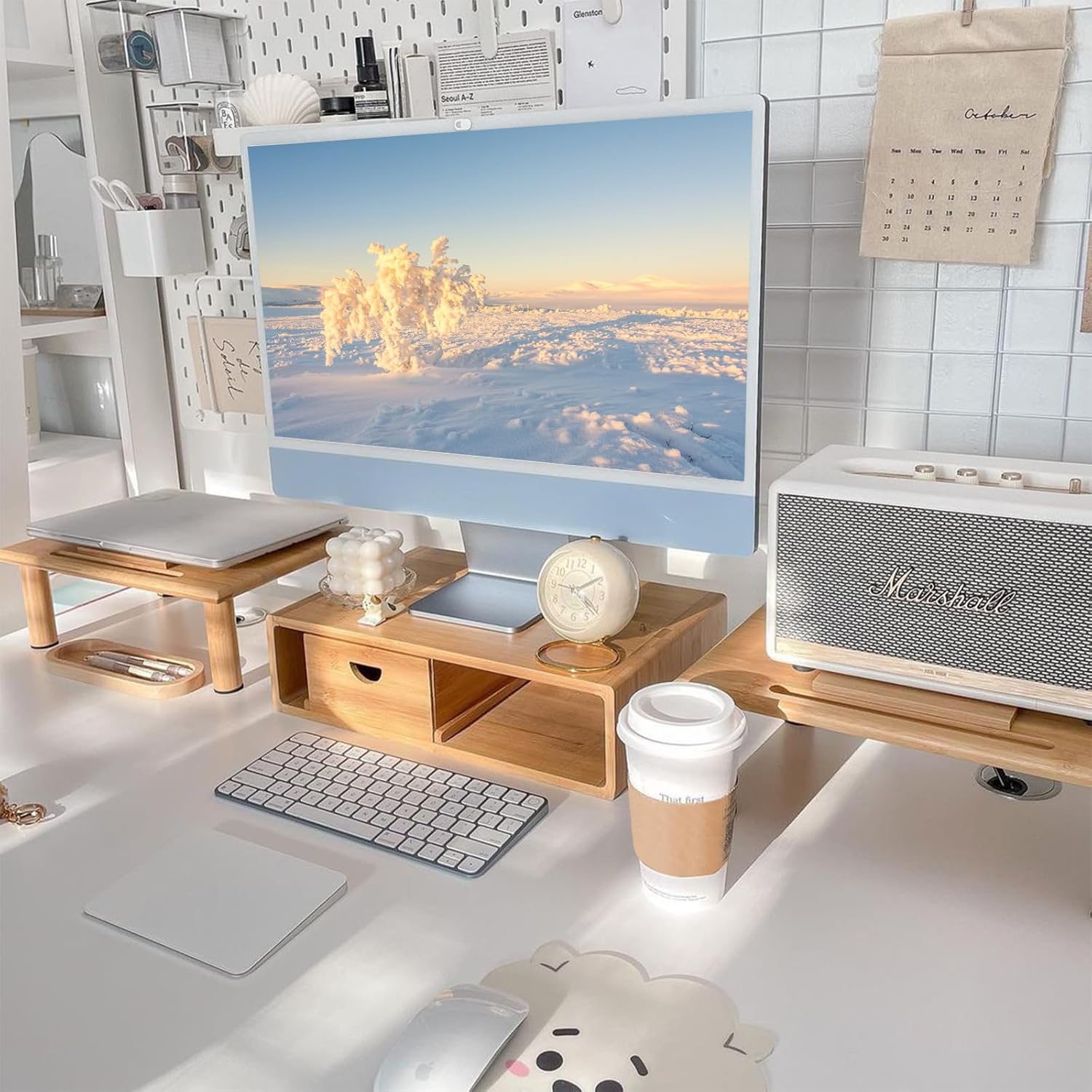
Bamboo Monitor Riser with Drawer
Limit: 50 lbs · Fixed height (4.5 in)
Why it works
- Pull-out drawer adds hidden storage without extra footprint
- Bamboo finish looks premium — works with most desk aesthetics
- Supports up to 50 lbs (any monitor size)
- Fits desks 36 inches and wider
Tradeoffs
- Fixed 4.5-inch height — can't adjust
- Drawer is shallow (1.5 inches deep)

Adjustable Height Desktop Riser (4-Level)
Limit: 44 lbs · 4 height levels (3–6 in)
Why it works
- Four stackable height levels — experiment without committing
- Metal construction at a plastic price
- Under $25 — cheapest functional option
Tradeoffs
- No storage drawer
- Adjusting height requires lifting the monitor off
- Basic aesthetics

USB-C Monitor Stand with Charging Hub
Limit: 40 lbs · Fixed height
Why it works
- Built-in USB hub (2x USB-A + 1x USB-C) saves buying separately
- Charges phone while elevating monitor
- Cables route cleanly through the stand
Tradeoffs
- At the top of the $50 budget
- USB hub quality varies — check reviews before buying
- Fixed height only
Best Monitor Arms Under $50
VIVO Single Monitor Arm (STAND-V001)
Limit: 22 lbs · Full range (height, tilt, swivel, rotate)
Why it works
- Full adjustment range: height, tilt, swivel, rotation
- Supports 75x75 and 100x100 VESA
- C-clamp fits desks 0.4–3.5 inches thick
- Cable management clips included
Tradeoffs
- Some wobble with heavier monitors (20+ lbs)
- Tension adjustment requires Allen key
- No gas spring — manual positioning only
Reddit: Most recommended arm in r/StandingDesk and r/battlestations under $50. Multiple users report 3+ years of reliable use.

HUANUO Single Monitor Arm (Gas Spring)
Limit: 17.6 lbs · Full range + gas spring
Why it works
- Gas spring: adjust height with one hand
- Smoother movement than friction-based arms
- Built-in cable management channel
- Full range: height, tilt, swivel, rotate
Tradeoffs
- Lower weight limit (17.6 lbs vs. VIVO's 22 lbs)
- Gas spring can lose tension after 2–3 years
- Slightly more expensive than VIVO

ErGear Single Monitor Arm (Heavy Duty)
Limit: 26.4 lbs · Full range + gas spring
Why it works
- Highest weight capacity under $50 (26.4 lbs)
- Handles ultrawide monitors (34–35 inch)
- Gas spring for smooth adjustment
- Sturdy steel construction
Tradeoffs
- At the $50 ceiling — overkill for standard 24–27 in monitors
- Bulkier arm (less minimalist look)
- Heavier clamp — needs a sturdy desk edge
All 6 Products Compared
| Product | Score | Weight | Adjust |
|---|---|---|---|
| StandBamboo Monitor Riser with Drawer | 9.2 | 50 lbs | Fixed height (4.5 in) |
| StandAdjustable Height Desktop Riser (4-Level) | 8.6 | 44 lbs | 4 height levels (3–6 in) |
| StandUSB-C Monitor Stand with Charging Hub | 8.4 | 40 lbs | Fixed height |
| ArmVIVO Single Monitor Arm (STAND-V001) | 8.9 | 22 lbs | Full range (height, tilt, swivel, rotate) |
| ArmHUANUO Single Monitor Arm (Gas Spring) | 8.7 | 17.6 lbs | Full range + gas spring |
| ArmErGear Single Monitor Arm (Heavy Duty) | 8.5 | 26.4 lbs | Full range + gas spring |
Decision Flowchart: Stand or Arm?
Is your monitor VESA compatible?
Is your desk glass, thin particle board, or has beveled edges?
Do you use a standing desk (sit-stand)?
Is your desk under 40 inches wide?
Do you have neck or eye strain from your current monitor position?
Do you just need the monitor a few inches higher?
Do you want portrait mode (vertical rotation)?
Best Choice by Scenario
Gaming Setup
Monitor Arm winsPull the screen closer during intense sessions, push it back for casual use. Portrait rotation on a secondary monitor is ideal for Discord or chat apps.
Exception: Heavy 34-inch ultrawide (20+ lbs)? Upgrade to ErGear Heavy Duty to avoid drooping.
Home Office / Remote Work (desk under 48 in)
Monitor Arm winsGas spring lets you adjust height quickly when switching postures. Small desks benefit most from the reclaimed surface space.
Home Office / Remote Work (desk over 48 in)
Monitor Stand winsMore desk space means the stand's footprint isn't a constraint. The drawer adds storage and the bamboo finish looks clean in a professional home office.
Standing Desk
Monitor Arm winsA fixed stand can't compensate for 12–18 inches of height change. The gas spring mechanism adjusts with one hand — seamless sit-stand transitions.
Dual Monitor Setup
Monitor Arm winsTwo separate stands consume roughly 400 square inches of desk space. A dual arm holds both monitors from a single clamp. Budget dual arms start at $35–$45.
Note: Dual arms at this price point have more wobble than single arms. Tighten tension bolts carefully during setup.

5 Mistakes to Avoid
Buying an arm for a non-VESA monitor
Check the back of your monitor first. If there are no four-hole mounting points (75x75mm or 100x100mm), an arm won't attach without a separate VESA adapter ($10–$20). Budget monitors and all-in-ones like iMacs often need adapters.
Clamping an arm to a weak desk
Particle board desks (common IKEA models like LINNMON) can crack under arm clamp pressure with heavy monitors. If your desk feels flimsy, reinforce the clamp point with a steel plate ($5–$10) or use a stand instead.
Forgetting cable length
Monitor arms position the screen further from the desk edge. Your existing HDMI or DisplayPort cable may be too short. Budget for a 6-foot cable ($8–$12) when buying an arm.
Over-spending on a stand
The difference between a $20 stand and a $45 stand is usually storage drawers and USB ports — not monitor support quality. If you just need height, the $20 adjustable riser works fine.
Ignoring monitor weight
Every arm has a weight limit. A 27-inch monitor typically weighs 10–15 lbs. A 32-inch ultrawide can weigh 18–22 lbs. If your monitor exceeds the arm's limit, it will droop over time.
Frequently Asked Questions
Is a monitor arm worth it?
For most users spending 6+ hours daily at a desk, yes. The ergonomic benefits (proper height, depth, and tilt) reduce neck and eye strain that compounds over months. At $30–$45 for a budget arm, the cost is comparable to a decent keyboard — and the health impact is arguably larger. For casual users or those with large desks, a stand is perfectly fine.
Do monitor arms work with any monitor?
Only monitors with VESA mounting holes (75x75mm or 100x100mm). Most monitors 24 inches and above have VESA holes, but check the back of your monitor or its spec sheet to confirm. Monitors without VESA holes need an adapter or are limited to stands.
Are monitor arms worth it for gaming?
Yes, particularly if you play competitive games where pulling the monitor closer helps reaction time, or if you use a secondary monitor in portrait mode for chat/streaming. The VIVO V001 ($32) is the most popular gaming arm under $50.
Can I use a monitor arm with a glass desk?
Not with a standard clamp — the clamp pressure can crack glass. Use a freestanding monitor arm (sits on the desk with a weighted base) or a grommet mount (bolts through a hole in the desk). Both options cost $40–$60 and are less common at the budget end.
Do I need a monitor arm for a standing desk?
Strongly recommended. A fixed stand can't adjust when you switch between sitting and standing — your monitor will be at the wrong height for one position. A gas spring arm ($35–$45) adjusts with one hand, making the transition seamless.
Monitor arm vs monitor stand for dual monitors?
Arms win decisively for dual setups. Two stands consume roughly 400 square inches of desk space. A dual arm uses one 9-square-inch clamp point. At $35–$45 for a budget dual arm, it's also cost-competitive with buying two separate stands.
What's the best monitor arm under $50?
The VIVO V001 ($30–$38) is the most recommended budget arm across Reddit, YouTube, and buyer reviews. It supports monitors up to 32 inches (22 lbs), has full adjustment range, and includes cable management clips. For gas spring convenience, the HUANUO ($35–$45) is the upgrade pick.
Final Verdict
Get a Monitor Stand if:
- Monitor isn't VESA compatible
- Desk is glass, fragile, or beveled
- Just need the monitor 4–6 in higher
- Want 2-minute setup, no tools
- Want storage underneath
- Budget is under $25
Get a Monitor Arm if:
- You use a standing desk
- Desk is under 48 inches wide
- Neck, shoulder, or eye strain
- Want portrait mode (rotation)
- Need to pull closer or push back
- Want maximum desk surface
The honest truth
At the under-$50 price point, both options are solid. A $35 arm gives you dramatically more adjustability than a $35 stand — but it also takes 15 minutes to install and requires a compatible monitor and desk. A $25 stand gives you 80% of what most people need (height elevation + storage) with zero hassle. The right choice isn't about which is "better" — it's about which problem you're actually solving.
Related Guides