
12 Best Small Desk Accessories That Actually Save Space (2026)
Twelve desk accessories evaluated for compact desks under 48 inches, dorm setups, and tiny home offices. Scored on footprint, build quality, and value - with honest tradeoffs and direct Amazon links.
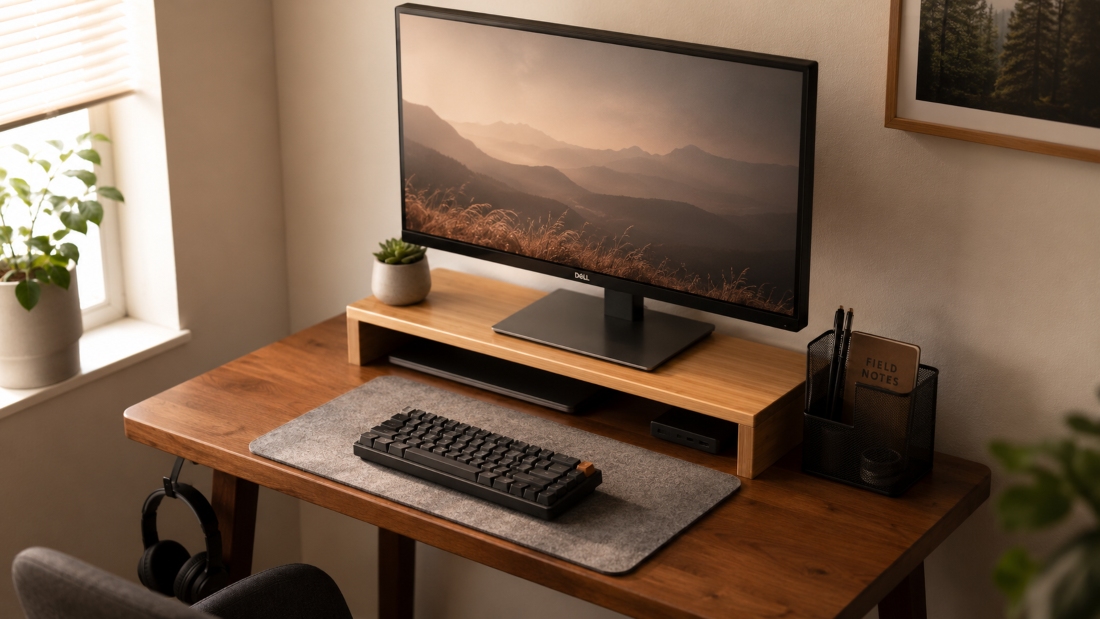
The fastest way to make a small desk more functional is not to buy a bigger desk. It is to choose accessories that store vertically, mount underneath, or clip to the sides instead of sitting flat on the surface. Most desks under 48 inches are not too small - they just have poor accessory choices taking up the surface area.
This guide covers 12 accessories across four categories: organization and storage, cable management, ergonomics, and productivity tech. Each accessory was selected for a compact footprint or zero footprint (mounted, clipped, or vertical). Scores reflect a mix of build quality, footprint efficiency, and value relative to alternatives on Amazon.
Quick Picks at a Glance
How to Choose Accessories for a Small Desk
Footprint over function
The first question for any small desk accessory is not what it does - it is how much surface area it takes. Prioritize accessories that mount underneath, clip to edges, or stand vertically. A monitor riser that also has storage under it earns its footprint twice. A decorative organizer that sits flat earns its footprint zero times.
Solve one problem at a time
Most small desks have three root problems: no vertical storage, cables everywhere, and an uncomfortable sitting position. Address them in that order. A monitor riser plus under-desk cable tray solves 80% of what makes a small desk frustrating. Add ergonomics accessories second, tech accessories third.
Cable management first
Before buying any visible accessory, deal with cables. One under-desk cable tray and a pack of cable clips costs under $40 and makes the desk look dramatically cleaner. Everything you add after cable management looks intentional instead of piled on.
Dorm vs home office constraints
Dorm rooms and rentals often prohibit drilling or permanent adhesive. Stick to clamp-on cable trays, pressure-fit organizers, and freestanding risers. For owned spaces, adhesive-mount under-desk drawers and cable trays unlock more options. Check whether adhesive will damage your desk surface before committing.
Set a total budget, not per-item
It is easy to spend $200 on accessories that conflict or overlap. Set a total budget of $60 to $120 and pick accessories from different categories. A $40 monitor riser plus a $28 cable tray plus a $20 desk mat covers the three main problems for under $90 with no overlap.
Skip purely aesthetic items
On a desk under 48 inches, every accessory must earn its footprint with a daily function. A small plant, a decorative tray, or a second organizer where you already have one is not saving space - it is adding clutter with aesthetic intent. Save decorative accessories for larger desks where surface area is not a constraint.
All 12 Small Desk Accessories: Full Reviews
Grouped by category. Each entry includes footprint, best use case, why it works for small desks, and honest tradeoffs.
Organization and Storage
These three accessories tackle the core small desk problem: vertical storage instead of horizontal sprawl.
Bamboo Monitor Riser with Drawer
Footprint: 22 x 9 inches
Best for: Overall use on any small desk
If you only buy one small desk accessory, make it a monitor riser with built-in storage. This bamboo model adds 4.5 inches of monitor height while reclaiming the dead space underneath for keyboards, notebooks, and small office supplies. The drawer holds pens, sticky notes, and cables you would otherwise scatter across the desk.
Why it works
- ✓22-inch width fits desks as narrow as 36 inches
- ✓Sliding drawer adds storage without adding footprint
- ✓Bamboo finish looks intentional and hides desk surface scratches
Tradeoffs
- ⚠Not adjustable in height - measure your monitor first
- ⚠Drawer is shallow at 1.5 inches - will not fit thicker items
Compact Mesh Desk Organizer
Footprint: 4 x 6 inches
Best for: Budget setups, first desk accessories purchase
The cheapest accessory on this list and one of the most effective. A simple 6-slot mesh organizer keeps pens, scissors, sticky notes, and phone cables in one place. At roughly 4 x 6 inches, it fits in the corner of even the smallest desk without crowding the working surface.
Why it works
- ✓Sub-$20 entry point with no real downside
- ✓Mesh design lets you see what is inside at a glance
- ✓Stackable if you need more storage later
Tradeoffs
- ⚠Mesh can shed small items like paper clips through the gaps
- ⚠Not the most premium-looking option for aesthetics-focused setups
Drawer-Style Under-Desk Organizer
Footprint: 0 (mounted under desk surface)
Best for: Storage maximalists, desks where the surface is already maxed out
This adhesive-mounted drawer hangs underneath your desk surface, adding storage without consuming any desktop real estate. Holds pens, notepads, charging cables, and small electronics. Perfect for small desk setups where the top surface is already at capacity.
Why it works
- ✓Zero desktop footprint - pure bonus storage
- ✓Adhesive mount works on most desk materials (skip glass desktops)
- ✓Closes out of sight for a cleaner visual look
Tradeoffs
- ⚠Adhesive can fail on textured or rough surfaces over time
- ⚠Limited weight capacity at around 3 pounds
Cable Management
Cables are the silent enemy of small desk setups. Three picks that earn their footprint.
Under-Desk Cable Management Tray
Footprint: 0 (mounted under desk surface)
Best for: Anyone with a visible cable nest on or around their desk
The single best upgrade for a small desk is hiding power strips and cable nests underneath the surface. This metal tray clamps to most desk edges and holds a standard power strip plus 6 to 8 cable bundles. Once installed, the desktop stops looking like a server room.
Why it works
- ✓Removes power strip from desktop entirely
- ✓Clamp-on installation - no drilling required
- ✓Supports up to 22 pounds, enough for power strips and chargers
Tradeoffs
- ⚠Installation takes 15 to 20 minutes
- ⚠Does not fit desks thicker than 1.5 inches at the edge
Magnetic Adhesive Cable Clips
Footprint: 0 (mounts on desk edges)
Best for: Charging cables that fall off the desk repeatedly
A simple problem-solver: phone chargers, USB cables, and headphone cords fall off the desk every time you move them. Adhesive cable clips solve this for at a budget-friendly price. Stick them to the side of your desk and cables stay in reach without sprawling across the surface.
Why it works
- ✓Sub-$15 fix for a daily annoyance
- ✓Does not take desktop space - mounts on edges and undersides
- ✓Magnetic clips release cables one-handed
Tradeoffs
- ⚠Cheap adhesive on budget versions can fail after 6 months
- ⚠Plastic clips can crack if cables are yanked rather than released
Cable Management Box (Compact)
Footprint: 12 x 5 inches
Best for: Glass desks or rentals where under-desk mounting is not possible
For setups where under-desk mounting is not possible (glass desks, rental restrictions), a desktop cable box hides power strips and cable nests inside a clean enclosure. The compact 12-inch version fits behind monitors on most small desks without intruding on the working area.
Why it works
- ✓No installation required - just plug in and close the lid
- ✓Slim profile fits behind monitors with minimal footprint
- ✓Vented to prevent overheating of power strips inside
Tradeoffs
- ⚠Still takes 12 x 5 inches of surface space
- ⚠Larger power strips or brick adapters may not fit inside
Ergonomics and Comfort
You spend hours at a small desk. These accessories make that sustainable.
Memory Foam Wrist Rest Set
Footprint: 8 x 9 inches (mouse rest)
Best for: Long typing and mouse sessions, 3 or more hours per day
Wrist strain builds up over time without obvious warning signs. This set includes one keyboard wrist rest and one mouse pad with built-in wrist support - both made from memory foam with non-slip backing. The compact mouse pad version at 8 x 9 inches fits small desks where full gaming-size pads do not.
Why it works
- ✓Mouse rest is compact rather than the oversized gaming-style pad
- ✓Non-slip backing means no sliding during fast mouse movements
- ✓Set covers both keyboard and mouse wrist strain in one purchase
Tradeoffs
- ⚠Memory foam compresses and flattens after 12 to 18 months of daily use
- ⚠Fabric covers can stain from skin contact over time
Compact Felt and Cork Desk Mat
Footprint: 24 x 12 inches
Best for: Aesthetic-focused setups, desks with visible surface damage
A desk mat does two things at once: it protects the desk surface and visually unifies the setup. The 24 x 12 inch size fits small desks perfectly, large enough for keyboard and mouse but small enough not to overwhelm a 36-inch desk. The combination of felt and cork materials stands out from standard rubber-backed gaming mats.
Why it works
- ✓Felt side feels premium under hands and wrists during extended use
- ✓Cork backing prevents any sliding on smooth desk surfaces
- ✓Reversible design extends usable life significantly
Tradeoffs
- ⚠Felt collects dust and shows pet hair visibly
- ⚠Spills can stain the felt side - it is not water-resistant
Adjustable Footrest for Small Spaces
Footprint: 0 (stows under desk when not in use)
Best for: Users whose chair height leaves feet unsupported at current desk height
If your chair is too tall or your desk is too high for your seated position, a footrest corrects the angle without expensive furniture replacement. This adjustable model rocks slightly for active sitting and stows compactly under most desks when not in use.
Why it works
- ✓Stows under the desk - zero impact on small floor space when not needed
- ✓Adjustable tilt accommodates different leg lengths and sitting positions
- ✓Textured top surface keeps shoes from sliding during use
Tradeoffs
- ⚠Plastic construction feels less solid than metal alternatives
- ⚠Tilt mechanism can develop a squeak after a few months of use
Tech and Productivity
The accessories most people skip - and the ones that consistently get mentioned after the fact.
Slim Headphone Stand with USB Hub
Footprint: 3 x 4 inches
Best for: Over-ear headphone users, gaming setups
If you have over-ear headphones, they are either taking up desk space or hanging off your monitor awkwardly. A combined headphone stand and USB hub solves two problems with one footprint - ideal for small gaming desks where every inch matters.
Why it works
- ✓Vertical orientation reclaims desk surface versus laying headphones flat
- ✓4-port USB hub eliminates the need for a separate accessory
- ✓Optional LED accent fits gaming desk aesthetics without extra cables
Tradeoffs
- ⚠USB hub is data-only on most models - no fast charging output
- ⚠Base footprint is still 3 x 4 inches and cannot be eliminated
Magnetic Phone Mount for Monitors
Footprint: 0 (mounts on monitor bezel)
Best for: Users who need phone visible during work without it on the desk
Your phone does not need a permanent spot on a small desk, but you do need to see it. A magnetic mount clips to the side of your monitor, keeping the phone visible at eye level without using any desktop space at all.
Why it works
- ✓Removes the phone from the desktop entirely
- ✓MagSafe-compatible models work with iPhone 12 and newer with zero setup
- ✓Easy to detach when you leave the desk or need to take a call
Tradeoffs
- ⚠Adhesive mount can leave residue on monitor bezels when removed
- ⚠Older phones without MagSafe need a magnetic ring sticker added
Flip-Style Pomodoro Timer
Footprint: 3 x 3 inches
Best for: Focus work, study sessions, avoiding phone distraction
Phones make terrible timers because they are a distraction waiting to happen. A dedicated flip-style Pomodoro timer keeps focus sessions visible without opening another app or unlocking a screen. Most models are roughly the size of a deck of cards, fitting even the most space-starved setup.
Why it works
- ✓Tiny footprint at roughly 3 x 3 inches
- ✓Silent countdown with a gentle alarm that does not disturb neighbors
- ✓Pre-set intervals of 5, 15, 25, and 30 minutes cover most focus methods
Tradeoffs
- ⚠Limited customization on budget models for non-standard interval lengths
- ⚠Battery-dependent - no plug-in option on most units
Comparison Table
| Accessory | Category | Footprint | Score | |
|---|---|---|---|---|
1Bamboo Monitor Riser with Drawer | Organization and Storage | 22 x 9 inches | 9.2 | Check price |
2Compact Mesh Desk Organizer | Organization and Storage | 4 x 6 inches | 8.7 | Check price |
3Drawer-Style Under-Desk Organizer | Organization and Storage | 0 (mounted under desk surface) | 8.4 | Check price |
4Under-Desk Cable Management Tray | Cable Management | 0 (mounted under desk surface) | 9.0 | Check price |
5Magnetic Adhesive Cable Clips | Cable Management | 0 (mounts on desk edges) | 8.5 | Check price |
6Cable Management Box (Compact) | Cable Management | 12 x 5 inches | 8.3 | Check price |
7Memory Foam Wrist Rest Set | Ergonomics and Comfort | 8 x 9 inches (mouse rest) | 8.6 | Check price |
8Compact Felt and Cork Desk Mat | Ergonomics and Comfort | 24 x 12 inches | 8.9 | Check price |
9Adjustable Footrest for Small Spaces | Ergonomics and Comfort | 0 (stows under desk when not in use) | 8.2 | Check price |
10Slim Headphone Stand with USB Hub | Tech and Productivity | 3 x 4 inches | 8.8 | Check price |
11Magnetic Phone Mount for Monitors | Tech and Productivity | 0 (mounts on monitor bezel) | 8.5 | Check price |
12Flip-Style Pomodoro Timer | Tech and Productivity | 3 x 3 inches | 8.4 | Check price |
Prices are approximate. Check Amazon for current pricing before purchasing.
Setup Combinations by Budget
If you want a complete small desk upgrade rather than one-off purchases, these three combinations cover different budgets with no overlap in function.
Under $50 - Bare Essentials
Saves roughly 40% of visible desktop clutter
- Compact mesh desk organizer
- Magnetic cable clips
- Compact desk mat
$50 to $120 - Balanced Setup
Fundamentally transforms how a small desk feels to use
- Bamboo monitor riser with drawer
- Under-desk cable tray
- Memory foam wrist rest set
- Magnetic phone mount
$120 to $200 - Complete Compact Setup
Equivalent to a full home office upgrade
- Bamboo monitor riser with drawer
- Under-desk cable tray
- Felt and cork desk mat
- Headphone stand with USB hub
- Adjustable footrest
- Flip Pomodoro timer
How We Evaluated These Accessories
Each accessory was assessed across four criteria weighted for small desk and dorm room constraints:
Footprint efficiency
How much desktop, under-desk, or vertical space does the accessory consume relative to what it provides? Zero-footprint accessories (mounted, clipped, vertical) score highest.
Build quality and durability
Material quality, weight capacity, and expected lifespan based on Amazon verified buyer review patterns and manufacturer specifications.
Setup simplicity
Whether installation requires drilling, permanent adhesive, or complex assembly. Clamp-on and freestanding options score higher for renters and dorm setups.
Value for price
Features delivered per dollar. Budget accessories need to deliver a clear daily function without requiring replacement within a year. The compact mesh organizer scores well here at under $18.
This guide reflects research across published specifications, manufacturer documentation, and analysis of verified Amazon buyer review patterns. Where observations reference buyer experience, they are based on review pattern analysis, not individual testing claims.
Frequently Asked Questions
What should I put on a small desk?
Prioritize accessories that serve double duty: a monitor riser with built-in storage, a desk mat that also functions as a mouse pad, a cable tray that also holds a power strip. Avoid single-purpose decorative items on desks under 48 inches. Vertical and under-desk accessories earn their place; surface-level items need to justify their footprint.
How do I make a small desk look bigger?
Three quick visual upgrades: (1) hide cables with an under-desk cable tray or cable box, (2) lift the monitor with a riser to clear usable desk space underneath, (3) add a desk mat to visually unify the surface. The desk looks larger because the eye sees less clutter and more intentional organization.
Are desk accessories worth it for small spaces?
The right ones, yes - especially monitor risers, cable management, and desk mats. These pay back their footprint immediately by adding vertical or under-desk storage or by hiding visual clutter. Skip purely decorative items unless your desk is over 48 inches wide and has room to spare.
What are the best desk accessories for a dorm room?
For a dorm desk (typically 40 to 48 inches wide): a bamboo monitor riser with drawer, an under-desk cable tray, a compact desk mat, and a magnetic phone mount. These cover storage, cables, ergonomics, and tech without overwhelming the limited surface area or requiring any permanent installation.
How much should I spend on small desk accessories?
Most people are well served by an $80 to $120 total budget covering 4 to 5 accessories. Spending more tends to mean buying accessories that overlap in function or take footprint you do not have. The $40 monitor riser with drawer and the $28 cable tray alone cover most small desk problems.
What desk accessories actually save space instead of adding clutter?
The footprint-saving accessories are: monitor risers (use vertical space under the screen), under-desk cable trays (use below-desk space), monitor-mounted phone holders (use bezel space), adhesive cable clips (use edge space), and under-desk drawer organizers (use the underside of the desk surface). Anything that sits on the desktop adds to clutter unless it also performs a daily function.
Browse all small desk accessories on Amazon
See current prices, deals, and Prime shipping options
Shop Desk Accessories on Amazon