
How to Measure a Monitor for a Privacy Screen
Affiliate Disclosure: We may earn a small commission on qualifying Amazon purchases at no extra cost to you. Full disclosure →
Two monitors advertised as the same diagonal size can need different privacy filters. The aspect ratio, front construction, and attachment system change what has to be covered. A filter that is nearly right can obscure content, leave gaps, or interfere with controls.
Quick answer: Identify the exact monitor model and the filter’s mounting style, then measure the area specified by that filter maker. For an inset filter, this is often the active screen inside a raised bezel. For a full-front design, it may be the whole glass face. Match width and height as well as diagonal size, and verify controls, camera access, curvature, and orientation separately.
Identify the product you need
A privacy filter reduces visibility from certain off-axis positions. A clear protector is mainly a physical covering, while an anti-glare filter addresses reflections. Some products combine functions, but the labels are not interchangeable.
Decide which viewing direction needs protection. A shared desk beside a walkway creates a different privacy problem from a monitor facing an open doorway. The filter’s specified viewing behavior and installed orientation need to match that problem.
For laptop-specific input and lid constraints, see touchscreen protector fit.
Find the exact monitor model
Read the label on the monitor or the model information in its menu. Include the complete suffix when checking compatibility. A product family may contain several screen sizes and front designs.
Do not use a retailer’s approximate title as your only reference. A nominal 24-inch class monitor may have a different actual diagonal from another 24-inch listing. Width and height provide a more direct fit check than the marketing category.
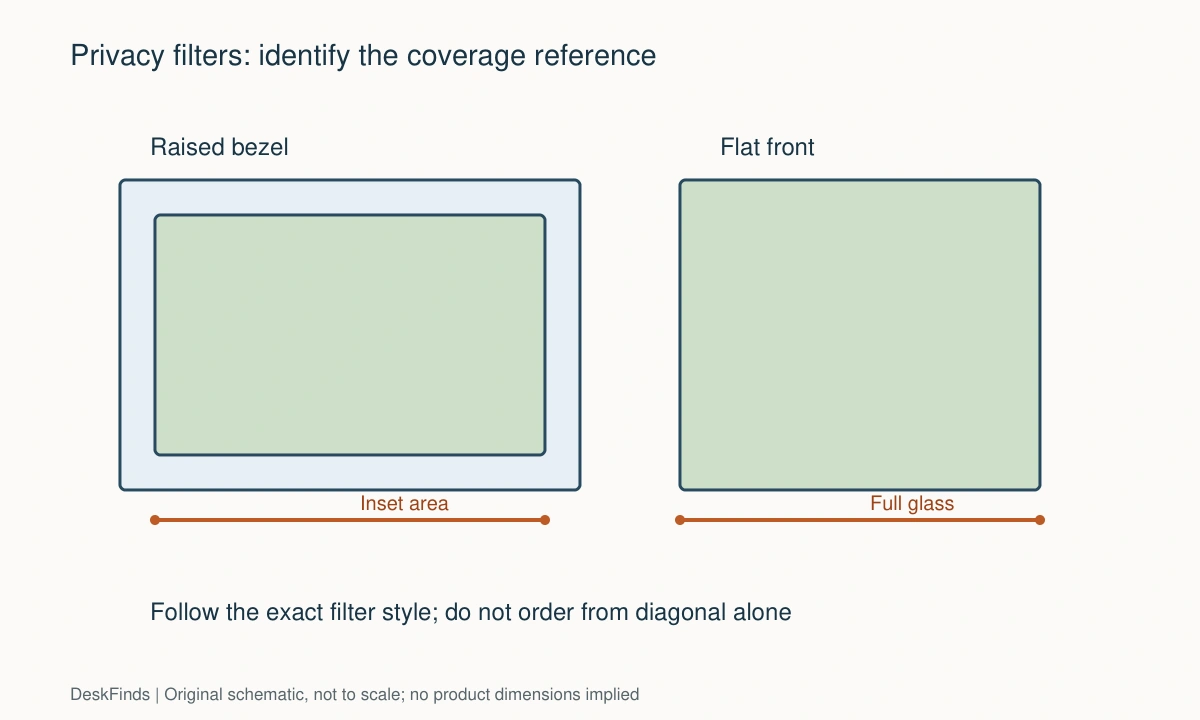
Distinguish raised bezel from flat front
A raised bezel forms a frame around the display. An inset filter typically sits within that opening, so the space inside the frame matters. A flat glass front may need a filter designed to cover more than the active image.
3M’s measuring guide distinguishes these constructions and gives different measurement reference points. Follow the instructions for the exact filter style rather than applying one rule to every product. A framed hanging filter can also use a different sizing method from an inset sheet.
Measure width and height directly
Use a ruler or tape that will not scratch the screen. Keep hard edges away from the surface and avoid pressing on the panel. Record horizontal and vertical dimensions with units, then repeat the measurements to catch an obvious error.
Measure the intended coverage area, not the monitor’s overall housing. Include an outline on a photo showing the endpoints used. That makes a support question much clearer than reporting only a diagonal number.

Use aspect ratio as a cross-check
A 16:9 filter and a 16:10 filter are different shapes even when their diagonal labels are similar. Ultrawide screens introduce further ratios. Compare the candidate filter’s stated width and height with your measurements.
For illustration, a theoretical 24-inch 16:9 rectangle has an image width of about 20.9 inches and height of about 11.8 inches. This calculation checks the shape; it is not an order specification for every monitor labeled 24 inches. Physical measurement and product compatibility still control the purchase.
Check the attachment system
Adhesive strips, side tabs, magnetic fittings, and hanging frames have different space requirements. Check whether the monitor has enough suitable surface for the attachment points and whether they obstruct a slim bezel or control button.
Do not assume a magnetic product will attach to every metal-looking display. Confirm the specified attachment hardware and compatible front construction. If accessories add adhesive magnetic strips, include those strips in the installation and removal decision.
Account for cameras and sensors
Integrated webcams, light sensors, microphones, and on-screen controls may occupy the front area. A full-front filter should have the appropriate cutouts or fit arrangement. A filter that covers the image correctly can still disable another feature.
With a separate webcam, check its clip and cable path. The clip may overlap a hanging filter or make it difficult to remove. Decide whether camera use and privacy-filter removal need to happen during the same work session.
Verify portrait and curved use
Rotating a filter can change its privacy behavior relative to the viewer. Confirm support for the orientation you intend to use. A filter marketed for a landscape monitor should not be presumed equally effective after rotation.
For curved screens, verify the specific curvature and attachment requirements. Do not bend a flat rigid product to match the display unless its maker permits that use. Size alone does not establish curved-screen compatibility.
Think about daily removal
If you alternate between confidential work and collaborative viewing, a removable system may be useful. It needs a protected storage place that keeps the filter flat and clean. Leaving it loose under a keyboard can scratch or crease it.
Consider cleaning access too. Follow both monitor and filter instructions, especially around coatings and adhesives. Do not spray cleaning liquid into gaps or use an adhesive remover without approval for the surface.

Make a fit record
| Field | What to record |
|---|---|
| Monitor | Complete model and screen orientation |
| Front design | Raised bezel, full glass, or another construction |
| Coverage | Measured width and height with endpoints identified |
| Filter style | Inset, framed, magnetic, adhesive, or tab-mounted |
| Features | Camera, sensors, touch, controls, and curvature |
| Routine | Permanent use or frequent removal |
Compare these fields with the monitor privacy-screen options only after the fit record is complete. A shortlist organized by diagonal size is a starting point, not confirmation that a particular sheet fits your display.
What a privacy filter cannot replace
Physical screen privacy does not replace account security, locking the computer, or following workplace information policies. Check your employer’s rules if the device is managed. Product descriptions about privacy angles should be evaluated as device-specific claims, not a guarantee against every viewing position.
Choose the filter whose measured coverage and mounting method match your screen. When one specification remains unclear, send the seller the exact model and your measurement photo before ordering.
Work through three screen shapes
A raised-bezel widescreen monitor
Start with the active area inside the bezel if that is the reference required by the filter’s instructions. Record horizontal and vertical dimensions directly. Then inspect whether tabs or adhesive strips need space on the frame. A very slim bezel can make attachment a separate question even when the sheet dimensions look correct.
If the product uses a hanging frame, return to its own measurement method rather than applying the inset-sheet rule. A larger framed product and a smaller inset filter can both be appropriate for different mounting designs. The product type decides how the measurements are interpreted.
A flat-front display with an integrated camera
Map the whole glass face and active image separately. Note the camera and sensors above the picture. A product that covers the glass may need specific cutouts or a design that leaves the camera region clear.
Compare exact model compatibility when available. Do not cut a filter to create a sensor opening unless the manufacturer permits trimming and provides a suitable procedure. The optical layer and attachment can be damaged by an improvised alteration, and a poorly placed cutout can leave the original problem unresolved.
An ultrawide screen used for shared work
Measure the width and height instead of relying on the ultrawide label. Check whether the filter supports any screen curvature and the intended attachment. Decide how collaborators will view the screen when the filter is not needed.
A removable filter requires a protected storage space larger than a normal laptop sleeve. Plan that location before purchase. An expensive wide sheet should not spend meetings bent against a wall or sliding beneath a keyboard.
A mathematical cross-check, with limits
For a rectangular image with diagonal d and ratio a:b, theoretical width is d × a divided by the square root of a² + b²; height uses b in the numerator. This calculation explains why diagonal labels alone are insufficient. It does not account for the bezel, front glass, cutouts, rounded corners, or the attachment system.
Use the calculation to catch an inconsistent listing, then use direct measurements and maker compatibility information to choose the product. If a seller’s stated width and height imply a different shape from the advertised ratio, ask for clarification rather than selecting the most convenient number.
Check viewing after correct installation
Open normal documents at your usual screen settings and view them from the positions relevant to your privacy concern. Follow the product’s setup guidance. Check whether you can still read comfortably from your working position and whether authorized sharing remains practical when the filter is removed or flipped.
Do not infer a universal privacy angle from a casual observation. Product claims should remain specific to the product, orientation, and conditions. If a filter makes normal work difficult, its nominal fit does not make it a suitable purchase. Consider a different product or room arrangement.

Buy from the coverage drawing
Save a copy of the candidate’s dimensions and attachment instructions before ordering. Product titles can be shortened or rounded, while the drawing shows what the filter actually covers. Compare its width and height against the reference area you measured, keeping units consistent throughout.
Do not apply one manufacturer’s nearest-size rule to another mounting system. A sheet inside a bezel and a frame hanging over a monitor have different boundaries. If the instructions give a particular sizing method, follow it and ask about a close mismatch. The aim is compatible coverage rather than the largest sheet you can attach.
For a shared workstation, consider whether the filter can be handled without touching its optical surface. A flip or removal system may help, but its hinge or attachment strips need space and appropriate support. Check the monitor’s thin top edge and webcam arrangement before assuming that system fits.
If your work requires reliable visual privacy, check the policy and product requirements that apply. A casual side-view test can reveal a poor arrangement, but it does not establish a tested privacy rating or make the room secure. Screen orientation and the location of bystanders remain relevant.
After receiving the filter, compare its dimensions and code with the order before installation. Keep protective packaging while you verify the product. Do not trim or force a mismatch merely because the diagonal label seems right. Correcting an order before adhesives are installed is usually simpler than trying to adapt an unsuitable optical sheet to the screen.
For the problem of reflections itself, see screen-glare reduction.
Worked example: two filters with the same diagonal label
Suppose a buyer has a raised-bezel monitor and finds two privacy products advertised for its nominal screen size. One is a flexible inset sheet, while the other has a hanging frame. The buyer initially compares only diagonal size and price.
The measuring instructions reveal different reference areas. The inset sheet is compared with the specified opening inside the bezel. The hanging product uses its own framed sizing method. Applying the first product’s nearest-size rule to the second would produce an unreliable comparison. The buyer keeps the coverage drawings separate.
Direct width and height measurements also expose an aspect-ratio mismatch in one listing. A similar diagonal does not make the sheet the same shape. The buyer asks for the exact dimensions and product code instead of assuming the retailer’s broad size category is accurate enough.
The remaining candidate fits the intended coverage but uses attachment strips near the top edge. A webcam clip occupies that region. The buyer checks whether the approved attachment can coexist with the camera rather than moving strips to unsupported locations. Another documented attachment style may be more practical.
The filter will be removed during collaborative work, so a storage destination is added. A wide sheet does not fit the existing laptop sleeve and would otherwise rest against a wall. The buyer includes a suitable protected storage method in the purchase comparison, recognizing that removability creates a handling task.
After correct installation, ordinary reading and authorized sharing are tested in the intended orientation. The buyer does not interpret a casual side-view observation as a universal privacy guarantee. The product must meet the relevant work requirement while remaining readable from the normal position.
The final decision is based on coverage, shape, attachment, feature access, and routine. A product passing the diagonal check alone has answered only one weak starting question. This example also explains why trimming a nearly fitting filter should not be the default response: it can alter the layer or attachment and conceal that the wrong style or ratio was selected in the first place.
If the display rotates, review vertical-monitor orientation.
Your eight-point comparison worksheet
Use these checkpoints to compare the actual room, furniture, or device with a candidate product. Keep each result separate; a favorable overall impression cannot resolve a failed required function. Blank record fields are deliberate so you can use your own measurements rather than copying hypothetical examples.
1. Screen identity
Record the complete monitor model, actual image size if documented, front design, and intended landscape or portrait use.
Use the model to resolve uncertainty when several monitors share a rounded diagonal label or similar family name.
2. Inset coverage
Measure inside a raised bezel only when the candidate filter’s instructions specify that coverage area.
Do not include housing width or assume that a framed hanging filter follows the same reference points as a flexible inset sheet.
3. Full-front coverage
Measure the entire glass face separately from the active image when comparing full-front products.
Verify cutouts and model support, because correct outside dimensions do not guarantee access to cameras, sensors, or controls.
4. Aspect ratio
Compare directly measured width and height with the candidate’s ratio and stated sheet dimensions.
Treat a theoretical diagonal calculation as a cross-check rather than a replacement for physical fit and installation information.
5. Attachment space
Inspect the surface required for tabs, strips, magnets, or a hanging frame and note any thin-bezel restrictions.
Choose a method that can be installed as directed without covering controls or assuming that every display accepts magnetic attachment.
6. Curvature and rotation
Check explicit support for the screen’s shape and the orientation in which the privacy layer will be used.
Do not bend an unsupported rigid product or assume rotating a landscape filter preserves its intended viewing behavior.
7. Removal routine
Measure the storage destination for a removed sheet and rehearse lifting or flipping it without contacting other equipment.
A removable design needs protected storage; loose placement under keyboards or against a wall can damage a thin optical sheet.
8. Viewing task
Read normal documents from the working position after installing according to the instructions, then test authorized screen sharing.
Keep comfort and the actual privacy requirement in the decision rather than accepting a physically fitting product that makes work impractical.
Sources and scope
- 3M: monitor and laptop measuring guide - Primary reference for different measuring areas on raised-bezel and flat-front designs. Follow the exact filter style.
Editorial note: This is a research-based planning guide, not a hands-on product test or a certification of a custom installation. Dimensions described as hypothetical are examples. Follow the exact product instructions and confirm unresolved compatibility before buying.