
How to Check Whether a Keyboard Tray Fits a Curved or Beveled Desk Edge

Affiliate Disclosure: We may earn a small commission on qualifying Amazon purchases at no extra cost to you. Full disclosure →
A clamp-on keyboard tray can fit the stated desktop thickness and still fail on a rounded, beveled, or curved edge. The clamp needs appropriate contact surfaces, and two clamps may not align with the same front edge. The depth of the edge profile matters as much as its thickness.
Quick answer: Inspect a side profile and top view of the desk, identify the flat contact areas above and below, and compare those areas with the complete clamp geometry and the tray’s mounting instructions. Check both clamp positions independently. Do not use a wedge, excessive tightening, or unapproved packing to make a clamp grip a surface it was not designed to hold.
Identify the kind of curve
A curved edge in plan view changes the desk’s outline when seen from above. A beveled edge changes the cross-section. A desk can have both. Photograph the front from above and from the side so the two problems remain separate.
Also inspect the underside. A rounded upper edge may sit above a flat lower face, while an underside bevel can remove the area the clamp pad needs. Do not judge the lower surface from the top’s appearance.
Map the clamp contact zone
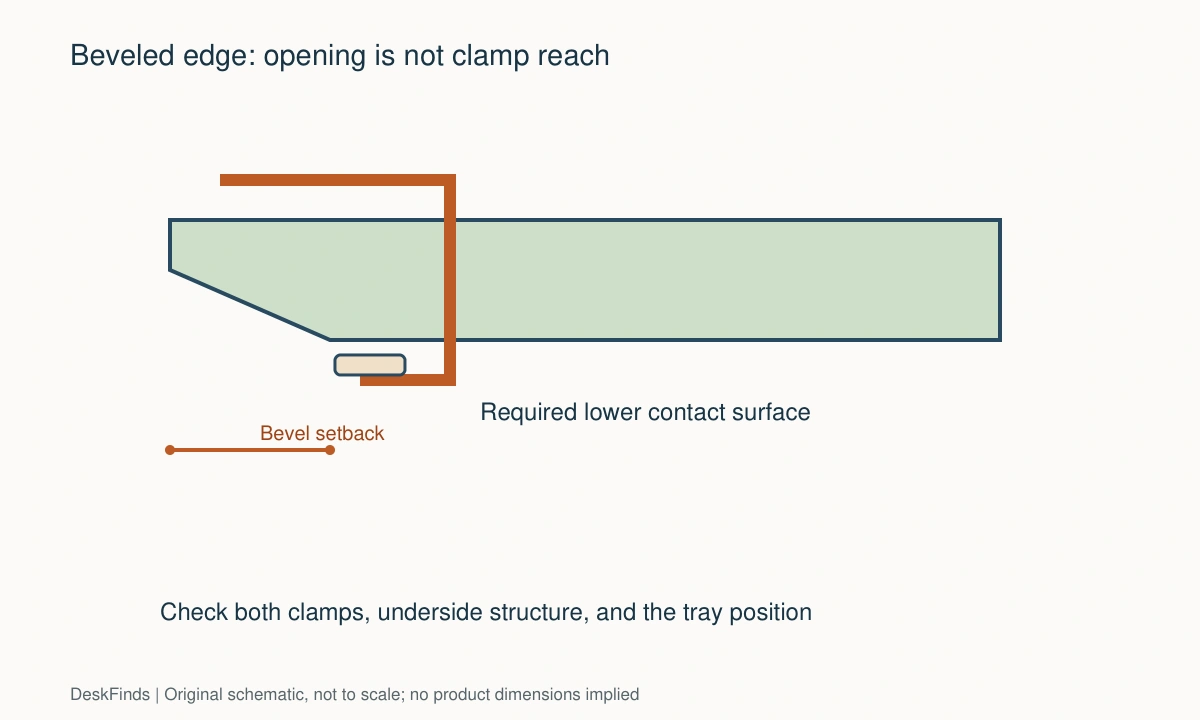
Find the manufacturer’s drawing of the upper bracket and lower pad. Record their size and how far inward they reach. The clamp opening describes thickness capacity; it does not necessarily describe the usable depth past an edge bevel.
Mark the expected contact areas on a paper section drawing. Both surfaces should meet the product’s requirements. A pad contacting only a slope or narrow ridge is not equivalent to full intended support.
Measure the bevel setback
Measure from the outermost desk edge to where the relevant flat surface begins. Repeat on the underside. Then compare that distance with the clamp’s reach and body shape.
A hypothetical clamp that reaches 1.5 inches inward cannot obtain a flat contact point that begins 2 inches behind the edge. Those dimensions are an illustration, not a recommendation for a particular tray. A longer clamp may help only if every other fit and material requirement is met.
Check two-clamp alignment
On a concave desktop, the left and right mounting points may lie at different angles relative to the tray. A rigid tray frame may not allow both clamps to seat properly. Check the permitted orientation rather than assuming each clamp can rotate independently.
Measure at the actual spacing required by the product. A straight central section of the desk may be too short for two clamps even though one clamp appears to fit. The tray’s mounting span is a separate dimension from keyboard-platform width.

Inspect the apron and frame
A front apron can block the lower clamp screw. A crossbar can occupy the space the tray rails need. These obstacles remain relevant even after the edge profile passes.
Look at the tray’s full installed envelope: clamps above the desk, screws below it, rails, platform, and any mouse extension. A narrow tray may have a wide clamp-to-clamp footprint. Ask for all relevant drawings before ordering.
Confirm desktop construction
A thick-looking edge can conceal a lightweight or hollow interior. Ask the desk maker whether clamping this accessory is permitted at the proposed location. A clamp range is not proof that the desktop can carry the load.
Do not assume a reinforcement plate makes every material acceptable. A plate can change contact distribution but does not establish the strength of an unknown core or unsupported edge. Follow the desk and tray instructions together.
Check the working position
A tray adds hardware below the top and usually changes where the keyboard sits relative to the desk. Confirm thigh clearance and the chair’s ability to approach. A successful clamp attachment does not guarantee a suitable typing position.
Place the keyboard and mouse together on the proposed platform outline. If the mouse must remain on the desk at a different height, consider whether that arrangement works for your tasks. Platform usability is separate from edge compatibility.
Compare alternatives without improvising mounts
A screw-mounted tray may avoid the front-edge clamp, but it needs suitable material, fastener depth, and clear mounting space. It is not an automatic answer for thin or hollow tops. Ask the desk maker about drilling and the tray maker about installation.
A different desk, lower input surface, or compact keyboard arrangement may be more practical than adapting an incompatible edge. Choose the alternative that resolves the whole working position rather than simply attaching the tray somehow.
Send a useful support request
Include the desk model, material information, side-profile photo, underside photo, bevel measurements, and desired clamp spacing. Ask whether the exact tray can mount according to its instructions at those locations.
A seller’s generic answer that the desk is within the thickness range leaves the edge question unresolved. Ask specifically about the flat contact depth and curvature. Keep written confirmation with the installation instructions.

Make a pass/fail record
| Check | Pass only when |
|---|---|
| Edge profile | Clamp reaches the required compatible flat surfaces |
| Mounting span | Both clamp locations seat as intended |
| Underside | Apron, rails, and screws have clear space |
| Desktop material | The proposed mounting method is permitted |
| Working position | Keyboard, mouse, thighs, and chair fit together |
For a conventional straight edge, our keyboard-tray fit guide covers the broader measurements. This guide addresses the extra geometry that makes curved and beveled desks difficult. If the mount needs an improvised wedge to work, treat compatibility as unconfirmed.
For the desk construction issue, see mounting-method comparison.
Compare three difficult edge profiles
Straight desk with an underside bevel
The upper bracket may rest on a flat surface while the lower pad meets a slope. Measure how far the underside bevel extends inward and compare it with the clamp’s actual reach. A desktop-thickness match does not resolve this contact problem.
Ask whether the tray maker permits the exact edge profile. A clamp with a deeper reach might be suitable, but only if it also clears the apron and provides the required contact area. Do not replace the manufacturer’s contact design with a homemade angled block.
Concave desktop with two clamps
The edge can turn away from a straight tray frame. Mark the two clamp locations at the product’s required span and draw the local edge direction at each point. Then compare with the permitted clamp alignment.
If the clamps cannot seat as designed, moving them closer is an option only when the tray supports that spacing. Otherwise, a different mounting design or input arrangement is needed. One clamp looking secure does not validate the whole platform.
Thick decorative edge with a lighter core
A substantial border can conceal a weaker central construction. Identify both the desk model and the material at the actual mounting points. A short clamp may contact only the decorative edge; a deeper clamp may reach another material entirely.
Obtain desk-maker guidance for the proposed accessory load and location. Do not treat a reinforcement plate as a certification of the core. Geometry, material support, and the working position must all pass independently.
Make a profile photograph useful
Place a ruler near the edge without damaging the finish and photograph the top, side, and underside. Mark where the flat contact surfaces begin. Include the apron and nearby frame in a second image so support can see whether the clamp screw or tray rail has space.
Ask a precise question: can this exact clamp seat correctly at these two locations according to the installation instructions? That is more useful than asking whether a tray fits a two-inch desk. Thickness is only one of the dimensions involved.
Protect the alternative plan from the same mistake
A screw-mounted tray may appear to bypass the bevel, but its rails need a sufficiently large flat mounting area and suitable fastener engagement. A rounded front edge can also change how far forward the platform must project to clear the desk.
Draw the keyboard in the working position and the tray in its stored position. Include thighs, chair arms, and mouse access. The alternative should solve the complete task rather than merely attaching hardware beneath the desktop.

Avoid buying an adaptation before confirming the interface
A deeper clamp, reinforcement plate, or alternative tray can sound like an easy fix. Each changes a different part of the problem. A deeper clamp may reach past a bevel but collide with a rail. A plate may spread contact while leaving the lower pad on a slope. A screw-mounted tray may avoid the edge but require material unsuitable for fasteners.
Write the failure precisely before choosing a fix: insufficient flat reach, incompatible clamp angle, blocked screw, unsuitable desktop construction, or poor input position. Then ask whether the proposed alternative resolves that specific failure while keeping all other requirements satisfied. This prevents a sequence of accessories bought to compensate for one another.
For a curved front, mark the tray’s centerline and both clamp positions on the desk plan. The local edge angle can differ at each location. Do not assume that moving the entire assembly slightly left or right preserves the same geometry. Recheck both points whenever the position changes.
Keep return terms and assembly instructions available during a trial. Do not mark or drill the desk before the mounting and material questions are settled. Once a product needs modification to fit, the purchase has become a different project with different risks and permissions.
The final choice may be to keep the keyboard on the desk, change chair or desk height appropriately, or select another desk. That can be a better result than attaching a tray through a complicated unsupported workaround. The objective is a usable input position with a documented mount, not merely finding a way to hang a platform below a difficult edge.
Keep the tray’s stored position on the drawing. A platform may work well while extended but meet the curved front or a pedestal when pushed back. Include the keyboard’s tallest point and any mouse support in that parked envelope. If storage requires removing the keyboard each time, assign it a separate safe destination and decide whether the routine is acceptable. Do not bend a rail or leave a stop disengaged to achieve more travel. The tray should retain its intended mechanism in both states. This final check is especially valuable when an alternative mounting location has moved the platform away from its expected centerline.
For another underside obstruction, compare rear-crossbar mounting checks.
Worked example: enough clamp opening, not enough reach
Suppose a desk has a beveled underside and a gently concave front edge. A keyboard tray’s published thickness range includes the desk, so the buyer initially assumes the clamp will fit. A profile drawing reveals that the lower flat surface starts farther inward than the clamp pad can reach.
The thickness comparison has passed, but the contact comparison has failed. The buyer records that failure specifically rather than tightening the clamp onto the slope. A wedge or reinforcement plate is not treated as an automatic fix because it changes the contact arrangement and still needs approval.
A deeper compatible clamp is considered. Its lower pad could reach the flat surface, but the desk’s apron occupies the screw-access area. That candidate fails for a different reason. The buyer requests a complete clamp drawing rather than continuing to compare only reach and opening.
The plan-view curve is checked next. At the required mounting span, the two local edge directions differ. The tray frame does not permit the needed independent clamp orientation. Moving the clamps closer would only be valid if the product supports that spacing, so the buyer asks about the documented mounting range.
A screw-mounted alternative is then evaluated as a separate installation. It requires suitable material, fastener engagement, and clear rail space. The desk maker cannot confirm the necessary mounting region, so drilling is not pursued merely to rescue the original tray idea.
The buyer finally tests the keyboard on the desk with a suitable adjustment to the overall workstation. If another tray or desk is later considered, the retained profile and underside sketch will make the inquiry clearer. The objective remains a useful keyboard and mouse position with a supported installation.
This example demonstrates why apparently small edge details can control the purchase. Thickness, reach, contact area, screw access, two-clamp alignment, and material suitability are independent checks. Passing one does not make another optional, and a succession of adaptations can be less practical than choosing a different input arrangement from the start.
For the tray’s general room requirements, see workstation assessment.
Your eight-point comparison worksheet
Use these checkpoints to compare the actual room, furniture, or device with a candidate product. Keep each result separate; a favorable overall impression cannot resolve a failed required function. Blank record fields are deliberate so you can use your own measurements rather than copying hypothetical examples.
1. Plan-view curve
Draw the desktop outline from above at both clamp positions and record the spacing required by the tray.
A concave edge can prevent a rigid two-clamp assembly seating even when one clamp looks compatible in isolation.
2. Upper contact
Identify the flat area the upper bracket requires and measure its position relative to the outside edge.
Do not count a rounded ridge or a narrow decorative strip as equivalent contact unless the product instructions permit it.
3. Lower contact
Measure the underside bevel setback, available flat area, and local surface construction beneath each clamp.
Compare the lower pad’s actual reach and shape; a suitable opening range does not establish that the pad reaches a usable surface.
4. Clamp access
Include the complete lower screw and the space needed to operate it, with apron and frame parts marked.
Choose a mounting location where the instructions can be followed without bearing on an unintended rail or omitting a clamp component.
5. Mounting span
Check the product’s permitted clamp-to-clamp distance and whether either clamp can change angle as documented.
Do not reposition a fixed mounting system or bend brackets to make a curved desk behave like a straight edge.
6. Desktop construction
Identify material and internal construction at the proposed locations and obtain permission for the mounting method.
Keep hollow cores and unsupported edges out of an assumed fit calculation; a reinforcement plate does not establish unknown structural capacity.
7. Input position
Place the actual keyboard and mouse on the tray outline and check seated reach, thighs, and chair approach.
A secure mount is only one part of success; reject a platform that creates an unsuitable or obstructed working position.
8. Alternative mount
For screw or other mounting, verify substrate, fastener depth, underside area, rails, and complete platform travel.
Treat it as a separate installation requiring its own checks rather than an automatic workaround for an incompatible clamp edge.
Sources and scope
- Fellowes: DeskReady keyboard-drawer requirements - Example showing model-specific clamp and unobstructed-underside requirements; not approval for a curved or beveled edge.
Editorial note: This is a research-based planning guide, not a hands-on product test or a certification of a custom installation. Dimensions described as hypothetical are examples. Follow the exact product instructions and confirm unresolved compatibility before buying.