
How to Choose a Desk for a Room With Baseboards and Wall Outlets
Affiliate Disclosure: We may earn a small commission on qualifying Amazon purchases at no extra cost to you. Full disclosure →
A desk can fit a wall’s width and still stand unexpectedly far from it. Baseboards may stop the feet, a crossbar may hit trim, and a rear-facing plug may need more room than the desktop drawing suggests. Those small projections can change the room layout.
Quick answer: Map the wall in side view, record the baseboard projection and height, locate the outlet and installed plugs, and compare those obstacles with the desk frame at the same heights. Plan the necessary rear gap deliberately. Do not cut trim, alter the desk, or force a connector into a tight bend just to make the desktop look flush.
Measure the trim as a shape
Record how far the baseboard projects from the finished wall and how high it rises. Decorative trim may have several steps. The thickest section does not always sit at the floor, so measure where the desk’s feet, legs, and crossbar will approach it.
Mark any wall molding higher up. A rear support that clears a low baseboard may meet a chair rail or cable cover. Photograph the profile with a ruler visible so you can compare it with a frame drawing later.
Find the desk’s first contact point
A top that overhangs its rear legs may clear trim while keeping the work surface relatively close to the wall. A frame with feet projecting backward may stop earlier. Neither design can be judged from desktop depth alone.
Ask for the rear leg setback, foot length, and crossbar height. Place cardboard blocks matching the trim profile against a rough desk outline. This helps distinguish a desktop-wall gap from a frame-wall collision.
Measure the outlet with a real plug installed
An empty outlet is not the relevant shape. A straight plug, right-angle plug, and plug-in adapter can have different projections and cable exits. Use your actual equipment or obtain a dimensioned drawing of the connector.
Include access for insertion and removal. A connector that technically fits behind the desk may still be impossible to reach when equipment needs servicing. Do not plan to tug a cord to remove a plug from an inaccessible socket.
Choose a rear gap based on the controlling object
The required gap is determined by the largest relevant obstacle and its operating needs. It is not a universal number that applies to every desk. Keep the cable’s natural route and the manufacturer’s bending instructions where provided.
For example, if a frame clears the trim but a plug requires more depth, the connector controls the final desk position. Moving the desk forward slightly may be more practical than replacing several unrelated components.
Check the monitor arm separately
A rear clamp can need clearance both behind and below the worktop. The wall outlet may sit exactly where the lower clamp or adjustment screw needs to go. A desk-wall gap chosen only for plugs may not be enough for an arm.
Map the clamp position before mounting. Do not shift it onto an unsupported desk area to avoid an outlet. For the full clearance question, see our monitor-arm mounting guide.
Plan power access without hiding problems
A power strip can consolidate connections, but it still needs suitable placement and use. Keep switches accessible and do not cover adapters with soft storage. Follow the device ratings and avoid connecting power strips in series.
If the only outlet is far from the desk, choose a suitable cable route around the room rather than across the chair’s path. A cord cover must suit the surface and traffic, and it does not make a pinched or damaged cord acceptable.
For supply consolidation, compare power strips and surge protectors.
Account for standing-desk travel
As the desktop rises, it may pass outlets, molding, wall shelves, or cable raceways. Inspect the full vertical path of rear accessories. Keep enough cable movement for the intended height range without using the wall socket as a strain-relief point.
A desk that sits correctly at its lowest position can still catch a projecting plug at a higher position. Use the manufacturer’s setup process and clear the motion path before normal operation. Do not intentionally test collision protection by driving the desk into an obstacle.
For moving tops, review standing-desk cable routes.
Consider a desk that works away from the wall
A small intentional gap can improve access and cleaning. In some rooms, a desk with a finished back can sit perpendicular to the wall or float slightly into the room. Compare the resulting chair route and glare before choosing that arrangement.
Do not trade one conflict for another. Moving the desk forward may reduce the space behind the chair. If that route becomes too tight, a shallower top or different frame may be a better purchase.
Avoid unapproved modifications
Notching a leg, cutting a rear brace, or drilling a composite top can change the furniture’s strength and warranty. Obtain written manufacturer guidance before modifications. A visible rear gap is preferable to a damaged support system.
The same applies to the room: removal of trim, relocation of an outlet, or work near wiring requires the right skills and permissions. Choose furniture that accommodates the existing wall where possible.

Turn the measurements into a buying filter
| Wall condition | Desk information to request |
|---|---|
| Tall baseboard | Rear brace and stretcher heights |
| Deep baseboard | Rear leg setback and foot projection |
| Outlet behind top | Desktop rear profile and plug access |
| Large adapters | Space for the complete connected adapter |
| Adjustable desk | Clear moving envelope at every intended height |
Compare candidate desks using the same finished-wall reference. A smaller advertised depth can still project farther into the room if its frame stops against thick trim. Your final floor plan should show the installed front edge, not merely the top’s catalog depth.
Compare three wall-and-frame combinations
Deep baseboard with inset rear legs
A top with enough rear overhang may sit close to the wall while its legs remain in front of the trim. Verify the overhang and leg profile with a drawing. Also check whether a low stretcher connects those legs and becomes the first contact point instead.
Measure the installed front edge once the frame is positioned. This is the number that belongs on the room plan. Two desks with identical desktop depth can project different distances into the room because their frames interact differently with the baseboard.
Low outlet behind a rear crossbar
The plug may fit below the worktop while the crossbar makes it difficult to reach. Check access with the cabinet or computer equipment you intend to place nearby. If connecting or disconnecting requires lying beneath a loaded desk, reconsider the arrangement.
A power strip can relocate connection points only when its supply route and mounting are suitable. It should not become an excuse to conceal an overloaded adapter cluster. Keep required ventilation, switches, and labels accessible enough for normal use and inspection.
Adjustable desktop passing a wall projection
A plug-in adapter or wall-mounted cable cover may sit in the moving path. Draw the desktop and rear accessories at the lowest and highest intended positions, then check intermediate heights where the obstacle exists. Endpoint clearance alone does not establish a clear path.
If the desk needs to move farther from the wall, update the chair clearance behind it. The change affects the whole room. A shallower top may preserve the working route more effectively than squeezing the chair into the remaining space.
Use a side-profile purchase sheet
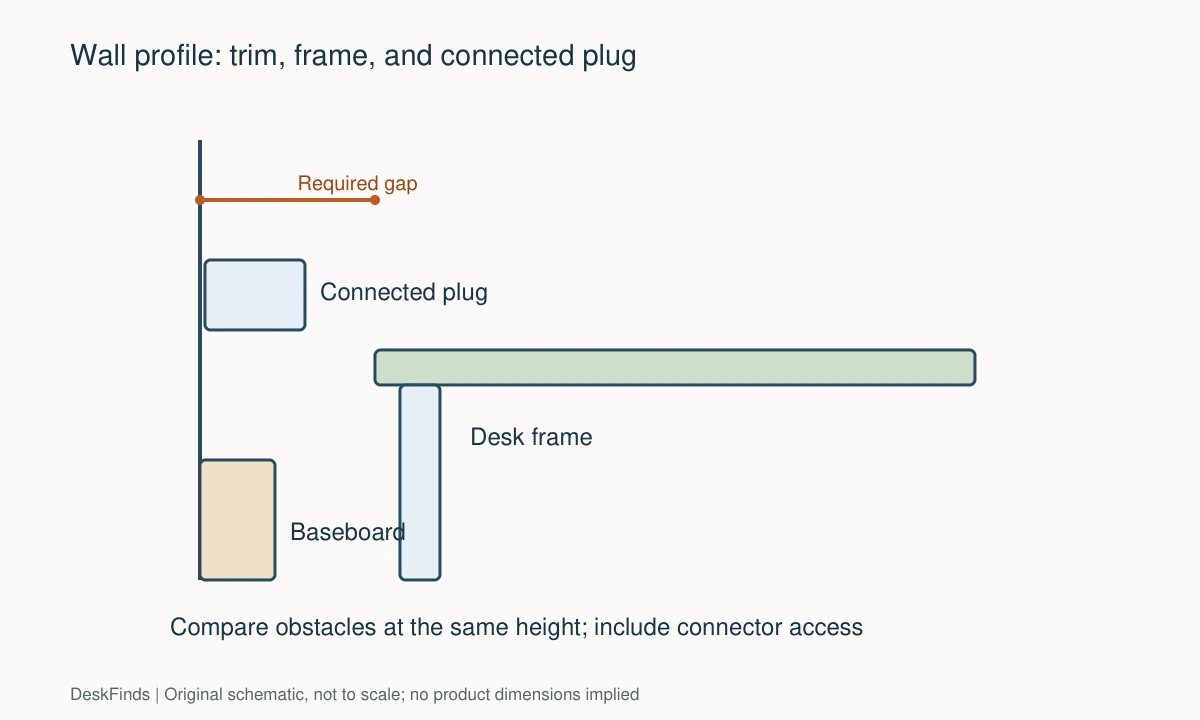
Draw the wall as a vertical line, then add trim and connected plugs at their measured positions. Draw the desk frame and top in another color. You do not need a precise engineering drawing to see which object sets the rear gap, but dimensions must share the same reference surface.
Write the required rear gap as a result of that comparison, not a general recommendation. If one connector is unknown, mark the gap unresolved. A right-angle cable may change the result, but verify its connector orientation and electrical suitability before making it part of the plan.
Keep maintenance realistic
Leave a way to clean behind the desk and inspect connections. A workstation that cannot move may need accessible cable openings or a carefully planned side approach. Do not seal a service route with decorative panels until the equipment has been used and checked.
When adding an arm, lamp clamp, or cable tray later, repeat the underside comparison. The original desk-wall gap may no longer accommodate the new hardware. Saving the wall profile makes that check easier than measuring the whole room again.

Compare installed depth instead of catalog depth
Create a simple sum for each candidate: the desktop depth plus the rear separation required by its frame, connectors, and accessories. This describes the front edge’s position relative to the wall. Use consistent reference points and remember that the required separation comes from the controlling obstruction, not from adding every gap twice.
For example, if one connector already sits within a larger frame-required wall gap, it may not add further projection. If it extends beyond that gap, it may become the controlling object. Draw the profiles together instead of stacking unrelated clearance allowances. The drawing should reveal the actual installed envelope.
Also account for cleaning and hand access. These may justify more room than the strict physical collision test. Describe them as practical needs rather than pretending they are universal manufacturer clearances. A fitted desk with remote service access and a frequently unplugged laptop station can reasonably need different arrangements.
When choosing an adapter or right-angle cable, verify connector orientation as well as electrical function. A plug that points the wrong way can cover a neighboring socket or make the route worse. Do not buy a cable solely because its product photograph looks flatter.
Finally, save the rear-wall sketch for future changes. A new power supply, monitor arm, or cable tray can alter the required gap. Rechecking the controlling profile is faster and more reliable than slowly pushing the desk toward the wall until something resists. The goal is a deliberate installed position that remains usable and easy to service.
Worked example: two desks with the same advertised depth
Consider two candidate desks with equal desktop depth. Desk A has rear feet that project behind the legs, while Desk B has inset rear legs and more top overhang. The room has a deep baseboard and an outlet above it. In a catalog comparison, the desks appear to occupy the same floor depth.
The side-profile sketch shows otherwise. Desk A’s rear feet meet the trim and stop the frame farther from the wall. Desk B clears the trim, so its position is controlled by the connected power adapter instead. The buyer records each installed front edge relative to the finished wall rather than comparing top depth alone.
Desk B initially looks better for chair clearance, but a monitor-arm clamp adds another rear and underside shape. Its lower adjustment screw would sit close to the outlet, making installation and later access awkward. The buyer checks another permitted mounting position and the arm’s reach before deciding that the desk has passed.
A right-angle power lead is considered to reduce projection. The connector must have the correct orientation and electrical compatibility; a flatter appearance is insufficient. The buyer verifies those requirements and checks whether the lead would cover an adjacent socket. If it does, the smaller profile may not be a useful improvement.
The desk’s final rear gap is then marked on the floor with the occupied chair in place. Both the front working area and the route behind the chair are checked. The buyer accepts a visible wall gap because it preserves cable access and avoids compression. Decorative cable concealment is postponed until the arrangement has been used.
This comparison produces an installed-depth result specific to the frame, wall, connector, and clamp. It is not a universal recommendation for how far desks should stand from walls. Retaining the sketch allows a later adapter or arm change to be checked deliberately. Without it, the household might gradually push the desk back until a plug or clamp becomes the accidental stop.
When the rear frame blocks a screen mount, see monitor arms and crossbars.
Your eight-point comparison worksheet
Use these checkpoints to compare the actual room, furniture, or device with a candidate product. Keep each result separate; a favorable overall impression cannot resolve a failed required function. Blank record fields are deliberate so you can use your own measurements rather than copying hypothetical examples.
1. Baseboard profile
Record projection at several heights, including decorative steps rather than treating the trim as one uniform block.
Compare the shape with the desk’s actual contact points so the tightest relevant part controls the installed position.
2. Rear legs
Obtain leg setback and rear foot projection from a frame drawing, not just the desktop’s overall depth.
Calculate where the front edge ends up after the feet clear the wall trim; this is the floor space the room must accommodate.
3. Crossbar height
Measure the rear stretcher’s height and distance inward from the top edge, including projecting fasteners.
Check both trim and outlet collisions at those heights before assuming the legs provide the only obstruction.
4. Installed connector
Measure the real plug or adapter with its cable attached and bending naturally under the maker’s instructions.
Reserve room for both its resting shape and connection access; an empty outlet measurement does not establish fit.
5. Clamp hardware
Map any monitor-arm or lamp clamp above and below the top at the chosen mounting point.
Keep the lower pad and adjustment screw clear of outlets and frame parts while retaining a mounting location approved for the desktop.
6. Room projection
Mark the desktop front edge after adding the necessary rear gap, then put the chair at its actual work position.
If the room route becomes too tight, compare a shallower top or another wall rather than compressing cables to reclaim space.
7. Moving height
Inspect every wall projection through the adjustable desk’s intended travel, including equipment fastened to the rear.
Clear the path by design and follow setup instructions; anti-collision features are not a substitute for a compatible layout.
8. Service access
Try reaching switches and connectors without pulling cables or removing loaded storage beneath the desk.
Leave an intentional access route and keep it free when adding decorative panels, organizers, or future equipment.
Sources and scope
- Ergotron: desk-mount systems - Reference for mounting-interface choices; wall profiles and connector checks here are original planning guidance.
Editorial note: This is a research-based planning guide, not a hands-on product test or a certification of a custom installation. Dimensions described as hypothetical are examples. Follow the exact product instructions and confirm unresolved compatibility before buying.