
8 Best Vertical Docking Stations for Clean Desk Setups in 2026
8 best vertical docking stations for a clean desk setup in 2026, from a dedicated vertical laptop stand dock to compact hubs that stand upright. Compare stability, ports, and MacBook clamshell fit.

New to Amazon Prime?
Get fast, free shipping on every pick in this guide, plus Prime Video and exclusive deals.
Try Prime Free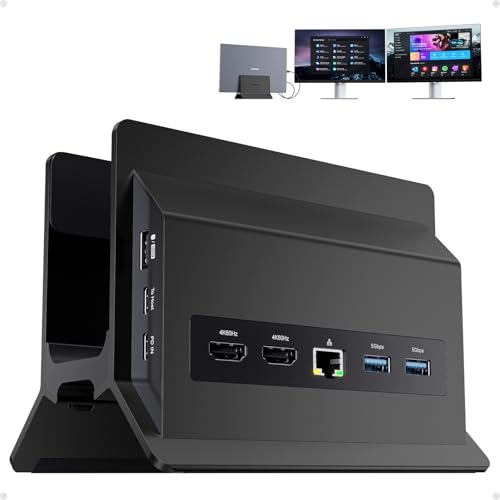


At a Glance
PULWTOP 11-in-1 USB C Docking Station, Vertical Laptop Dock Stand
↓ See why we picked it4URPC MacBook Pro Docking Station, Vertical Stand for MacBook
↓ See why we picked itBaseus Spacemate Laptop Docking Station, 11-in-1 for Windows
↓ See why we picked itWAVLINK USB C Docking Station, Dual 5K/4K DisplayLink 13-in-1
↓ See why we picked itPlugable USB C Triple Display Docking Station
↓ See why we picked itAnker Nano 13-in-1 Laptop Docking Station, Detachable 6-in-1 Hub
↓ See why we picked itAnker Prime Docking Station (DL7400), 14-Port Triple Display
↓ See why we picked itA vertical docking station frees up desk surface by standing your laptop and its ports upright instead of flat, but the format brings its own tradeoffs, port accessibility gets harder when connectors sit up top or on the side, cable routing needs more planning to actually look clean, and running a MacBook in clamshell mode on a vertical stand raises a genuine thermal question worth understanding before you buy.
Below are 8 docking stations we evaluated for vertical or space-saving desk setups, from a purpose-built vertical laptop dock to compact hubs that pair well with a separate vertical stand, weighed on stability, port placement, and how each handles a clamshell-mode laptop running under load.
5 Criteria to Look For Before Buying a Vertical Docking Stations for Clean Desk Setup
Key buying criteria so you get the right fit the first time.
Check the real power delivery wattage, not just "PD" in the listing
Power delivery (PD) wattage determines whether a dock can actually charge your laptop while it's connected, not just pass a trickle of power through, and this number varies widely, from 60W barely-adequate figures up to 100W or higher business-tier docks.
This matters because a dock rated below what your laptop actually needs to charge under load, especially a larger laptop or one running demanding tasks while docked, will slowly drain the battery even while "charging", a frustrating and easy-to-miss problem.
Check the listing for the specific PD wattage number, and compare it against your laptop's actual charging brick wattage, not just whether the listing mentions power delivery at all.
Verify actual display support against your specific laptop and GPU, not just port count
A dock listing multiple HDMI or DisplayPort outputs doesn't guarantee your laptop can actually drive all of them at full resolution and refresh rate simultaneously, that capability depends on your laptop's specific GPU and USB-C controller, which some docks work around using DisplayLink technology and others don't.
This distinction matters a lot if you're building a dual or triple monitor setup, since a laptop that can't natively drive multiple external displays will show a blank or mirrored screen on a non-DisplayLink dock's extra port, regardless of how many ports the dock has.
Check whether the dock uses native DisplayPort Alt Mode or DisplayLink chip technology, and separately verify your specific laptop model's documented maximum number of external displays before assuming any multi-port dock will drive them all.
Match data transfer speeds and Ethernet to what you actually move and how
USB data ports on a dock range widely in real transfer speed, from basic 480Mbps USB 2.0 speeds up to 10Gbps or higher, a gap that matters enormously if you regularly move large files to and from external drives, but barely matters if you're just charging a mouse and keyboard.
Ethernet port speed follows the same logic, a dock's Gigabit or 2.5Gb Ethernet port is only as fast as your actual home or office network infrastructure supports, so paying for 2.5Gb Ethernet on a network that tops out at Gigabit gains nothing.
Check the specific listed speed for each port type you'll actually use regularly, and compare Ethernet speed against your router's actual rated speed, not just the dock's spec sheet in isolation.
Confirm compatibility with your specific laptop's USB-C or Thunderbolt port
Not every USB-C port supports the same features, some laptops only support USB-C data and charging without any video output over that port at all, while others support full Thunderbolt with much higher bandwidth for multiple 4K displays.
Docks built around Thunderbolt certification generally support more demanding multi-display and high-speed configurations, but require a genuinely Thunderbolt-capable port on your laptop to unlock that performance, plugging a Thunderbolt dock into a USB-C-only port still works but loses the extra bandwidth.
Check your specific laptop's documented port capabilities (Thunderbolt 3, Thunderbolt 4, or USB-C without Thunderbolt), not just that it has a USB-C-shaped port, before assuming any docking station will unlock its full advertised capability.
Consider heat and long-term reliability under sustained daily use
A docking station that stays plugged in and under load for 8+ hours a day handles thermal stress very differently than a hub used occasionally for a quick file transfer, and a compact plastic-bodied dock with no real heat dissipation can throttle performance or degrade faster under that kind of sustained daily use than an aluminum-bodied one.
This matters more for anyone using the dock as their primary daily workstation setup than for occasional or travel use.
Check reviews specifically for mentions of the dock running hot, disconnecting intermittently after extended use, or degrading over months, rather than relying on the unboxing-day performance most reviews describe.
8 Best Vertical Docking Stations for Clean Desk Setups in 2026
PULWTOP 11-in-1 USB C Docking Station, Vertical Laptop Dock Stand
About this pick
The PULWTOP is built specifically as a vertical stand and dock combined, holding a closed laptop upright while routing 2 HDMI 4K outputs, 10Gbps USB A/C ports, and Ethernet through a single base rather than a separate stand plus a flat dock. That combination is the clearest example in this list of the vertical format done as one purpose-built unit instead of two stacked accessories.
If you plan to run a MacBook in clamshell mode on this stand, check that the contact points leave an air gap under the laptop's vents rather than sitting flush, sustained heavy tasks in clamshell mode can trigger thermal throttling within 20-30 minutes if airflow underneath is blocked.
Strong 10Gbps data port speed. Set against that, fit depends on your specific laptop's thickness and vent placement. Both matter when comparing it to the other picks here.
Best for: Buyers who want a true all-in-one vertical stand and dock rather than 2 separate pieces
Check price on AmazonPros
- +Only pick in this list combining a vertical stand and dock in one unit
- +Strong 10Gbps data port speed
- +Frees up the most desk surface of any pick here
- +Reasonable price for a dedicated vertical form factor
Cons
- −Fit depends on your specific laptop's thickness and vent placement
- −Vertical port placement means reaching up or over to plug in USB drives
- −New listing with no review history yet
4URPC MacBook Pro Docking Station, Vertical Stand for MacBook
About this pick
4URPC's dock is built explicitly around a MacBook-shaped vertical stand, which matters a lot for a Mac buyer specifically because some Apple Silicon chip generations only enable a second external display in clamshell mode. A vertical stand like this one makes running the laptop lid-closed with dual monitors a natural, permanent setup rather than something you re-trigger every time you close the lid.
That said, clamshell mode blocks the laptop's own screen and keyboard from providing any visual thermal warning, so pick a stand position with real airflow clearance underneath and avoid stacking anything against the vents during long, demanding sessions.
The standout detail is that enables clamshell dual-display use cases naturally. Balancing that out, mac-specific design, less useful for Windows laptops.
Best for: MacBook owners who want a permanent clamshell dual-display vertical setup
Check price on AmazonPros
- +Vertical stand shape matched specifically to MacBook dimensions
- +Enables clamshell dual-display use cases naturally
- +Includes SD and microSD card slots
- +100W adapter included in the price
Cons
- −Mac-specific design, less useful for Windows laptops
- −Clamshell mode raises real thermal risk under sustained heavy tasks
- −Fewer USB-A ports than some flat dock alternatives
TobenONE 18-in-2 MacBook Docking Station, Dual Monitor
About this pick
TobenONE packs 18 total ports across its docking base, the highest port count in this list, aimed at a MacBook user who wants to consolidate a vertical stand setup, dual 4K monitors, and a wide range of peripherals into one connection point. The included 150W adapter is the highest wattage of any pick here.
If you're pairing this with a separate vertical stand to run a MacBook in clamshell mode, keep the same air-gap principle in mind, a vertical position with the vents flush against a stand's contact points is the setup most likely to trigger throttling under sustained load.
150W adapter is the strongest included charging in this list. That's a real strength, but weigh it against the flip side: higher price than most other picks.
Best for: MacBook users who want maximum port consolidation alongside a separate vertical stand
Check price on AmazonPros
- +Highest total port count in this list
- +150W adapter is the strongest included charging in this list
- +Dual 4K monitor support
- +Good consolidation point for a heavily peripheral-loaded desk
Cons
- −Higher price than most other picks
- −Not paired with its own vertical stand, buy one separately
- −Larger dock body takes more desk space than the slimmer picks
Baseus Spacemate Laptop Docking Station, 11-in-1 for Windows
About this pick
Baseus's Spacemate is a compact 11-in-1 hub built for Windows laptops, with triple display support across 4K HDMI and DisplayPort, 10Gbps data ports, and 100W PD charging, all in a footprint small enough to sit upright beside a laptop on a vertical stand without dominating the desk.
Plugging in USB drives or headphones does mean reaching over to wherever this hub sits next to the stand, a common tradeoff of any vertical setup, a short USB-C extension cable brought down to desk level solves the reach problem cheaply.
Triple display support. On the other hand, no vertical stand included, needs a separate one. Both are worth keeping in mind before deciding.
Best for: Windows laptop owners who want a compact hub next to their own vertical stand
Check price on AmazonPros
- +Compact footprint pairs well with a separate vertical laptop stand
- +Triple display support
- +10Gbps data ports
- +Power adapter included in the price
Cons
- −No vertical stand included, needs a separate one
- −Port reach can require an extension cable in a vertical setup
- −Windows-focused, less optimized for Mac clamshell use
WAVLINK USB C Docking Station, Dual 5K/4K DisplayLink 13-in-1
About this pick
WAVLINK's DisplayLink-based dock supports dual 5K or 4K displays and works across M1 through M4 Macs as well as Windows, useful if your clean desk setup mixes displays or you switch laptops. 130W PD charging and 5 USB ports round out a genuinely full-featured 13-in-1 layout.
DisplayLink docks route video over USB rather than a native GPU connection, which is worth knowing if you're troubleshooting display flicker in a vertical, clamshell-style setup, the fix is usually the DisplayLink driver rather than the dock's cabling.
A genuine advantage here is that broad Mac and Windows compatibility. The tradeoff is that displayLink requires driver installation and updates.
Best for: Buyers who want dual 5K displays and cross-platform compatibility in a clean desk setup
Check price on AmazonPros
- +Dual 5K display support, higher than most picks in this list
- +Broad Mac and Windows compatibility
- +130W PD is among the highest in this list
- +5 USB ports plus Ethernet
Cons
- −DisplayLink requires driver installation and updates
- −No included vertical stand
- −Larger body than the more compact hub picks
Plugable USB C Triple Display Docking Station
About this pick
Plugable's triple display dock covers 3 HDMI outputs, 100W PD, and 6 USB 5Gbps ports with broad Windows, macOS, and ChromeOS compatibility, and its compact rectangular body stands neatly beside a vertical laptop stand without adding much visual clutter to the desk.
Running cable management cleanly in a vertical setup usually comes down to the last stretch, the power cable from the dock's PSU to the wall outlet, a cable channel or clip along the desk edge keeps that final cable from undoing an otherwise tidy layout.
Triple display support. That said, no vertical stand included. Neither should be a surprise once you know to look for it.
Best for: Buyers who want a reliable, broadly compatible dock next to a vertical stand
Check price on AmazonPros
- +Established brand with broad OS compatibility
- +Triple display support
- +6 USB ports for peripheral-heavy desks
- +Compact body suits a vertical, minimal-clutter layout
Cons
- −No vertical stand included
- −1 of 3 HDMI outputs is limited to 30Hz at 4K
- −Mid-range price without the highest-end display specs
Anker Nano 13-in-1 Laptop Docking Station, Detachable 6-in-1 Hub
About this pick
The Anker Nano splits into a main dock plus a detachable 6-in-1 hub, letting you keep the core dock stationary next to a vertical stand while carrying the smaller hub separately when you need portability. That split design is a genuinely different approach to the reach problem that vertical setups create.
With the detachable hub, you can bring the ports you actually need most, like a USB-C data port or SD slot, down to desk level on a short cable rather than reaching up to the full dock mounted higher on a stand.
Worth calling out specifically: triple display support. The catch is detachable design adds one more cable to manage.
Best for: Buyers who want dock ports split between a fixed unit and a portable, closer-to-hand hub
Check price on AmazonPros
- +Detachable hub solves the vertical-setup port reach problem directly
- +Triple display support
- +10Gbps USB-C data port
- +Reasonable mid-range price
Cons
- −Detachable design adds one more cable to manage
- −No vertical stand included
- −New listing with no review history yet
Anker Prime Docking Station (DL7400), 14-Port Triple Display
About this pick
The Anker Prime DL7400 is the highest-end pick in this list, with 14 ports, DisplayLink-powered triple 4K 60Hz output, 140W max charging, and a built-in cooling fan plus smart display, a rare combination for a dock meant to sit near a compact vertical setup without overheating under sustained load.
The active cooling fan is worth calling out specifically for a clean desk setup running heavy, sustained workloads, it's one of the few docks in this list built to manage its own heat output directly rather than relying purely on passive venting.
Active cooling fan manages heat under sustained load. Set against that, highest price in this list. Both matter when comparing it to the other picks here.
Best for: Buyers running sustained heavy workloads who want a dock with its own active cooling
Check price on AmazonPros
- +Highest port count and charging wattage among compact picks in this list
- +Active cooling fan manages heat under sustained load
- +Triple 4K 60Hz display support
- +Smart display adds at-a-glance status info
Cons
- −Highest price in this list
- −Requires the latest DisplayLink driver installed
- −No included vertical stand
How We Evaluated These Vertical Docking Stations for Clean Desk Setups
Each pick was assessed across 5 criteria weighted for real-world use.
Vertical stand fit and stability
Checked whether each pick includes its own vertical stand or pairs with a separate one, and how stable the resulting setup is under vibration or an accidental bump.
MacBook clamshell thermal consideration
Looked specifically at contact points and airflow clearance for picks marketed toward MacBook clamshell use, since blocked vents under sustained heavy tasks can trigger thermal throttling within 20-30 minutes.
Port accessibility in vertical orientation
Weighed how easy or awkward it is to reach USB drives, headphones, or cards when ports sit up top or on the side of a vertical setup rather than flat on the desk.
Cable routing for a genuinely clean look
Considered how much planning each dock's cable layout requires to actually look tidy, since the power cable from the dock's PSU to the wall is often the hardest one to hide.
Display and charging capability
Compared display count and resolution, charging wattage, and total port count against price to judge value within the vertical or space-saving category.
How to Choose the Right Vertical Docking Stations for Clean Desk Setups
By Rating Confidence: Highest Rated vs Most Reviewed
| Your priority | Recommended pick |
|---|---|
| Highest average rating | PULWTOP 11 |
| Largest review base, strongest reliability signal | PULWTOP 11 |
By Budget
| Budget | Recommended pick |
|---|---|
| Under $80 | 4URPC MacBook Pro Docking Station |
| Up to $228 | Anker Prime Docking Station |
Triple-Monitor vs Dual-Monitor Support
Triple-monitor support
More display headroom, worth it if you actually run three external displays. In this comparison: Baseus Spacemate Laptop Docking Station, Plugable USB C Triple Display Docking Station, Anker Nano 13, Anker Prime Docking Station.
Dual-monitor support
Covers the most common setup at a typically lower price. In this comparison: 4URPC MacBook Pro Docking Station, TobenONE 18.
Default to dual-monitor support unless you specifically run a three-display setup.
By Ethernet Support
| Your priority | Recommended pick |
|---|---|
| Wired Ethernet needed | PULWTOP 11 |
| Wi-Fi only is fine | TobenONE 18 |
For a Dual or Triple Monitor Setup Specifically
Look for
Native DisplayPort Alt Mode or DisplayLink chip technology, verified against your specific laptop's documented maximum external display count.
In this comparison
PULWTOP 11 is worth checking against its listed display support before buying, given its strong review base.
When to Spend More
Spend more if
You need reliable multi-display support and full-speed charging under daily sustained use, where Anker Prime Docking Station's higher price buys real headroom over the cheaper picks.
Save if
You only need occasional charging and a single extra port, where 4URPC MacBook Pro Docking Station covers the same job at a lower price.
Frequently Asked Questions
Is it safe to run a MacBook in clamshell mode on a vertical dock?
It can be, but airflow matters. A MacBook draws cooling air through its underside vents, and if a vertical stand's contact points sit flush against those vents, heavy sustained tasks can trigger thermal throttling within 20-30 minutes. Choose a stand, like the 4URPC MacBook Vertical Stand in this list, that leaves a genuine air gap at the bottom rather than flush contact.
Why are the ports harder to reach on a vertical docking station?
Vertical docks place their ports on top or along the side rather than flat on a desk, so plugging in a USB drive or headphones takes more reaching than a traditional flat dock. A short USB-C extension cable brought down to desk level is a simple fix if this becomes a daily inconvenience.
Do vertical docking stations actually look clean, or is that just in photos?
The vertical format itself does save real desk surface, but achieving a genuinely clean look in person still requires cable planning. The power cable running from the dock's adapter to the wall outlet is usually the last visible cable, a cable channel or clip along the desk edge solves this cheaply without needing a different dock.
Should I buy a purpose-built vertical dock or a separate stand and hub?
A purpose-built unit like the PULWTOP 11-in-1 combines both into one piece and one cable, which is simpler. A separate compact hub paired with your own vertical stand, like the Baseus Spacemate or Plugable Triple Display, gives you more flexibility to choose each piece independently, at the cost of coordinating 2 products instead of 1.
Why would I want a MacBook in clamshell mode instead of just using the built-in screen?
Certain Apple Silicon chip generations only enable a second external display specifically while the laptop is in clamshell mode. A vertical stand makes running that configuration permanently a natural setup rather than something you have to re-trigger by closing the lid each session, as long as you handle thermal clearance correctly.
Is a heavier laptop stable on a vertical dock stand?
It depends on the stand's weight rating and base design. A vertical stand or dock holding a heavier laptop needs enough base width and weight capacity to resist tipping under vibration or an accidental bump. Look for a weighted base or cable-management clip attachment points if you're mounting a larger, heavier laptop vertically.
Bottom Line
best overall: PULWTOP 11-in-1 USB C Docking Station, Vertical Laptop Dock Stand - best purpose-built vertical dock pick in this roundup.
See the full rankings above for all picks with pros, cons, and best-for summaries.
Browse on Amazon
All Prime-eligible options with current pricing.
Shop on Amazon →