
6 Best USB4 NVMe Enclosures Under $150 in 2026
We compared USB4 NVMe enclosures under $150 by brand warranty, PCIe generation support, and real sustained speed, not just the 40Gbps headline claim.

New to Amazon Prime?
Get fast, free shipping on every pick in this guide, plus Prime Video and exclusive deals.
Try Prime Free



At a Glance
ACASIS 40Gbps M.2 NVMe SSD Enclosure with Cooling Fan (TBU405 Pro)
↓ See why we picked itStepping up from the under-$100 tier doesn't necessarily buy a faster enclosure, since every pick here still tops out at the same 40Gbps interface. What changes at this budget is warranty length, name-brand support, and which specific PCIe SSD generations each enclosure is actually built and tested around.
We looked past the shared speed rating to compare controller chips, brand warranty terms, and the fine print each manufacturer includes about drive compatibility, since that's where two enclosures at nearly the same price genuinely diverge once you own one for more than a few months.
5 Criteria to Look For Before Buying a USB4 NVMe Enclosures Under $150
Key buying criteria so you get the right fit the first time.
Distinguish a certified Intel chip from a third-party controller
Most USB4 NVMe enclosures use a third-party bridge chip, commonly the ASM2464PD, to translate between the NVMe drive and the USB4 port, but a smaller number use an Intel-certified chip like the JHL7440 instead, which Intel licenses specifically to accessory makers that pass its own Thunderbolt certification testing. This isn't just a branding difference: a certified chip generally means the manufacturer has validated compatibility against Intel's own reference hardware and driver stack, which can matter for edge-case compatibility on certain Mac or PC configurations. Look for the word "certified" paired with a specific chip name in the listing, rather than a vague "premium chip" claim with no model number attached.
Compare stated warranty length, not just brand recognition
At this higher $90-150 price point, the warranty term becomes a real factor in the value calculation, since a failure a year or two after purchase costs you the full price again if there's no coverage. Some manufacturers in this category explicitly state a 2-year limited warranty covering defects in materials and workmanship, while others don't mention a warranty term at all in the main listing, which typically defaults to Amazon's standard return window rather than an extended manufacturer warranty. Check the listing's "What You Get" or warranty section specifically, and don't assume a 2-year warranty just because the brand is well known, since even recognized brands vary their warranty terms by product line.
Match the enclosure to your SSD's specific PCIe generation
Not every USB4 enclosure is built the same way around every NVMe drive generation. Some are specifically tuned and tested against PCIe Gen4 drives, naming a reference drive directly in the listing, while others are more general-purpose and don't specify a PCIe generation at all. If you're using a newer, faster PCIe Gen4 SSD, an enclosure specifically validated against that generation is more likely to actually deliver the drive's rated speed than a generic enclosure that was primarily tested with an older or slower drive. Check the listing for the specific SSD model used in any stated speed test, and see if it matches your own drive's generation.
Check whether the enclosure supports SATA M.2 drives or only PCIe NVMe
M.2 is a physical connector shape, not a single drive standard, and it's used by both older, slower SATA-based SSDs and newer, much faster PCIe NVMe SSDs that look identical from the outside. A USB4 enclosure built for 40Gbps speeds is generally designed and tested only for PCIe NVMe drives, and at least one enclosure in this comparison states explicitly that it does not support SATA M.2 SSDs at all, meaning the drive simply won't work in it regardless of the physical fit. Before buying, confirm your specific SSD is a PCIe NVMe drive (check the product listing or the drive's own model number against the manufacturer's spec sheet) rather than assuming any M.2-shaped drive is interchangeable.
Look for a sustained-speed claim, not just a peak burst number
A single peak transfer speed, often quoted from a short benchmark test, doesn't tell you how the enclosure performs during a long, continuous transfer where heat has time to build up and potentially throttle performance. A small number of listings in this category go further and state a specific sustained-use rating, such as a number of hours the enclosure can run at full speed before thermal effects become a concern. If your typical use case involves multi-hour backup jobs, large video exports, or extended file transfers rather than quick file drops, prioritize a listing that makes a sustained-speed claim specifically, not just a peak number from a brief test.
6 Best USB4 NVMe Enclosures Under $150 in 2026
Cable Matters 40Gbps USB4 / Thunderbolt 4 SSD Enclosure
About this pick
Even against pricier options in this wider $150 ceiling, Cable Matters remains the strongest starting point: an active cooling fan, a dual-color status LED that shows when the connection has fallen back from 40Gbps to USB 3.2 speed, and a foldable body, all at less than half the price of the priciest pick in this comparison.
The gap between this and the Satechi and Lexar picks below isn't speed, it's brand warranty length and drive capacity ceiling. Cable Matters doesn't publish a warranty term as prominently as the brand-name picks here, and it explicitly doesn't support double-sided M.2 SSDs, which the pricier options handle without issue.
Best for buyers who don't need warranty assurance beyond Amazon's standard return window and who are running a single-sided SSD, since the core speed and cooling capability match pricier picks here almost exactly.
Best for: budget-conscious buyers with a single-sided SSD who don't need a name-brand multi-year warranty
Check price on AmazonPros
- +Cheapest pick in this comparison by a wide margin
- +Dual-color LED confirms actual transfer speed
- +Folds flat for easy travel packing
Cons
- −No prominently stated multi-year warranty
- −Does not support double-sided M.2 SSDs
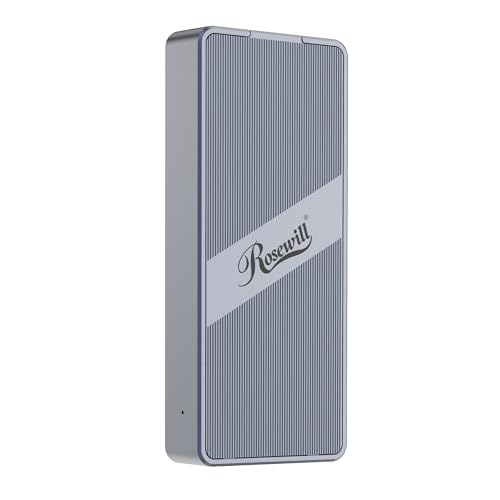
Rosewill 40Gbps M.2 NVMe SSD Enclosure
About this pick
Rosewill's specific claim, rated for up to 4 hours of full-speed operation, sets it apart in a category where most listings only ever quote a peak burst speed and stay silent on how long that speed actually holds. It runs the same ASM2464PD controller chip found in several pricier enclosures in this comparison.
Against the ACASIS and Satechi picks further down this list, Rosewill trades brand-name backing and a longer stated warranty for a lower price and a more travel-focused, pocketable build with a transparent back plate.
Best for buyers running long backup jobs or video export sessions where the drive needs to hold speed for hours, not just a quick file copy, without paying for a premium brand name on top of that capability.
Best for: buyers running multi-hour sustained transfer jobs who don't need a premium brand name attached
Check price on AmazonPros
- +Proven ASM2464PD chip shared with pricier picks
- +Explicitly rated for extended full-speed sessions
- +Compact and genuinely pocketable
Cons
- −No bundled thermal pad or heatsink accessories
- −Shorter or less prominent warranty than the brand-name picks
ACASIS 40Gbps M.2 NVMe SSD Enclosure with Cooling Fan (TBU405 Pro)
About this pick
ACASIS builds the TBU405 Pro around a certified Intel JHL7440 chip specifically, the same Thunderbolt-certified silicon Intel licenses to premium dock and enclosure makers, rather than the more common ASM2464PD chip most of this comparison's cheaper picks use. That certification is a real, checkable distinction, not just marketing language.
Compared to the Cable Matters and Rosewill picks, the tested speeds here (2805MB/s read, 2734MB/s write on a Samsung 980 Pro) are lower on paper, but ACASIS positions this specifically around Mac compatibility, explicitly naming M1/M2/M3 Pro and Max MacBook support and calling out professional workstation use with high-capacity drives like a 990 Pro 4TB.
Best for Mac-based creative professionals who specifically want an Intel-certified Thunderbolt chip in their enclosure rather than the third-party ASM controller most competitors use, and who are running video editing or large-file workflows.
Best for: Mac-based video editors and creative professionals who want a certified Intel Thunderbolt chip over a third-party controller
Check price on AmazonPros
- +Certified Intel Thunderbolt chip, not third-party
- +Explicitly tested on M1/M2/M3 Mac hardware
- +Fan has a manual on/off switch
Cons
- −Lower tested speed than the ASM2464PD-based picks
- −Pricier than the Cable Matters and Rosewill picks for similar 8TB ceiling
Lexar E750 40Gbps M.2 NVMe SSD Enclosure
About this pick
Lexar is a storage brand most buyers already recognize from SD cards and USB drives, and the E750 carries that same brand's 2-year limited warranty and stated Lexar Quality Labs testing process. That's a different kind of assurance than the smaller, less-known brands earlier in this comparison offer.
Against the ACASIS pick above, Lexar's stated 3800MB/s speed is actually higher, and it uses aircraft-grade aluminum construction with a dedicated heat dissipation groove plus thermal pads rather than a fan, meaning quieter passive-leaning cooling backed by a metal body built specifically to manage heat.
Best for buyers who specifically value buying from a storage brand they already trust for other products, and who want a 2-year warranty explicitly backed by a company with an established quality-testing process.
Best for: buyers who want a recognized storage brand's warranty and quality assurance over a smaller third-party manufacturer
Check price on AmazonPros
- +Recognized storage brand with 2-year warranty
- +Rated speed matches the fastest picks here
- +Aluminum body with dedicated heat groove
Cons
- −No active fan, relies on passive aluminum cooling
- −Costs more than the ACASIS pick for a similar 8TB-class ceiling
SABRENT USB4 NVMe SSD Enclosure (EC-U4TN)
About this pick
SABRENT specifically optimizes this enclosure around PCIe Gen4 x4 SSDs, naming its own Rocket 4 Plus drive as the reference pairing, and quotes a 3,900MB/s USB4 ceiling, slightly above most competitors' stated numbers, alongside a separate 2,700MB/s figure specifically for Thunderbolt 3/4 hosts rather than blending the two into one vague claim.
Compared to Lexar's aluminum passive-leaning design, SABRENT includes an active integrated cooling fan in an aluminum-and-ABS hybrid body, aimed at creators and mobile professionals moving large PCIe Gen4 files rather than general backup use. One real limitation: it explicitly does not support SATA M.2 SSDs, only PCIe NVMe drives.
Best for buyers specifically running a PCIe Gen4 NVMe SSD like a Sabrent Rocket 4 Plus, who want an enclosure tuned for and tested against that exact drive class rather than a general-purpose one.
Best for: buyers running a PCIe Gen4 NVMe SSD who want an enclosure specifically tuned around that drive class
Check price on AmazonPros
- +Highest stated USB4 speed ceiling in this tier
- +Separately rated for Thunderbolt vs USB4 hosts
- +Aluminum and ABS hybrid body with active fan
Cons
- −Does not support SATA M.2 SSDs at all
- −No stated maximum drive capacity beyond form factor
Satechi USB4 NVMe SSD Pro Enclosure
About this pick
Satechi's Pro model remains the only pick in this comparison rated for drives up to 16TB, double the 8TB ceiling every other enclosure here states, which matters specifically if you're building a large archival or personal NAS-style backup drive rather than a working scratch disk.
At under $100, it sits below the SABRENT and Lexar picks in price while adding a CES award-winning design credential, a 2-year limited warranty, and a full accessory bundle in the box, a thermal pad, silicone installation pin, clear case, and USB4 cable, that the cheaper picks in this comparison don't consistently include.
Best for buyers specifically planning to use a 10TB or larger SSD, where every other pick's 8TB ceiling would be a real limitation, and who want the accessory bundle included rather than bought separately.
Best for: buyers using a 10TB+ SSD who want the accessory bundle included and a documented 2-year warranty
Check price on AmazonPros
- +Only pick in this tier rated past 8TB
- +Full accessory bundle included in the box
- +CES award-winning design with 2-year warranty
Cons
- −Polycarbonate casing rather than aluminum
- −Stated speed slightly below SABRENT's USB4 ceiling
How We Evaluated These USB4 NVMe Enclosures Under $150
Each pick was assessed across 5 criteria weighted for real-world use.
Controller chip and certification check
we distinguished certified Intel Thunderbolt chips (like ACASIS's JHL7440) from the more common third-party ASM2464PD controller, since Intel certification is a checkable, real credential rather than a marketing claim.
Brand warranty comparison
at this higher price tier, we specifically compared stated warranty length and brand reputation, since a $90-100 enclosure failing after a year is a meaningfully worse outcome than a $50 one failing at the same point.
PCIe generation and drive-type fit
we checked which enclosures were explicitly tuned for or tested against specific PCIe Gen4 drives versus general-purpose NVMe support, and flagged any that exclude SATA M.2 or double-sided drives entirely.
Sustained vs burst speed claims
we favored listings that documented sustained-use behavior (like a stated hours-long full-speed rating) over ones that only quote a single peak burst-speed number with no context for how long it holds.
Live price gate
every pick had to be in stock and priced at or under $150 on the date this guide was checked; enclosures that only hit this tier during a temporary sale were excluded.
How to Choose the Right USB4 NVMe Enclosures Under $150
By Priority
| If you mainly need | Recommended pick |
|---|---|
| The lowest price with active cooling | Cable Matters 40Gbps USB4 / Thunderbolt 4 SSD Enclosure |
| A certified Intel Thunderbolt chip | ACASIS 40Gbps M.2 NVMe SSD Enclosure (TBU405 Pro) |
| A recognized brand warranty | Lexar E750 40Gbps M.2 NVMe SSD Enclosure |
| Capacity beyond 8TB | Satechi USB4 NVMe SSD Pro Enclosure |
By Budget
| Price range | Recommended pick |
|---|---|
| Under $60 | Cable Matters (under $50) or Rosewill (under $60) |
| $60 to $90 | ACASIS (under $80), Lexar E750 (under $90), or SABRENT (under $90) |
| Up to $150 | Satechi USB4 NVMe SSD Pro Enclosure (under $100) |
Third-Party Controller vs Certified Intel Chip
Third-party ASM2464PD controller (Cable Matters, Rosewill, Lexar, Satechi)
The most common chip in this category, with strong real-world compatibility and generally the fastest tested speeds in this comparison.
Certified Intel JHL7440 chip (ACASIS)
A licensed Thunderbolt-certified chip Intel provides to premium accessory makers, with slightly lower tested speeds but explicit Mac-hardware validation.
Most buyers should default to an ASM2464PD-based pick like Cable Matters or Lexar for raw speed, unless you specifically want Intel's own certified chip and tested Mac compatibility, in which case ACASIS is the pick here.
By Drive Generation and Type
| Your SSD is | Recommended pick |
|---|---|
| A PCIe Gen4 drive like a Sabrent Rocket 4 Plus | SABRENT USB4 NVMe SSD Enclosure |
| A standard NVMe drive up to 8TB | Cable Matters, Rosewill, ACASIS, or Lexar |
| A SATA M.2 or mSATA drive | None of these enclosures, all require PCIe NVMe |
| Larger than 8TB | Satechi USB4 NVMe SSD Pro Enclosure |
For Mac-Based Creative Professionals Specifically
Look for
Explicit testing against Apple Silicon Macs named in the listing (M1/M2/M3 or later), not just a generic "Mac compatible" claim with no chip generation named.
In this comparison
ACASIS is the only pick that names specific M1/M2/M3 Pro and Max MacBook and iPad Pro testing directly in its listing.
When to Spend More
Spend more if
You need a documented brand warranty or capacity past 8TB: Lexar's E750 (under $90) carries a 2-year warranty from a recognized storage brand, and Satechi's Pro model (under $100) is the only pick here rated past 8TB.
Save if
You're running a standard-capacity single-sided SSD and don't need a name-brand warranty: Cable Matters (under $50) matches the core speed and cooling of pricier picks here for less than half the cost.
Frequently Asked Questions
Is it worth paying up to $150 instead of staying under $100 for a USB4 enclosure?
Only if you specifically need one of the things the higher tier adds: a certified Intel Thunderbolt chip, a longer name-brand warranty, or drive capacity past 8TB. The raw 40Gbps speed rating doesn't meaningfully change between the two price tiers, since most picks in both use the same class of controller chip.
What's the real difference between a certified Intel chip and a third-party controller like the ASM2464PD?
A certified Intel chip means the manufacturer passed Intel's own Thunderbolt certification testing for that specific product, which can mean more validated compatibility on certain hardware, particularly Macs. The more common third-party ASM2464PD controller generally delivers faster tested speeds in practice and is used in the large majority of enclosures in this category, including most of the picks in this comparison.
Can I use a SATA M.2 SSD in any of these enclosures?
No. Every enclosure in this comparison is built specifically for PCIe NVMe drives, and at least one explicitly states it does not support SATA M.2 SSDs at all. If you're not sure which type your drive is, check its model number against the manufacturer's own spec sheet before buying an enclosure.
Do I need to buy a separate USB4 cable, or is one included?
Most enclosures in this comparison include a USB4 or Thunderbolt-compatible cable in the box, though the included cable length is sometimes quite short (around 6 inches on some listings). If you need a longer cable for your desk setup, check the included cable's length in the listing and budget for a separate longer USB4 cable if needed.
Why does the Satechi Pro enclosure support 16TB when the others only go up to 8TB?
This comes down to the enclosure's internal design and controller specification rather than the general USB4 standard, which doesn't impose an 8TB limit itself. Most manufacturers in this category simply design and test their enclosures around drives up to 8TB, since that covers the vast majority of consumer NVMe SSDs currently on the market, while Satechi specifically engineered and validated its Pro model for larger drives.
Will a 2-year warranty actually cover accidental damage to the enclosure?
Typically not. A standard manufacturer's limited warranty, the kind mentioned across several picks in this comparison, covers defects in materials and workmanship under normal use, not accidental drops, liquid damage, or misuse. Check the specific warranty terms on the product listing or manufacturer's website for the exact coverage scope before assuming it covers any kind of damage.
Bottom Line
best overall: Cable Matters 40Gbps USB4 / Thunderbolt 4 SSD Enclosure - best overall pick in this roundup.
See the full rankings above for all picks with pros, cons, and best-for summaries.
Browse on Amazon
All Prime-eligible options with current pricing.
Shop on Amazon →