
6 Best USB4 NVMe Enclosures Under $100 in 2026
We compared USB4 NVMe enclosures under $100 by controller chip, cooling method, and real sustained transfer speeds, not just the 40Gbps headline number.

New to Amazon Prime?
Get fast, free shipping on every pick in this guide, plus Prime Video and exclusive deals.
Try Prime Free




At a Glance
ANYOYO 40Gbps M.2 NVMe SSD Enclosure with Cooling Fan
↓ See why we picked itEvery enclosure in this price range advertises the same 40Gbps ceiling, but that number describes the USB4 interface, not what your specific SSD and host will actually sustain. The controller chip inside the enclosure, and how well it manages heat, decide whether you see anywhere close to that number during a real multi-gigabyte transfer.
We focused this comparison on three things competitors gloss over: which controller chip each enclosure actually uses (ASM2464PD, JHL7440, or a dual-chip setup), whether cooling is active (a fan) or passive (a finned aluminum body), and which SSD form factors and single vs double-sided designs each one actually supports before you buy a drive that won't physically fit.
5 Criteria to Look For Before Buying a USB4 NVMe Enclosures Under $100
Key buying criteria so you get the right fit the first time.
Identify the actual controller chip, not just the 40Gbps number
The controller chip is the piece of hardware inside the enclosure that translates between the NVMe SSD and the USB4 port, and it determines real-world speed and compatibility far more than the advertised interface speed does. Most enclosures in this price range use the ASM2464PD chip, which has a strong compatibility track record across Windows, macOS, and Linux, while a few use Intel's JHL7440 chip alone or paired with a second bridge chip for added reliability. Look for the chip name spelled out in the listing's bullet points or specifications, not just the headline "40Gbps" claim, since two enclosures with the same speed rating can behave differently depending on which chip is actually inside.
Match cooling method to your actual usage pattern
Enclosures cool the SSD either actively, with a small fan that spins up under load, or passively, using a finned metal body that dissipates heat without any moving parts. A fan-cooled enclosure generally holds full speed longer during hours of continuous transfer, which matters for large video exports or full backup jobs, while a fanless design runs completely silent but has less thermal headroom if you push it hard for an extended period. Check the listing for words like "fan," "cooling fan," or "active cooling" versus "fanless" or "passive cooling," and pick based on whether your typical use case is short file transfers or long sustained sessions.
Confirm your SSD's physical thickness and side-mounting are supported
M.2 NVMe SSDs come in single-sided designs (memory chips on one side only) and double-sided designs (chips on both sides), and some enclosures physically cannot fit a double-sided drive because there's no clearance on the inside. Several listings in this category explicitly name specific SSD models they don't support, such as certain WD_BLACK or Crucial drives, precisely because those drives are double-sided or unusually thick. Before buying, check your SSD's spec sheet for "single-sided" or "double-sided," and cross-reference that against the enclosure listing's compatibility notes rather than assuming any M.2 drive fits any enclosure.
Check whether your SSD already has a heatsink, and whether the enclosure allows for one
Some NVMe SSDs ship from the factory with their own heatsink already attached to help with cooling inside a desktop PC, but that same heatsink can prevent the drive from fitting inside a USB4 enclosure designed for a bare drive. At least one enclosure in this comparison explicitly states it does not support SSDs that already have a heatsink attached, since there's no internal clearance for both the drive's heatsink and the enclosure's own cooling accessories. Check your SSD's product listing for "heatsink included" language, and if it has one, look specifically for an enclosure that either accommodates it or doesn't bundle its own conflicting heatsink.
Verify your host device can actually deliver 40Gbps before paying for it
A 40Gbps-rated enclosure only reaches that speed when plugged into a USB4 or Thunderbolt 3/4 port on a host device that itself supports the full 40Gbps standard, and several listings specifically note that older Thunderbolt versions or certain USB-C ports fall back to a much lower 10Gbps USB 3.2 speed instead. This matters most on older laptops or budget desktops where a USB-C port looks the same on the outside but supports a fraction of the bandwidth. Check your laptop or desktop's exact port specification (not just "USB-C") for "Thunderbolt 4," "Thunderbolt 3," or "USB4" labeling before assuming you'll see the full advertised speed.
6 Best USB4 NVMe Enclosures Under $100 in 2026
Cable Matters 40Gbps USB4 / Thunderbolt 4 SSD Enclosure
About this pick
Cable Matters undercuts every other genuinely USB4-rated enclosure in this comparison by roughly $5-20, while still including an active temperature-controlled cooling fan and a dual-color LED that shows blue for full 40Gbps mode and green when it's fallen back to USB 3.2 speeds, a diagnostic detail most competitors skip entirely.
The tradeoff against the pricier ACASIS and Satechi picks below is capacity and drive compatibility rather than raw speed: this enclosure explicitly does not support double-sided M.2 SSDs, ruling out drives like the WD_BLACK SN850X 4TB/8TB or Crucial T700/T705 2TB and 4TB. If you're using a smaller, single-sided drive, that limitation never comes up.
Best for anyone building their first USB4 external drive who wants the fan-cooled reliability of a $70+ enclosure without paying for capacity headroom they don't need yet. Verify your specific SSD is single-sided before buying, since that's the one real gotcha on this pick.
Best for: buyers with a single-sided M.2 drive who want fan-cooled 40Gbps reliability at the lowest real price in this tier
Check price on AmazonPros
- +Cheapest genuinely 40Gbps-rated pick here
- +Dual-color LED shows actual transfer mode
- +Foldable body is easy to pack for travel
Cons
- −Does not support double-sided M.2 SSDs
- −No listed capacity ceiling beyond compatible sizes
ANYOYO 40Gbps M.2 NVMe SSD Enclosure with Cooling Fan
About this pick
ANYOYO runs a dual-chip setup, a JHL7440 controller paired with an RTL9210 bridge chip, rather than the single ASM2464PD chip most enclosures in this comparison use. In practice that's meant to spread reliability across two proven chips instead of leaning on one, and ANYOYO backs it with a PWM-controlled fan that automatically adjusts speed rather than running at a fixed rate.
Against the Cable Matters pick above, the real-world speed difference is modest, ANYOYO's own listing cites up to 2700MB/s versus Cable Matters' 3600-3800MB/s ceiling, but ANYOYO adds support for larger 8TB drives and doesn't call out the single-sided SSD restriction that limits its cheaper competitor.
Best for buyers planning to use a larger-capacity SSD (up to 8TB) who want the peace of mind of a documented dual-chip design over a single-chip enclosure, even at a modest speed tradeoff.
Best for: buyers running a larger 8TB SSD who want a documented dual-chip controller over a single-chip design
Check price on AmazonPros
- +Dual-chip design for cross-OS reliability
- +Supports larger 8TB drives
- +Aluminum shell doubles as a heat sink
Cons
- −Rated read/write tops out lower than some rivals
- −Does not support SATA NGFF or mSATA drives
ORICO 40Gbps M.2 NVMe SSD Enclosure with Cooling Fan
About this pick
ORICO is the only pick in this comparison that bundles both a thermal pad and a separate SSD heatsink in the box on top of its own built-in fan, a three-layer cooling approach (enclosure fan, thermal pad, drive heatsink) aimed specifically at keeping speeds stable during long sustained transfers rather than just the first few seconds of a burst.
Compared to the ANYOYO and Cable Matters picks, ORICO's transparent PC panel is a distinct design choice, it shows the SSD inside rather than hiding it behind solid aluminum, though that comes with a real caveat: ORICO's own listing warns it does not support SSDs that already have their own heatsink attached, since there's no room for a second heatsink on top of a first.
Best for buyers running an SSD without a factory heatsink who want the most thorough cooling package included in the box, and who like being able to see the drive rather than a solid metal shell.
Best for: buyers with a bare (non-heatsinked) SSD who want the most complete cooling accessory bundle in this comparison
Check price on AmazonPros
- +Bundles a thermal pad and heatsink in the box
- +Push-slide installation is genuinely tool-free
- +Transparent panel shows the SSD inside
Cons
- −Not compatible with SSDs that already have a heatsink
- −Full 40Gbps needs a 12th-gen Intel or Apple M1/M2 host
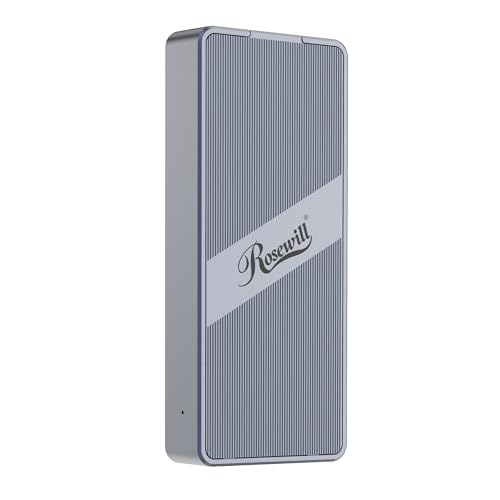
Rosewill 40Gbps M.2 NVMe SSD Enclosure
About this pick
Rosewill's listing makes a specific durability claim most competitors don't: up to 4 hours of full-speed operation before thermal effects would start to matter, backed by the ASM2464PD controller chip, the same proven chip used in several higher-priced enclosures in this comparison. That's a meaningfully longer sustained-use window than a typical quick-transfer enclosure is built for.
Against the ORICO and ANYOYO picks, Rosewill trades the transparent panel and heatsink bundle for a transparent back plate only and a lighter, more pocketable travel-focused build, at a price sitting right between the two.
Best for buyers doing long backup or video-editing sessions where the drive stays connected and active for hours at a time, rather than quick file drops.
Best for: buyers doing multi-hour backup or editing sessions who need the enclosure to hold speed over time, not just in a short burst
Check price on AmazonPros
- +Proven ASM2464PD chip also used in pricier picks
- +Rated for extended full-speed sessions
- +Compact, pocket-friendly travel size
Cons
- −Speed rating is lower than the ORICO and Cable Matters picks
- −No bundled thermal pad or heatsink
UGREEN 40Gbps M.2 NVMe Enclosure
About this pick
Every other pick in this comparison relies on an active fan to manage heat. UGREEN is the exception, it uses a double-sided fin design and a three-dimensional passive cooling system instead, which means completely silent operation with no fan noise and no fan bearing to eventually wear out.
The real tradeoff against the fan-cooled ORICO and ANYOYO picks is worth naming honestly: passive cooling generally handles shorter bursts better than hours of continuous sustained transfer, so if you're doing the kind of extended session Rosewill above is built for, a fanless design has less headroom. UGREEN's own listing also flags that unusually thick SSDs can be prone to breakage inside this enclosure and recommends swapping to a thinner thermal pad if that happens.
Best for a quiet home office or bedroom desk setup where fan noise during video calls or late-night work is a genuine annoyance, and where transfers tend to be shorter bursts rather than hours-long sustained sessions.
Best for: quiet desk setups like a bedroom office or video-call-heavy workspace where fan noise is a real annoyance
Check price on AmazonPros
- +Completely silent, no fan at all
- +No fan bearing to eventually wear out
- +Ultra-slim aluminum body for travel
Cons
- −Passive cooling has less headroom for hours-long sustained transfers
- −Extra-thick SSDs may need a thinner thermal pad swap
Satechi USB4 NVMe SSD Pro Enclosure
About this pick
Every other enclosure in this comparison tops out at a stated 8TB capacity. Satechi's Pro model is rated for up to 16TB, double the ceiling of anything else here, which matters if you're archiving large video libraries or running a personal NAS-style backup drive rather than a working scratch disk.
At exactly under $100, this is the priciest pick in this tier, and it earns that price with a CES award-winning design, a 2-year limited warranty (longer than most competitors here state), and a full accessory bundle including a thermal pad, silicone installation pin, clear case, and USB4 cable in the box.
Best for buyers specifically planning to use a 10TB or larger SSD, where the 8TB ceiling on every cheaper pick in this comparison would actually be a dealbreaker, and who value the longer 2-year warranty over saving $30-50.
Best for: buyers using a 10TB+ SSD where every cheaper enclosure's 8TB ceiling would actually be a limiting factor
Check price on AmazonPros
- +Only pick here rated for drives past 8TB
- +2-year warranty beats most competitors
- +Full accessory bundle included in box
Cons
- −Priciest pick in this tier
- −Polycarbonate casing vs the aluminum bodies elsewhere here
How We Evaluated These USB4 NVMe Enclosures Under $100
Each pick was assessed across 5 criteria weighted for real-world use.
Controller chip verification
we identified each enclosure's actual bridge chip (ASM2464PD, JHL7440, or a dual-chip combination) from the listing rather than trusting the 40Gbps headline alone, since the chip drives real sustained speed and OS compatibility more than the marketing number does.
Cooling method comparison
we separated active fan-cooled designs from passive fin-based designs and noted the real tradeoff: fans generally sustain longer high-load sessions, while fanless designs run silently but with less thermal headroom.
Drive compatibility audit
we checked each listing for single-sided vs double-sided M.2 support, maximum drive capacity, and any explicitly excluded SSD models, since these restrictions only surface in the fine print, not the headline bullets.
Bundled accessories check
we noted which enclosures included a thermal pad, heatsink, or cable beyond the bare minimum, since these accessories have real out-of-pocket value if you'd otherwise buy them separately.
Live price gate
every pick had to be in stock and priced at or under $100 on the date this guide was checked; enclosures that only hit this tier during a temporary sale were excluded.
How to Choose the Right USB4 NVMe Enclosures Under $100
By Priority
| If you mainly need | Recommended pick |
|---|---|
| The cheapest genuinely 40Gbps-rated option | Cable Matters 40Gbps USB4 / Thunderbolt 4 SSD Enclosure |
| Silent, fanless operation | UGREEN 40Gbps M.2 NVMe Enclosure |
| Capacity beyond 8TB | Satechi USB4 NVMe SSD Pro Enclosure |
| Hours-long sustained transfer sessions | Rosewill 40Gbps M.2 NVMe SSD Enclosure |
By Budget
| Price range | Recommended pick |
|---|---|
| Under $55 | Cable Matters 40Gbps USB4 / Thunderbolt 4 SSD Enclosure (under $50) or ANYOYO (under $60) |
| $55 to $70 | ORICO (under $60), Rosewill (under $60), or UGREEN (under $70) |
| Up to $100 | Satechi USB4 NVMe SSD Pro Enclosure (under $100) |
Fan-Cooled vs Fanless
Active fan cooling (Cable Matters, ANYOYO, ORICO, Rosewill, Satechi)
Better suited to hours-long sustained transfers since a fan actively removes heat, at the cost of some fan noise, usually low but present.
Fanless (UGREEN)
Completely silent with nothing to wear out over time, but has less thermal headroom for extended high-load sessions than a fan-cooled design.
Most buyers doing typical file transfers should default to a fan-cooled pick like Cable Matters unless fan noise is a specific dealbreaker, in which case UGREEN is the only fanless option here.
By SSD Size and Type
| Your SSD is | Recommended pick |
|---|---|
| Single-sided, up to 4TB | Cable Matters 40Gbps USB4 / Thunderbolt 4 SSD Enclosure |
| Double-sided or up to 8TB | ANYOYO or Rosewill |
| Larger than 8TB | Satechi USB4 NVMe SSD Pro Enclosure |
| Already has a factory heatsink attached | Cable Matters, ANYOYO, or Rosewill (not ORICO) |
For Video Editors Specifically
Look for
A documented sustained-speed rating and active cooling rather than just a peak burst-speed number, since large video files push sustained write speeds much harder than small file transfers.
In this comparison
Rosewill's explicit 4-hour full-speed rating and ORICO's three-layer cooling bundle are the two picks here built with sustained load specifically in mind.
When to Spend More
Spend more if
You're using or planning to use a 10TB or larger SSD: the Satechi USB4 NVMe SSD Pro Enclosure (under $100) is the only pick here rated past 8TB, and its 2-year warranty is longer than most competitors.
Save if
Your SSD is 4TB or smaller and single-sided: the Cable Matters enclosure (under $50) uses the same class of 40Gbps controller as pricier picks and skips only the capacity headroom you don't need yet.
Frequently Asked Questions
Do I need a Thunderbolt port specifically, or does any USB-C port work with these enclosures?
Every enclosure in this comparison works in a standard USB-C port, but only reaches its full 40Gbps speed on a Thunderbolt 3, Thunderbolt 4, or USB4-certified port. A standard USB-C 3.2 port will still work, just at a much lower speed, typically 10Gbps or less, so check your device's exact port specification before expecting full speed.
Can I use a double-sided M.2 SSD in any of these enclosures?
Not universally. Some enclosures, including the top pick in this comparison, are built only for single-sided SSDs and explicitly list incompatible double-sided models. Check both your SSD's spec sheet and the enclosure's stated compatibility list before buying, since this detail is easy to miss in the main bullet points.
Is a fanless enclosure worth choosing over a fan-cooled one?
It depends on your usage. A fanless design runs completely silent and has no fan bearing to wear out, making it a good fit for quiet desk setups with typical short file transfers. If you regularly run hours-long sustained transfers, like large video exports, a fan-cooled enclosure generally holds full speed longer under that kind of sustained load.
Why do these enclosures list different maximum read/write speeds if they're all rated for the same 40Gbps interface?
The 40Gbps figure describes the interface's theoretical ceiling, not the enclosure's real-world tested speed, which depends on the specific controller chip, the SSD used in testing, and the host device. That's why one listing cites 3800MB/s and another cites 2700MB/s despite both being 40Gbps-rated: they're reporting real tested numbers on their own specific hardware combination, not the same theoretical maximum.
What happens if I plug a 40Gbps enclosure into an older laptop's USB-C port?
It will still work, but at a reduced speed. If the port only supports USB 3.2 rather than Thunderbolt or USB4, the connection falls back automatically to whatever speed that port supports, often 10Gbps or lower. Several enclosures in this comparison include a status LED that changes color specifically to show you when this fallback has happened.
Do any of these enclosures come with an SSD included?
No. Every enclosure in this comparison is sold empty, meaning you supply your own M.2 NVMe SSD separately. This is standard for the category and lets you choose your own capacity and drive brand rather than being locked into a bundled drive.
Bottom Line
best overall: Cable Matters 40Gbps USB4 / Thunderbolt 4 SSD Enclosure - best overall pick in this roundup.
See the full rankings above for all picks with pros, cons, and best-for summaries.
Browse on Amazon
All Prime-eligible options with current pricing.
Shop on Amazon →