
4 Best Thunderbolt 5 Docks with 10GbE in 2026
We compared Thunderbolt 5 docks with built-in 10 Gigabit Ethernet by real port counts, display limits, and whether a Windows driver install is required first.

New to Amazon Prime?
Get fast, free shipping on every pick in this guide, plus Prime Video and exclusive deals.
Try Prime Free


At a Glance
A dock's built-in 10 Gigabit Ethernet port delivers 10 times the throughput of the 1GbE port found on most docking stations, genuinely useful for fast file transfers to a NAS or a high-speed office network, but Ethernet over Thunderbolt only works on Thunderbolt-based or PCIe-capable USB4 hosts.
We compared this lineup on real port counts, documented display limits per platform, and driver requirements, since one listing specifically requires Windows users to install a separate 10 Gigabit Ethernet driver before the port will function at full speed.
5 Criteria to Look For Before Buying a Thunderbolt 5 Docks with 10GbE
Key buying criteria so you get the right fit the first time.
A Dock's 10GbE Port May Require a Separate Driver Install to Reach Full Speed on Windows
The CalDigit TS5 Plus pick specifically states that Windows users must install a separate 10 Gigabit Ethernet driver from the manufacturer's website before the port reaches its full rated speed, a real extra setup step that isn't always obvious from the product photos or title alone. This matters if you're deploying a dock to a non-technical user or a shared office computer where an unexpected driver install could cause confusion or a support ticket, and matters less if you're comfortable handling driver installation yourself. Check a dock's listing or manual specifically for a stated Windows driver requirement before assuming the 10GbE port will work at full speed immediately out of the box.
Backward Compatibility With Slower Ethernet Speeds Determines Whether a 10GbE Dock Works With Your Current Network
The CalDigit TS5 Plus pick specifically confirms its 10GbE port is backwards compatible with 1GbE, 2.5GbE, and 5GbE connections, meaning it will still function correctly even if your router, switch, or NAS doesn't yet support the full 10 gigabit speed. This matters if you're upgrading your dock before your broader network infrastructure, since a non-backward-compatible port could leave you without any wired Ethernet connection at all until the rest of your network catches up. Look for an explicit backward-compatibility statement on a 10GbE dock's listing, especially if your home or office network hasn't been fully upgraded to 10 gigabit speeds yet.
Ethernet Over Thunderbolt Only Works on Thunderbolt or PCIe-Capable USB4 Hosts, Not Every USB-C Laptop
The CalDigit TS5 Plus pick specifically notes that Ethernet is only supported on Thunderbolt-based hosts as well as USB4 hosts that support PCIe, meaning a generic USB-C laptop without genuine Thunderbolt or PCIe-capable USB4 may not get any Ethernet functionality through the dock at all, regardless of the dock's own specifications. This matters significantly if wired networking is your primary reason for buying a 10GbE dock, since a mismatched host could make that specific feature entirely unusable. Verify your exact laptop's Thunderbolt or USB4 PCIe support before buying a dock specifically for its Ethernet capability, rather than assuming any USB-C port will work.
Built-In NVMe Storage Expansion Adds Real Value but Requires You to Separately Purchase and Install a Drive
The Sonnet Echo 21 pick's built-in M.2 NVMe SSD slot supports drives up to 8TB, but the drive itself is sold separately and must be user-installed, meaning the dock's advertised storage capability isn't included in the box and requires an additional purchase and a basic installation step. This matters if you're budgeting for a complete storage solution and need to account for the SSD's cost on top of the dock's listed price, and matters less if you already own a compatible NVMe drive or don't need the storage feature. Check whether a dock's NVMe slot ships with a drive included or requires a separate purchase, and factor that real additional cost into your total budget comparison.
Mac-Exclusive Docks Can Unlock Higher Display Counts Than Cross-Platform Docks, at the Cost of Platform Flexibility
The iVANKY FusionDock Ultra pick specifically achieves up to two 8K@60Hz or four 6K@60Hz displays through a dual-chip architecture engineered exclusively for the Mac ecosystem, a higher simultaneous display count than the cross-platform CalDigit and Sonnet picks in this comparison support on any single platform. This matters if you're committed to a Mac-only workflow with multiple external displays and want the maximum display headroom available, and matters less if you need a dock that also works reliably with a Windows or Chromebook machine. Decide whether platform-exclusive display performance or cross-platform flexibility matters more for your actual daily setup before choosing between a Mac-optimized dock and a universal one.
4 Best Thunderbolt 5 Docks with 10GbE in 2026
CalDigit TS5 Plus Thunderbolt 5 Docking Station
About this pick
This dock's listing specifically states its 10GbE port is backwards compatible with 1GbE, 2.5GbE, and 5GbE networks, giving it real flexibility across whatever network infrastructure you actually have, while explicitly noting Windows users must install a separate 10 Gigabit Ethernet driver from the manufacturer's website. Its 20 total ports include Dual USB Controllers, a genuinely distinct architecture where front and rear USB ports each get their own dedicated 10Gb/s controller to avoid bottlenecks.
Compared to the Sonnet picks below, this one's 330W power supply sustains 140W dedicated charging to the host laptop plus power across all remaining ports simultaneously, and its aluminum heat sink chassis is specifically engineered and tested to dissipate the heat generated by that power delivery.
Best for buyers who want the most total ports with backwards-compatible Ethernet and dual independent USB controllers.
Best for: buyers who want the most total ports with backwards-compatible Ethernet
Check price on AmazonPros
- +10GbE port is backwards compatible with slower network speeds
- +Dual USB controllers avoid bottlenecks across front and rear ports
- +330W power supply sustains full power across all 20 ports
Cons
- −Windows requires a separate driver install for full 10GbE speed
- −Highest total ports also means the largest desk footprint
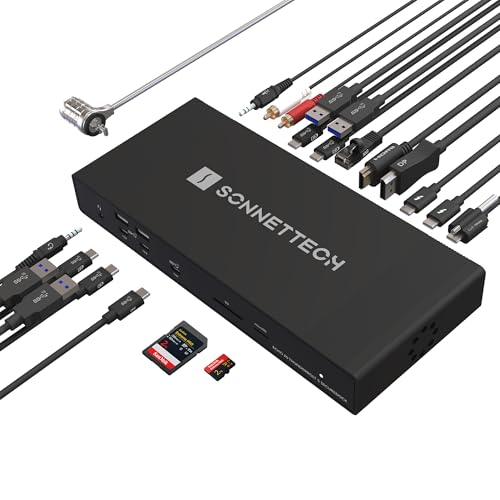
Sonnet Echo 21 Thunderbolt 5 SuperDock
About this pick
This dock's listing specifically calls out a built-in M.2 NVMe SSD slot supporting a user-installed drive up to 8TB, letting you add ultra-fast internal storage for media and project files without an external enclosure taking up a separate port. Its 21 total interfaces include three Thunderbolt 5 ports, nine 10Gbps USB ports, and a dedicated 10Gb Ethernet port alongside the NVMe expansion.
Compared to the CalDigit pick above, this one's single-cable 140W charging supports Mac, Windows, Chromebook, and iPad Pro with Thunderbolt or USB4, a broader stated device compatibility list than most competing docks bother to specify.
Best for buyers who want built-in NVMe storage expansion alongside 10GbE networking in one device.
Best for: buyers who want built-in NVMe storage expansion alongside 10GbE networking
Check price on AmazonPros
- +Built-in NVMe SSD slot eliminates the need for a separate storage enclosure
- +Broad stated compatibility across Mac, Windows, Chromebook, and iPad Pro
- +21 total interfaces cover nearly every peripheral need
Cons
- −NVMe drive is sold separately and must be user-installed
- −Same price as the CalDigit pick with fewer total USB ports
Sonnet Echo 20 Thunderbolt 5 SecureDock
About this pick
This dock's listing specifically states its 10GbE networking uses standard Cat6 or Cat6A cabling for ultra-fast connections to NAS systems, meaning it works with cabling most home offices and small businesses may already have run rather than requiring specialty hardware. Its 20 total interfaces include three Thunderbolt 5 ports and nine 10Gbps USB ports, alongside HDMI and DisplayPort outputs supporting up to 8K.
Compared to the Sonnet Echo 21 pick above, this one omits the built-in NVMe SSD slot entirely, which brings its price down by $50 for buyers who don't need internal storage expansion and already have external drives.
Best for buyers who want strong 10GbE and display support without paying for NVMe storage expansion they won't use.
Best for: buyers who want strong 10GbE and display support without paying for unused NVMe expansion
Check price on AmazonPros
- +Works with standard Cat6/Cat6A cabling most offices already have
- +$50 cheaper than the Echo 21 by omitting unused NVMe expansion
- +140W charging alongside strong 8K display support
Cons
- −No built-in NVMe storage slot unlike the Echo 21 sibling
- −Fewer total interfaces than the CalDigit TS5 Plus
iVANKY 26-in-1 FusionDock Ultra
About this pick
This dock's listing specifically states it supports up to two 8K@60Hz displays or four 6K@60Hz monitors simultaneously on a MacBook Pro with an M-series Max chip, a genuinely high display count built specifically for the Mac ecosystem rather than as a general cross-platform afterthought. Its triple-layer thermal system combines an NTC-controlled fan, internal copper heat sinks, and a floating chassis design specifically engineered to sustain 120Gbps peak performance during 24/7 operation.
Compared to the CalDigit and Sonnet picks above, this one is exclusively Mac-focused rather than cross-platform, and its 10Gbps RJ45 Ethernet port pairs with four dedicated 80/120Gbps USB-C downstream ports at 15W each for connecting multiple high-speed RAID arrays.
Best for MacBook Pro Max-chip owners who want the highest simultaneous display count with 10GbE in a Mac-only dock.
Best for: MacBook Pro Max-chip owners who want the highest simultaneous display count with 10GbE
Check price on AmazonPros
- +Highest simultaneous display count of any pick in this comparison
- +Triple-layer cooling system built to sustain peak performance 24/7
- +Four dedicated high-speed downstream ports for RAID arrays
Cons
- −Highest price in this comparison at under $650
- −Exclusively for Mac, not usable with Windows or Chromebook hosts
How We Evaluated These Thunderbolt 5 Docks with 10GbE
Each pick was assessed across 5 criteria weighted for real-world use.
Real 10GbE Throughput and Backward Compatibility
Compared stated Ethernet speeds and whether each dock's 10GbE port works with slower existing networks.
Driver and Setup Requirements
Compared whether Windows or macOS requires a separate driver install for full 10GbE speed.
Total Port Count and Storage Expansion
Compared overall connectivity including any built-in NVMe SSD expansion.
Display Support Per Platform
Compared documented display count and resolution limits on Mac versus Windows.
Thermal Design Under Sustained Load
Compared cooling approaches for maintaining performance during extended high-throughput use.
How to Choose the Right Thunderbolt 5 Docks with 10GbE
By Primary Need
| If you mainly need | Recommended pick |
|---|---|
| The most total ports with flexible backward-compatible Ethernet | CalDigit TS5 Plus Thunderbolt 5 Docking Station |
| Built-in NVMe storage expansion alongside 10GbE | Sonnet Echo 21 Thunderbolt 5 SuperDock |
| Strong 10GbE and display support at a lower price | Sonnet Echo 20 Thunderbolt 5 SecureDock |
| The highest simultaneous display count on a Mac | iVANKY 26-in-1 FusionDock Ultra |
By Budget
| Price range | Recommended pick |
|---|---|
| Under $450 | Sonnet Echo 20 SecureDock (under $450) |
| Under $500 | CalDigit TS5 Plus or Sonnet Echo 21 (both under $500) |
| Under $650 | iVANKY 26-in-1 FusionDock Ultra (under $650) |
Cross-Platform Flexibility vs Mac-Optimized Performance
Cross-platform (CalDigit, Sonnet Echo 21/20)
These docks work across Mac, Windows, Chromebook, and iPad Pro, trading peak Mac-specific display count for broader device compatibility.
Mac-optimized (iVANKY FusionDock Ultra)
Built exclusively for the Mac ecosystem with a dual-chip architecture, unlocking a higher simultaneous display count on M-series Max chips than the cross-platform picks support.
If you work across multiple operating systems, default to the CalDigit or Sonnet picks. If you're committed to a MacBook Pro Max-chip workflow with several external displays, the iVANKY's Mac-exclusive design delivers more display headroom.
By Storage Need
| Your storage situation | Recommended pick |
|---|---|
| Want internal NVMe storage without a separate enclosure | Sonnet Echo 21 Thunderbolt 5 SuperDock |
| Already have external storage and don't need it built in | Sonnet Echo 20 Thunderbolt 5 SecureDock |
| Running multiple external RAID arrays instead | iVANKY 26-in-1 FusionDock Ultra |
For Home Office NAS Backup Specifically
Look for
A 10GbE port that works with standard Cat6 or Cat6A cabling you likely already have run, rather than requiring specialty cabling or hardware.
In this comparison
The Sonnet Echo 20 SecureDock specifically states standard Cat6/Cat6A compatibility, making it a straightforward drop-in for an existing home office network.
When to Spend More
Spend more if
You're a MacBook Pro Max-chip user running multiple high-resolution displays, where the iVANKY FusionDock Ultra's under $650 price buys genuinely more display headroom than any other pick here.
Save if
You want strong 10GbE and Thunderbolt 5 performance without NVMe storage expansion, where the Sonnet Echo 20 delivers that for under $450, the lowest price in this comparison.
Frequently Asked Questions
Do I need a driver install for the 10GbE port on every dock in this comparison?
The CalDigit TS5 Plus specifically requires a Windows driver install for full 10 Gigabit Ethernet speed, so checking each listing's setup requirements before buying, especially if you're on Windows, is worth doing rather than assuming plug-and-play operation.
What's the most common mistake buyers make when choosing a Thunderbolt 5 dock with 10GbE?
Assuming any USB-C laptop will get full Ethernet functionality through the dock, when Ethernet over Thunderbolt specifically requires a genuine Thunderbolt-based host or a PCIe-capable USB4 host to work at all.
Is the Sonnet Echo 21 worth the same price as the CalDigit TS5 Plus if I don't need built-in NVMe storage?
If you don't need the built-in NVMe SSD slot, the CalDigit TS5 Plus's higher total port count and dual USB controller design likely deliver more everyday value at the same under $500 price.
Will the iVANKY FusionDock Ultra work with my Windows laptop?
No, the iVANKY FusionDock Ultra is specifically built exclusively for the Mac ecosystem and will not work as advertised with a Windows or Chromebook laptop, so Windows users should choose one of the cross-platform picks instead.
How much faster is 10GbE really compared to the 1GbE port on a typical dock?
10 Gigabit Ethernet delivers 10 times the throughput of standard 1GbE, which is genuinely noticeable when transferring large files to a NAS or fast network storage, though the real-world benefit depends on your network and storage device also supporting those speeds.
Can I add my own NVMe SSD to any of these docks, or only the ones with a dedicated slot?
Only the Sonnet Echo 21 in this comparison has a dedicated built-in M.2 NVMe slot for internal storage expansion; the other three picks would require a separate external SSD enclosure connected to one of their USB or Thunderbolt ports instead.
Bottom Line
best overall: CalDigit TS5 Plus Thunderbolt 5 Docking Station - best overall pick in this roundup.
See the full rankings above for all picks with pros, cons, and best-for summaries.
Browse on Amazon
All Prime-eligible options with current pricing.
Shop on Amazon →