
4 Best Thunderbolt 5 Docks for 4K 120Hz and 240Hz in 2026
We compared Thunderbolt 5 docks by their stated refresh rate ceilings per display count, since 120Hz and 240Hz support often depends on monitor count.

New to Amazon Prime?
Get fast, free shipping on every pick in this guide, plus Prime Video and exclusive deals.
Try Prime Free


At a Glance
A Thunderbolt 5 dock's headline 4K@120Hz or 4K@240Hz spec usually applies only under a specific display count and host chip combination, so the same dock can drop to a lower refresh rate the moment a second or third monitor joins the setup.
We compared this lineup on exactly how each listing documents its refresh rate ceiling per display count, since one listing specifically states dual 4K@240Hz drops to triple 4K@144Hz once a third display is added, a real tradeoff worth understanding before buying.
5 Criteria to Look For Before Buying a Thunderbolt 5 Docks for 4K 120Hz and 240Hz
Key buying criteria so you get the right fit the first time.
A Dock's Refresh Rate Ceiling Almost Always Depends on How Many Displays Are Active Simultaneously
The Lenovo pick specifically documents four different display configurations with different refresh rates depending on how many monitors are connected at once, from three 8K@60Hz down to a four-monitor mix including 4K@240Hz and 4K@120Hz, illustrating that a dock's single headline refresh rate figure is rarely the number you'll get once you add a second or third display. This matters significantly if you're planning a multi-monitor setup where every display needs to hit a specific refresh rate, and matters less if you only run one external display. Look for a listing that specifically breaks down refresh rate by exact display count, rather than quoting only its best-case single-display number, before assuming a dock will support your full multi-monitor setup at your target refresh rate.
Windows and macOS Frequently Get Genuinely Different Display Capabilities From the Identical Dock Hardware
The CalDigit E5 pick specifically states Windows hosts can drive three 4K@144Hz displays while Mac hosts are capped at two 6K or 8K displays, or dual 4K@240Hz on supporting Macs, a real platform-level difference baked into the same physical dock rather than a minor footnote. This matters if you're choosing a dock for a specific operating system, since assuming Windows-quoted specs apply equally to macOS (or vice versa) can lead to a real letdown after purchase. Check whether a listing states its display specs separately for Windows and macOS, and read the platform-specific numbers that match your actual computer, not just the dock's single best-case headline claim.
Sustained Power Delivery Under Full Multi-Display Load Is a Different Spec Than a Dock's Peak Charging Wattage
The CalDigit E5 pick specifically states its 90W power delivery is sustained across all 9 connected devices simultaneously, backed by a 180W power supply, distinguishing genuine sustained delivery from a peak wattage figure that might only apply with fewer devices connected. This matters if you're running a laptop plus several other powered peripherals off the same dock and need reliable charging throughout, and matters less if you only connect a laptop and one or two low-power accessories. Look for language specifically confirming sustained power delivery across the dock's full rated device count, not just a single peak wattage number that may not hold under real multi-device load.
A Modular or Upgradeable Dock Design Can Extend a Dock's Useful Life as Display Standards Change
The Dell SD25TB5 Pro pick specifically advertises a modular dock design with swappable module capability, letting a buyer upgrade specific components of the dock over time rather than replacing the entire unit when a new display standard or port type emerges. This matters if you expect to keep a dock for many years through multiple monitor upgrades, and matters less if you plan to replace the whole setup within a couple of years anyway. Check whether a dock's listing specifically names swappable or upgradeable components, since this is a genuinely differentiating feature most competing docks in this price range don't offer at all.
A Purpose-Built Laptop-Specific Dock Trades General-Purpose Flexibility for a More Complete Out-of-Box Package
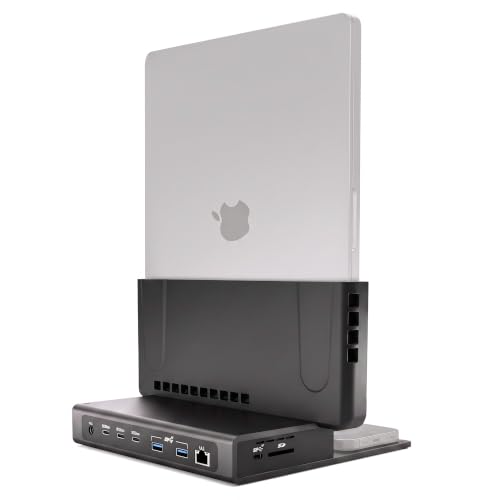
The Brydge ProDock Trio pick is specifically built only for MacBook Pro 16-inch models, shipping with a precision-fit sleeve, a vertical stand, and a Thunderbolt 5 cable included in the box, a more complete package than a standalone universal dock that ships with just the dock itself. This matters if you own the exact laptop model a dock is purpose-built for and want the extras included, and matters less if you might switch laptop brands or models in the future and need a dock that works across different devices. Weigh a purpose-built dock's included accessories and tailored fit against a universal dock's broader future compatibility before deciding which tradeoff fits your situation.
4 Best Thunderbolt 5 Docks for 4K 120Hz and 240Hz in 2026
Lenovo ThinkPad Thunderbolt 5 Smart Dock 7500
About this pick
This dock's listing specifically states it can drive up to three 8K@60Hz displays or four monitors in configurations including two 4K@240Hz and two 4K@120Hz simultaneously, a genuinely granular breakdown of exactly which refresh rate and display count combinations are supported. Its 180W Power Delivery via PD 3.1 charges a demanding laptop while running that display load, and 120Gbps data speeds come through its Thunderbolt 5 connection.
Compared to the CalDigit and Brydge picks below, this one's Intelligent Management via Lenovo's Accessories Fleet Manager, a cloud-based tool powered by AWS, lets IT managers remotely configure, update, and diagnose fleets of docks from anywhere, a genuinely enterprise-oriented feature the other picks in this comparison lack.
Best for buyers who want the most granular documented refresh rate breakdown across four simultaneous displays with enterprise-grade remote fleet management.
Best for: buyers who want the most granular documented refresh rate breakdown across four simultaneous displays
Check price on AmazonPros
- +Most granular documented refresh rate breakdown per display count
- +180W charging covers demanding workstation laptops
- +Cloud-based fleet management for IT-managed deployments
Cons
- −Higher price than the CalDigit E5 pick below
- −Enterprise fleet management features are irrelevant for a single home user
CalDigit E5 Thunderbolt 5 Element 5 Hub
About this pick
This dock's listing specifically discloses that Windows Thunderbolt 5 hosts can drive three 4K@144Hz displays, while Mac hosts are limited to two 6K@60Hz or 8K@60Hz displays, or dual 4K@240Hz specifically on Macs that support these resolutions, a transparent platform-specific breakdown rather than a single blended spec. Its Bandwidth Boost feature shifts up to 120Gb/s toward displays when ultra high-refresh monitors are connected.
Compared to the Lenovo pick above, this one's 90W sustained power delivery across all 9 connected devices simultaneously, backed by a 180W power supply and Offline Charging that works even when not connected to a host, is a genuinely differentiated feature for shared desk setups.
Best for buyers who want the lowest price in this comparison with transparent platform-specific refresh rate documentation.
Best for: buyers who want the lowest price with transparent platform-specific refresh rate documentation
Check price on AmazonPros
- +Lowest price in this comparison at under $250
- +Transparent platform-specific refresh rate documentation for Windows vs Mac
- +Offline Charging works even without a connected host
Cons
- −Triple display support is Windows-only, not available on macOS
- −Base M1 to M3 Macs do not support dual displays at all
Brydge ProDock Trio TB5 MacBook Docking Station
About this pick
This dock's listing specifically states triple 4K displays at 144Hz or dual 8K displays at 60Hz, with the explicit caveat that display count and refresh rate depend on your exact MacBook chip and Apple's own display limits, an honest disclosure rather than an overstated blanket claim. Its vertical aluminum stand holds a MacBook Pro upright in a space black finish, reducing desk footprint while keeping airflow open around the laptop.
Compared to the Lenovo and CalDigit picks above, this one is purpose-built specifically for MacBook Pro 16-inch models with M1 Max through M5 Max chips, shipping with a precision-fit sleeve, a vertical stand, and a Thunderbolt 5 cable in the box, a more complete out-of-box package than a standalone dock.
Best for MacBook Pro owners who want a vertical desk-saving design with an honest per-chip display disclosure.
Best for: MacBook Pro 16-inch owners who want a vertical, desk-saving docking design
Check price on AmazonPros
- +Vertical design saves real desk footprint versus a flat dock
- +Honest disclosure that display specs depend on exact MacBook chip
- +Ships complete with sleeve, stand, and Thunderbolt 5 cable included
Cons
- −Purpose-built only for MacBook Pro 16-inch, not a general-purpose dock
- −Reduced bandwidth and display support on Thunderbolt 4 Macs
Dell SD25TB5 Pro Thunderbolt 5 Smart Dock
About this pick
This dock's listing specifically highlights a modular dock design with swappable module capability, letting you upgrade the dock's capabilities over time rather than replacing the entire unit when your needs change, a genuinely distinct approach among the picks in this comparison. Its SuperBoost technology delivers fast charging and data transfer at up to 40GB/s, and its port mix includes 2x DisplayPort 2.1, 1x HDMI 2.1, and 2x Thunderbolt 5.
Compared to the CalDigit pick above, this one's 180W power adapter and broader OS compatibility spanning macOS, Windows 10, Windows 11, and Ubuntu OS makes it a more platform-agnostic choice for a mixed-device household or office.
Best for buyers who want a future-upgradeable modular dock design with the broadest listed OS compatibility.
Best for: buyers who want a future-upgradeable modular dock with the broadest OS compatibility
Check price on AmazonPros
- +Modular swappable design allows future upgrades without full replacement
- +Broadest listed OS compatibility including Ubuntu
- +SuperBoost technology delivers fast 40GB/s data transfer
Cons
- −Highest price in this comparison at under $450
- −Listing does not specify an exact 120Hz or 240Hz refresh rate ceiling
How We Evaluated These Thunderbolt 5 Docks for 4K 120Hz and 240Hz
Each pick was assessed across 5 criteria weighted for real-world use.
Refresh Rate Documentation Per Display Count
Compared how specifically each listing states its refresh rate ceiling as display count increases.
Platform-Specific Display Limits
Compared Windows versus macOS display and refresh rate differences on the same dock.
Power Delivery Under Full Display Load
Compared sustained charging wattage while driving multiple high-refresh displays simultaneously.
Build and Form Factor
Compared vertical, modular, and standard flat dock designs for desk footprint.
Real Bandwidth Allocation
Compared stated dynamic bandwidth shifting between data throughput and display needs.
How to Choose the Right Thunderbolt 5 Docks for 4K 120Hz and 240Hz
By Display Count and Refresh Rate Need
| Your display need | Recommended pick |
|---|---|
| Four displays with mixed 4K@240Hz and 4K@120Hz | Lenovo ThinkPad Thunderbolt 5 Smart Dock 7500 |
| Triple 4K@144Hz on Windows or dual 4K@240Hz on Mac | CalDigit E5 Thunderbolt 5 Element 5 Hub |
| Triple 4K@144Hz specifically on MacBook Pro | Brydge ProDock Trio TB5 MacBook Docking Station |
| General 4K multi-display without a specific refresh spec | Dell SD25TB5 Pro Thunderbolt 5 Smart Dock |
By Budget
| Price range | Recommended pick |
|---|---|
| Under $250 | CalDigit E5 Thunderbolt 5 Element 5 Hub (under $250) |
| Under $400 | Lenovo ThinkPad Smart Dock 7500 (under $400) or Brydge ProDock Trio (under $400) |
| Under $450 | Dell SD25TB5 Pro (under $450) |
Windows High-Refresh vs Mac High-Refresh
Windows high-refresh (Lenovo, CalDigit)
Windows Thunderbolt 5 hosts on the Lenovo and CalDigit picks can reach triple 4K displays at 144Hz or higher, a configuration not available on macOS through the same docks.
Mac high-refresh (Brydge, CalDigit)
macOS is generally limited to fewer simultaneous high-refresh displays than Windows on the same hardware, with the Brydge and CalDigit picks both explicitly capping Mac display count below their Windows-side maximums.
If you're on Windows and want the most simultaneous high-refresh displays, the Lenovo or CalDigit picks give you that headroom. If you're on a MacBook Pro specifically, the Brydge pick's honest per-chip disclosure helps you know exactly what to expect before buying.
By Power Delivery Need
| Your charging need | Recommended pick |
|---|---|
| Maximum 180W charging for a demanding workstation laptop | Lenovo ThinkPad Smart Dock 7500 or Dell SD25TB5 Pro |
| 140W charging for a MacBook Pro | Brydge ProDock Trio TB5 |
| Charging even when the dock isn't connected to a host | CalDigit E5 (Offline Charging feature) |
For IT-Managed Office Fleets Specifically
Look for
Remote fleet management capability that lets IT administrators configure, update, and diagnose docks across an organization without physically visiting each desk.
In this comparison
The Lenovo ThinkPad Smart Dock 7500 specifically includes Lenovo Accessories Fleet Manager, a cloud-based AWS-powered tool built for exactly this use case.
When to Spend More
Spend more if
You need the most granular four-display refresh rate breakdown and enterprise fleet management, where the Lenovo pick's under $400 price is justified by its IT-management features.
Save if
You mainly need dual or triple high-refresh displays without enterprise features, where the CalDigit E5 delivers that for under $250, the lowest price in this comparison.
Frequently Asked Questions
Will any Thunderbolt 5 dock give me 4K@120Hz on three monitors at once?
It depends on your operating system and host chip: the Lenovo and CalDigit picks in this comparison both document Windows-specific high-refresh triple-display support, while Mac display counts and refresh rates are generally more limited on the same hardware.
What's the most common mistake buyers make when shopping for a high-refresh Thunderbolt 5 dock?
Assuming a dock's single headline refresh rate figure applies no matter how many displays you connect, when most docks specifically document a lower refresh rate ceiling once a second or third display is added.
Is the Dell SD25TB5 Pro worth the higher price over the CalDigit E5?
If you specifically want a modular, upgradeable dock design and the broadest listed OS compatibility including Ubuntu, the Dell's higher price is justified, but if you mainly need strong Windows or Mac high-refresh display support at a lower cost, the CalDigit E5 is the better value.
Do I need a genuine Thunderbolt 5 laptop to get the high refresh rates advertised on these docks?
Yes, full 80Gb/s bandwidth and the highest advertised refresh rate and display count combinations specifically require a genuine Thunderbolt 5 host, with reduced bandwidth and display support on Thunderbolt 4 or earlier hosts.
How do I know if my exact MacBook Pro chip supports triple 4K@144Hz on the Brydge dock?
The Brydge listing specifically states full bandwidth and triple-display output require a Thunderbolt 5 MacBook with an M4 Pro, M4 Max, M5 Pro, or M5 Max chip or newer, so checking your exact chip generation against that list before buying is the reliable way to confirm support.
Can I use these docks for both a home office and IT-managed corporate deployment?
Any of these docks work fine in a home office, but if you specifically need remote fleet configuration and diagnostics across many desks, the Lenovo ThinkPad Smart Dock 7500's cloud-based fleet management feature is built specifically for that corporate IT use case.
Bottom Line
best overall: Lenovo ThinkPad Thunderbolt 5 Smart Dock 7500 - best overall pick in this roundup.
See the full rankings above for all picks with pros, cons, and best-for summaries.
Browse on Amazon
All Prime-eligible options with current pricing.
Shop on Amazon →