
6 Best Thumb Trackball Mice in 2026
Six thumb-operated trackball mice compared by tilt, battery, connection and build, for anyone who wants cursor control without moving the whole arm.

New to Amazon Prime?
Get fast, free shipping on every pick in this guide, plus Prime Video and exclusive deals.
Try Prime Free



At a Glance
A thumb trackball puts the ball under your thumb on the side of the body, so your hand rests in a relaxed position while only the thumb moves the cursor. It is the layout most people picture when they hear trackball, and it is the easiest to adapt to coming from a regular mouse.
The catch is that your thumb does the precision work, and long sessions can tire it if the ball is stiff or the body does not fit. The six models here range from Logitech's flagship to inexpensive wired balls. We compared them on listed specs: ball size where given, tilt, charging, connection and any enterprise or warranty details. Treat the learning period of a week or two as normal.
6 Criteria to Look For Before Buying a Thumb Trackball Mice
Key buying criteria so you get the right fit the first time.
Thumb fatigue over long sessions
A thumb ball asks one digit to do the fine cursor work, so a stiff ball or an awkward reach can tire it. The standard 34mm ball is easy to roll, but if you work for six hours or more a day, test whether your thumb feels sore after the first week. Look for a stated thumb-operated design and a return window of at least 30 days.
Tilt angle and forearm position
Some thumb models tilt 15 to 20 degrees, which lifts the outer edge of your hand and reduces palm-down forearm twist. Others sit flat, which is fine if you do not mind. Look for a stated angle in degrees; a vague ergonomic claim without a number does not tell you anything.
Right-hand only construction
Almost all thumb trackballs are shaped for the right hand, because the ball sits at the left of the body. A left-handed buyer should look for a model explicitly marked left-hand, or choose a finger ball instead. Check the title for the word right-handed or left-handed.
Bearing and ball smoothness
The ball rides on small bearings, and plastic ones can feel sticky as dust builds up. Larger or ruby-type bearings stay smoother. Look for any mention of the bearing type, and check that the ball pops out for cleaning.
Button layout and programmability
Thumb balls usually include back and forward buttons near the thumb, and some let you reassign them. A six-button layout can map shortcuts like copy or paste. Check the listing for the button count and whether software is required for remapping.
Charging versus cable
A wired ball never dies but ties you to the computer, while a wireless one needs a battery. The wired USB-C route is simplest on modern laptops. Check for dual Type-A and Type-C plugs on wired listings.
6 Best Thumb Trackball Mice in 2026
Logitech MX Ergo S Advanced Wireless Trackball
About this pick
The MX Ergo S adds a 20 degree tilt angle, six customizable buttons and a switch that toggles between speed and high-precision tracking. Charging is by USB-C, with a listed one-minute charge for up to 24 hours and about 120 days on a full charge. Logitech lists quieter clicks than the previous generation.
It is the most expensive pick here by a wide margin, and next to the Logitech Ergo M575 for Business Wireless Trackball it adds tilt, a rechargeable battery and the precision switch. Against the Nulea M501 Wireless Thumb Trackball Mouse, it gives you far more refinement for several times the price.
Best for someone who sits at a trackball all day and wants every adjustment. The caveat is cost, since two budget thumb balls cost less than this one.
Best for: Heavy daily use and fast charging
Check price on AmazonPros
- +Tilted body for forearm posture
- +Fast USB-C charging
- +Speed and precision switch
- +Quieter clicks listed
Cons
- −Highest price in this list
- −Overkill for casual use
Logitech Ergo M575 for Business Wireless Trackball
About this pick
The business version of the M575 is aimed at IT teams, with listing language about remote deployment and use at scale. It is a thumb-ball design with a sculpted shape, cursor speed adjustment through Logi Tune, and a listing note that it is certified by US Ergonomics.
It costs a little more than the Nulea M501 Wireless Thumb Trackball Mouse and less than the plain Logitech Ergo M575 Wireless Trackball (White). Compared with the Logitech MX Ergo S Advanced Wireless Trackball, it has no tilt hinge or rechargeable battery, but it also costs under half as much.
A fit for an office or school that wants a standard, managed trackball. The caveat is that the listing leans toward enterprise features most home users will never touch.
Best for: Offices that deploy trackballs at scale
Check price on AmazonPros
- +Built for managed deployments
- +Compact for tight workspaces
- +Ergonomics certification mentioned
- +Familiar thumb layout
Cons
- −Enterprise features unused at home
- −No tilt adjustment
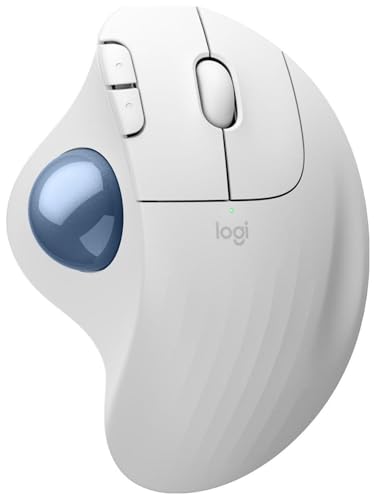
Logitech Ergo M575 Wireless Trackball (White)
About this pick
This listing is the white Logitech Ergo M575, a Bluetooth thumb trackball. The bullets are thin and only repeat a model number, so most of what we can say comes from the title, which describes a wireless ergonomic mouse with Bluetooth and encryption.
It sits between the Logitech Ergo M575 for Business Wireless Trackball and the Logitech MX Ergo S Advanced Wireless Trackball on price, and it lacks the business packaging of the first and the tilt of the second. Compared with the Nulea M501 Wireless Thumb Trackball Mouse, it costs about double for the Logitech name.
Best for buyers who specifically want the original M575 in white. The caveat is that the listing gives little feature detail, so confirm specs on the product page.
Best for: Buyers who want the original M575
Check price on AmazonPros
- +Established Logitech thumb layout
- +White colorway to match setups
- +Bluetooth wireless
- +Familiar M575 shape
Cons
- −Listing is thin on details
- −Pricier than similar thumb balls
Nulea M501 Wireless Thumb Trackball Mouse
About this pick
The Nulea M501 pairs a thumb-controlled ball with a rechargeable battery, four DPI levels and six buttons. It connects to up to three devices over Bluetooth or a USB dongle, with a switch button on the bottom.
Against the Logitech Ergo M575 for Business Wireless Trackball, it gives you rechargeability and extra buttons for less. Compared with the wired Nulea M509 Wired Thumb Trackball Mouse, it adds pairing and a battery, but it also adds charging.
Pick it for a home office that wants wireless without a Logitech price. The caveat is that the listing gives no battery life number.
Best for: Value-focused wireless users
Check price on AmazonPros
- +Wireless at a budget price
- +Six buttons with back and forward
- +Built-in battery
- +Three device pairing
Cons
- −No battery life figure
- −No tilt option
Nulea M509 Wired Thumb Trackball Mouse
About this pick
The M509 is a wired thumb ball with a 5.9 foot cable and a dual Type-A and Type-C interface, so it plugs into modern laptops without an adapter. It has six buttons, adjustable DPI and needs no drivers.
It costs less than the Nulea M501 Wireless Thumb Trackball Mouse and needs no battery or pairing. Compared with the PORLEI Wired Thumb Trackball Mouse, 34mm, it has the same wired approach but adds a dual connector and a longer cable.
Best for a desk where you never want to think about batteries. The caveat is that the cable is a tether, and the listing does not give a ball size.
Best for: No-charging desks with USB-C ports
Check price on AmazonPros
- +Fits both USB-C and USB-A ports
- +No battery or pairing
- +Six-button layout
- +Low price
Cons
- −Ball size not listed
- −Cable limits placement
PORLEI Wired Thumb Trackball Mouse, 34mm
About this pick
PORLEI's wired model has a 34mm thumb ball, RGB lighting, five adjustable DPI levels and a 1.8 meter cable that plugs into USB. It uses an optical sensor with three-point positioning.
It is the cheapest thumb ball in this list. Against the Nulea M509 Wired Thumb Trackball Mouse, it adds RGB lighting but drops the Type-C plug.
A reasonable first trackball if you want to try one for the least money. The caveat is that RGB is cosmetic, and it needs a USB-A port.
Best for: Lowest-cost wired thumb ball
Check price on AmazonPros
- +Cheapest of the six
- +Standard 34mm ball
- +No batteries or pairing
- +Five DPI settings
Cons
- −USB-A plug only
- −RGB adds little value
How We Evaluated These Thumb Trackball Mice
Each pick was assessed across 5 criteria weighted for real-world use.
Thumb ergonomics
We compared shell shape, tilt where listed and any ergonomic certification claims in the listing text.
Connection and power
Wired versus Bluetooth, receiver details and battery type were checked from each listing.
Button and software features
Button counts, DPI steps and programmable options were weighed.
Fit for the thumb layout
We noted which models use a standard 34mm ball and which listings leave ball size out.
Value for price
We compared price against listed features and buyer feedback themes.
How to Choose the Right Thumb Trackball Mice
By Usage Level
| Your situation | Recommended pick |
|---|---|
| You sit at a trackball all day | Logitech MX Ergo S Advanced Wireless Trackball |
| You manage a team's peripherals | Logitech Ergo M575 for Business Wireless Trackball |
| You want the original white M575 | Logitech Ergo M575 Wireless Trackball (White) |
| You want wireless on a budget | Nulea M501 Wireless Thumb Trackball Mouse |
| You want wired and USB-C ready | Nulea M509 Wired Thumb Trackball Mouse |
By Budget
| Budget | Recommended pick |
|---|---|
| Under $28 | PORLEI Wired Thumb Trackball Mouse, 34mm |
| $28 to $34 | Nulea M501 Wireless Thumb Trackball Mouse |
| $40 to $60 | Logitech Ergo M575 for Business Wireless Trackball |
| About $100 | Logitech MX Ergo S Advanced Wireless Trackball |
Tilted vs Flat Body
Tilted
A hinged or angled body lifts the outer edge of your hand to reduce forearm rotation. In this list the Logitech MX Ergo S Advanced Wireless Trackball lists a 20 degree tilt.
Flat
A flat body is simpler and lower, and it suits people who find a raised shape awkward. The Nulea M501 Wireless Thumb Trackball Mouse, Nulea M509 Wired Thumb Trackball Mouse and PORLEI Wired Thumb Trackball Mouse, 34mm are flat, and the Logitech Ergo M575 for Business Wireless Trackball has no listed tilt.
Most buyers should start flat unless they already feel forearm strain with a regular mouse.
Wired or Wireless Connection
| Your situation | Recommended pick |
|---|---|
| You want no batteries ever | Nulea M509 Wired Thumb Trackball Mouse |
| You want RGB lighting and a low cost | PORLEI Wired Thumb Trackball Mouse, 34mm |
| You want three paired devices | Nulea M501 Wireless Thumb Trackball Mouse |
| You want fast charging | Logitech MX Ergo S Advanced Wireless Trackball |
For Hybrid Office Workers Specifically
Look for
A compact body, easy device switching and a long battery or a cable you can keep plugged in.
In this comparison
The Nulea M501 Wireless Thumb Trackball Mouse switches between three devices, while the Nulea M509 Wired Thumb Trackball Mouse suits a permanent laptop dock with its Type-C plug.
When to Spend More
Spend more if
You use a thumb ball for hours daily and want tilt, fast charging and a precision toggle, which the Logitech MX Ergo S Advanced Wireless Trackball offers.
Save if
You are trying thumb control for the first time, where the PORLEI Wired Thumb Trackball Mouse, 34mm or Nulea M509 Wired Thumb Trackball Mouse keeps cost low.
Frequently Asked Questions
Does a thumb trackball work for left-handed users?
Most thumb balls are built for the right hand. A left-hand model exists from some brands, but none in this list is marked left-handed. Left-handers usually do better with a finger-operated ball.
Will my thumb get tired?
It can, especially in the first week and with a stiff ball. Take short breaks and try a trial period of a couple of weeks. If your thumb stays sore, switch to a finger trackball.
Can I replace the ball if I lose it?
Replacement 34mm balls are sold separately for some models, like the M575 family, but check compatibility. Do not buy a ball sold with no mouse unless the listing names your model.
Is the MX Ergo S worth it over the cheaper M575 line?
If you work at a trackball all day, the tilt, fast charging and precision switch are worth the money. For lighter use the M575 line or the Nulea covers the basics. Price is the deciding factor.
How do I clean the ball and sensor?
Push the ball out through the underside hole, wipe the ball and rollers with a lint-free cloth, and let it dry. Do this every few weeks. Avoid harsh solvents.
Do thumb trackballs work on glass or any surface?
Yes, since the body stays still and the ball does the tracking. This makes them good for couches, glass desks and cluttered work surfaces.
Bottom Line
best overall: Logitech MX Ergo S Advanced Wireless Trackball - best premium pick in this roundup.
See the full rankings above for all picks with pros, cons, and best-for summaries.
Browse on Amazon
All Prime-eligible options with current pricing.
Shop on Amazon →