
6 Best Finger Trackball Mice in 2026
Six finger-operated trackball mice compared by ball size, wired or wireless setup, device pairing and buttons, for fingertip control with a still wrist.

New to Amazon Prime?
Get fast, free shipping on every pick in this guide, plus Prime Video and exclusive deals.
Try Prime Free



At a Glance
On a finger trackball the ball sits in the middle of the body, and your index and middle fingers roll it while your thumb handles the buttons. That spreads cursor work across several fingers instead of loading everything onto the thumb, and the larger balls tend to give smoother, finer movement.
The six models below run from a 40mm wireless Perixx to a 55mm wired unit, and several pair with up to three devices. We compared them on listed specs: ball diameter, connection, DPI range, button count and desk footprint. Because these bodies are broad, check hand size before ordering, and give yourself a week or two to build finger control.
6 Criteria to Look For Before Buying a Finger Trackball Mice
Key buying criteria so you get the right fit the first time.
Ball diameter for fingertip control
Finger models commonly use 40 to 55mm balls, and a bigger ball moves the cursor more smoothly per roll but needs a broader body. The 55mm unit here is the largest, while 40mm balls are more compact. Look for the millimeter figure in the title or bullets, since some listings leave it out.
Hand size versus body width
A finger trackball's body is wide because the ball sits in the center, so a small hand may not reach the side buttons comfortably. Measure from wrist crease to fingertip and compare it to the listed length, such as 7.2 inches on the ELECOM. Check for a large-hands or small-hands note.
Ruby or large bearings
A ball that rides on small plastic bearings can pick up grit, while three 2.5mm artificial ruby bearings resist clogging and stay smooth longer. It affects how often you have to clean. Look for a bearing description in the bullets.
Button count and hand swap
Finger models usually have the primary buttons on the left and right side of the ball and more at the top corners. Eight buttons let you remap shortcuts, but more buttons means more learning. Look for a one-touch left-right swap if the desk is shared.
Connection modes and pairing
Some models pair four devices, with one wired plus a 2.4GHz receiver and two Bluetooth channels, while others are strictly one connection. Wired versions never need charging. Check for the exact count of devices and whether a wired fallback exists.
Battery claim versus real life
Listings quote 60 days or 120 days, but that is typically measured in light use. Heavy typing days drain faster. Look for the cell size, such as 930mAh, which tells you more than a day count.
6 Best Finger Trackball Mice in 2026
ELECOM HUGE Wireless Index Finger Trackball
About this pick
ELECOM's HUGE is a 2.4GHz wireless finger trackball with eight physical buttons, three DPI steps at 500, 1000 and 1500, and three 2.5mm artificial ruby bearings under the ball. The listing gives a body of 4.5 by 7.2 inches and works with Windows 7 and later and macOS 10.13 and later.
It is the priciest pick here, and compared with the Perixx PERIMICE-822IR Wireless Index Finger Trackball you give up Bluetooth and multi-device switching for a bigger button set and ruby bearings. Against the wired 55mm Wired Ambidextrous Finger Trackball Mouse, you gain wireless freedom but lose the dedicated hand-swap button.
A match for people who want a lot of programmable buttons and a smooth ball. The caveat is a large body that needs real desk room, and the listing does not state a battery life.
Best for: Programmers and editors needing many buttons
Check price on AmazonPros
- +Eight programmable buttons
- +Ruby bearings resist dust
- +Wireless 2.4GHz link
- +Works on Windows and Mac
Cons
- −Large body takes desk space
- −No Bluetooth listed
Perixx PERIMICE-822IR Wireless Index Finger Trackball
About this pick
Perixx's 822IR has a 40mm glossy ball made in Europe, controlled by the index and middle fingers. It supports one wired, one 2.4GHz and two Bluetooth connections, so four devices in all, and it has six quiet-click buttons.
Compared with the Nulea M505A Wireless Index Finger Trackball, it has a smaller ball but more connection modes and a wired fallback. Against the ELECOM HUGE Wireless Index Finger Trackball, it costs less and adds Bluetooth, though it has fewer buttons.
Best for a hybrid setup juggling a desktop, laptop and tablets. The caveat is that a 40mm ball sits between the compact and big sizes, so it will not suit someone who wants the largest possible ball.
Best for: Four-device desks and quiet offices
Check price on AmazonPros
- +Pairs with four devices
- +Quiet-click buttons all round
- +Remap buttons without installing software
- +Wired fallback mode
Cons
- −Mid-size ball only
- −Priced above the budget group
Nulea M505A Wireless Index Finger Trackball
About this pick
The Nulea M505A has a 44mm index finger ball, five DPI modes and a rechargeable battery that the listing says lasts up to 60 days on a charge. It connects to up to three devices via Bluetooth or a USB receiver.
It undercuts the Perixx PERIMICE-822IR Wireless Index Finger Trackball by a few dollars while giving a larger ball, but lacks a wired fallback. Compared with the ProtoArc EM03 NL Wireless Finger Trackball below, the ball is bigger and the price higher.
A solid fit for a home office wanting a bigger ball and recharging. The caveat is that the battery figure is the maker's claim and real life varies with use.
Best for: Rechargeable 44mm control
Check price on AmazonPros
- +Larger 44mm ball
- +Rechargeable, 60 day claim
- +Three device pairing
- +Five DPI modes
Cons
- −No wired mode
- −Battery life is a claim
55mm Wired Ambidextrous Finger Trackball Mouse
About this pick
This wired unit has an oversized 55mm blue ball, four DPI levels from 400 to 1600 and a one-touch button that swaps left and right button functions. It also lists dual scroll wheels, a DPI switch, a screen lock and middle and back buttons.
It is the largest ball in the list, and compared with the 44mm Wired Finger Trackball Mouse for Large Hands below it adds hand switching and the screen lock. Against the wireless ELECOM HUGE Wireless Index Finger Trackball, it saves money and removes batteries, but gives up wireless.
Choose it if you have big hands and want a no-batteries, left-or-right-hand body. The caveat is that the brand is not named on the listing, so support is a question mark.
Best for: Large hands and left-right sharing
Check price on AmazonPros
- +Biggest ball in the group
- +One-touch hand switching
- +No batteries to manage
- +Dual scroll wheels
Cons
- −Unnamed brand
- −Wired only
ProtoArc EM03 NL Wireless Finger Trackball
About this pick
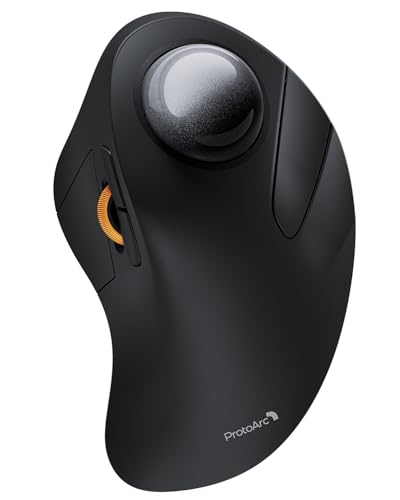
The ProtoArc EM03 NL uses an index-finger trackball with quiet clicks, a smooth frosted ball surface and a 930mAh battery that the listing quotes at up to 60 days per charge. It pairs with three devices through Bluetooth or a USB receiver.
Compared with the Nulea M505A Wireless Index Finger Trackball, it is cheaper and similarly rechargeable, though the listing does not state the ball size. Against the wired 44mm Wired Finger Trackball Mouse for Large Hands, it adds wireless but costs a bit more.
Good for a first finger trackball without spending much. The caveat is that ball diameter is not stated, so check the photos.
Best for: Cost-conscious wireless users
Check price on AmazonPros
- +Quiet clicks
- +Rechargeable with big battery
- +Three device pairing
- +Frosted ball surface
Cons
- −Ball size not listed
- −Mid-price for a budget pick
44mm Wired Finger Trackball Mouse for Large Hands
About this pick
This wired 44mm finger-operated trackball has five DPI levels, a 1.8 meter cable and plug-and-play USB-A with no drivers. The listing is aimed at larger hands and calls out use on nearly any surface.
It is the lowest-priced pick here. Against the 55mm Wired Ambidextrous Finger Trackball Mouse, it has a smaller ball and no hand-swap button, but costs less.
A sensible entry point if you want to test a finger ball without spending much. The caveat is that the brand is unnamed in the listing and the plug is USB-A only.
Best for: Cheap wired finger control
Check price on AmazonPros
- +Lowest price in this list
- +No batteries or pairing
- +Five DPI settings
- +Suits large hands
Cons
- −Brand not named
- −No wireless or Type-C
How We Evaluated These Finger Trackball Mice
Each pick was assessed across 5 criteria weighted for real-world use.
Ball size and control
We compared the listed ball diameter and bearing type for each model, noting where a listing left the figure out.
Body fit
Dimensions and the large-hands language were noted since finger bodies are wider than thumb bodies.
Connection flexibility
Wired, 2.4GHz and Bluetooth paths and device counts were compared from the listings.
Button layout
Button count, hand-swap features and scroll wheels were scored for daily use.
Value for price
Price was weighed against what each listing actually includes, with recurring buyer comments as a tiebreaker.
How to Choose the Right Finger Trackball Mice
By Ball Size
| Your situation | Recommended pick |
|---|---|
| You want the largest ball | 55mm Wired Ambidextrous Finger Trackball Mouse |
| You want a mid-size wireless ball | Nulea M505A Wireless Index Finger Trackball |
| You want a compact 40mm ball | Perixx PERIMICE-822IR Wireless Index Finger Trackball |
| You want ruby bearings and many buttons | ELECOM HUGE Wireless Index Finger Trackball |
By Budget
| Budget | Recommended pick |
|---|---|
| Under $35 | 44mm Wired Finger Trackball Mouse for Large Hands |
| $35 to $40 | 55mm Wired Ambidextrous Finger Trackball Mouse |
| $40 to $50 | Nulea M505A Wireless Index Finger Trackball |
| Over $50 | ELECOM HUGE Wireless Index Finger Trackball |
Wired vs Wireless
Wired
A cable means no batteries and no pairing but ties the ball to the computer. The 55mm Wired Ambidextrous Finger Trackball Mouse and 44mm Wired Finger Trackball Mouse for Large Hands are wired.
Wireless
Wireless models pair with several devices and keep the desk neat, in exchange for charging. The ELECOM HUGE Wireless Index Finger Trackball, Perixx PERIMICE-822IR Wireless Index Finger Trackball, Nulea M505A Wireless Index Finger Trackball and ProtoArc EM03 NL Wireless Finger Trackball are wireless.
Most buyers should go wireless unless the machine is a fixed desktop.
Device and Hand Needs
| Your situation | Recommended pick |
|---|---|
| You switch among four devices | Perixx PERIMICE-822IR Wireless Index Finger Trackball |
| You are left-handed or share the mouse | 55mm Wired Ambidextrous Finger Trackball Mouse |
| You want quiet clicks and a rechargeable cell | ProtoArc EM03 NL Wireless Finger Trackball |
| You have large hands and a tight budget | 44mm Wired Finger Trackball Mouse for Large Hands |
For Spreadsheet Work Specifically
Look for
Extra buttons for copy and paste shortcuts, a dedicated scroll wheel and a smooth ball for small cell targets.
In this comparison
The ELECOM HUGE Wireless Index Finger Trackball offers eight buttons and the 55mm Wired Ambidextrous Finger Trackball Mouse lists dual scroll wheels.
When to Spend More
Spend more if
You want ruby bearings and a full button set for all-day use, as on the ELECOM HUGE Wireless Index Finger Trackball.
Save if
You only need basic finger control, where the 44mm Wired Finger Trackball Mouse for Large Hands gets the job done cheaply.
Frequently Asked Questions
Are finger trackballs harder to learn than thumb trackballs?
Many people need a bit longer because you coordinate several fingers instead of one thumb. A week or two of regular use is typical. Practice in your normal apps rather than in games.
Will a finger trackball fit small hands?
The body is wide, so small hands may stretch to reach the buttons. Measure your hand and compare it to the listed length. A thumb model or a compact body may suit smaller hands better.
Do I need to clean the ball often?
Skin oil and dust collect under the ball, so pop it out and wipe the rollers every few weeks. Ruby bearings help resist clogging. Use a lint-free cloth.
Is a larger ball always better?
A bigger ball gives smoother, finer control but needs a bigger body and more finger reach. A 40mm ball is a compromise. Pick the size that fits your hand.
Is the ELECOM HUGE worth more than the budget wired options?
It is worth it if you use many buttons and want ruby bearings with a wireless link. If you only need cursor control, the wired 44mm option is far cheaper. It is mostly a button and bearing premium.
Can I use one on a Mac?
Several do, such as the ELECOM, which lists macOS 10.13 and later. Check the compatibility line on any listing before buying. Some features may need software.
Bottom Line
best overall: ELECOM HUGE Wireless Index Finger Trackball - best premium finger ball pick in this roundup.
See the full rankings above for all picks with pros, cons, and best-for summaries.
Browse on Amazon
All Prime-eligible options with current pricing.
Shop on Amazon →