
8 Best Split Ergonomic Keyboards in 2026
8 best split ergonomic keyboards in 2026, from row-staggered entry points to fully programmable column-staggered boards. Compare tenting, price, and learning curve.

New to Amazon Prime?
Get fast, free shipping on every pick in this guide, plus Prime Video and exclusive deals.
Try Prime Free



At a Glance
Logitech Ergo K860 Wireless Ergonomic Split Keyboard with Wrist Rest
↓ See why we picked itKINESIS Advantage360 Professional Split Ergonomic Keyboard
↓ See why we picked itKINESIS Freestyle2 Ergonomic Keyboard for PC (9" Separation)
↓ See why we picked itLogitech Wave Keys Wireless Ergonomic Keyboard with Cushioned Palm - Sand
↓ See why we picked itNulea Wireless Ergonomic Keyboard, Split Keyboard with Cushioned Wrist Rest
↓ See why we picked itArteck Split Ergonomic Keyboard with Cushioned Wrist and Palm Rest
↓ See why we picked itKINESIS Freestyle2 USB-A Ergonomic Keyboard w/ VIP3 Lifters
↓ See why we picked itKINESIS Freestyle Edge RGB Plus Split Mechanical Keyboard
↓ See why we picked itA split ergonomic keyboard separates the keys into two independent halves that can be positioned shoulder-width apart, which reduces the inward shoulder rotation a standard keyboard forces on most typists. The category spans a wide difficulty range though, from a row-staggered board that still looks familiar to a fully column-staggered, programmable layout that requires relearning where every key sits.
Below are 8 split ergonomic keyboards we evaluated on layout type, tenting range, learning curve, and how each fits into a realistic buying path from entry-level to premium, ranging from an under-$50 entry-level split board to a $479 fully programmable Bluetooth split keyboard.
5 Criteria to Look For Before Buying a Split Ergonomic Keyboard
Key buying criteria so you get the right fit the first time.
Understand the difference between a fully split board and a fixed-gap split design
"Split keyboard" covers a wide range of actual designs, some are two genuinely separate halves connected by a cable that you can position independently at your own preferred shoulder width, while others are a single fixed board with a gap molded into the middle at one preset width.
This distinction matters directly for the actual ergonomic benefit, a true split lets you match the gap to your own shoulder width for genuinely neutral wrist and shoulder positioning, while a fixed-gap design offers a smaller, preset benefit that may not match your body.
Check the listing specifically for whether the halves are truly separate and independently positionable, not just whether the word "split" appears in the title.
Check tenting angle adjustability if forearm rotation strain is your actual concern
Tenting refers to angling each half of the keyboard upward toward the center, which reduces forearm pronation (the twisting motion of resting your palms flat), and adjustable tenting legs or built-in stands let you dial in an angle that suits your specific comfort level, while a flat, non-tenting split keyboard still separates your hands but doesn't address forearm rotation at all.
This matters more if forearm or wrist strain from flat typing is the actual problem you're trying to solve, less if hand separation alone is your main goal.
Check whether tenting angle is adjustable and by how many degrees, not just whether the keyboard is described as "ergonomic."
Consider the real adjustment period before judging whether a split layout works for you
Switching to a split keyboard involves a genuine adjustment period, typically one to three weeks, during which typing speed and accuracy commonly drop before the new hand positioning becomes natural, this is a normal part of the transition, not a sign the keyboard is a bad fit or poorly made.
This matters most for anyone whose job depends on fast, accurate typing, where a temporary speed drop during the adjustment period has a real short-term cost worth planning around.
Check reviews for mentions of how long the adjustment period took for reviewers with a similar typing-heavy workflow to yours, and consider trying the new layout during a lower-stakes work period rather than a deadline crunch.
Match layout size (full-size, tenkeyless, or compact) to your actual number-pad and function-key usage
Split keyboards come in full-size, tenkeyless (no number pad), and more compact layouts that also drop the function row or arrow keys, and this size choice is a real tradeoff between desk space and reduced mouse reach versus keys available without a modifier combination.
This matters directly if you regularly use a number pad for data entry or spreadsheets, a compact split layout without one adds real friction, while someone who never touches the number pad gains a shorter, more neutral reach to the mouse with a smaller layout.
Check the specific layout size and key count against your actual daily workflow, not just the general "ergonomic" category.
Weigh wireless convenience against the cable management a split design already requires
A split keyboard already involves a cable connecting the two halves (unless it's fully wireless per-half), so the calculus around wireless connectivity is slightly different than for a standard keyboard, going wireless eliminates the desk cable entirely but adds battery management for what's often already a more complex setup.
This matters more if desk cable clutter is a real concern for your specific setup, less if you're already running a cable between the two halves regardless.
Check whether the connecting cable between halves is required even in a "wireless" model, since some split keyboards still need it despite wireless computer connectivity.
8 Best Split Ergonomic Keyboards in 2026
Logitech Ergo K860 Wireless Ergonomic Split Keyboard with Wrist Rest
About this pick
The Ergo K860 uses a row-staggered split layout, meaning the keys stay in familiar rows rather than switching to a column-staggered grid, which keeps the relearning curve much shorter than a fully ortholinear board. A fixed, domed split shape plus built-in negative tilt handles most of the ergonomic benefit without asking you to relearn key positions.
This is the easiest true split in this list to adopt, which makes it the practical starting point for a touch typist who wants real ergonomic benefit without months of retraining.
Built-in negative tilt reduces wrist extension. That's a real strength, but weigh it against the flip side: split angle is fixed, not adjustable.
Best for: Touch typists who want real split ergonomics with minimal relearning
Check price on AmazonPros
- +Row-staggered layout keeps the learning curve short
- +Built-in negative tilt reduces wrist extension
- +Attached palm rest needs no separate purchase
- +Reliable multi-device pairing
Cons
- −Split angle is fixed, not adjustable
- −Halves don't fully separate shoulder-width
- −No adjustable tenting beyond the built-in tilt
KINESIS Advantage360 Professional Split Ergonomic Keyboard
About this pick
The Advantage360 Professional is a fully separable, column-staggered, contoured split keyboard with quiet mechanical switches and open-source programmable firmware, the deepest ergonomic and customization option in this list. Adjustable tenting and a genuinely contoured key well shape the layout around your hand rather than the other way around.
This is the most expensive pick here and asks the most of a new user, since column-staggered layouts require relearning key positions from scratch, but it also offers the most complete ergonomic control for someone who has already decided a full split is worth the investment.
Worth calling out specifically: fully programmable open-source firmware. The catch is most expensive pick in this list by a wide margin.
Best for: Buyers ready to commit to the deepest ergonomic and programmable split keyboard available
Check price on AmazonPros
- +Most advanced ergonomic contouring in this list
- +Fully programmable open-source firmware
- +Adjustable tenting
- +Quiet mechanical switches
Cons
- −Most expensive pick in this list by a wide margin
- −Column-staggered layout has the steepest learning curve
- −Programmable firmware requires a real time investment to configure
KINESIS Freestyle2 Ergonomic Keyboard for PC (9" Separation)
About this pick
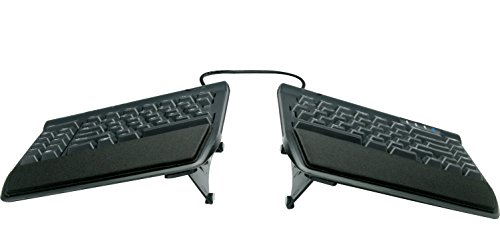
The Freestyle2 is a row-staggered split keyboard connected by a cable, letting the two halves separate up to 9 inches while keeping familiar key rows, a reasonable middle step between a fixed split and a fully independent one. It's wired, which removes battery concerns for a desk that stays in one place.
As a step up from a wave keyboard but well short of a fully programmable board, it's a practical entry point for someone testing whether true separation actually helps before spending on a premium contoured model.
Familiar row-staggered layout, easier relearning. Set against that, wired only. Both matter when comparing it to the other picks here.
Best for: Buyers testing true split separation before committing to a premium contoured board
Check price on AmazonPros
- +True independent separation up to 9 inches
- +Familiar row-staggered layout, easier relearning
- +No battery or pairing setup
- +Reasonable entry price for true separation
Cons
- −Wired only
- −No tenting adjustment
- −Basic build compared to premium picks
Logitech Wave Keys Wireless Ergonomic Keyboard with Cushioned Palm - Sand
About this pick
Wave Keys is not a true split, its wave-curved keys stay fixed in one piece, but it's the gentlest possible first step for someone who has never tried an ergonomic layout and wants to see if the concept helps before buying a true split board. The built-in cushioned rest and short adjustment period make it low-risk.
Buyers who find real benefit here and want more separation can step up to a row-staggered true split like the Freestyle2 or Ergo K860 next, using this as a deliberate entry point in a longer progression rather than a final split keyboard.
A genuine advantage here is that lowest price entry point. The tradeoff is not a true split, halves are fixed together.
Best for: Buyers who want to test ergonomic typing before committing to a true split keyboard
Check price on AmazonPros
- +Shortest adjustment period of any pick in this list
- +Lowest price entry point
- +Built-in cushioned rest
- +Reasonable first step before a true split
Cons
- −Not a true split, halves are fixed together
- −Far less forearm relief than the split picks in this list
- −No tenting adjustment
Nulea Wireless Ergonomic Keyboard, Split Keyboard with Cushioned Wrist Rest
About this pick
The Nulea is the cheapest true split keyboard in this list, a row-staggered layout with a cushioned wrist rest and both Bluetooth and USB-C wireless connectivity. It's a hinged design rather than fully independent halves, so separation is more limited than a cable-connected model.
Rechargeable via USB-C rather than disposable batteries is a genuine convenience at this price point, and the row-staggered layout keeps the relearning curve manageable for a first true split keyboard.
USB-C rechargeable, no disposable batteries. That's a real strength, but weigh it against the flip side: hinged design limits separation vs. a cable-connected split.
Best for: Budget buyers who want a genuine true split rather than just a wave keyboard
Check price on AmazonPros
- +Lowest price for a true split keyboard in this list
- +USB-C rechargeable, no disposable batteries
- +Row-staggered layout, manageable relearning
- +Cushioned wrist rest included
Cons
- −Hinged design limits separation vs. a cable-connected split
- −Smaller brand with less established support
- −No adjustable tenting beyond the hinge
Arteck Split Ergonomic Keyboard with Cushioned Wrist and Palm Rest
About this pick
The Arteck splits into two halves connected by a hinge that supports an adjustable tenting angle, letting each side tilt outward to reduce forearm pronation more than a fixed-angle split can. Most true split keyboards in this price range fix the angle at the factory, so this stands out on that spec alone.
A cushioned wrist and palm rest runs the width of both halves, and the row-staggered layout keeps the relearning curve reasonable. It's a strong middle ground between the cheapest entry-level splits and a premium contoured board.
Worth calling out specifically: true split shape for real forearm relief. The catch is windows-focused compatibility.
Best for: Buyers who want adjustable tenting without paying for a fully contoured board
Check price on AmazonPros
- +Adjustable tenting angle at a mid-range price
- +True split shape for real forearm relief
- +Full-width cushioned rest included
- +Row-staggered layout, manageable relearning
Cons
- −Windows-focused compatibility
- −Bulkier than a fixed hinge design
- −Tenting hinge adds moving parts to maintain
KINESIS Freestyle2 USB-A Ergonomic Keyboard w/ VIP3 Lifters
About this pick
This version of the Freestyle2 ships with VIP3 lifters, an add-on kit that props each half up at an adjustable tenting angle, something the base Freestyle2 doesn't include on its own. It's still a row-staggered, cable-connected split, so the layout relearning stays manageable.
The lifters are the real upgrade here over the base 9-inch model, letting you dial in a tenting angle rather than typing flat, which is one of the most effective ways to reduce forearm pronation without jumping to a fully contoured board.
Familiar row-staggered layout. Set against that, pricier than the base Freestyle2 without lifters. Both matter when comparing it to the other picks here.
Best for: Buyers who want the Freestyle2's familiar layout with real tenting adjustment
Check price on AmazonPros
- +Adjustable tenting via included VIP3 lifters
- +Familiar row-staggered layout
- +No battery or pairing setup
- +Meaningful upgrade over the base Freestyle2
Cons
- −Pricier than the base Freestyle2 without lifters
- −Wired only
- −Lifters add setup steps versus a built-in tenting hinge
KINESIS Freestyle Edge RGB Plus Split Mechanical Keyboard
About this pick
The Freestyle Edge RGB Plus is a row-staggered, cable-connected split with hot-swappable linear mechanical switches, RGB lighting, and full programmability, aimed at buyers who want split ergonomics without giving up a mechanical typing feel or gaming-oriented features. Mac keycaps and a lift kit ship in the box.
A detachable palm support and the included lift kit give you tenting adjustment on top of the row-staggered layout's manageable relearning curve, making it one of the more complete mid-to-premium options in this list for someone who splits time between typing and gaming.
A genuine advantage here is that lift kit included for tenting adjustment. The tradeoff is pricier than the non-mechanical split picks.
Best for: Buyers who want a mechanical typing feel alongside split ergonomics
Check price on AmazonPros
- +Mechanical switches with hot-swap support
- +Lift kit included for tenting adjustment
- +Fully programmable
- +Mac keycaps included for cross-platform use
Cons
- −Pricier than the non-mechanical split picks
- −RGB and gaming features add cost some buyers won't use
- −Row-staggered only, not column-staggered like the Advantage360
How We Evaluated These Split Ergonomic Keyboards
Each pick was assessed across 5 criteria weighted for real-world use.
Row-staggered vs. column-staggered layout
Distinguished row-staggered splits, which keep familiar key rows, from column-staggered ortholinear boards like the Advantage360, which require relearning key positions from scratch.
Degree of separation and tenting
Compared hinged, fixed-angle splits against cable-connected, fully independent halves, and noted which picks support adjustable tenting versus a fixed built-in tilt.
Realistic learning curve
Weighed how large an adjustment each pick asks of a touch typist, from the short entry path of a wave keyboard to the multi-month relearning of a fully column-staggered board.
Programmability and firmware
Checked whether a board offers fully programmable, open-source firmware versus fixed key mapping, since programmability adds real value but also setup complexity.
Value across the entry-to-premium path
Weighed price against separation, tenting, and build quality across the full range in this list, from the entry-level split to the fully programmable premium board.
How to Choose the Right Split Ergonomic Keyboards
By Split Type
| Your priority | Recommended pick |
|---|---|
| Fully split, independently positionable halves | Logitech Ergo K860 Wireless Ergonomic Split Keyboard with Wrist Rest |
| Most-reviewed, strongest reliability signal | Logitech Ergo K860 Wireless Ergonomic Split Keyboard with Wrist Rest |
By Budget
| Budget | Recommended pick |
|---|---|
| Under $50 | Nulea Wireless Ergonomic Keyboard |
| Up to $479 | KINESIS Advantage360 Professional Split Ergonomic Keyboard |
Adjustable Tenting vs Flat Split
Adjustable tenting
Reduces forearm rotation strain by angling each half, worth it if forearm pronation is a real concern. In this comparison: KINESIS Advantage360 Professional Split Ergonomic Keyboard, Arteck Split Ergonomic Keyboard with Cushioned Wrist and Palm Rest, KINESIS Freestyle2 USB, KINESIS Freestyle Edge RGB Plus Split Mechanical Keyboard.
Flat split
Still separates hands to a natural width, but doesn't address forearm rotation. In this comparison: Logitech Ergo K860 Wireless Ergonomic Split Keyboard with Wrist Rest, KINESIS Freestyle2 Ergonomic Keyboard for PC, Logitech Wave Keys Wireless Ergonomic Keyboard with Cushioned Palm, Nulea Wireless Ergonomic Keyboard.
Default to adjustable tenting if forearm strain, not just hand separation, is your actual concern.
By Layout Size
Check each pick's listed layout size and whether it includes a number pad against your actual daily workflow before buying, not just the general "ergonomic" category. Logitech Ergo K860 Wireless Ergonomic Split Keyboard with Wrist Rest is the most-reviewed option here if you want the safer bet.
For Carpal Tunnel or Wrist Pain Specifically
Look for
A genuinely adjustable split gap and tenting angle, not just a fixed-gap board labeled ergonomic.
In this comparison
Logitech Ergo K860 Wireless Ergonomic Split Keyboard with Wrist Rest is worth checking against its listed split and tenting adjustability before buying, given its strong review base.
When to Spend More
Spend more if
Wrist or forearm strain is a genuine daily problem, where KINESIS Advantage360 Professional Split Ergonomic Keyboard's adjustability gives real headroom over the cheaper picks.
Save if
You just want to try a split layout without a big investment, where Nulea Wireless Ergonomic Keyboard covers the same job at a lower price.
Frequently Asked Questions
How long does it take to learn a split ergonomic keyboard?
A row-staggered split like the Ergo K860 or Nulea usually takes a few weeks to feel natural. A column-staggered board like the KINESIS Advantage360 commonly takes 4-8 weeks to regain 80% of prior typing speed, and some people never fully return to their old speed.
What's an affordable way to start with split keyboards?
Start with a wave keyboard to test whether ergonomic typing helps at all, then move to a row-staggered true split like the Freestyle2 or Nulea in this list before committing to a premium column-staggered board like the Advantage360. This staged approach avoids spending $400+ before you know it's the right fit.
What is QMK or ZMK firmware and do I need to understand it?
QMK and ZMK are open-source firmware platforms that let advanced boards like the KINESIS Advantage360 be fully remapped, layer by layer. You don't need to use them, the board works fine on default settings, but unlocking the full programmability requires learning config files and keymaps.
Does a split keyboard help if I don't touch type?
Not much. Split keyboards assume consistent, fixed finger-to-key positions from touch typing. If you hunt-and-peck, you'll get little of the intended ergonomic benefit and may find the transition more frustrating than helpful.
What's the difference between row-staggered and column-staggered split keyboards?
Row-staggered splits, like the Ergo K860, Freestyle2, and Nulea in this list, keep keys arranged in the same staggered rows as a standard keyboard, so relearning is minimal. Column-staggered boards like the KINESIS Advantage360 rearrange keys into vertical columns, which requires relearning nearly every key position but can offer a more natural finger reach once learned.
How much desk space do I need for a split keyboard?
Placing two halves shoulder-width apart typically needs at least 80cm of desktop width plus room for the mouse to the side. Measure your desk before buying a fully separable board like the Freestyle2 or Advantage360, a hinged split like the Arteck or Nulea needs less width since the halves stay closer together.
Bottom Line
best overall: Logitech Ergo K860 Wireless Ergonomic Split Keyboard with Wrist Rest - best overall split keyboard pick in this roundup.
See the full rankings above for all picks with pros, cons, and best-for summaries.
Browse on Amazon
All Prime-eligible options with current pricing.
Shop on Amazon →