
6 Best Small Keyboards Under $30 in 2026
We compared small keyboards under $30 by connection type and battery setup, since a compact layout alone doesn't guarantee comfortable typing.

New to Amazon Prime?
Get fast, free shipping on every pick in this guide, plus Prime Video and exclusive deals.
Try Prime Free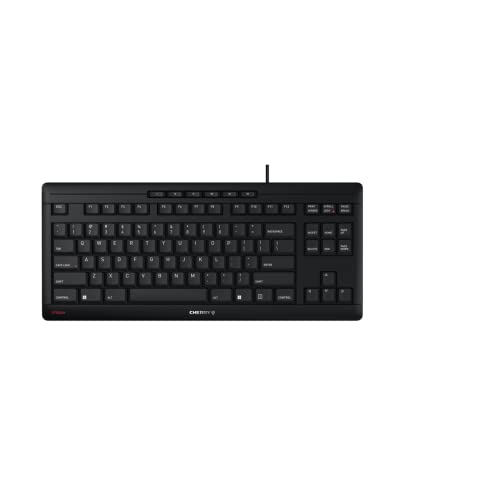




At a Glance
Dropping the number pad is what makes these keyboards small, but that single change affects more than desk space: without a numpad, your mouse sits closer to the keyboard's main keys, which most ergonomics guidance points to as a more natural shoulder position for long typing sessions.
We looked past "compact" as a marketing word to compare actual connection type (2.4GHz USB dongle versus true Bluetooth), key travel style, and battery arrangement, since these three details vary more between picks in this price range than the small footprint itself does.
5 Criteria to Look For Before Buying a Small Keyboards Under $30
Key buying criteria so you get the right fit the first time.
Understand what removing the number pad actually changes about your posture
A small keyboard's defining feature is dropping the number pad found on full-size keyboards, and the real benefit isn't just desk space, it's that your mouse can sit directly next to the keyboard's main key cluster instead of several inches further right where a numpad would otherwise be. Ergonomics guidance generally points to this closer mouse position as reducing shoulder strain during long sessions, since you're not reaching as far to the side repeatedly throughout the day. If you frequently use a numeric keypad for data entry work, factor in that a small keyboard removes that function entirely rather than just shrinking it, so check whether your actual workflow needs numpad access before switching.
Check the actual connection type, not just "wireless" as a label
Wireless small keyboards in this price range use one of two genuinely different connection methods: a 2.4GHz USB dongle that plugs into a USB-A port, or true Bluetooth that pairs directly without an extra dongle taking up a port. A 2.4GHz dongle keyboard won't connect to a device with no USB-A port at all (some newer laptops and tablets), while true Bluetooth works on any Bluetooth-capable device but can sometimes have a marginally less instant wake-up response than a dedicated USB dongle. Check the listing specifically for "Bluetooth" versus "2.4GHz USB receiver" language, and confirm your target device has the right kind of port or wireless support before buying.
Decide between disposable batteries and a built-in rechargeable battery
Wireless keyboards in this category power themselves either through standard disposable batteries (typically AA or AAA) that you replace when they run out, or a built-in rechargeable battery that you top up via a USB or USB-C cable periodically. Disposable batteries mean an instant swap when they die with no waiting, but an ongoing cost and occasional need to have spares on hand, while a rechargeable battery eliminates that ongoing purchase but requires remembering to charge it before it fully depletes, and generally can't be swapped instantly if it dies mid-use. If you want zero downtime and don't mind buying batteries occasionally, disposable is the safer choice; if you'd rather avoid battery purchases and can plan ahead for charging, rechargeable works well.
Look for a named switch mechanism if typing feel matters to you
Most keyboards in this price range use generic membrane or scissor-switch mechanisms without naming a specific technology, while at least one listing in this comparison names a specific branded switch mechanism (Cherry's own SX scissor switches) directly, giving you a real, comparable spec rather than a vague "comfortable typing" claim. A named switch mechanism from an established keyboard manufacturer generally signals more engineering attention to consistent key feel and durability than an unnamed generic switch, though unnamed switches can still feel perfectly comfortable for casual use. If typing feel and long-term key durability matter to you specifically, prioritize a listing that names its actual switch technology.
Check for a stated key layout difference before assuming standard touch-typing compatibility
Compressing a keyboard down in size sometimes means the manufacturer adjusts less commonly used keys, like the Enter key or the arrangement around it, to fit the smaller footprint, and at least one listing in this comparison explicitly warns that its Enter key layout differs from a standard full-size keyboard. If you're a fast touch typist who relies on muscle memory for key positions, this kind of layout change can genuinely slow you down for an adjustment period after switching. Check the listing's description and any layout diagram images carefully for mentions of a non-standard key arrangement before assuming any compact keyboard matches a standard full-size layout exactly.
6 Best Small Keyboards Under $30 in 2026
Cherry Stream Wired Keyboard Without Number Pad, Compact TKL
About this pick
Cherry names its own SX scissor switch technology directly in this listing, a mechanism built around a precise, consistent pressure point rather than a generic membrane switch, and backs it with an independently verified GS "Tested Safety" certification most competitors don't mention.
Against the cheaper Rii and Lumsburry picks below, Cherry adds two rubberized fold-out feet plus an integrated metal plate specifically for stability, a detail suggesting a sturdier build than the lighter plastic keyboards at the bottom of this price range.
Best for buyers who type frequently throughout the day and want a documented switch mechanism and certified build quality over the cheapest possible compact keyboard.
Best for: frequent typists who want a documented switch mechanism and certified build quality
Check price on AmazonPros
- +Documented Cherry SX switch mechanism
- +Independently certified for safety testing
- +Metal plate and fold-out feet add stability
Cons
- −Wired only, no wireless option
- −Priciest pick in this comparison
Arteck 2.4G Wireless Keyboard, Ultra Slim and Compact
About this pick
Arteck uses a built-in rechargeable lithium battery rather than swappable AAA batteries, rated for 6 months on a single charge based on 2 hours of daily use, and includes the USB-C charging cable needed to top it up in the box.
Against the TECKNET pick below, which relies on 2.4GHz USB connection with disposable AAA batteries, Arteck's rechargeable design means no ongoing battery purchases, though it does require remembering to recharge periodically rather than swapping in fresh batteries instantly.
Best for buyers who'd rather recharge occasionally than keep buying replacement batteries, and who want a full-size key layout despite the compact overall footprint.
Best for: buyers who prefer recharging over buying replacement batteries and want full-size keys
Check price on AmazonPros
- +Rechargeable, no disposable batteries needed
- +24-month warranty stated directly
- +Full-size keys despite compact footprint
Cons
- −Needs periodic recharging rather than instant battery swap
- −2.4GHz only, no Bluetooth option
TECKNET 2.4G Wireless Mini Compact Keyboard
About this pick
TECKNET states exact dimensions (11.5 x 4.9 inches, 10.4 ounces) directly in the listing, genuinely one of the smaller and lighter footprints in this comparison, plus a stated 36-month warranty with registration, longer than most competitors here mention.
The listing is upfront about a real tradeoff worth knowing before buying: this keyboard uses a different Enter key layout than standard full-size keyboards, meaning touch typists accustomed to a standard layout may need an adjustment period.
Best for buyers who prioritize the smallest physical footprint and a longer stated warranty, and who don't mind a short adjustment period for a non-standard Enter key layout.
Best for: buyers who want the smallest physical footprint and the longest stated warranty here
Check price on AmazonPros
- +Genuinely compact stated dimensions
- +36-month warranty, longest in this comparison
- +Quiet, low key travel typing feel
Cons
- −Non-standard Enter key layout needs adjustment
- −USB-A receiver required, no Bluetooth option
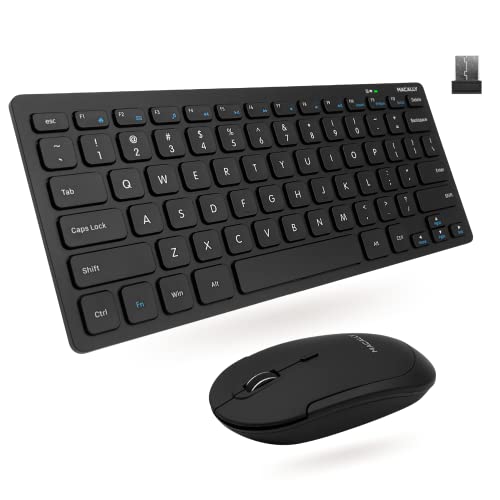
Macally Small Wireless Keyboard and Mouse Combo
About this pick
This is the only pick in this comparison that bundles a matching compact mouse in the same purchase, connected through a single USB dongle rather than needing two separate receivers, with the mouse offering 3 selectable DPI modes (800/1200/1600).
Against the standalone keyboards above, Macally's 78-key layout is more compressed than TECKNET's or Arteck's, and the company states up to a 2-year warranty plus lifetime support, among the longer coverage terms in this comparison.
Best for buyers setting up a new small-desk workstation from scratch who want a matched keyboard and mouse pair from one purchase rather than sourcing them separately.
Best for: buyers setting up a new small-desk workstation who want a matched keyboard and mouse pair
Check price on AmazonPros
- +Keyboard and mouse in one matched purchase
- +Single dongle powers both devices
- +Long stated warranty and support terms
Cons
- −Most compressed key layout in this comparison
- −Priciest pick here, though it includes a mouse
Lumsburry Computer Keyboard, 87 Keys Compact Wired
About this pick
Lumsburry adds adjustable rainbow LED backlighting, a feature none of the pricier picks in this comparison include, with both brightness and light mode adjustable to your preference, useful for typing in dim lighting without needing a separate desk lamp aimed at the keyboard.
Against the similarly priced Rii pick below, Lumsburry trades some of that simplicity for the backlight feature and 12 dedicated multimedia shortcut keys across the F1-F12 row.
Best for buyers who want backlit keys for low-light typing without paying the premium of a full mechanical gaming keyboard.
Best for: buyers who want backlit keys for low-light typing at a genuinely low price
Check price on AmazonPros
- +Adjustable backlighting, rare at this price
- +12 dedicated multimedia shortcut keys
- +Simple plug-and-play, no driver needed
Cons
- −Wired only, no wireless option
- −Backlight adds a small amount of power draw over USB
Rii RK907 Ultra-Slim Compact USB Wired Keyboard
About this pick
Rii's RK907 is the cheapest pick in this entire comparison at under $10, using low-profile keys for a quieter, more comfortable keystroke than a taller-key design, with a splash-resistant desktop-centric build for everyday office use.
Against the pricier Lumsburry and Cherry picks, this skips backlighting and any certified switch technology, keeping things to the essential plug-and-play function at the lowest possible price in this comparison.
Best for buyers who want the absolute lowest price for a genuinely compact, quiet-typing keyboard without any extra features beyond the core function.
Best for: buyers who want the lowest possible price for a genuinely compact, comfortable-typing keyboard
Check price on AmazonPros
- +Lowest price in this comparison
- +Low-profile keys feel quiet and comfortable
- +Splash-resistant build for everyday office use
Cons
- −No backlighting or certified switch tech
- −Basic feature set compared to pricier picks
How We Evaluated These Small Keyboards Under $30
Each pick was assessed across 5 criteria weighted for real-world use.
Connection type verification
we distinguished true Bluetooth from 2.4GHz USB-dongle wireless and wired USB connections, since each has real, different tradeoffs for device compatibility and setup.
Key switch and travel comparison
we noted which listings name a specific switch mechanism (like Cherry's SX scissor switches) versus a generic membrane design, since named switch technology is a real, checkable quality signal.
Battery arrangement check
for wireless picks, we identified whether each uses a built-in rechargeable battery or standard disposable batteries, since this affects long-term ownership cost and convenience differently.
Stated warranty comparison
we compared each listing's stated warranty term directly, since coverage varied meaningfully across similarly priced picks in this comparison.
Live price gate
every pick had to be in stock and priced at or under $30 on the date this guide was checked; keyboards that only hit this tier during a temporary sale were excluded.
How to Choose the Right Small Keyboards Under $30
By Priority
| If you mainly need | Recommended pick |
|---|---|
| A documented switch mechanism and certified safety | Cherry Stream Wired Keyboard Without Number Pad |
| Rechargeable battery, no disposables | Arteck 2.4G Wireless Keyboard |
| A matched keyboard and mouse combo | Macally Small Wireless Keyboard and Mouse Combo |
| The lowest possible price | Rii RK907 Ultra-Slim Compact USB Wired Keyboard |
By Budget
| Price range | Recommended pick |
|---|---|
| Under $16 | Rii RK907 (under $10), Lumsburry (under $15), or TECKNET (under $20) |
| Up to $30 | Arteck (under $25), Cherry Stream (under $25), or Macally combo (under $30) |
Wired vs Wireless
Wired (Cherry Stream, Lumsburry, Rii)
No batteries to manage and typically the most reliable connection, at the cost of one more cable on your desk.
Wireless (TECKNET, Arteck, Macally)
Cleaner desk setup with no cable, but requires either battery swaps or periodic recharging depending on the specific model.
If a completely clutter-free desk matters more than avoiding battery management, Arteck's rechargeable design splits the difference well.
By Feature Priority
| Priority | Recommended pick |
|---|---|
| Backlit keys for low-light typing | Lumsburry Computer Keyboard |
| Longest stated warranty | TECKNET (36 months) or Macally (up to 2 years) |
| Certified switch technology | Cherry Stream Wired Keyboard |
For a New Small-Desk Setup Specifically
Look for
A matched keyboard and mouse bundle using a single USB dongle, so you're not sourcing and pairing two separate devices for a brand-new desk.
In this comparison
The Macally combo is the only pick here that bundles a matching mouse using one shared dongle.
When to Spend More
Spend more if
You type for hours daily and want a documented switch mechanism and certified safety testing: Cherry Stream (under $25) is the only pick here with named switch technology.
Save if
You just need basic compact typing without extra features: Rii RK907 (under $10) covers the core function at the lowest price in this comparison.
Frequently Asked Questions
Will I lose functionality by switching from a full-size keyboard to a small one?
The main functional loss is the dedicated number pad, useful for fast numeric data entry. Every other standard key, including function keys and arrow keys, is typically retained on a small keyboard; only the numpad itself is removed to save desk space.
Is a 2.4GHz USB dongle keyboard better than a Bluetooth one?
Neither is universally better; they suit different situations. A 2.4GHz dongle needs a free USB-A port but often has a very reliable, low-latency connection. Bluetooth needs no extra port and works with more device types, including tablets, but check that your target device actually has Bluetooth support first.
How long do disposable batteries typically last in these keyboards?
It varies by model and usage, but several listings in this comparison state figures around 6 to 12 months of typical daily use before needing a battery change or recharge. Check the specific listing's stated battery life figure rather than assuming a standard duration across all wireless keyboards.
Do small keyboards work the same on Mac and Windows?
Most wired and wireless small keyboards in this comparison state broad compatibility across Windows, Mac, and Linux systems, though a few keys (like special media or Windows-specific shortcut keys) may not have an equivalent function on macOS. Check the specific listing's stated OS compatibility if cross-platform use matters to you.
Will a backlit compact keyboard drain a wireless battery faster?
Yes, generally. Backlighting requires additional power beyond the keyboard's basic wireless signal, so a backlit wireless keyboard typically has shorter battery life between charges or battery swaps than an otherwise similar non-backlit model. If maximizing battery life matters most, a non-backlit pick is the safer choice.
Can I use a small keyboard and a separate full-size numeric keypad together?
Yes, this is a common setup for buyers who want the ergonomic mouse-positioning benefit of a small keyboard while still occasionally needing numeric entry. A separate USB or wireless numeric keypad accessory can be added alongside any of the keyboards in this comparison without conflict.
Bottom Line
best overall: Cherry Stream Wired Keyboard Without Number Pad, Compact TKL - best overall pick in this roundup.
See the full rankings above for all picks with pros, cons, and best-for summaries.
Browse on Amazon
All Prime-eligible options with current pricing.
Shop on Amazon →