
4 Best PoE Injectors for IP Cameras in 2026
We compared PoE injectors for IP cameras by installation scenario, since two nearby cameras on one cable need a different unit than a single camera does.

New to Amazon Prime?
Get fast, free shipping on every pick in this guide, plus Prime Video and exclusive deals.
Try Prime Free


At a Glance
Powering an IP camera over PoE avoids running a separate electrical line to a mounting location, but the right injector depends heavily on your specific installation scenario, whether that's a single camera, two cameras near each other, or a bulk multi-camera installer job.
We compared this lineup on real installation scenarios rather than raw wattage alone, since one listing here specifically combines two cameras onto a single cable run to save on cabling costs, a genuinely different use case than a standard single-camera injector.
5 Criteria to Look For Before Buying a PoE Injectors for IP Camera
Key buying criteria so you get the right fit the first time.
A First-Party Brand-Specific Injector Removes Compatibility Guesswork for That Specific Camera Ecosystem
An injector built and sold by the same company that makes your camera, like Reolink's own Gigabit injector for its PoE camera lineup, has been validated specifically against that brand's power negotiation behavior, while a generic third-party injector should work with any standard 802.3af/at camera but occasionally surfaces brand-specific quirks. This matters more if you've had a prior compatibility issue with a generic injector and a specific camera brand, and matters less if you're comfortable troubleshooting a generic unit. Consider a first-party injector specifically when one exists for your camera brand and removing that variable is worth a modest price premium.
Combining Two Cameras Onto One Cable Run Requires a Genuinely Different Product Than a Standard Injector
A standard PoE injector powers exactly one device per cable run, while a combiner-splitter kit specifically merges the signal and power for two separate cameras onto a single shared cable back to the switch, then splits them apart again near the camera locations, a real installation-cost saver when two cameras sit physically close together. This matters significantly if you're installing two cameras at the same corner of a building or room and want to avoid running two separate long cables, and matters not at all if your cameras are spread across different areas of a property. Confirm your specific camera placement layout before choosing a combiner kit over standard individual injectors.
Bulk Multi-Camera Kits Deliver a Much Lower Per-Unit Cost but Typically Sacrifice Speed and Standard Negotiation
A bulk kit of 5 or more passive injector-splitter pairs can cost roughly $2 per pair, dramatically less than buying 5 individual standard injectors, but this cost saving typically comes with a tradeoff to 10Mbps-only speed and passive power delivery without the safety negotiation of 802.3af/at standard PoE. This matters significantly for an installer working on a large multi-camera job with standard-definition cameras where the speed tradeoff is irrelevant, and matters much less for a single high-resolution 4K camera that genuinely needs Gigabit throughput. Match the bulk kit's speed and power delivery limitations against your specific cameras' actual requirements before buying in volume.
IP Rating on Just One Component of a Kit Doesn't Mean the Entire Kit Is Outdoor-Rated
A combiner-splitter kit may state an IP68 rating specifically on its receiver splitter unit, the component actually exposed to weather near the camera, while the sender combiner unit that stays indoors near your switch has no such rating and shouldn't be installed outdoors. This matters because assuming an entire kit shares one uniform weatherproofing rating could lead you to install an indoor-only component outdoors by mistake. Check which specific component of a multi-part kit carries the outdoor rating before planning your installation locations.
Passive PoE in a Budget Kit Requires You to Separately Match Your Device's Exact Voltage
A budget passive injector, like the PoE Texas Mode B pick, passes through whatever voltage you supply it rather than negotiating the correct voltage automatically, meaning you must separately purchase a power adapter matching your specific camera's voltage requirement, unlike a standard 802.3af/at injector that handles this automatically. This matters if you're not confident about matching voltage specifications correctly, where a standard negotiated injector removes that risk, and matters less if you already know your camera's exact voltage requirement and have a compatible adapter. Check whether a budget passive option requires a separately purchased, voltage-matched power adapter before assuming the low sticker price is the complete cost.
4 Best PoE Injectors for IP Cameras in 2026
REOLINK Gigabit Injector (RLA-PI1)
About this pick
This injector's listing specifically states compatibility with Reolink PoE IP cameras, video doorbells, and floodlight cameras as a first-party accessory, removing any compatibility guesswork for buyers already using Reolink's camera ecosystem. Its supply of up to 30W to PoE+ devices or 15.4W to standard PoE devices covers the range Reolink's own camera lineup typically needs.
Compared to the multi-camera combiner below, this one serves a single Reolink camera or device at a time, the standard single-device injector use case most buyers with one or two cameras actually need.
Best for buyers with Reolink PoE cameras, video doorbells, or floodlight cameras who want guaranteed first-party compatibility.
Best for: buyers with Reolink PoE cameras, video doorbells, or floodlight cameras
Check price on AmazonPros
- +First-party Reolink compatibility removes guesswork
- +Gigabit speed suits Reolink's higher-resolution camera models
- +Plug and play with no configuration needed
Cons
- −Not specifically validated for other camera brands
- −Standard single-device injector, not for multi-camera runs
IPCamPower POE Combiner Splitter Adapter
About this pick
This kit's listing specifically states it lets you run one cable to a switch or NVR for two cameras installed near each other, using a sender combiner unit and a receiver splitter unit with weatherproof RJ45 connectors rated IP68 for full weather exposure. Its stated compatibility with both Mode A and Mode B PoE and all standard 802.3af/at switches, NVRs, and cameras is broader than some competing combiners on the market.
Compared to the REOLINK pick above, this one solves a specific installation problem, avoiding a second long cable run when two cameras sit near each other, rather than simply powering one camera.
Best for buyers installing two cameras near each other who want to avoid running two separate long cables back to the switch or NVR.
Best for: buyers installing two cameras near each other who want to avoid a second long cable run
Check price on AmazonPros
- +Saves real cabling cost and labor for two nearby cameras
- +IP68-rated receiver unit for full outdoor exposure
- +Broad brand compatibility, not locked to Mode A or B only
Cons
- −Only useful when two cameras are physically near each other
- −Not a standard single-camera injector
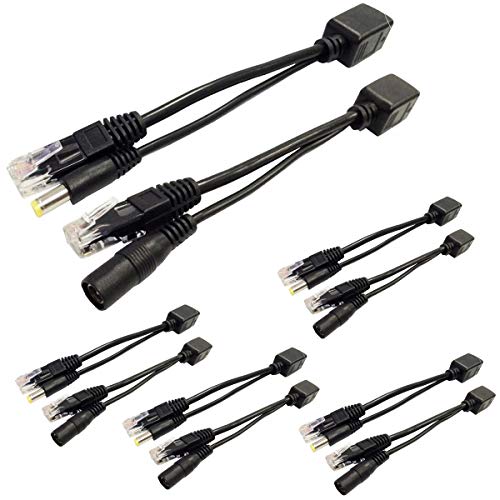
5 Pairs Passive PoE Injector and Splitter Kit
About this pick
This kit's listing specifically states 5 complete injector and splitter pairs (10 pieces total) with a 5.5mm x 2.1mm DC connector, supporting any DC voltage up to 60V, making it a genuinely cost-effective bulk purchase for an installer setting up multiple cameras at once. Its per-pair cost works out to about $2 each, a fraction of a single standard injector's price.
Compared to the single-unit picks above, this one is built for volume, an installer or homeowner setting up 5 cameras at once, rather than a one-off single-camera purchase.
Best for installers or homeowners setting up multiple cameras at once who want the lowest per-unit cost.
Best for: installers or homeowners setting up multiple standard-definition cameras at once
Check price on AmazonPros
- +Lowest per-unit cost in this comparison by a wide margin
- +Bulk quantity suits a multi-camera installation project
- +Works with any DC voltage up to 60V
Cons
- −10Mbps only, not suitable for high-resolution cameras
- −Passive only, no standard 802.3af/at negotiation
PoE Texas Single-Port Mode B Passive PoE Injector
About this pick
This injector's listing specifically states a compact, mountable design that screws into a wall near an outlet or under a desk, reducing clutter for a single-camera installation. Its full Gigabit data speed (10/100/1000) at this low price point stands out compared to the 10Mbps bulk kit above.
Compared to the REOLINK pick above, this one costs $15 less and delivers full Gigabit speed for a single camera, though it requires you to supply your own 12-56V power adapter separately.
Best for buyers with a single camera who want Gigabit speed at the lowest single-unit price, and already have a compatible power adapter on hand.
Best for: buyers with a single camera who want Gigabit speed at the lowest single-unit price
Check price on AmazonPros
- +Full Gigabit speed at the lowest single-unit price
- +Compact mountable design reduces installation clutter
- +One year warranty with phone support
Cons
- −Power supply sold separately, an added cost
- −Passive only, requires matching your device's exact voltage
How We Evaluated These PoE Injectors for IP Cameras
Each pick was assessed across 5 criteria weighted for real-world use.
Installation Scenario Match
Compared single-camera, multi-camera-combiner, and bulk-installer use cases separately rather than by wattage alone.
Camera Brand Compatibility
Compared first-party brand-specific injectors against generic multi-brand compatibility.
Port Speed
Compared Gigabit versus 10/100Mbps port speeds relative to typical camera resolution needs.
Cost Per Camera
Compared real per-unit cost for bulk kits against standard single-unit injector pricing.
Weatherproofing for Outdoor Cameras
Compared stated IP ratings for outdoor-exposed components.
How to Choose the Right PoE Injectors for IP Cameras
By Installation Scenario
| Your installation | Recommended pick |
|---|---|
| Single Reolink camera or device | REOLINK Gigabit Injector |
| Two cameras installed near each other | IPCamPower POE Combiner Splitter |
| 5+ cameras, bulk installer job | 5 Pairs Passive PoE Injector Kit |
| Single camera, budget priority | PoE Texas Single-Port Mode B Injector |
By Budget
| Price range | Recommended pick |
|---|---|
| Under $10 (per 5-pack) | 5 Pairs Passive PoE Injector Kit (under $10) |
| Under $10 (single unit) | PoE Texas Single-Port Mode B Injector (under $10) |
| Under $20 | IPCamPower POE Combiner Splitter (under $20) |
| Under $25 | REOLINK Gigabit Injector (under $25) |
Single-Camera Injector vs Two-Camera Combiner Kit
Single-camera injector (REOLINK, PoE Texas)
The standard choice when you have one camera per cable run back to your switch or NVR.
Two-camera combiner (IPCamPower)
Saves a full separate cable run when two cameras are physically near each other, combining their signal and power onto one shared cable back to the switch.
The combiner kit only makes sense when two cameras are genuinely close together; for cameras in different locations, standard single injectors per camera remain the simpler choice.
By Camera Resolution
| Your camera's resolution | Recommended pick |
|---|---|
| 4K or high-resolution | REOLINK Gigabit Injector or PoE Texas (both Gigabit) |
| Standard-definition, bulk install | 5 Pairs Passive PoE Injector Kit (10Mbps) |
For an Outdoor Camera Installation Specifically
Look for
An IP-rated component wherever the hardware will actually be exposed to weather, not just a generic waterproof claim covering the whole kit.
In this comparison
The IPCamPower kit specifically states its receiver splitter unit is IP68-rated for full exposure to rain, sleet, snow, and sun.
When to Spend More
Spend more if
You have a Reolink camera or two cameras near each other needing a combiner, where the REOLINK or IPCamPower picks solve those specific scenarios that a basic injector can't.
Save if
You're installing several standard-definition cameras at once, where the bulk 5-pair kit's roughly $2 per-unit cost beats buying individual injectors.
Frequently Asked Questions
Do I need a brand-specific PoE injector for my security camera?
Not necessarily; most IP cameras work with any standard 802.3af/at PoE injector, but a first-party injector from your camera's manufacturer removes any small compatibility uncertainty a generic unit might introduce.
When does a two-camera combiner kit make sense over two separate injectors?
Specifically when two cameras are installed near each other and you want to avoid running two separate long cables back to your switch or NVR, saving real cabling cost and installation time.
Is a bulk passive injector kit good enough for a 4K security camera?
No, bulk passive kits are typically limited to 10Mbps speed, which will bottleneck a high-resolution 4K camera; use a Gigabit-rated injector for higher-resolution cameras instead.
What's the most common mistake when installing a PoE injector for a camera?
Assuming a passive PoE injector's voltage automatically matches your camera's requirement, when in fact you must separately confirm and supply a compatible power adapter at the correct voltage for a passive setup.
Can I use a two-camera combiner kit outdoors?
Check which specific component is IP-rated; typically only the receiver splitter unit near the cameras is weatherproof, while the sender combiner unit near your switch should stay indoors.
How much does a bulk multi-camera injector kit typically save compared to individual injectors?
A 5-pair bulk kit can cost roughly $2 per pair compared to $10-25 for a single standard injector, a significant saving for an installer working on multiple standard-definition cameras at once.
Bottom Line
best overall: REOLINK Gigabit Injector (RLA-PI1) - best for reolink cameras pick in this roundup.
See the full rankings above for all picks with pros, cons, and best-for summaries.
Browse on Amazon
All Prime-eligible options with current pricing.
Shop on Amazon →