
8 Best Monitors Under $300 in 2026
8 monitors under $300 compared by resolution, refresh rate, and real adjustability, from budget QHD panels to 300Hz gaming and 4K options.

New to Amazon Prime?
Get fast, free shipping on every pick in this guide, plus Prime Video and exclusive deals.
Try Prime Free




At a Glance
Once you cross from under-$100 territory into the $150 to $300 range, the whole product category changes: 1080p gives way to QHD (1440p) as the baseline, refresh rates climb from 75Hz to as high as 300Hz, and USB-C and 4K both become realistic options instead of a stretch.
We compared this range on resolution, refresh rate, and real-world adjustability (height, tilt, swivel) rather than ranking by brand name or price alone, since those three specs are what actually separates a genuinely better monitor from one that just costs more.
5 Criteria to Look For Before Buying a Monitors Under $300
Key buying criteria so you get the right fit the first time.
Resolution: QHD vs 4K
QHD (2560x1440) and 4K (3840x2160) both show up in this price range, and the difference is real: 4K packs roughly 50% more pixels into the same 27-inch panel, producing noticeably sharper text and finer detail, but it also demands more from your GPU to run smoothly at a good frame rate. QHD is the more common choice at this price because it balances sharpness with easier GPU requirements, which is why most gaming-oriented picks in this range stick with it rather than 4K. Check the exact resolution figure stated in the listing title or spec sheet, not just "Ultra HD" or "2K" marketing language, since those terms get used inconsistently.
Refresh rate and whether you'll actually use it
Refresh rates in this price range span from 75Hz up to 300Hz, and the jump from 60Hz to 144Hz is noticeable even in everyday desktop use, while 144Hz to 300Hz mainly matters for competitive gaming where split-second reaction time counts. Paying for 300Hz without a GPU capable of driving games at that frame rate means you're paying for a spec you can't actually use. Check your GPU's realistic frame rate at your target resolution before choosing a refresh rate tier, and look at the monitor's spec sheet for the exact Hz figure rather than vague terms like "high refresh rate."
Port selection: USB-C vs HDMI/DisplayPort only
USB-C monitors in this range can carry video, data, and laptop charging power (typically up to 65W) over a single cable, while HDMI/DisplayPort-only monitors need a separate charger cable for your laptop. This single-cable convenience is worth a real price premium, often $50-80 in this comparison, if you dock and undock a laptop regularly, but it's wasted money if your setup is a desktop PC or a laptop that doesn't support USB-C charging. Check both the monitor's listed wattage and your laptop's actual charging requirement before assuming USB-C power delivery will fully charge your specific device.
Panel size and curve vs flat
Both 27-inch and 32-inch panels appear at similar prices in this range, and a curved option exists at 32 inches alongside a flat one, so size and curvature are independent choices, not tied to price tier. A larger 32-inch panel at the same QHD resolution as a 27-inch one has lower pixel density, meaning text looks marginally less sharp despite having more physical screen space. A curve adds gaming and video immersion but can visibly distort flat content like spreadsheet grids or code columns, so check your primary use case before choosing curved over flat.
Color accuracy and HDR certification
Listed color gamut figures (99% sRGB, 130% sRGB, 95% DCI-P3) and HDR certifications (HDR10, VESA DisplayHDR 400) vary meaningfully across this price range, and a higher percentage isn't automatically better for every use: 130% sRGB oversaturates colors relative to the 100% sRGB standard most web and photo content is built for, while 99% sRGB tracks that standard closely. VESA DisplayHDR 400 is a certified, tested standard, while uncertified "HDR10 support" just means the panel accepts an HDR signal without guaranteeing the brightness or contrast to render it well. Check for the specific certification name, not just the word "HDR," if HDR quality matters for your use case.
8 Best Monitors Under $300 in 2026
ASUS TUF Gaming VG27AQ3A 27-Inch QHD 180Hz
About this pick
A 27-inch Fast IPS panel running 1440p at 180Hz, which is a genuinely rare combination at this price, most competitors still ask a premium for refresh rates above 144Hz at QHD resolution. ASUS's ELMB Sync technology runs its blur-reduction backlight strobing alongside variable refresh rate simultaneously, a pairing that's normally an either-or choice on cheaper monitors.
Against the other picks here, this is the clearest value play for anyone doing any amount of gaming: the Dell S2725DSM below matches its resolution and speakers but caps out at 144Hz, and the LG 27G640A-B only beats it on refresh rate by paying $100 more.
This is best for buyers who want the highest refresh rate per dollar in this QHD range and don't need 4K or USB-C charging. The main caveat is that 130% sRGB, while vivid, runs wider than the 100% sRGB standard, so colors can look slightly oversaturated for color-critical photo work.
Best for: buyers who want the most gaming performance per dollar in this price range
Check price on AmazonPros
- +180Hz at QHD is rare at this price point
- +ELMB Sync runs blur reduction and VRR together
- +Built-in speakers skip a separate purchase
- +3-year warranty with advanced replacement
Cons
- −130% sRGB oversaturates for color-accurate editing work
- −No USB-C port for single-cable laptop setups
Dell 27 Plus QHD Monitor S2725DSM
About this pick
The cheapest genuine QHD panel in this comparison, at $169.99 for 2560x1440 with a 144Hz refresh rate and a 1500:1 contrast ratio, noticeably deeper than the 1000:1 standard on budget IPS panels. Dell backs this with 4-star TUV certification for blue-light reduction, a step up from the basic flicker-free claims most budget monitors make.
Compared to the ASUS above, this gives up 36Hz of refresh rate and the ELMB Sync blur reduction, but in exchange costs about $28 less and includes the same dual 3W speaker setup. For anyone not specifically chasing competitive-gaming refresh rates, that's a reasonable trade.
This is best for buyers prioritizing QHD resolution on the tightest budget in this range. Skip it if you specifically want the fastest possible refresh rate, since the ASUS and LG picks both go meaningfully higher.
Best for: buyers who want QHD resolution at the lowest possible price in this range
Check price on AmazonPros
- +Cheapest real QHD panel in this comparison
- +1500:1 contrast is deeper than typical budget IPS
- +4-star TUV certification for blue-light reduction
- +Full height/tilt/pivot/swivel adjustability
Cons
- −144Hz is the lowest refresh rate of the QHD gaming picks here
- −No USB-C, HDMI and DisplayPort only
LG 27G640A-B UltraGear 27-Inch QHD 300Hz
About this pick
The fastest panel in this comparison at 300Hz, more than double the 144Hz baseline most QHD monitors in this price bracket top out at, paired with VESA DisplayHDR 400 certification and 95% DCI-P3 color coverage for noticeably richer HDR highlights than the non-certified picks here.
It's also the only monitor in this lineup with both USB-C (15W power delivery) and dual HDMI 2.1 ports, letting a laptop charge over the same cable carrying video, something the Dell and Samsung picks can't do. That connectivity and the 300Hz ceiling are also why it sits at the top of this guide's price range.
This is best for buyers who specifically want the highest refresh rate available at QHD and some USB-C convenience. If 300Hz doesn't matter for your use case, the ASUS pick above delivers 180Hz, which is still well above standard, for about $100 less.
Best for: buyers who specifically want the highest refresh rate this price range offers
Check price on AmazonPros
- +300Hz is the highest refresh rate in this comparison
- +USB-C with 15W power delivery, unique among these picks
- +95% DCI-P3 for richer HDR color than competitors
- +Dual HDMI 2.1 plus DisplayPort for multiple sources
Cons
- −Highest price in this lineup at $299.99
- −300Hz benefit is marginal without a GPU that can drive it
Samsung 32" Odyssey G5 (G50F) QHD Gaming Monitor
About this pick
A 32-inch flat QHD panel at 180Hz, giving noticeably more screen real estate than the 27-inch picks in this guide at a similar or lower price, useful for anyone splitting the screen into multiple windows rather than wanting the sharpest possible pixel density. Samsung's Black Equalizer feature brightens shadow detail specifically for visibility in dark game scenes, a feature not present on the other picks here.
At 32 inches, the same 2560x1440 resolution is spread over more physical screen area than on the 27-inch competitors, meaning slightly lower pixel density and marginally softer text, a real tradeoff for anyone doing text-heavy work rather than gaming.
This is best suited to buyers who want maximum screen size at QHD resolution over the sharpest possible text, or who specifically value Black Equalizer for dark-scene gaming. Skip it if desk depth is limited, since a 32-inch panel needs meaningfully more viewing distance than a 27-inch one.
Best for: buyers who want the largest screen at QHD resolution in this price range
Check price on AmazonPros
- +32 inches of QHD screen real estate for less than most 27-inch rivals
- +Black Equalizer brightens shadow detail for dark-scene visibility
- +Height-adjustable ergonomic stand with full pivot and swivel
Cons
- −Lower pixel density than 27-inch QHD picks at the same resolution
- −Needs more desk depth than the 27-inch options here
ASUS VA27AQ 27-Inch QHD IPS
About this pick
A straightforward 27-inch QHD panel without a gaming-focused refresh rate, running 75Hz instead of the 144Hz-plus of the other picks here, which keeps the price down to $162.95 for buyers who don't need the extra speed. ASUS backs it with a 3-year warranty including advanced replacement, a longer term than typical for this price tier.
For document-heavy or design work, 99% sRGB color accuracy and a frameless edge-to-edge design matter more than refresh rate, and this panel delivers both while still undercutting every other QHD pick in this guide on price.
This is best for buyers who want QHD sharpness for productivity or content work and have no real gaming use case, since the 75Hz refresh rate is the clear tradeoff against the gaming-oriented picks above.
Best for: buyers who want QHD sharpness for work rather than gaming
Check price on AmazonPros
- +Lowest price of any QHD pick in this guide
- +99% sRGB suits design and photo work
- +3-year warranty with advanced replacement
- +VGA port included for older equipment
Cons
- −75Hz is well below the gaming-oriented picks in this guide
- −No USB-C or HDR support
LG 32G600A-B UltraGear 32-Inch Curved QHD
About this pick
The only curved panel in this comparison, a 1000R curve on a 32-inch QHD display, tighter than the more common 1500R-1800R curves on budget curved monitors, meaning the screen wraps more noticeably around your field of view at normal viewing distance. It runs 180Hz at 1440p, matching the Samsung pick above on both size and refresh rate.
Against the flat Samsung Odyssey G5 at a similar price, the choice comes down to curve preference: the curve adds immersion for gaming and video but can introduce slight distortion on flat content like spreadsheets or code, something flat-panel buyers don't have to think about.
This is best for buyers who specifically want a curved display at 32 inches and QHD resolution. If you're unsure whether curved suits your use case, the flat Samsung pick above offers the same size and refresh rate without that tradeoff.
Best for: buyers who specifically want a curved QHD display in this price range
Check price on AmazonPros
- +Tighter 1000R curve than typical budget curved monitors
- +180Hz matches the flat Samsung pick at a similar price
- +3-side virtually borderless design at 32 inches
Cons
- −Curve can distort flat content like spreadsheets or code
- −No G-Sync compatibility listed, FreeSync only
Dell 27 Plus QHD USB-C Monitor S2725DC
About this pick
The same 27-inch QHD 144Hz panel as the Dell S2725DSM above, but with a single USB-C cable delivering up to 65W of laptop charging power alongside video and data, a genuine single-cable setup for anyone who wants to avoid separate charger and video cables on a laptop dock.
A pop-out quick-access USB-C and USB-A port on the side makes charging a phone or connecting a flash drive easier without reaching behind the monitor, a small but real convenience the plain HDMI/DisplayPort version doesn't have.
This is best for buyers using a laptop that charges over USB-C who want to cut down to one cable. If your setup is desktop-based or your laptop doesn't support USB-C charging, the non-USB-C S2725DSM above delivers the identical panel for $80 less.
Best for: buyers with a USB-C laptop who want a genuine single-cable setup
Check price on AmazonPros
- +65W USB-C charging covers most laptops over one cable
- +Same panel quality as the cheaper Dell S2725DSM
- +Pop-out side port for quick phone charging or drives
- +4-star TUV certification for eye comfort
Cons
- −$80 more than the identical panel without USB-C
- −144Hz caps below the ASUS and LG gaming picks
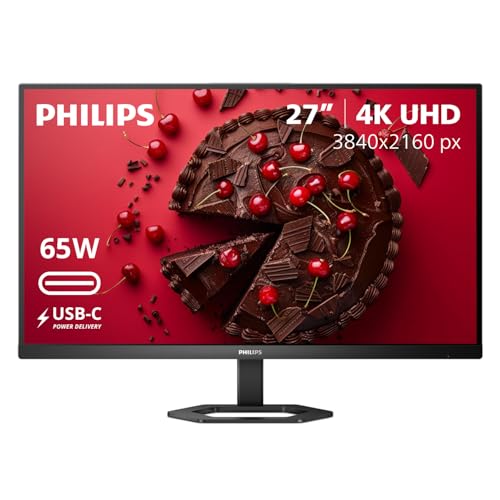
Philips 27" 4K UHD USB-C Monitor 27E1N5900R
About this pick
The only true 4K panel in this comparison, 3840x2160 at 27 inches, roughly 163 pixels per inch versus about 109 PPI on the QHD picks here, a real difference in text sharpness for anyone doing document or code work. It pairs that resolution with 65W USB-C power delivery and a built-in USB 3.2 hub, letting it double as a laptop dock.
Philips backs this with a 4-year advance replacement warranty, longer than any other pick in this guide, meaning a replacement ships before you return the faulty unit if something goes wrong.
This is best for buyers who want 4K sharpness and USB-C docking over a high refresh rate, since this panel's strength is resolution and connectivity, not gaming speed. If refresh rate matters more than pixel density, the QHD gaming picks above are the better fit.
Best for: buyers who want 4K sharpness and USB-C docking over gaming speed
Check price on AmazonPros
- +Only true 4K panel in this comparison
- +4-year advance replacement warranty, longest in this guide
- +USB-C hub functionality doubles as a laptop dock
- +MultiView supports two input sources at once
Cons
- −No high-refresh-rate option, standard 60Hz only
- −4K needs a capable GPU to drive smoothly
How We Evaluated These Monitors Under $300
Each pick was assessed across 5 criteria weighted for real-world use.
Resolution and pixel density
Compared actual resolution (QHD vs 4K) and pixel density across panel sizes, not just the marketing resolution label.
Refresh rate and sync technology
Checked the stated refresh rate alongside FreeSync, G-Sync compatibility, and blur-reduction features like ELMB Sync.
Port and charging capability
Verified USB-C power delivery wattage, HDMI version, and DisplayPort availability against what each panel actually ships with.
Adjustability and build
Checked height, tilt, swivel, and pivot adjustability, plus VESA mount compatibility, against the listed stand specifications.
Verified listing data only
Used only prices, specs, and features as printed in each current listing, no invented ratings or review counts.
How to Choose the Right Monitors Under $300
By Primary Use Case
| Your priority | Recommended pick |
|---|---|
| Competitive gaming, highest refresh rate | LG 27G640A-B (300Hz) |
| Best overall gaming value | ASUS TUF VG27AQ3A (180Hz) |
| Document and design work, not gaming | ASUS VA27AQ (99% sRGB, 75Hz) |
| Sharpest text and 4K detail | Philips 27E1N5900R (4K) |
| Maximum screen size | Samsung Odyssey G5 32" or LG 32G600A-B curved |
By Budget
| Price range | Recommended pick |
|---|---|
| Around $163-$170 | ASUS VA27AQ or Dell S2725DSM |
| Around $197-$229 | ASUS TUF VG27AQ3A, Samsung Odyssey G5, or Philips 27E1N5900R |
| Around $230-$250 | LG 32G600A-B curved or Dell S2725DC (USB-C) |
| Up to $300 | LG 27G640A-B (300Hz, USB-C, DisplayHDR 400) |
QHD vs 4K
QHD (2560x1440)
Easier on your GPU, available at every price point in this guide, and the standard choice for gaming at high refresh rates. The ASUS TUF VG27AQ3A and Dell S2725DSM both deliver this at the lower end of the range.
4K (3840x2160)
Sharper text and finer detail, but needs a more capable GPU to run smoothly and tops out at 60Hz in this price range. The Philips 27E1N5900R is the only 4K option here.
Default to QHD unless sharp text and 4K detail specifically matter more to you than gaming refresh rate.
Flat vs Curved at 32 Inches
Samsung Odyssey G5 (flat)
Same 32-inch QHD size and 180Hz refresh rate as the LG curved option, without the curve's potential distortion on flat content like spreadsheets or code.
LG 32G600A-B (curved, 1000R)
Adds gaming and video immersion with a tighter curve than typical budget curved monitors, at a similar price to the flat Samsung alternative.
Choose curved if gaming and video are your primary use, flat if you spend significant time on spreadsheets, code, or design work.
For a Laptop Docking Setup Specifically
Look for
USB-C with at least 65W power delivery, confirmed against your specific laptop's actual charging wattage requirement, not just the monitor's advertised maximum.
In this comparison
The Dell S2725DC and LG 27G640A-B both offer USB-C power delivery; the Philips 27E1N5900R adds a full USB 3.2 hub on top of charging for connecting peripherals through the monitor.
When to Spend More
Spend more if
You specifically want 300Hz refresh rate, DisplayHDR 400 certification, and USB-C in one panel, which only the LG 27G640A-B at $299.99 delivers together.
Save if
QHD at 144Hz-180Hz already covers your gaming needs, since the ASUS TUF VG27AQ3A and Dell S2725DSM deliver most of the same real-world experience for $100+ less.
Frequently Asked Questions
Is QHD or 4K better for a monitor under $300?
QHD (1440p) is the better default choice in this price range for most buyers, since it needs less GPU power to run smoothly at a good frame rate and pairs well with the high refresh rates available at this price. 4K makes sense specifically if sharp text and fine detail matter more to you than refresh rate, and you have a GPU capable of driving 4K output.
Do I need 180Hz or 300Hz, or is 144Hz enough?
144Hz is already a large step up from the standard 60Hz and is enough for most gaming and everyday use. 180Hz and 300Hz mainly benefit competitive, fast-paced gaming where split-second reaction time matters, and only if your GPU can actually produce frame rates that high. If you're unsure, 144Hz-180Hz options in this guide cost less than the 300Hz pick and cover the vast majority of real-world use cases.
Is USB-C power delivery worth paying extra for?
It's worth it if you regularly dock and undock a laptop that supports USB-C charging, since it replaces two cables (power and video) with one. It's not worth the premium if your setup is desktop-based or your laptop doesn't support USB-C PD charging, in which case the identical panel without USB-C, like the Dell S2725DSM versus the S2725DC, saves real money.
What's the most common mistake buyers make shopping in this price range?
Paying for a higher refresh rate than their GPU can actually use. A 300Hz monitor paired with a GPU that only produces 100-120 frames per second in your games delivers no real benefit over a 144Hz panel at a lower price. Check your GPU's realistic frame rate at your target resolution before choosing a refresh-rate tier.
Is a curved monitor worth it over a flat one at the same price?
It depends on your primary use. A curve adds genuine immersion for gaming and video content, but it can visibly distort flat content like spreadsheet grids, code columns, or design layouts. If your work is document or code-heavy, the flat Samsung Odyssey G5 in this guide offers the same size and refresh rate as the curved LG pick without that tradeoff.
Do these monitors need a monitor arm, or is the included stand good enough?
Every pick in this guide ships with height, tilt, swivel, and pivot adjustability built into the stand, which is a step up from the tilt-only stands common on monitors under $100. A separate monitor arm is still worth considering if you want to free up desk space underneath the monitor or need a mount height outside the stand's adjustment range.
Bottom Line
best overall: ASUS TUF Gaming VG27AQ3A 27-Inch QHD 180Hz - best overall pick in this roundup.
See the full rankings above for all picks with pros, cons, and best-for summaries.
Browse on Amazon
All Prime-eligible options with current pricing.
Shop on Amazon →