
8 Best Mini PC Mounting Brackets in 2026
8 Mini PC mounting brackets we compared for material strength and whether the listing includes full hardware or a bracket alone.

New to Amazon Prime?
Get fast, free shipping on every pick in this guide, plus Prime Video and exclusive deals.
Try Prime Free
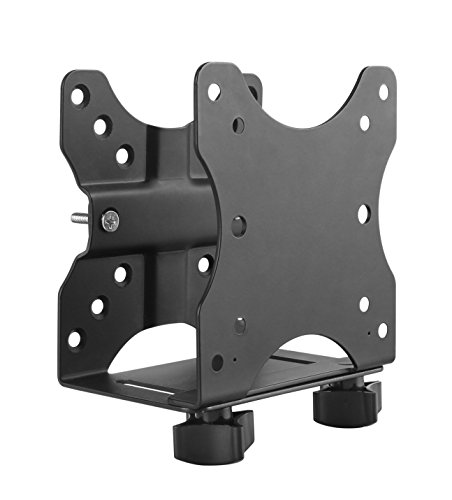


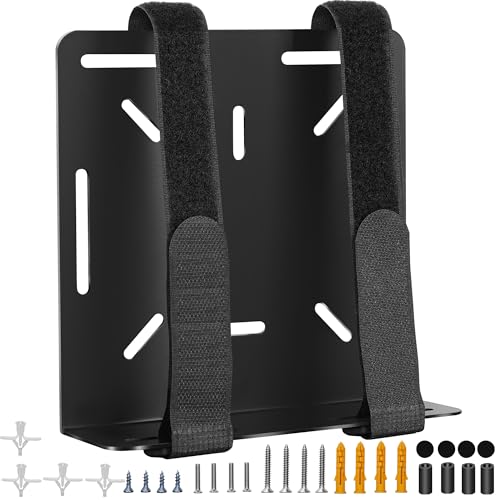
At a Glance
HumanCentric Thin Client Mount Bracket, Full Hardware Kit
↓ See why we picked itVIVO Adjustable Thin Client Mini PC Mount Bracket, Steel
↓ See why we picked itsuptek Thin Client Mount Bracket, Open-Frame Steel
↓ See why we picked itAdjustable Thin Client Mini PC Mount Bracket, Universal Fit
↓ See why we picked itMini PC Mount Bracket for Lenovo ThinkCentre, Complete Kit
↓ See why we picked itMini PC Mount Bracket for Dell OptiPlex Micro, Complete Kit
↓ See why we picked itUniversal Wall and VESA Bracket, Adjustable Strap Mount
↓ See why we picked itThe word 'bracket' gets used loosely in this category, and it is worth clarifying upfront what you are actually buying. Some listings ship a standalone bracket that still needs separate wall or VESA attachment hardware, while most of the products commonly called brackets are actually complete mount kits with screws, straps, and wall or VESA hardware already included. We checked each listing's real contents rather than assuming the word 'bracket' in the title means less hardware than the word 'mount'.
Based on the actual feature lists, every product in this guide ships as a complete kit rather than a bare bracket requiring a separate purchase, which is worth knowing before you add a second item to your cart expecting to need it. Beyond that clarification, this guide compares bracket material, load-bearing strength, and universal versus model-specific sizing.
5 Criteria to Look For Before Buying a Mini PC Mounting Bracket
Key buying criteria so you get the right fit the first time.
Verify your exact mini PC model against the mount's stated compatibility list
Mini PC mounts and brackets are built around specific chassis dimensions and screw-hole patterns, and unlike a universal VESA monitor mount, many mini PC brackets are designed for one specific brand's chassis shape, such as Dell OptiPlex Micro, Lenovo ThinkCentre Tiny, HP EliteDesk Mini, or a specific generation of Mac mini.
Mounting hardware that doesn't match your exact model can fail to align with the screw holes at all, or worse, only partially secure the device, creating a real risk of it working loose over time in a mount that's supposed to hold it stationary.
Check the listing's stated compatible models and generations specifically against your own mini PC's exact model number, not just the general "mini PC" category claim in the title.
Confirm the mount's actual mounting surface (VESA, rack, wall, or under-desk) matches your install location
Mini PC mounts split into genuinely different installation categories: VESA mounts attach to the back of a monitor or TV using the standardized VESA hole pattern, rack mounts fit a 10-inch home-lab or 19-inch commercial server rack, wall mounts attach directly to drywall or a stud, and under-desk mounts clamp to the underside of a desk surface, and these are not interchangeable hardware despite all falling under the same general product category.
Buying a rack-format shelf when you actually need a VESA bracket, for instance, means the hardware simply won't attach to your intended surface at all, since the mounting mechanism itself is fundamentally different between categories.
Identify your specific installation surface first (monitor back, rack, wall, or desk underside) and filter specifically for that mount type, rather than searching generically for "mini PC mount" and assuming any result will work for your setup.
Check the stated weight capacity against your mini PC's actual weight
A mount's weight capacity, when disclosed, reflects how much load the bracket's screws, arms, and adhesive or clamping mechanism can safely hold long-term without gradually sagging, loosening, or failing outright, and mini PCs vary meaningfully in weight depending on their chassis material and internal components, from under a pound for the lightest fanless designs to several pounds for units with larger heatsinks or multiple drive bays.
Mounting a device at or near a bracket's rated limit, especially on a mount holding the device at an angle or overhead behind a monitor, leaves little margin for the natural loosening that happens over months of use, vibration, or repeated adjustment.
Weigh your specific mini PC model (check its listed weight spec) against the mount's stated capacity, and favor a mount with meaningful headroom above your device's actual weight rather than one rated right at the edge.
Consider port and cable access after the mount is installed, not just before
A mini PC's ports are typically concentrated on the rear and sometimes front panel, and once mounted, especially behind a monitor, inside a rack, or under a desk, those ports can become significantly harder to reach for routine tasks like plugging in a USB drive or checking a status light, even though the mount holds the device perfectly securely.
Some mounts are specifically designed to preserve front-panel port access after installation, while others prioritize a low-profile or flush mount that trades away easy access for a cleaner look, and this is a real day-to-day usability tradeoff that photos alone don't always make obvious.
Think through which ports you'll need to access regularly after mounting (power, a USB drive, HDMI swaps) and check whether the specific mount's design keeps those reachable, rather than only checking that it physically holds the device.
Check what installation hardware is actually included versus what you'll need to source separately
Mount listings vary in how complete their included hardware kit is, some ship with every screw, VESA adapter plate, and cable tie needed for a full installation, while others assume you already have compatible mounting screws from the mini PC's original packaging or a previous mount, which isn't always the case if you're mounting a device for the first time or switching setups.
This matters because discovering mid-installation that you're missing a specific screw size or an adapter plate means a delayed setup and a second order, a genuinely avoidable frustration.
Check the listing's stated included contents specifically, and if you no longer have your mini PC's original mounting screws, confirm the mount ships with compatible replacements rather than assuming they're included by default.
8 Best Mini PC Mounting Brackets in 2026
Adjustable Thin Client Mini PC Mount Bracket, Complete Kit
About this pick
Despite being called a bracket, this ships as a complete mounting kit, with hardware for wall, under-desk, and monitor-arm installation all included in one box. It fits device widths from 0.63 to 2.8 inches and supports up to 12 pounds on metal construction, with a built-in cable management channel and small pen holder as practical extras.
It earns the top spot in this comparison over HumanCentric Thin Client Mount Bracket for one main reason. Genuinely complete kit despite the 'bracket' name. On price, it comes in below HumanCentric Thin Client Mount Bracket, which is worth weighing if cost is your deciding factor between the two.
Worth knowing before you decide: 12 lb capacity is above average for this category. On the other side, No stated combined weight rating for VESA piggyback use. That's the main tradeoff to weigh against everything above.
Best for: Buyers who want a complete mounting kit at a low price without needing to source any separate attachment hardware.
Check price on AmazonPros
- +Genuinely complete kit despite the 'bracket' name
- +12 lb capacity is above average for this category
- +Cable management is a useful included extra
- +Works across three mounting locations with one kit
Cons
- −Not device-specific, so fit is less rigid than a model-matched bracket
- −Metal gauge and thickness are not specified in the listing
- −No stated combined weight rating for VESA piggyback use
HumanCentric Thin Client Mount Bracket, Full Hardware Kit
About this pick
This bracket ships with hardware for all three of its supported mounting locations, wall, under-desk, and pole, along with silicone scratch strips and a visual step-by-step instruction manual. It fits devices 0.65 to 2.55 inches deep and is rated for 11 pounds device-only or 18 pounds combined with a monitor on the same VESA point.
One spot below Adjustable Thin Client Mini PC Mount Bracket in this ranking, it costs more than Adjustable Thin Client Mini PC Mount Bracket. The compromise here is straightforward: Highest price in this guide. What you gain in return: Complete hardware for three mounting locations in one kit. Whether that trade is worth it depends on which side matters more for your use case.
Worth knowing before you decide: Publishes a combined weight rating, unusual for this category. On the other side, Side power button requirement excludes some NUC models. That's the main tradeoff to weigh against everything above.
Best for: Buyers who want the most complete hardware kit and clearest instructions, with a genuine combined-weight rating.
Check price on AmazonPros
- +Complete hardware for three mounting locations in one kit
- +Publishes a combined weight rating, unusual for this category
- +Illustrated manual reduces installation guesswork
- +Silicone strips protect the device
Cons
- −Highest price in this guide
- −Universal fit is less rigid than a model-specific bracket
- −Side power button requirement excludes some NUC models
VIVO Adjustable Thin Client Mini PC Mount Bracket, Steel
About this pick
This bracket is built from solid steel with a powder coated, rust-resistant finish, and the listing backs it with a 3-year manufacturer warranty, a strong signal of confidence in the bracket's material and long-term load-bearing strength. It adjusts from 1.8 to 7.1 centimeters of width and is rated for up to 5 kilograms, about 11 pounds.
Sitting just under HumanCentric Thin Client Mount Bracket, it's priced lower than HumanCentric Thin Client Mount Bracket. Here's the honest tradeoff: 11 lb capacity is average, not class-leading. And here's what it gets you instead: Longest warranty in this guide, a strong signal of material confidence. That's the real difference between the two picks, not just a ranking number.
Worth knowing before you decide: Rust-resistant steel construction. On the other side, Universal fit is less rigid than a model-specific bracket. That's the main tradeoff to weigh against everything above.
Best for: Buyers who want the bracket material and warranty to be the deciding factor over raw weight capacity.
Check price on AmazonPros
- +Longest warranty in this guide, a strong signal of material confidence
- +Rust-resistant steel construction
- +Complete hardware for three mounting locations
- +Open-frame design supports airflow
Cons
- −11 lb capacity is average, not class-leading
- −No cable management feature included
- −Universal fit is less rigid than a model-specific bracket
suptek Thin Client Mount Bracket, Open-Frame Steel
About this pick
This bracket adjusts from 0.6 to 2.7 inches of width and is built from solid steel with a rust-proof coating, rated to support up to 11 pounds. The open-frame bracket design is specifically called out in the listing as reducing thermal throttling by letting air pass around the mounted device rather than pressing it flat against a solid backing plate.
Ranked just behind VIVO Adjustable Thin Client Mini PC Mount Bracket, it costs more than VIVO Adjustable Thin Client Mini PC Mount Bracket. The real tradeoff against that pick: Same 11 lb ceiling as several picks here. In exchange, it offers this instead: Complete hardware kit for three mounting locations. That's the swap that decides whether this pick or the one above it is the better fit for your setup.
Worth knowing before you decide: Open-frame design supports airflow. On the other side, Strap-based retention needs periodic tightness checks. That's the main tradeoff to weigh against everything above.
Best for: Buyers who want a complete bracket kit built specifically around airflow rather than maximum physical enclosure.
Check price on AmazonPros
- +Complete hardware kit for three mounting locations
- +Open-frame design supports airflow
- +11 lb capacity covers most Mini PCs
- +Rubber pads prevent scratching during mounting
Cons
- −Same 11 lb ceiling as several picks here
- −Open-frame design offers less physical protection than an enclosed bracket
- −Strap-based retention needs periodic tightness checks
Adjustable Thin Client Mini PC Mount Bracket, Universal Fit
About this pick
This bracket adjusts to fit device widths from 0.63 to 2.8 inches and names a wide range of compatible brands, including HP, Dell, Lenovo, NUC, and several newer mini gaming PC models. It supports up to 12 pounds on metal, open-frame construction, with hardware included for wall, under-desk, behind-monitor, and pole mounting.
One spot below suptek Thin Client Mount Bracket in this ranking, it costs more than suptek Thin Client Mount Bracket. The compromise here is straightforward: Not device-specific, so fit is less rigid than a model-matched bracket. What you gain in return: Wide named-brand compatibility list. Whether that trade is worth it depends on which side matters more for your use case.
Worth knowing before you decide: 12 lb capacity is above average for this category. On the other side, No combined weight rating for VESA piggyback setups. That's the main tradeoff to weigh against everything above.
Best for: Buyers who want one adjustable bracket to reliably fit several different Mini PC brands and models over time.
Check price on AmazonPros
- +Wide named-brand compatibility list
- +12 lb capacity is above average for this category
- +Complete hardware for four mounting locations
- +Cable management is a genuinely useful extra
Cons
- −Not device-specific, so fit is less rigid than a model-matched bracket
- −Pole clamp diameter range is limited
- −No combined weight rating for VESA piggyback setups
Mini PC Mount Bracket for Lenovo ThinkCentre, Complete Kit
About this pick
This bracket is model-specific rather than universally sized, built for a named list of Lenovo ThinkCentre Tiny desktop models and explicitly excluding unlisted ones. Because it matches one exact chassis rather than adjusting to fit a range, it holds more rigidly for load-bearing purposes than a strap-based universal bracket would.
Sitting just under Adjustable Thin Client Mini PC Mount Bracket, it costs more than Adjustable Thin Client Mini PC Mount Bracket. Here's the honest tradeoff: Only fits listed Lenovo ThinkCentre Tiny models. And here's what it gets you instead: Rigid, model-specific fit for named ThinkCentre models. That's the real difference between the two picks, not just a ranking number.
Worth knowing before you decide: Complete hardware for three mounting locations. On the other side, Not a universal-fit option if you switch Mini PC models later. That's the main tradeoff to weigh against everything above.
Best for: Lenovo ThinkCentre Tiny owners who want the rigid fit of a model-specific bracket over a universal adjustable one.
Check price on AmazonPros
- +Rigid, model-specific fit for named ThinkCentre models
- +Complete hardware for three mounting locations
- +Rubber mat protects the chassis
- +Power adapter strap keeps cabling tidy
Cons
- −Only fits listed Lenovo ThinkCentre Tiny models
- −No stated weight capacity
- −Not a universal-fit option if you switch Mini PC models later
Mini PC Mount Bracket for Dell OptiPlex Micro, Complete Kit
About this pick
This is a second model-specific bracket in this guide, matched to a long, named list of Dell OptiPlex Micro Form Factor computers and explicitly excluding tower, small form factor, and Wyse models. It ships as a complete kit with hardware for wall, VESA, and under-desk mounting, plus Velcro straps to secure the OptiPlex's power adapter.
Ranked just behind Mini PC Mount Bracket for Lenovo ThinkCentre, it costs more than Mini PC Mount Bracket for Lenovo ThinkCentre. The real tradeoff against that pick: Only fits listed OptiPlex Micro models. In exchange, it offers this instead: Rigid, model-specific fit for a long, named list of OptiPlex Micro models. That's the swap that decides whether this pick or the one above it is the better fit for your setup.
Worth knowing before you decide: Complete hardware for three mounting locations. On the other side, Not adaptable to a different Mini PC model later. That's the main tradeoff to weigh against everything above.
Best for: Dell OptiPlex Micro owners who want a rigid, model-specific bracket with complete hardware included.
Check price on AmazonPros
- +Rigid, model-specific fit for a long, named list of OptiPlex Micro models
- +Complete hardware for three mounting locations
- +Power adapter straps keep cabling organized
- +Clear compatibility list in the listing
Cons
- −Only fits listed OptiPlex Micro models
- −No stated weight capacity
- −Not adaptable to a different Mini PC model later
Universal Wall and VESA Bracket, Adjustable Strap Mount
About this pick
This bracket uses adjustable straps rated for devices up to a 17 inch perimeter rather than a fixed-size cutout, and it names a genuinely wide list of compatible Dell, Lenovo, and HP mini PC models. Wall and behind-monitor or TV hardware is included, making it a complete kit rather than requiring separate attachment purchases.
One spot below Mini PC Mount Bracket for Dell OptiPlex Micro in this ranking, it's priced lower than Mini PC Mount Bracket for Dell OptiPlex Micro. The compromise here is straightforward: Strap-based hold is less rigid for load-bearing than a fixed bracket. What you gain in return: Complete kit including wall hardware. Whether that trade is worth it depends on which side matters more for your use case.
Worth knowing before you decide: Named model compatibility list beyond generic size claims. On the other side, Included anchors are generic, not matched to a specific wall material. That's the main tradeoff to weigh against everything above.
Best for: Buyers with a mixed collection of small devices who want one strap-based bracket to fit several irregular shapes.
Check price on AmazonPros
- +Complete kit including wall hardware
- +Named model compatibility list beyond generic size claims
- +Strap design accommodates irregular device shapes
- +Works for a mixed fleet of small devices
Cons
- −Strap-based hold is less rigid for load-bearing than a fixed bracket
- −No stated weight capacity in the listing
- −Included anchors are generic, not matched to a specific wall material
How We Evaluated These Mini PC Mounting Brackets
Each pick was assessed across 4 criteria weighted for real-world use.
Complete kit vs bracket-only clarity
We checked each listing's actual contents to confirm whether it ships as a complete mount kit or a bare bracket needing separate hardware, and reported this honestly rather than assuming from the product title.
Bracket material and load-bearing strength
We compared steel, metal, and strap-based constructions against their stated weight ratings, since material choice directly affects how confidently a bracket holds a Mini PC over years of use.
Universal vs model-specific sizing tradeoffs
We separated brackets built for one named chassis from universal adjustable brackets, since a rigid model-specific fit and broad multi-device compatibility solve different problems.
Complete installation cost
We evaluated whether the price shown includes everything needed for installation, or whether a buyer should budget for additional wall or VESA hardware beyond what is in the box.
How to Choose the Right Mini PC Mounting Brackets
By Mounting Surface
| Where it's going | Recommended pick in this comparison |
|---|---|
| Behind a monitor or TV (VESA) | Universal Wall and VESA Bracket |
| Server rack (10-inch or 19-inch) | Adjustable Thin Client Mini PC Mount Bracket |
| Wall or under-desk | Universal Wall and VESA Bracket |
By Budget
| Price range | Recommended pick |
|---|---|
| Under $20 | Adjustable Thin Client Mini PC Mount Bracket |
| Mid-range | Universal Wall and VESA Bracket |
| No firm budget ceiling, prioritizing brand-specific fit | HumanCentric Thin Client Mount Bracket |
Brand-Specific Fit vs Universal Compatibility
Brand-Specific Fit
Matches one specific chassis shape exactly, generally a more secure fit for that exact model. In this comparison: Adjustable Thin Client Mini PC Mount Bracket.
Universal / Multi-Brand
Works across several mini PC brands with adjustable hardware, more flexible if you might switch devices later. In this comparison: Adjustable Thin Client Mini PC Mount Bracket.
Confirm your exact mini PC model against the listing's stated compatibility either way, since even a "universal" mount has real size limits.
By Post-Install Port Access
None of these picks specifically advertise preserved front-port access after mounting; check each listing's product photos for where the ports land once installed if that matters to you.
For a Home Lab Rack Specifically
Look for
Explicit confirmation of 10-inch (home-lab) versus 19-inch (commercial) rack compatibility, since these are different standards, plus whether it's full or half rack-unit width.
In this comparison
Adjustable Thin Client Mini PC Mount Bracket fits this specifically: Genuinely complete kit despite the 'bracket' name.
When to Spend More
Spend more if
You want what HumanCentric Thin Client Mount Bracket offers: Complete hardware for three mounting locations in one kit. That's a real functional upgrade over the budget picks here, not just a brand markup.
Save if
Adjustable Thin Client Mini PC Mount Bracket already covers the essentials: Genuinely complete kit despite the 'bracket' name. The main thing you'd be paying extra for elsewhere in this list is broader compatibility you may not need.
Frequently Asked Questions
Does a Mini PC 'bracket' include the screws and wall hardware, or do I need to buy those separately?
Based on the listings verified for this guide, every pick ships as a complete kit including mounting hardware. This is not guaranteed for every product using the word bracket outside this guide, so check the included-items list before buying elsewhere.
Is a steel bracket always stronger than a strap-based one?
For rigidity, generally yes. A strap-based bracket trades some load-bearing rigidity for the ability to fit devices of irregular or varying shapes, which a fixed steel bracket cannot always accommodate.
Should I buy a universal bracket or a model-specific one?
A model-specific bracket, matched to your exact Mini PC chassis, holds more rigidly if your model is on the compatibility list. A universal adjustable bracket is the safer default if your model is not covered or if you expect to remount a different device later.
What's the actual difference between a 'bracket' and a 'mount' in this category?
Based on the products checked for this guide, there isn't a reliable technical difference; both terms are used for complete kits and for standalone components depending on the specific listing. Check the included-items list rather than relying on the word choice in the title.
Do bracket weight ratings account for a docking station or accessory attached to the Mini PC?
Usually not unless explicitly stated. Most ratings assume a bare Mini PC, so check for a combined weight figure if you plan to mount a Mini PC alongside a dock or other accessory.
Bottom Line
best overall: Adjustable Thin Client Mini PC Mount Bracket, Complete Kit - best overall pick pick in this roundup.
See the full rankings above for all picks with pros, cons, and best-for summaries.
Browse on Amazon
All Prime-eligible options with current pricing.
Shop on Amazon →