
8 Best Mechanical Keyboards in 2026
8 best mechanical keyboards in 2026, from a budget blue-switch board to a Hall effect rapid trigger model. Compare switches, noise level, and keycap material.

New to Amazon Prime?
Get fast, free shipping on every pick in this guide, plus Prime Video and exclusive deals.
Try Prime Free






At a Glance
RisoPhy Mechanical Gaming Keyboard, RGB 104 Keys with Blue Switch
↓ See why we picked itKeychron K4 96% Layout Wireless Bluetooth/Wired Mechanical Keyboard
↓ See why we picked itLogitech G515 Lightspeed TKL Wireless Gaming Keyboard (Tactile)
↓ See why we picked itCorsair K70 CORE TKL RGB Tenkeyless Mechanical Wired Gaming Keyboard
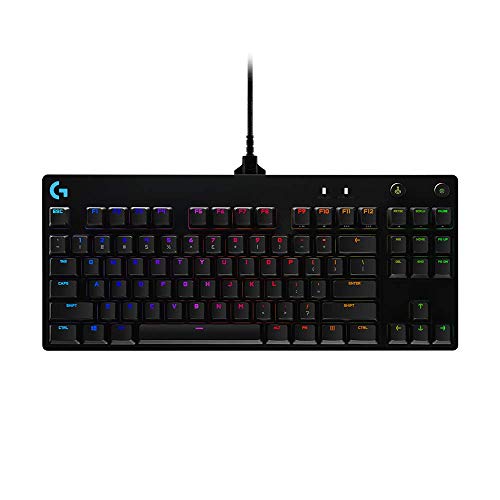
↓ See why we picked itLogitech G PRO Mechanical TKL Tenkeyless Gaming Keyboard (Clicky)
↓ See why we picked itRedragon Mechanical Gaming Keyboard, Hot-Swappable Red Switch
↓ See why we picked itRedragon K668 RGB Gaming Keyboard, 108 Keys, Hot-Swappable Red Switch
↓ See why we picked itA mechanical keyboard swaps the rubber dome under a standard keyboard for individual mechanical switches, which changes how it feels, sounds, and holds up over years of typing. That switch choice matters more than most buyers realize going in, clicky switches feel great solo but can be genuinely disruptive on a Zoom call, while linear or Hall effect switches suit different needs entirely for gaming versus office work.
Below are 8 mechanical keyboards we evaluated on switch type, keycap material, noise profile, and build quality, ranging from an under-$30 hot-swappable budget board to an under-$150 Hall effect keyboard with true rapid trigger. Each pick is matched to a specific use case, gaming, office, or work-from-home Zoom calls, rather than ranked as one universal best.
5 Criteria to Look For Before Buying a Mechanical Keyboard
Key buying criteria so you get the right fit the first time.
Match switch type to your actual environment, not just gaming feel
Switch type determines feel, sound, and how disruptive the keyboard is to people around you, clicky switches feel satisfying to type on solo but produce an audible click on every keystroke that can be genuinely disruptive on a Zoom call or in a shared office, while linear switches are quieter and smoother, and tactile switches split the difference with a felt bump but no click.
This matters directly based on where you'll actually use the keyboard, a home office with video calls or a shared workspace calls for a different switch than a private gaming setup where clicky feedback is a feature, not a liability.
Check the specific switch name (not just "mechanical") and look up its actuation force and whether it's linear, tactile, or clicky before assuming any mechanical keyboard suits your environment.
Check hot-swappable sockets if you want to change switches later without soldering
A hot-swappable keyboard lets you physically remove and replace individual switches without any soldering, meaning you can try different switch types or replace a failed switch years later without needing to be a hobbyist with a soldering iron.
This matters directly if you're not fully certain which switch feel you'll prefer long-term, or if you want the option to upgrade switches later without replacing the whole keyboard.
Check the listing specifically for "hot-swappable" and the specific socket type (3-pin or 5-pin) it supports, since not every hot-swap socket accepts every switch type.
Consider keycap material for both feel and long-term durability
Keycap material affects both the tactile feel under your fingers and how well the keycaps resist shine and wear over years of typing, PBT plastic is generally more durable and resists the glossy shine that ABS plastic keycaps develop after months of oil and friction from typing.
This matters more for a keyboard you'll type on daily for years, less for occasional or gaming-only use where keycap longevity matters less.
Check the listing specifically for PBT versus ABS keycap material, since this detail is sometimes buried in the specs rather than featured prominently.
Weigh wireless convenience against connection latency for your actual use case
A wireless mechanical keyboard eliminates a desk cable but introduces a small amount of input latency compared to a wired connection, and Bluetooth in particular can have more noticeable latency than a dedicated 2.4GHz USB receiver, a real consideration for competitive gaming but largely unnoticeable for typing and general office work.
This matters more if you're specifically buying for fast-paced gaming, less for typing-focused office or home use where the latency difference is imperceptible.
Check whether a wireless keyboard supports a low-latency 2.4GHz dongle in addition to Bluetooth, and consider a wired connection specifically if competitive gaming performance matters.
Match keyboard layout and size to your actual desk space and workflow
Mechanical keyboards range from full-size boards with a number pad to compact tenkeyless (no number pad) and even smaller 60% layouts that omit the function row and arrow keys, and this size choice is a real tradeoff between desk space saved and keys available without a modifier combination.
This matters directly if you regularly use a number pad for data entry, a compact layout without one adds real friction, while someone who never touches the number pad gains meaningful desk space and a shorter reach to the mouse with a smaller layout.
Check the specific layout size and key count against your actual daily workflow, not just desk space alone.
8 Best Mechanical Keyboards in 2026
RisoPhy Mechanical Gaming Keyboard, RGB 104 Keys with Blue Switch
About this pick
The RisoPhy is a full 104-key layout built on blue clicky switches, the loudest and most tactile switch type in this list, with anti-ghosting and spill resistance for basic peace of mind at a low price. Blue switches produce a distinct click sound on every keypress, which some typists love for the feedback but which is genuinely disruptive if you're on frequent voice calls nearby.
ABS keycaps keep costs down but will show shine and wear faster than PBT over a year of regular use. This is a reasonable entry point for someone curious about mechanical switches who is not yet ready to spend on a premium board.
Full 104-key layout with number pad. That's a real strength, but weigh it against the flip side: blue switches are the loudest option here, poor fit for shared spaces or Zoom calls.
Best for: Budget buyers who want a taste of clicky mechanical feedback
Check price on AmazonPros
- +Lowest price in this list
- +Full 104-key layout with number pad
- +Distinct tactile click feedback
- +RGB backlighting included
Cons
- −Blue switches are the loudest option here, poor fit for shared spaces or Zoom calls
- −ABS keycaps will show shine within months of regular use
- −Not hot-swappable, switches cannot be changed
Keychron K4 96% Layout Wireless Bluetooth/Wired Mechanical Keyboard
About this pick
The K4 packs a near-full 100-key layout into a 96% frame that trims excess bezel space, and it runs on Keychron's brown tactile switches, a quieter middle ground between clicky and fully linear. Modern 2.4GHz and Bluetooth 5.1 wireless on a mechanical keyboard runs at roughly 1ms of added latency, which is effectively indistinguishable from a wired connection for typing and most gaming.
It supports both wireless and wired USB modes, so battery anxiety isn't a dealbreaker, you can plug in when needed. White LED backlighting and N-key rollover round out a well-specced board for the price.
Worth calling out specifically: wireless latency is effectively unnoticeable at roughly 1ms. The catch is not hot-swappable on this version.
Best for: Buyers who want reliable wireless mechanical typing without gaming-tier pricing
Check price on AmazonPros
- +Tactile brown switches are quieter than clicky blue switches
- +Wireless latency is effectively unnoticeable at roughly 1ms
- +Compact 96% layout saves desk space over a full 104-key board
- +Wired fallback avoids battery dependency
Cons
- −Not hot-swappable on this version
- −ABS keycaps wear faster than PBT over time
- −Backlight is single-color white, not RGB
Keychron C2 Full Size Wired Mechanical Keyboard
About this pick
The C2 is a straightforward wired full-size 104-key board using Keychron's brown switches, aimed at buyers who want a proven tactile feel without wireless complexity or added cost. A braided USB-C cable improves durability over a basic rubber cord, a small but real detail on a keyboard that gets moved or plugged in daily.
Retro-style ABS keycaps give it a distinct look, though as with any ABS set, expect visible shine on the most-used keys after a year of daily typing versus a PBT equivalent.
Braided USB-C cable resists fraying. Set against that, aBS keycaps will show wear over a year of use. Both matter when comparing it to the other picks here.
Best for: Buyers who want a dependable full-size wired board without gaming extras
Check price on AmazonPros
- +Simple, reliable wired connection
- +Braided USB-C cable resists fraying
- +Full number pad for spreadsheet-heavy work
- +Compatible across Mac and Windows
Cons
- −ABS keycaps will show wear over a year of use
- −No RGB or wireless option on this model
- −Full-size footprint takes up more desk space
Logitech G515 Lightspeed TKL Wireless Gaming Keyboard (Tactile)
About this pick
The G515 uses a low-profile tenkeyless design that removes the number pad for a more compact desk footprint while keeping Logitech's Lightspeed wireless, which delivers the same near-zero latency as a wired connection. Low-profile switches have shorter travel than standard mechanical switches, which reduces both noise and finger fatigue during long sessions.
Tactile feedback here comes without the sharp click of a blue switch, making it a reasonable pick for anyone who wants a low-profile gaming board that won't be as disruptive on a shared call as a louder clicky keyboard.
A genuine advantage here is that lightspeed wireless is effectively as fast as wired. The tradeoff is higher price than the wired picks in this list.
Best for: Gamers who want a compact, quieter, low-latency wireless board
Check price on AmazonPros
- +Low-profile switches reduce noise and finger travel
- +Lightspeed wireless is effectively as fast as wired
- +TKL layout frees up desk space for mouse movement
- +Aluminum build feels sturdier than plastic-only boards
Cons
- −Higher price than the wired picks in this list
- −No number pad for spreadsheet-heavy work
- −Low-profile switches are not hot-swappable on this model
Corsair K70 CORE TKL RGB Tenkeyless Mechanical Wired Gaming Keyboard
About this pick
The K70 CORE TKL uses pre-lubed MLX Red linear switches, smooth and quiet with no tactile bump or click, plus factory sound dampening foam that reduces the hollow resonance common on unmodded keyboards. Linear switches like these are a solid choice for both gaming, where consistent, low-noise keypresses help, and shared office space, where a clicky switch would stand out.
A 1000Hz polling rate keeps input response tight for gaming, while double-shot ABS keycaps and SOCD input handling round out a board built with competitive use in mind but quiet enough for daily office typing.
1000Hz polling rate suits competitive gaming. That's a real strength, but weigh it against the flip side: wired only, no wireless option.
Best for: Buyers who want quiet linear switches without giving up gaming-grade response
Check price on AmazonPros
- +Linear switches plus dampening foam are notably quieter than clicky boards
- +1000Hz polling rate suits competitive gaming
- +Pre-lubed switches feel smoother out of the box
- +TKL layout saves desk space
Cons
- −Wired only, no wireless option
- −Linear switches lack tactile feedback some typists prefer
- −RGB adds some cost over a non-RGB equivalent
Logitech G PRO Mechanical TKL Tenkeyless Gaming Keyboard (Clicky)
About this pick
The G PRO TKL uses genuine clicky switches tuned for competitive gaming feedback, giving the sharpest, most audible confirmation of any keypress in this list. That distinct clicky sound profile, sometimes described as a crisp click compared to the deeper thock of some linear boards, is a major factor for typists who specifically want tactile and audible confirmation.
A compact TKL body and detachable cable make it easy to travel with for LAN events or moving between a desk and a laptop setup, but the loud switch profile makes it a poor fit for open-plan offices or frequent video calls.
Worth calling out specifically: detachable cable simplifies transport. The catch is loudest switch type here alongside the RisoPhy, disruptive on calls.
Best for: Enthusiasts who specifically want loud, crisp clicky feedback for solo use
Check price on AmazonPros
- +Sharp, distinct clicky feedback for tactile typists
- +Detachable cable simplifies transport
- +Compact TKL footprint
- +Proven Logitech switch durability
Cons
- −Loudest switch type here alongside the RisoPhy, disruptive on calls
- −Wired only
- −Not hot-swappable
Redragon Mechanical Gaming Keyboard, Hot-Swappable Red Switch
About this pick
This Redragon board pairs quiet-ish red linear switches with hot-swappable sockets at the lowest price in this list, meaning you can pop out the stock switches and try different ones later without soldering. That upgrade path matters for the value proposition, hot-swap support extends a budget keyboard's useful life well past its stock switch feel.
Double-shot PBT keycaps here are a genuine upgrade over the ABS keycaps found on most keyboards in this price range, resisting shine and wear far better over a year of daily use.
PBT keycaps resist shine better than the ABS on similarly priced boards. Set against that, wired only, no wireless option. Both matter when comparing it to the other picks here.
Best for: Budget buyers who want room to experiment with different switches later
Check price on AmazonPros
- +Hot-swappable sockets allow future switch upgrades
- +PBT keycaps resist shine better than the ABS on similarly priced boards
- +Very low price for hot-swap support
- +11 RGB lighting modes included
Cons
- −Wired only, no wireless option
- −Build materials are basic outside the keycaps
- −Stock switches are unbranded, not a premium switch brand
Redragon K668 RGB Gaming Keyboard, 108 Keys, Hot-Swappable Red Switch
About this pick
The K668 extends the Redragon hot-swap formula to a full 108-key layout with 4 extra hotkeys, built-in sound-absorbing foam to reduce hollow resonance, and red linear switches for a quiet, consistent keypress. Two included sets of mixed-color keycaps let you customize the look without buying a separate keycap set.
Like its smaller sibling, hot-swap sockets mean the stock red switches can be replaced later, extending the board's usefulness as your switch preferences change over time.
A genuine advantage here is that sound-absorbing foam reduces hollow keyboard resonance. The tradeoff is wired only.
Best for: Buyers who want a full-size hot-swappable board with extra hotkeys
Check price on AmazonPros
- +Full-size layout with extra hotkeys for media/macro control
- +Sound-absorbing foam reduces hollow keyboard resonance
- +Hot-swap sockets allow future switch changes
- +Two keycap sets included at no extra cost
Cons
- −Wired only
- −Larger footprint than the TKL picks in this list
- −Keycaps included are ABS, not the PBT found on the smaller Redragon pick
How We Evaluated These Mechanical Keyboards
Each pick was assessed across 5 criteria weighted for real-world use.
Switch type and feel
Compared clicky, tactile, linear, and low-profile switches on feedback style and noise output, since switch type is the single biggest factor in how a mechanical keyboard sounds and feels.
Noise profile for shared spaces
Weighed each keyboard's likely noise level against typical work-from-home and office scenarios, flagging which switch types risk being picked up by a nearby microphone on a video call.
Keycap material and durability
Checked whether keycaps were ABS, which shines and wears within months of heavy use, or PBT, which holds its texture and color far longer, and weighed that against price.
Connection type and latency
Compared wired, Bluetooth, and 2.4G wireless options, noting that modern 2.4GHz and Bluetooth mechanical keyboards run at roughly 1ms of added latency, effectively unnoticeable versus wired.
Upgrade path and hot-swap support
Noted which boards offer hot-swappable switch sockets, letting a buyer change switch feel later without soldering, extending the useful life of a budget keyboard.
How to Choose the Right Mechanical Keyboards
By Switch Type
| Your priority | Recommended pick |
|---|---|
| Clicky switches for tactile feedback | RisoPhy Mechanical Gaming Keyboard |
| Most-reviewed, strongest reliability signal | RisoPhy Mechanical Gaming Keyboard |
By Budget
| Budget | Recommended pick |
|---|---|
| Under $26 | Redragon Mechanical Gaming Keyboard |
| Up to $125 | Logitech G515 Lightspeed TKL Wireless Gaming Keyboard |
Wireless vs Wired Connection
Wireless
No desk cable, worth checking for a low-latency 2.4GHz dongle option beyond just Bluetooth. In this comparison: Keychron K4 96% Layout Wireless Bluetooth/Wired Mechanical Keyboard, Keychron C2 Full Size Wired Mechanical Keyboard, Logitech G515 Lightspeed TKL Wireless Gaming Keyboard.
Wired
Zero input latency and no battery to manage, the safer choice for competitive gaming. In this comparison: RisoPhy Mechanical Gaming Keyboard, Corsair K70 CORE TKL RGB Tenkeyless Mechanical Wired Gaming Keyboard, Logitech G PRO Mechanical TKL Tenkeyless Gaming Keyboard, Redragon Mechanical Gaming Keyboard, Redragon K668 RGB Gaming Keyboard.
Default to wired if competitive gaming latency matters, wireless for general typing and office use.
By Keycap Material
Check each pick's listed keycap material (PBT vs ABS) against how long you plan to use it daily before buying, since PBT resists shine and wear better over years. RisoPhy Mechanical Gaming Keyboard is the most-reviewed option here if you want the safer bet.
For Shared Office or Video Call Use Specifically
Look for
Linear or tactile switches rather than clicky ones, to avoid disruptive noise on calls or in a shared space.
In this comparison
RisoPhy Mechanical Gaming Keyboard is worth checking against its listed switch type before buying, given its strong review base.
When to Spend More
Spend more if
You want hot-swappable switches and premium PBT keycaps for years of daily use, where Logitech G515 Lightspeed TKL Wireless Gaming Keyboard's build quality gives real headroom over the cheaper picks.
Save if
You just want to try the mechanical feel without a big investment, where Redragon Mechanical Gaming Keyboard covers the same job at a lower price.
Frequently Asked Questions
How loud are mechanical keyboards compared to normal conversation?
It varies significantly by switch type. Clicky switches, like the RisoPhy or Logitech G PRO in this list, produce the sharpest, most audible sound on every press, comparable to or louder than normal conversation at close range. Linear and low-profile switches, like the Corsair K70 CORE or Logitech G515, are noticeably quieter and better suited to shared spaces.
What's the difference between Hall effect, optical, and mechanical switches?
Standard mechanical switches, used in every pick in this list, register a keypress through a physical metal contact at a fixed point of travel. Hall effect switches use a magnet to sense position, and optical switches use a light beam, both allowing adjustable actuation points and rapid trigger, a feature aimed at competitive gaming rather than typing. None of the picks in this list are Hall effect or optical.
Will a mechanical keyboard be picked up by my microphone on video calls?
Clicky switches are the most likely to be picked up by a nearby condenser microphone or headset mic. Linear or low-profile switches, like the Corsair K70 CORE TKL or Logitech G515, produce meaningfully less noise and are a safer choice for frequent video calls.
What does ABS vs. PBT keycap material actually mean for me?
ABS keycaps are cheaper to produce but develop a visible shine on frequently pressed keys within a few months of daily use. PBT keycaps, found on the Redragon Hot-Swappable pick in this list, resist this wear far longer and keep their texture and color for years, though they add cost.
Is a wireless mechanical keyboard too laggy for gaming?
Not with modern hardware. The Keychron K4 and Logitech G515 in this list both run 2.4GHz or Bluetooth wireless at roughly 1ms of added latency, which is effectively indistinguishable from a wired connection for both typing and the vast majority of gaming use cases.
What does hot-swappable mean and is it worth paying for?
A hot-swappable keyboard has sockets under the keycaps that let you remove and replace individual switches without soldering. Both Redragon picks in this list support hot-swapping, which is worth prioritizing on a budget keyboard since it lets you change the feel or noise level later without buying an entirely new board.
Bottom Line
best overall: RisoPhy Mechanical Gaming Keyboard, RGB 104 Keys with Blue Switch - best budget pick pick in this roundup.
See the full rankings above for all picks with pros, cons, and best-for summaries.
Browse on Amazon
All Prime-eligible options with current pricing.
Shop on Amazon →