
6 Best Left-Handed Trackball Mice in 2026
Six trackball mice usable with the left hand, from ELECOM left-handed thumb models to ambidextrous Kensington and Nulea units, compared by ball and connection.

New to Amazon Prime?
Get fast, free shipping on every pick in this guide, plus Prime Video and exclusive deals.
Try Prime Free



At a Glance
ELECOM EX-G Left-Handed Trackball Mouse (Ruby Bearings)
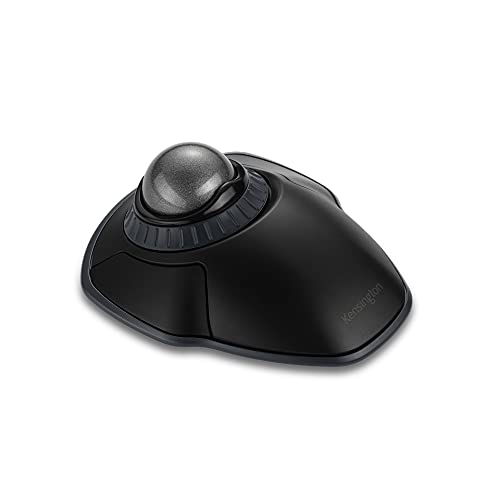
↓ See why we picked itKensington Orbit Wireless Trackball with Scroll Ring
↓ See why we picked itKensington Orbit Wireless with Touch Scroll Ring (K72352US)
↓ See why we picked itLeft-handed buyers have a smaller menu in the trackball aisle. Most thumb-ball models are shaped for the right hand, so a left-hander needs either a body built mirror-image for the left or a symmetrical design that works equally well for both hands.
The six picks here are all explicitly left-hand capable, from ELECOM's left-handed EX-G thumb ball to ambidextrous Kensington and Nulea finger balls. We compared them on listed specs: how the listing describes handedness, ball size, connection, DPI settings and software requirements. Always confirm that your chosen model is described for left-hand use, because a right-hand shape will feel wrong.
6 Criteria to Look For Before Buying a Left-Handed Trackball Mice
Key buying criteria so you get the right fit the first time.
True left-hand versus symmetrical
A left-handed shape is a mirror image of a right-hand body, with the thumb ball on the right side, while an ambidextrous design uses a symmetrical shell. A mirrored shape usually fits the left hand more naturally, but only a few models exist. Look for left-handed in the listing title.
Button mapping for left use
Even symmetrical bodies may have primary buttons that favor one hand, and software can swap left and right. A dedicated hand-switch button helps on shared desks. Check for a mapping utility or a physical switch.
Ball size and hand span
Thumb balls are around 34mm while finger balls range 40 to 55mm. A bigger ball gives finer control but needs a larger hand span. The Orbit with a 32mm ball is aimed at small to average hands.
Software and OS limits
Some left-handed models list Windows versions only, and Mac or ChromeOS customization may be limited. That matters because button remapping is how a lefty adapts a shared layout, and it fails without a supported driver. Check the system requirements line before buying and confirm your exact operating system appears in it.
Bearings and cleaning
Ruby bearings resist dust, which matters because skin oil and grit build up under any ball over weeks of use. A ball that rides on clogged plastic bearings feels sticky and skips. Look for a bearing description in the bullets and confirm the ball pops out through an underside hole.
Wired or wireless
A wired model never needs charging. A wireless one allows free placement but needs batteries or charging. Confirm the receiver type.
6 Best Left-Handed Trackball Mice in 2026
ELECOM EX-G Left-Handed Wireless Thumb Trackball
About this pick
This EX-G is built for the left hand and uses thumb control with optical tracking, six programmable buttons and two DPI steps at 750 and 1500. It uses a red ball for tracking accuracy and connects over a 2.4GHz USB receiver.
Compared with the ELECOM EX-G Left-Handed Trackball Mouse (Ruby Bearings), it lists thumb control and Windows from Vista onward, while the sibling lists ruby bearings. Against the ambidextrous Nulea M512 Wireless 55mm Ambidextrous Trackball, it is a true left-handed shape but with a smaller ball.
Pick it if you want a thumb trackball that actually fits the left hand. The caveat is that DPI offers only two steps, and the software for button mapping is a download.
Best for: Lefties wanting a true thumb ball
Check price on AmazonPros
- +Mirror-image left-hand shape
- +Six programmable buttons
- +Red ball for tracking accuracy
- +Wireless 2.4GHz link
Cons
- −Only two DPI steps
- −Software is a separate download
ELECOM EX-G Left-Handed Trackball Mouse (Ruby Bearings)
About this pick
This sibling listing is another left-handed EX-G with six physical buttons and 750 or 1500 DPI. It rolls on three 2.5mm artificial ruby ball bearings, and the system requirements cover Windows 8.1, 10 and 11.
It is priced the same as the ELECOM EX-G Left-Handed Wireless Thumb Trackball, so the choice comes down to which listing and requirements fit you. Compared with the Kensington Kensington Orbit Wireless Trackball with Scroll Ring, it has a smaller ball and no scroll ring.
A good match for a left-hander on Windows who wants durable bearings. The caveat is that it overlaps heavily with the other EX-G, so check which one is in stock.
Best for: Lefties on newer Windows
Check price on AmazonPros
- +Ruby bearings resist dirt
- +Left-handed shape
- +Six buttons
- +Windows 8.1 to 11 listed
Cons
- −Near twin of the other EX-G
- −Two DPI steps only
Kensington Orbit Wireless Trackball with Scroll Ring
About this pick
Kensington's wireless Orbit has a 40mm ball, a scroll ring, four DPI levels from 400 to 1600, and 2.4GHz plus Bluetooth connectivity with 128-bit AES encryption. It is symmetrical, so it works for left and right hands equally.
It costs a few dollars more than the ELECOM EX-G Left-Handed Wireless Thumb Trackball and gives a bigger ball and scroll ring in return. Compared with the Kensington Expert Wired Trackball (K64325), it is far cheaper but lacks the wrist rest and the biggest ball.
A strong pick for a shared station or for left-handers who like finger-style rolling. The caveat is that the listing does not spell out whether the battery is replaceable.
Best for: Mixed-hand desks
Check price on AmazonPros
- +Symmetrical for either hand
- +Scroll ring for paging
- +Encrypted wireless link
- +Four DPI steps
Cons
- −Battery type not detailed
- −No wrist rest
Nulea M512 Wireless 55mm Ambidextrous Trackball
About this pick
The Nulea M512 has a 55mm ball, 400 to 1600 DPI in four steps and a layout that supports left and right hands. It connects to three devices by Bluetooth or 2.4GHz wireless, with the listing pointing to graphic design and video editing.
Against the Kensington Orbit Wireless Trackball with Scroll Ring, it has a larger ball and an extra device slot but no scroll ring. Compared with the Kensington Expert Wired Trackball (K64325), it is wireless and priced lower, though without the Kensington brand.
Best for a lefty who wants a big finger ball and wireless pairing for less. The caveat is that the listing text is lighter on battery details.
Best for: Large ball and three-device switching
Check price on AmazonPros
- +Largest wireless ball here
- +Ambidextrous layout
- +Three device pairing
- +Four DPI steps
Cons
- −Battery details thin
- −Less established brand
Kensington Expert Wired Trackball (K64325)
About this pick
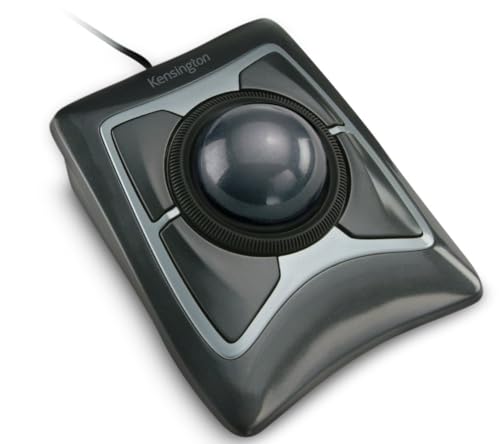
Kensington's wired Expert has a 55mm ball, a patented scroll ring, a detachable wrist rest and an ambidextrous body. It uses a wired USB-A connection and a customizable 4-button layout through KensingtonKonnect software.
It is the priciest pick here, and compared with the Nulea M512 Wireless 55mm Ambidextrous Trackball you get a built-in rest and a scroll ring instead of wireless. Against the Kensington Orbit Wireless Trackball with Scroll Ring, it has a bigger ball and a cable.
Choose it for a fixed desk where a left-hander wants maximum support. The caveat is the wired connection and the listing's note that ChromeOS users cannot customize it.
Best for: Long sessions with a wrist rest
Check price on AmazonPros
- +Wrist rest included
- +Big ball and scroll ring
- +Works for either hand
- +No batteries needed
Cons
- −Priciest pick
- −ChromeOS cannot customize buttons
Kensington Orbit Wireless with Touch Scroll Ring (K72352US)
About this pick
This Orbit uses a compact 32mm ball with touch scrolling, a Bluetooth LE or USB nano receiver connection and an ambidextrous shape. The listing says it is designed to fit small to average hands and needs no drivers.
It has the smallest ball in the list, which compared with the Nulea M512 Wireless 55mm Ambidextrous Trackball is a clear step down in fine control. Against the Kensington Orbit Wireless Trackball with Scroll Ring, it is cheaper but has the touch scroll rather than a physical ring.
Best for a left-hander with a smaller hand who wants a travel-friendly unit. The caveat is that it is not aimed at large hands.
Best for: Small-to-average left hands
Check price on AmazonPros
- +Compact body
- +Either hand works
- +Plug and play
- +Touch scrolling
Cons
- −Small ball
- −Not for large hands
How We Evaluated These Left-Handed Trackball Mice
Each pick was assessed across 5 criteria weighted for real-world use.
Left-hand suitability
We checked each listing for explicit left-handed or ambidextrous wording.
Ball and body size
Listed ball diameters and fit notes were compared.
Connection and power
Wired, 2.4GHz and Bluetooth setups were noted.
Buttons and software
Button counts, DPI steps and software notes were weighed.
Value for price
Value meant asking what extra dollars add on the listing, then checking whether owners mention it.
How to Choose the Right Left-Handed Trackball Mice
By Hand Shape
| Your situation | Recommended pick |
|---|---|
| You want a true left-handed thumb ball | ELECOM EX-G Left-Handed Wireless Thumb Trackball |
| You want left-handed with ruby bearings | ELECOM EX-G Left-Handed Trackball Mouse (Ruby Bearings) |
| You want a symmetrical scroll ring ball | Kensington Orbit Wireless Trackball with Scroll Ring |
| You have a small to average hand | Kensington Orbit Wireless with Touch Scroll Ring (K72352US) |
By Budget
| Budget | Recommended pick |
|---|---|
| $39 to $40 | Nulea M512 Wireless 55mm Ambidextrous Trackball |
| $40 to $45 | ELECOM EX-G Left-Handed Wireless Thumb Trackball |
| $45 to $50 | Kensington Orbit Wireless Trackball with Scroll Ring |
| $50 to $58 | Kensington Expert Wired Trackball (K64325) |
Mirrored vs Ambidextrous
Mirrored left-hand
A body shaped for the left hand fits the palm naturally but is only useful to lefties. The ELECOM EX-G Left-Handed Wireless Thumb Trackball and ELECOM EX-G Left-Handed Trackball Mouse (Ruby Bearings) are examples.
Ambidextrous
A symmetrical shell works for both hands, helpful for shared desks, but fit is a compromise. The Kensington Orbit Wireless Trackball with Scroll Ring, Nulea M512 Wireless 55mm Ambidextrous Trackball, Kensington Expert Wired Trackball (K64325) and Kensington Orbit Wireless with Touch Scroll Ring (K72352US) fit this group.
Most lefties who work alone should pick the mirrored shape, and shared desks suit an ambidextrous body.
Ball Control Preference
| Your situation | Recommended pick |
|---|---|
| You want a big 55mm ball | Nulea M512 Wireless 55mm Ambidextrous Trackball |
| You want a thumb ball | ELECOM EX-G Left-Handed Wireless Thumb Trackball |
| You want a wrist rest and ring | Kensington Expert Wired Trackball (K64325) |
| You want the smallest body | Kensington Orbit Wireless with Touch Scroll Ring (K72352US) |
For Shared Desks Specifically
Look for
A symmetrical shell, a hand-switch option or button remapping and a wireless link.
In this comparison
The Kensington Orbit Wireless Trackball with Scroll Ring and Nulea M512 Wireless 55mm Ambidextrous Trackball are symmetrical and wireless, and the Kensington Expert Wired Trackball (K64325) adds a wrist rest on a wired link.
When to Spend More
Spend more if
You want a wrist rest and scroll ring for hours of use, as on the Kensington Expert Wired Trackball (K64325).
Save if
You only need basic left-hand control, where the Nulea M512 Wireless 55mm Ambidextrous Trackball or ELECOM EX-G Left-Handed Wireless Thumb Trackball costs less.
Frequently Asked Questions
Do any thumb trackballs work well for left-handers?
A few, like the ELECOM EX-G left-handed models here, are mirrored for the left hand. Most other thumb balls are right-handed. Check the title for left-handed.
Is an ambidextrous trackball as comfortable as a left-handed one?
It can be fine, but the shape is a compromise. A mirrored shape usually fits better. Try one with a return window.
Are the two ELECOM EX-G left-handed listings different?
They are very close siblings with the same price and button count. The difference is in listed system requirements and details. Choose by availability.
Can I swap the buttons in software?
Most listings mention software for button assignment, which can swap left and right. Check for a download and OS support.
Is the Kensington Expert worth the premium for a lefty?
It is worth it if you want the wrist rest and a 55mm ball. For lighter use a cheaper ambidextrous model is enough. It is wired.
How long does it take to adapt?
Expect a week or two. Left-handers already adapt to right-handed gear, so many adjust quickly.
Bottom Line
best overall: ELECOM EX-G Left-Handed Wireless Thumb Trackball - best left-handed thumb ball pick in this roundup.
See the full rankings above for all picks with pros, cons, and best-for summaries.
Browse on Amazon
All Prime-eligible options with current pricing.
Shop on Amazon →