
4 Best KVM Switches Under $30 in 2026
We compared KVM switches under $30 by USB port speed, switching method, and real 4K@60Hz support, since not every budget switch delivers what it claims.

New to Amazon Prime?
Get fast, free shipping on every pick in this guide, plus Prime Video and exclusive deals.
Try Prime Free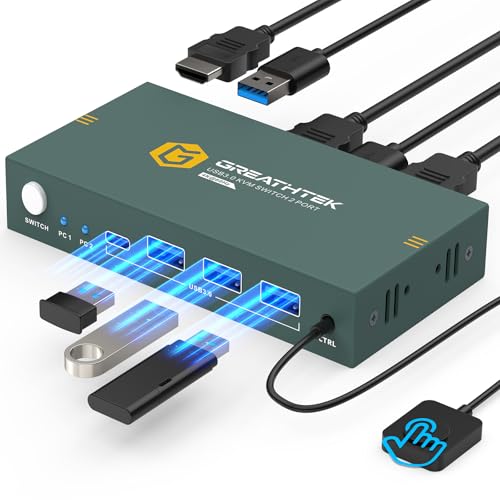


At a Glance
HDMI KVM Switch 1 Monitor 2 Computers, Wired Extend Controller
↓ See why we picked itUnder $30, KVM switches share a common core design, an HDMI switch box that lets two computers share one monitor, keyboard, and mouse, but they differ in real ways: USB 2.0 versus USB 3.0 port speed, whether a wired remote lets you hide the switch away from your desk, and how reliably each one actually holds a stable 4K signal.
We compared this lineup on stated USB transfer speeds, switching method flexibility, and specific compatibility notes each listing discloses, since a $30 KVM switch works fine for most desks, but the details that separate a good one from a frustrating one aren't always obvious from the headline spec.
5 Criteria to Look For Before Buying a KVM Switches Under $30
Key buying criteria so you get the right fit the first time.
USB 2.0 vs USB 3.0 Isn't Just a Number, It's a Real Speed Difference for Storage Devices
USB 2.0 ports max out around 480Mbps of data transfer, while USB 3.0 ports reach up to 5Gbps, over ten times faster, a difference you'll genuinely notice if you regularly copy large files to or from a shared flash drive or external hard drive connected through the KVM switch. For a basic keyboard and mouse alone, this speed difference doesn't matter, but check the specific USB version stated in the listing if you plan to share storage devices between computers.
Adaptive EDID Technology Solves a Common Flickering and Resolution Problem
EDID (Extended Display Identification Data) is the information a monitor sends to a computer describing its supported resolutions and refresh rates, and when a KVM switch sits between the monitor and multiple computers, this data exchange can sometimes fail or produce a mismatch, causing flickering or a computer defaulting to a lower resolution than the monitor supports. A KVM switch with stated adaptive EDID technology handles this exchange more reliably, reducing these frustrating display issues compared to a switch without this feature.
Hotkey Switching Isn't Universal at This Price, Even When a Switch Has Other Convenient Features
Several listings in this comparison specifically state that keyboard hotkey switching (pressing a key combination to switch computers without touching the physical switch box) is not supported, even on picks with other conveniences like a wired remote or desktop controller. If keyboard-only switching without reaching for a separate button or remote matters to you, check this specific detail in the listing rather than assuming it's included just because other switching methods are.
A KVM Switch's HDMI Adapter Compatibility Warning Should Be Taken Seriously, Not as Generic Caution
Some listings, like one pick in this comparison, specifically warn that using HDMI adapters or conversion cables (for connecting devices with DisplayPort, USB-C, or other non-HDMI outputs) may cause unstable or flickering transmission, or the connection dropping out entirely. This is a specific, testable limitation rather than generic legal caution, so if your setup requires an adapter to reach HDMI, either choose a pick without this warning or budget for potential troubleshooting.
Included Cables Represent Real Cost Savings Worth Factoring Into Your Total Price Comparison
A KVM switch listed at a lower price but requiring you to separately buy two HDMI cables and USB cables can end up costing more in total than a slightly pricier pick that includes everything needed in the box. Before comparing listings by sticker price alone, check exactly what's included and factor in the cost of any cables you'd need to buy separately to get an honest total cost comparison.
4 Best KVM Switches Under $30 in 2026
HDMI KVM Switch 1 Monitor 2 Computers, 2 Port
About this pick
This switch includes three full USB 3.0 ports rather than the USB 2.0 connections common on cheaper picks in this comparison, meaning connected flash drives, external hard drives, and scanners transfer data noticeably faster alongside your keyboard and mouse.
Its adaptive EDID technology automatically negotiates display settings between your monitor and both computers, reducing the flicker or resolution mismatch issues that can plague simpler KVM switches, and it supports both wired remote and physical button switching for flexible placement.
Best for buyers who want genuine USB 3.0 speed and adaptive EDID stability at the top of this price range.
Best for: buyers who want genuine USB 3.0 speed and stable EDID handling
Check price on AmazonPros
- +Full USB 3.0 speed on all three ports, not just USB 2.0
- +Adaptive EDID reduces flicker and resolution mismatch issues
- +Two switching methods for flexible desk placement
Cons
- −Does not support keyboard hotkey switching per the listing
- −Requires all three HDMI cables purchased separately
4K KVM Switch HDMI 2 Port Box
About this pick
At under $19, this switch includes both USB cables and both HDMI cables in the box, a genuine cost savings over picks that require you to source your own cables separately, and it works with a wide range of source devices beyond just PCs, including game consoles and streaming boxes.
A color-coded LED indicator (green or blue) shows which computer is currently active, and the listing backs the purchase with lifetime technical support, a specific commitment worth noting at this price point.
Best for buyers who want a genuinely complete kit, cables included, at the lowest price in this comparison.
Best for: buyers who want a complete, cable-included kit at the lowest price here
Check price on AmazonPros
- +Includes all necessary USB and HDMI cables in the box
- +Works with game consoles and streaming devices, not just PCs
- +Backed by stated lifetime technical support
Cons
- −No stated USB 3.0 speed like the pricier pick above
- −Single button switching only, no wired remote option
HDMI KVM Switch 1 Monitor 2 Computers, Wired Extend Controller
About this pick
This is the lowest price in this comparison, and it's upfront about a real limitation, the listing specifically warns that using HDMI conversion cables or adapters may cause unstable or flickering transmission, meaning it's built for a direct HDMI-to-HDMI setup rather than adapted connections.
Its included desktop controller lets you hide the switch box itself while keeping quick access to switching, and the listing offers a 24-month replacement warranty if you run into compatibility issues, a longer stated commitment than some pricier competitors.
Best for buyers with a straightforward direct-HDMI setup who want the lowest price and don't need USB 3.0 speeds.
Best for: buyers with a direct HDMI setup who want the lowest price here
Check price on AmazonPros
- +Lowest price in this entire comparison
- +24-month replacement warranty, longer than some competitors
- +Desktop controller lets you hide the switch box
Cons
- −USB 2.0 speed only, not USB 3.0 like pricier picks
- −Explicitly warns against using HDMI adapters or conversion cables
TIGKTING USB 3.0 HDMI KVM Switch, 2 Port
About this pick
This pick includes four built-in USB 3.0 ports rated for up to 5Gbps transfer speed, the most USB ports in this comparison, with backward compatibility down to USB 2.0, 1.1, and 1.0 for older peripherals you might still be using.
Its dual switch modes (push-button and wired desktop controller) and clear LED indicators match the flexibility of the pricier pick above, and it's backed by a stated 24-month after-sales service period.
Best for buyers who want the most USB 3.0 ports in this comparison for connecting several peripherals at once.
Best for: buyers who want the most USB 3.0 ports for connecting multiple peripherals
Check price on AmazonPros
- +Most USB 3.0 ports in this comparison at four total
- +Backward compatible with older USB 2.0/1.1/1.0 peripherals
- +24-month after-sales service commitment
Cons
- −Does not support keyboard hotkey switching per the listing
- −Same under $30-under $30 price range as the top pick with similar specs
How We Evaluated These KVM Switches Under $30
Each pick was assessed across 5 criteria weighted for real-world use.
USB Port Speed and Count
Compared stated USB 2.0 versus USB 3.0 speeds and total port count across the lineup, since this varies meaningfully at this price point.
Switching Method Flexibility
Checked whether each switch supports both a physical button and a wired remote or desktop controller for flexible placement away from the desk.
Cable Inclusion
Noted which listings include the necessary HDMI and USB cables versus requiring buyers to source them separately, a real cost difference.
Compatibility Caveats and Warnings
Checked listings for specific disclosed limitations, like warnings against using HDMI adapters, rather than assuming universal compatibility.
Warranty and Support Terms
Compared stated warranty length and after-sales service commitments across the lineup, since these varied even among similarly priced switches.
How to Choose the Right KVM Switches Under $30
By Primary Use Case
| If you mainly need | Recommended pick |
|---|---|
| USB 3.0 speed and stable EDID handling | HDMI KVM Switch 1 Monitor 2 Computers, 2 Port |
| A complete kit with all cables included | 4K KVM Switch HDMI 2 Port Box |
| The most USB 3.0 ports for multiple peripherals | TIGKTING USB 3.0 HDMI KVM Switch, 2 Port |
By Budget
| Price range | Recommended pick |
|---|---|
| Under $19 | HDMI KVM Switch, Wired Extend Controller (under $20) or 4K KVM Switch Box (under $20) |
| Under $30 | HDMI KVM Switch 2 Port (under $30) or TIGKTING USB 3.0 (under $30) |
USB 2.0 vs USB 3.0 Ports
USB 2.0 (Wired Extend Controller pick)
Fine for a basic keyboard and mouse, but noticeably slower for transferring files via a connected flash drive or external hard drive.
USB 3.0 (Top pick and TIGKTING)
Up to 5Gbps transfer speed, meaningfully faster for USB storage devices, scanners, and other data-heavy peripherals shared between computers.
If you only connect a keyboard and mouse, USB 2.0 is sufficient. If you regularly share a flash drive or external storage between computers, prioritize a USB 3.0 pick.
By Cable Requirements
| Your situation | Recommended pick |
|---|---|
| You don't already have spare HDMI/USB cables | 4K KVM Switch HDMI 2 Port Box (cables included) |
| You already have compatible cables on hand | Any pick in this comparison, cables aren't required |
For Direct HDMI Setups Specifically
Look for
A listing that explicitly states compatibility with HDMI adapters or conversion cables if your setup requires one, rather than assuming universal compatibility.
In this comparison
The HDMI KVM Switch with Wired Extend Controller explicitly warns against using adapters, so a direct HDMI-to-HDMI setup is required for stable performance.
When to Spend More
Spend more if
You want maximum USB 3.0 ports for multiple peripherals, where the TIGKTING USB 3.0 pick offers four full-speed ports in this comparison.
Save if
A basic switch with included cables covers your needs, where the 4K KVM Switch HDMI 2 Port Box delivers a complete kit for under $19.
Frequently Asked Questions
Can I use a USB-C to HDMI adapter with these KVM switches if my laptop doesn't have HDMI?
It depends on the specific switch; some listings in this comparison explicitly warn against using adapters or conversion cables, which can cause unstable transmission, while others don't mention this limitation. Check the specific listing's compatibility notes before assuming an adapter will work reliably.
Do any of these budget KVM switches support keyboard hotkey switching?
No, all four picks in this comparison explicitly state they do not support keyboard hotkey switching, relying instead on a physical button, wired remote, or desktop controller to switch between computers.
Is USB 3.0 necessary if I'm just sharing a keyboard and mouse between two computers?
No, a basic keyboard and mouse use minimal bandwidth well within USB 2.0 capability, so USB 3.0 mainly matters if you're also sharing storage devices, scanners, or other data-heavy USB peripherals between the two computers.
Will these KVM switches work with gaming consoles like PS5 or Xbox in addition to computers?
Some picks in this comparison, like the 4K KVM Switch HDMI 2 Port Box, explicitly state compatibility with gaming consoles, TV boxes, and other HDMI source devices beyond just PCs, though always confirm this in the specific listing before assuming universal device compatibility.
What does adaptive EDID technology actually fix in practice?
It reduces the chances of your monitor flickering, defaulting to a lower resolution than it supports, or failing to display properly when switching between the two connected computers, by more reliably communicating the monitor's actual capabilities to whichever computer is active.
How do I know if a KVM switch at this price will support 4K resolution reliably?
All four picks in this comparison state support for 4K@60Hz, but check for any specific cable length or quality warnings in the listing, since some note that HDMI 2.0 standard cables under a certain length are required to maintain a stable 4K signal.
Bottom Line
best overall: HDMI KVM Switch 1 Monitor 2 Computers, 2 Port - best overall pick in this roundup.
See the full rankings above for all picks with pros, cons, and best-for summaries.
Browse on Amazon
All Prime-eligible options with current pricing.
Shop on Amazon →