
4 Best KVM Switches Under $100 in 2026
We compared KVM switches under $100 by real dual-monitor support, 4-computer scaling, and USB-C port count for growing multi-device desk setups.

New to Amazon Prime?
Get fast, free shipping on every pick in this guide, plus Prime Video and exclusive deals.
Try Prime Free


At a Glance
Under $100, KVM switches move beyond a single shared monitor into genuine dual-monitor extend and mirror modes, and one pick in this comparison scales to four separate computers rather than the two-computer limit common at cheaper tiers.
We compared this lineup on whether dual-monitor support is real extend mode or just duplicated mirroring, how many computers each switch can realistically manage, and USB-C port inclusion for modern peripherals, since at this price the meaningful differences are about scale and display flexibility, not just resolution.
5 Criteria to Look For Before Buying a KVM Switches Under $100
Key buying criteria so you get the right fit the first time.
Extend Mode and Mirror Mode Serve Genuinely Different Purposes on a Dual-Monitor KVM Switch
Extend mode lets each of your two monitors show different content, effectively giving you the same expanded desktop experience you'd have with monitors plugged directly into one computer, while mirror mode duplicates the identical image on both screens, useful mainly for presentations or a shared secondary display. Before choosing a dual-monitor KVM switch, confirm it explicitly supports extend mode if that's your actual goal, since some cheaper switches marketed as "dual monitor" only support mirroring.
Scaling to Four Computers Requires Meaningfully More Cables and Careful Graphics Card Configuration
A 4-computer KVM switch, like the pick in this comparison, requires connecting HDMI and DisplayPort cables from each of the four separate computers, and on machines with both discrete and integrated graphics cards, both video ports need to come from the discrete card specifically for the setup to work as advertised. This added complexity is worth the tradeoff only if you genuinely need to manage four separate systems regularly, not as a default choice over simpler options.
A USB-C Port Alongside USB-A Ports Future-Proofs Your Peripheral Connections
Many newer peripherals, external drives, and docking accessories now use USB-C connectors, and a KVM switch offering at least one USB-C port alongside the more common USB-A ports, like several picks in this comparison, means you won't need a separate USB-C to USB-A adapter for these devices. If you've noticed more of your accessories shipping with USB-C cables recently, prioritize a switch with this port included rather than an all-USB-A design.
Two Similarly Specced Switches Can Have a Real Price Difference Worth Investigating
The UGREEN and Heravo picks in this comparison share nearly identical core specifications, dual monitor support, 4 USB 3.0 ports, 4K@60Hz, yet differ by $10 in price, generally reflecting brand recognition and stated feature details like adaptive EDID technology rather than a fundamental hardware difference. When two listings look nearly identical on paper, read the specific feature descriptions closely rather than assuming the pricier one is automatically better.
Simpler, Cheaper Options Remain Valid Even in a Comparison Focused on Dual-Monitor Switches
Not every buyer researching KVM switches in this price range actually needs dual-monitor or multi-computer support, and an established single-monitor switch like the IOGEAR pick in this comparison can serve a straightforward two-computer, one-monitor desk setup reliably for significantly less money. Resist the pull toward the most feature-rich option in a comparison if your actual daily setup doesn't require those extra capabilities.
4 Best KVM Switches Under $100 in 2026
UGREEN HDMI KVM Switch, 2 Monitors 2 Computers
About this pick
This switch supports genuine dual-monitor extend mode alongside mirror mode, letting each computer drive two separate displays rather than duplicating the same image, and its 4 USB 3.0 ports (3 USB-A, 1 USB-C) cover both modern and legacy peripherals without needing an adapter.
UGREEN's listing is specific and transparent about setup requirements, each computer needs 2 HDMI cables plus 1 USB-A cable connected to work properly, and the two monitors can only show one computer's output at a time, details that help set accurate expectations before purchase.
Best for buyers who want genuine dual-monitor extend mode with broad USB-A and USB-C compatibility.
Best for: buyers who want genuine dual-monitor extend mode with broad USB compatibility
Check price on AmazonPros
- +Genuine dual-monitor extend mode, not just mirroring
- +Broad USB-A and USB-C port coverage
- +Transparent setup requirements clearly documented
Cons
- −No EDID emulation support per the listing
- −Requires each computer to have 2 HDMI outputs, not adaptable from single-HDMI laptops easily
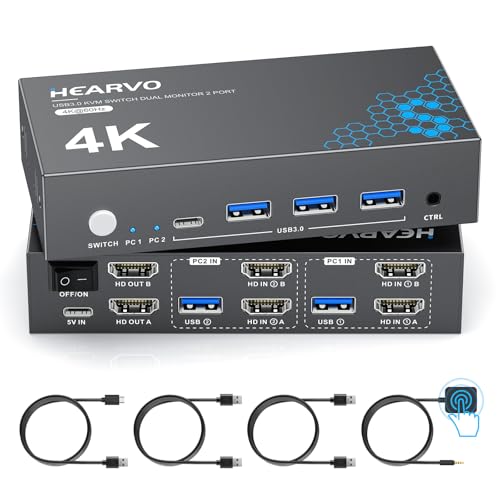
Heravo USB 3.0 HDMI KVM Switch, 2 Monitors 2 Computers
About this pick
At $10 less than the UGREEN pick above, this switch delivers the same core dual-monitor, 4 USB 3.0 port configuration, positioning it as a genuine budget alternative for buyers who want dual-monitor KVM switching without paying the full UGREEN price.
Its adaptive EDID technology specifically targets reducing screen flicker and resolution mismatch during switching, a detail UGREEN's listing doesn't explicitly claim, while both switches share HDCP 2.2 compatibility for protected content playback.
Best for buyers who want dual-monitor KVM switching with adaptive EDID stability at a lower price than the UGREEN pick.
Best for: buyers who want dual-monitor switching with EDID stability at a lower price
Check price on AmazonPros
- +$10 cheaper than the UGREEN pick with a similar core spec sheet
- +Adaptive EDID technology explicitly addresses flicker issues
- +Same 4 USB 3.0 port configuration as the pricier pick
Cons
- −Requires 6 HDMI cables total for full dual-monitor setup, not included
- −Less established brand recognition than UGREEN
HDMI Displayport KVM Switch, 4 Computers 2 Monitors
About this pick
This is the only pick in this comparison that scales to four separate computers rather than two, sharing one keyboard, one mouse, and two monitors across all four sources, with support up to 8K@60Hz on the HDMI side and 4K@144Hz on the DisplayPort side.
Its combination of HDMI and DisplayPort inputs gives more flexibility for connecting a mix of computer types than an HDMI-only switch, and both button and wired controller switching methods let you choose between quick desk access and a hidden, tidy setup.
Best for buyers who specifically need to manage four separate computers from one shared keyboard, mouse, and dual-monitor setup.
Best for: buyers who need to manage four separate computers from a shared dual-monitor desk setup
Check price on AmazonPros
- +Only pick here scaling to four separate computers
- +Mixed HDMI and DisplayPort inputs for flexible source compatibility
- +High resolution ceiling up to 8K@60Hz on HDMI
Cons
- −Each computer with discrete and integrated graphics needs both ports on the discrete card
- −Requires more cables and setup complexity than a simple 2-computer switch
IOGEAR 2-Port Full HD KVM Switch (GCS32HU)
About this pick
For buyers exploring this $100-ceiling comparison who don't actually need dual-monitor or 4-computer support, this established IOGEAR pick delivers reliable single-monitor, 2-computer switching at less than half the price of the dual-monitor picks above.
Its molded-in cables and travel-friendly compact design suit a simpler single-monitor desk setup or an IT professional who needs to carry a switch between locations, without the added cable complexity that dual-monitor and 4-computer switches require.
Best for buyers who want a simple, reliable single-monitor switch and don't need dual-monitor or multi-computer scaling.
Best for: buyers who want a simple, reliable single-monitor switch without dual-monitor complexity
Check price on AmazonPros
- +Established brand at less than half the price of dual-monitor picks
- +Molded-in cables eliminate loose cable clutter
- +Simpler setup than dual-monitor or 4-computer alternatives
Cons
- −Single monitor only, not dual-monitor like the other picks here
- −Maximum 1920x1200 resolution, not 4K
How We Evaluated These KVM Switches Under $100
Each pick was assessed across 5 criteria weighted for real-world use.
Genuine Dual-Monitor Extend vs Mirror-Only
Checked which picks support true extend mode across two monitors versus only mirroring the same image, a meaningful functional difference.
Computer Scaling Beyond Two
Noted which pick in this comparison scales to four computers rather than the standard two-computer limit found elsewhere.
USB-C Port Inclusion
Compared which switches include a USB-C port alongside USB-A for modern peripheral compatibility.
Setup Complexity and Cable Requirements
Assessed how many cables and connections each switch realistically requires for full functionality, since dual-monitor and 4-computer setups add real complexity.
Value Relative to Feature Scope
Weighed each pick's price against whether its feature set (dual-monitor, multi-computer) matches what a given buyer actually needs.
How to Choose the Right KVM Switches Under $100
By Primary Use Case
| If you mainly need | Recommended pick |
|---|---|
| Genuine dual-monitor extend mode with broad USB support | UGREEN HDMI KVM Switch, 2 Monitors 2 Computers |
| Dual-monitor switching at a lower price | Heravo USB 3.0 HDMI KVM Switch, 2 Monitors 2 Computers |
| Managing four separate computers | HDMI Displayport KVM Switch, 4 Computers 2 Monitors |
By Budget
| Price range | Recommended pick |
|---|---|
| Under $40 | IOGEAR GCS32HU (under $40) for single-monitor needs |
| $60-$70 | Heravo Dual Monitor (under $60) or UGREEN Dual Monitor (under $70) |
| Under $100 | HDMI Displayport 4-Computer Switch (under $100) |
2-Computer Dual-Monitor vs 4-Computer Setup
2-Computer Dual-Monitor (UGREEN or Heravo)
Simpler setup with fewer cables, ideal if you regularly switch between exactly two computers and want each to drive two separate monitors.
4-Computer Setup (HDMI Displayport pick)
Scales to four separate machines sharing the same dual-monitor desk, worth the added cable complexity if you genuinely manage that many systems.
Most home offices only need 2-computer switching. The 4-computer pick is worth its added complexity specifically for IT professionals or power users managing multiple systems.
By Monitor Count Needs
| Your monitor setup | Recommended pick |
|---|---|
| Single monitor is enough | IOGEAR 2-Port Full HD KVM Switch |
| Dual monitors for each computer | UGREEN, Heravo, or the 4-Computer HDMI Displayport pick |
For IT Professionals Managing Multiple Systems Specifically
Look for
A switch that scales beyond two computers, with mixed HDMI and DisplayPort input options for connecting varied hardware.
In this comparison
The HDMI Displayport KVM Switch, 4 Computers 2 Monitors is specifically built for managing more systems than the standard 2-computer limit.
When to Spend More
Spend more if
You need to manage four separate computers from one desk, where the HDMI Displayport 4-Computer pick is the only option here supporting this scale.
Save if
A single monitor and two computers cover your needs, where the IOGEAR GCS32HU costs less than half of the dual-monitor picks in this comparison.
Frequently Asked Questions
Do I need identical monitors for the dual-monitor extend mode to work properly?
No, the monitors don't need to be identical models, though both should support the resolution and refresh rate you intend to use, since a significant mismatch in capabilities between the two monitors could limit your overall dual-monitor experience to the lower-capability display.
Can I connect a laptop to the 4-computer KVM switch if it only has one HDMI output?
For the dual-monitor 4-computer configuration, each computer typically needs 2 video outputs (HDMI and/or DisplayPort) to drive both monitors; a laptop with only a single HDMI output would need a USB-C to DisplayPort or similar adapter to provide the second video connection, if its USB-C port supports video output.
What's the practical difference between the UGREEN and Heravo dual-monitor switches given their similar specs?
Based on the listings, UGREEN doesn't explicitly claim adaptive EDID technology while Heravo does, and UGREEN carries a $10 price premium likely reflecting its more established brand recognition; functionally, both deliver a similar dual-monitor, 4 USB 3.0 port experience.
Is the IOGEAR switch's 1920x1200 resolution good enough for general office work?
Yes, 1920x1200 comfortably handles general office tasks like word processing, spreadsheets, web browsing, and video calls; it's only a meaningful limitation if you specifically need 4K resolution for detailed photo or video editing work.
How many total cables do I need for the full 4-computer, 2-monitor KVM switch setup?
Based on the listing, each of the four computers needs both HDMI and DisplayPort connections plus a USB 3.0 cable, meaning a fully connected setup requires roughly 12 video cables plus 4 USB cables in total, a meaningfully more complex cable management task than a simple 2-computer switch.
Will switching between computers on these dual-monitor KVM switches interrupt an active video call?
Yes, switching the KVM to a different computer will disconnect whatever active session (including video calls) is running on the previously active computer's displays, since the monitors, keyboard, and mouse all redirect to the newly selected computer.
Bottom Line
best overall: UGREEN HDMI KVM Switch, 2 Monitors 2 Computers - best overall pick in this roundup.
See the full rankings above for all picks with pros, cons, and best-for summaries.
Browse on Amazon
All Prime-eligible options with current pricing.
Shop on Amazon →