
4 Best KVM Switches Under $150 in 2026
We compared KVM switches under $150 by USB-C docking capability, Power Delivery wattage, and triple-monitor scaling for professional multi-device desks.

New to Amazon Prime?
Get fast, free shipping on every pick in this guide, plus Prime Video and exclusive deals.
Try Prime Free

At a Glance
HDMI Displayport KVM Switch, 3 Monitor 4 Computer
↓ See why we picked itUnder $150, KVM switches shift from simple switching boxes into genuine docking stations, adding real Power Delivery charging up to 100W, EDID emulation that keeps window positions stable across switches, and triple-monitor scaling for the first time in this budget-tier series.
We compared this lineup on Power Delivery wattage for laptop charging, EDID emulation quality, and how many monitors and computers each switch genuinely supports at once, since at this price the meaningful differences are professional docking features, not just another resolution bump.
5 Criteria to Look For Before Buying a KVM Switches Under $150
Key buying criteria so you get the right fit the first time.
Rated Power Delivery Wattage and Actual Delivered Wattage Aren't Always the Same Number
A switch rated for 100W Power Delivery, like one pick in this comparison, may actually deliver less to the connected laptop in practice, the listing itself states 73-85W actual charging due to line loss and cable resistance, a detail worth knowing before assuming the rated number is exactly what reaches your device. When comparing charging capability between switches, look for listings that disclose this real-world figure rather than only advertising the theoretical maximum.
EDID Emulation Prevents a Genuinely Annoying Window-Repositioning Problem
Without EDID emulation, switching between computers on a multi-monitor KVM setup can cause your operating system to forget window positions and reset them to a default arrangement each time you switch, since the display loses its remembered configuration momentarily. A switch with dedicated EDID emulation, like the ON/OFF dial on one pick in this comparison, stores the display's information persistently so your window layout stays consistent across switches, a real quality-of-life improvement for anyone switching frequently throughout the day.
Confirmed Apple Silicon Compatibility Is Worth Verifying Directly, Not Assuming
Some KVM switches work flawlessly with Intel-based Macs but have compatibility quirks with Apple's M1/M2/M3 chip architecture due to how these chips handle external display and USB-C signaling differently. A listing that specifically states confirmed compatibility with M1/M2 chip MacBooks, like the ATEN US3310 in this comparison, is a stronger signal of real-world tested compatibility than a generic "works with Mac" claim that doesn't specify chip generations.
A Hybrid Multi-Input Switch Solves a Real Problem for Non-Uniform Office Hardware
Many small offices accumulate a mix of computer hardware over time, a newer USB-C laptop alongside older desktops using DisplayPort or HDMI, and a KVM switch requiring identical connector types across all inputs simply can't accommodate this reality. A hybrid switch designed to accept different connector combinations across its ports, like one pick in this comparison, directly solves this real-world mismatch rather than forcing you to standardize your hardware just to use a KVM switch.
Switching Speed Matters More the More Often You Actually Switch
A stated 2-second switch time, like on one ATEN pick in this comparison, matters significantly more for someone toggling between a work laptop and personal computer dozens of times throughout the day than for someone who switches once in the morning and once at night. If your workflow involves frequent switching, prioritize a pick with explicitly stated fast switching and lag-elimination technology over one that only advertises maximum resolution.
4 Best KVM Switches Under $150 in 2026
ATEN US3311 2-Port USB-C KVM Switch
About this pick
ATEN combines a genuine KVM switch with a built-in docking station in this pick, supporting up to 100W Power Delivery laptop charging alongside 8K/4K video at up to 144Hz, specs that put it at the top of this comparison for both charging capability and display quality.
Its 4 USB 3.2 Type-A ports plus specific compatibility with iPhone 15 Pro and Samsung DeX devices extend its usefulness beyond just laptop switching, and ATEN backs it with a 3-year limited hardware warranty, rigorously tested under diverse environmental conditions according to the listing.
Best for buyers who want the highest Power Delivery wattage and display resolution ceiling in this comparison, backed by ATEN's stated durability testing.
Best for: buyers who want maximum charging wattage and display resolution in a compact 2-port switch
Check price on AmazonPros
- +Highest Power Delivery wattage in this comparison at 100W
- +8K/144Hz resolution ceiling, the highest here
- +3-year limited hardware warranty with stated durability testing
Cons
- −USB bandwidth may default to USB 2.0 speeds above 4K@60Hz per the listing
- −Single DisplayPort monitor output, not multi-monitor
ATEN US3310 2-Port 4K HDMI USB-C KVM Dock
About this pick
This ATEN pick prioritizes fast, lag-free switching, ATEN specifically states just a 2-second switch time, over the higher resolution ceiling of the US3311 above, using ATEN's Video DynaSync technology to eliminate the switching lag and resolution issues common on cheaper switches.
Its 85W Power Delivery charging and HDMI output at 4K@30Hz suit buyers connecting an iPad Pro or smartphone alongside a laptop rather than requiring the highest possible refresh rate, and it's specifically confirmed compatible with Apple M1/M2 chip MacBooks.
Best for buyers who want fast, lag-free switching between mixed device types like a laptop, iPad Pro, and smartphone, with confirmed Apple Silicon compatibility.
Best for: buyers who want fast, confirmed Apple Silicon-compatible switching across mixed device types
Check price on AmazonPros
- +Confirmed compatible with Apple M1/M2 chip MacBooks
- +Fast, stated 2-second switching with no lag or resolution issues
- +Works with mixed devices including iPad Pro and smartphones
Cons
- −Lower resolution ceiling than the US3311 pick at 4K@30Hz
- −Lower Power Delivery wattage than the US3311's 100W
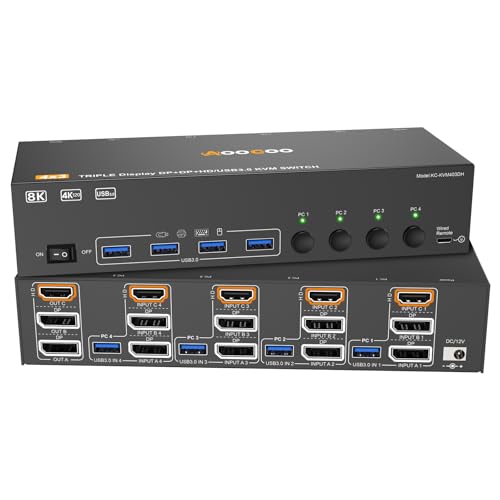
HDMI Displayport KVM Switch, 3 Monitor 4 Computer
About this pick
This is the only pick in this comparison scaling to three monitors across four separate computers, using 2 DisplayPort plus 1 HDMI2.1 connections for up to 8K@60Hz or 4K@144Hz resolution, a genuine multi-monitor solution for buyers managing multiple systems simultaneously.
Its extended and copy display modes let you choose between showing different content on each monitor or duplicating the same view across all three, and 4 USB 3.0 ports handle keyboard, mouse, and additional peripheral sharing across the four connected computers.
Best for buyers who need genuine triple-monitor output while managing up to four separate computers from one shared setup.
Best for: buyers who need genuine triple-monitor output across up to four separate computers
Check price on AmazonPros
- +Only pick here scaling to three monitors across four computers
- +High resolution ceiling matching the ATEN picks above
- +Extended and copy modes offer real display flexibility
Cons
- −Requires 2 DP + HDMI connections per computer, a complex cable setup
- −No Power Delivery charging support like the ATEN docking picks
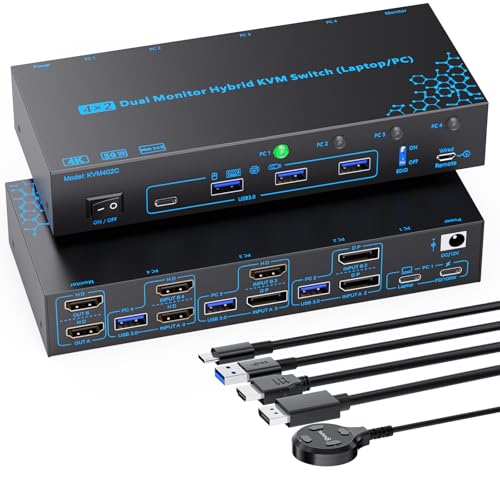
2 Monitors 4 Computers Hybrid KVM Switch with EDID Emulator
About this pick
This switch's standout feature is accepting four genuinely different input combinations simultaneously, one laptop via USB-C, and three desktops via various DisplayPort and HDMI combinations, solving a mixed-hardware office setup that none of the other picks in this comparison handle as flexibly.
Its EDID ON/OFF dial lets you enable EDID emulation specifically to prevent window positions from resetting when switching computers, or disable it if that causes compatibility issues with certain hardware, plus 100W Power Delivery charging (delivering 73-85W in practice per the listing) for the connected laptop.
Best for buyers with a genuinely mixed office setup, one laptop and multiple desktops with different port types, who want charging and EDID control in one switch.
Best for: buyers with a mixed laptop-and-multiple-desktop setup needing flexible input compatibility
Check price on AmazonPros
- +Accepts four genuinely different input types simultaneously
- +EDID ON/OFF dial gives direct control over window-position stability
- +100W-rated Power Delivery charges the connected laptop
Cons
- −Actual laptop charging wattage is lower than the rated 100W due to line loss
- −Complex cable requirements across the three desktop computers
How We Evaluated These KVM Switches Under $150
Each pick was assessed across 5 criteria weighted for real-world use.
Power Delivery Wattage for Laptop Charging
Compared stated Power Delivery wattage and, where disclosed, the actual real-world charging wattage delivered versus the rated maximum.
EDID Emulation Quality
Checked which picks specifically address window-position stability during switching through EDID emulation technology.
Multi-Monitor and Multi-Computer Scaling
Compared how many monitors and computers each switch genuinely supports simultaneously at this price tier.
Apple Silicon and Mixed-Device Compatibility
Noted specific confirmed compatibility with MacBook M1/M2 chips, iPad Pro, and other mixed device types beyond standard Windows laptops.
Switching Speed and Lag
Compared stated switching speed and any specific lag-reduction technology across the lineup.
How to Choose the Right KVM Switches Under $150
By Primary Use Case
| If you mainly need | Recommended pick |
|---|---|
| Maximum charging wattage and resolution | ATEN US3311 2-Port USB-C KVM Switch |
| Fast switching with confirmed Apple Silicon support | ATEN US3310 2-Port 4K HDMI USB-C KVM Dock |
| Triple-monitor output across four computers | HDMI Displayport KVM Switch, 3 Monitor 4 Computer |
By Budget
| Price range | Recommended pick |
|---|---|
| Under $113 | HDMI Displayport 3-Monitor 4-Computer switch (under $120) |
| $140-$150 | Hybrid 4-Port EDID switch (under $140), ATEN US3311 (under $150), or ATEN US3310 (under $150) |
ATEN US3311 vs US3310
US3311 (Higher Resolution)
100W charging and up to 144Hz refresh rate for buyers who prioritize the sharpest, smoothest display over the fastest possible switch time.
US3310 (Faster Switching)
85W charging with a stated 2-second lag-free switch time and confirmed Apple M1/M2 compatibility, better for buyers switching frequently between mixed devices.
If you switch between computers dozens of times a day, the US3310's fast switching matters more. If display quality is your priority, the US3311's higher resolution ceiling wins.
By Monitor Count Needs
| Your monitor setup | Recommended pick |
|---|---|
| Single monitor, docking-focused | ATEN US3311 or ATEN US3310 |
| Triple monitors across multiple computers | HDMI Displayport KVM Switch, 3 Monitor 4 Computer |
For a Mixed Laptop-and-Desktop Office Specifically
Look for
A hybrid-input switch accepting different connector combinations simultaneously, since a mixed office often pairs a USB-C laptop with desktops using varied ports.
In this comparison
The Hybrid 4-Port KVM Switch with EDID Emulator specifically accepts USB-C, DisplayPort, and HDMI inputs together across four different computers.
When to Spend More
Spend more if
You want maximum charging wattage and the highest resolution ceiling in a compact docking switch, where the ATEN US3311 leads this comparison.
Save if
Triple-monitor, multi-computer scaling matters more than charging or docking features, where the HDMI Displayport 3-Monitor pick costs less while still delivering high resolution.
Frequently Asked Questions
Will the ATEN US3311's 100W Power Delivery fully charge a power-hungry gaming laptop?
It depends on the specific laptop's charging requirements; 100W covers most standard and even many higher-power ultrabooks, but some gaming laptops requiring 130W or more chargers may charge more slowly or not keep pace during heavy simultaneous use through this switch.
Can I use the hybrid 4-port switch with just two computers instead of the full four it supports?
Yes, the switch supports up to four different computers but doesn't require using all four ports simultaneously; you can connect just two devices and leave the remaining ports unused without any functional downside.
Does EDID emulation need to be manually turned on, or is it automatic?
On the hybrid pick in this comparison, EDID emulation is controlled through a dedicated ON/OFF dial, meaning you manually enable or disable it based on whether your specific setup benefits from window-position stability or encounters compatibility issues with it enabled.
What's the practical difference between the ATEN US3311 and US3310 for a typical home office user?
The US3311 offers higher resolution (up to 144Hz) and more charging power (100W), while the US3310 offers faster stated switching speed (2 seconds) and confirmed Apple M1/M2 compatibility at a lower resolution ceiling (4K@30Hz); most home office users switching between a laptop and desktop would find either sufficient, with the choice coming down to whether display quality or switching speed matters more.
Do I need special cables for the 3-monitor 4-computer KVM switch, or will standard HDMI and DisplayPort cables work?
Standard HDMI 2.1 and DisplayPort 1.4 cables work, but the listing specifically recommends using high-quality, shorter cables to maintain a stable 8K or 4K@144Hz signal, since longer or lower-quality cables can cause signal degradation at these higher resolutions and refresh rates.
Is a KVM switch dock like the ATEN picks a good replacement for a separate laptop docking station?
Yes, both ATEN picks in this comparison combine KVM switching with genuine docking station functionality, including USB hub ports and charging, meaning they can replace a separate dedicated dock if you're also switching between two computers, though a standalone dock might offer more total ports if you don't need the switching feature.
Bottom Line
best overall: ATEN US3311 2-Port USB-C KVM Switch - best overall pick in this roundup.
See the full rankings above for all picks with pros, cons, and best-for summaries.
Browse on Amazon
All Prime-eligible options with current pricing.
Shop on Amazon →