
6 Best Headsets for Zoom Calls in 2026
Six headsets for Zoom meetings compared on microphone noise control, USB or Bluetooth connection, comfort and mute controls, from budget wired to wireless.

New to Amazon Prime?
Get fast, free shipping on every pick in this guide, plus Prime Video and exclusive deals.
Try Prime Free


At a Glance
Zoom does not care what headset you wear, but the people on the other end certainly do. What they hear is the microphone path, not the headphone drivers, so a boom mic that sits near your mouth beats a flashy pair of earcups every time. That is why a plain wired headset often sounds better in a meeting than a pricey wireless set with a poorly placed mic.
We compared six headsets by connection type, mic design and comfort, and noted where the listing names certification or call-control features. A few are certified for other platforms, but we only say a headset is certified for Zoom when the listing does.
5 Criteria to Look For Before Buying a Headsets for Zoom Call
Key buying criteria so you get the right fit the first time.
Mic path matters more than the speakers
The people on a Zoom call hear what the microphone captures, so a boom mic that sits close to your mouth gives clearer speech than a mic built into an earcup. Boom mics also reject more room noise. Look for 'boom mic' and 'noise-canceling microphone' on the listing rather than 'noise-canceling headphones'.
Noise cancelling versus mic noise reduction
Active noise cancelling changes what you hear, while mic noise reduction changes what others hear. For meetings, mic noise reduction is more important. Check the listing for the term 'microphone' next to the noise feature.
USB, Bluetooth or analog connection
A USB headset is plug and play and has its own sound card, so it behaves consistently. Bluetooth adds freedom but can be affected by interference, and 3.5mm needs a headphone jack. Look for the connector type and, for USB-C laptops, an adapter or native USB-C.
Certification claims
A certified headset has been checked by the platform for compatibility, which usually means call-control buttons work properly. Not all listings name Zoom, and some are certified for Teams or Cisco instead. Look for the exact platform name on the listing.
Mute control you can reach
A mute button on the cable or earcup is faster than the on-screen one and helps avoid awkward moments. Check for in-line controls or flip-to-mute booms in the images.
6 Best Headsets for Zoom Calls in 2026
Poly Blackwire 5220
About this pick
The Poly Blackwire 5220 is a wired headset with a flexible boom, a noise-canceling microphone and conforming ear cushions that give some passive isolation. It connects with a USB-C cord with a tethered USB-A adapter, and the listing says it is certified for Microsoft Teams and Zoom with plug-and-play compatibility.
It is the only pick here whose listing explicitly names Zoom certification, which is useful if your company has a device policy. Against the Yealink UH34 Lite it costs more and is built to be more rugged.
Choose it for an everyday work headset where certification and a stable cable matter. If you want freedom to move, the Logitech Zone 301 is wireless.
Best for: a work headset where certification matters
Check price on AmazonPros
- +Zoom certification named on the listing
- +Flexible boom mic
- +Multi-device switching
- +Conforming ear cushions
Cons
- −Costs the most of the group
- −Wired only
Yealink UH34 Lite
About this pick
The Yealink UH34 Lite is a wired USB-A headset weighing about 5 ounces with a noise-canceling microphone, soft foam cushions and in-line controls. The listing says it is certified by Microsoft Teams and auto-configures as the default audio device once plugged in.
It is lighter and cheaper than the Poly Blackwire 5220, though the listing does not name Zoom certification. For the price, it covers the basics of a meeting headset well.
Pick it for a straightforward USB headset at a modest price. If you need USB-C directly, check for an adapter first.
Best for: a simple, light USB headset for daily calls
Check price on AmazonPros
- +Light on the head
- +Plugs in and configures itself
- +In-line volume and mute
- +Low cost
Cons
- −USB-A only
- −Zoom certification not named
Logitech Zone 301
About this pick
The Logitech Zone 301 is a Bluetooth headset with dual beamforming microphones on an extended boom, noise-canceling algorithms, and 30mm drivers. It has a wireless range of up to 98 feet and switches between a computer and phone, with customization through the LogiTune app.
Compared with the wired picks, it adds freedom to walk around, with a battery to manage. Against the JIAMQISHI wireless headset it has a better-known software and mic design.
Choose it for calls where you pace or leave the desk. A wired headset is more reliable if you stay put.
Best for: calls where you walk around the room
Check price on AmazonPros
- +Move around while on a call
- +Boom mic with noise suppression
- +Switches between computer and phone
- +App for sidetone and EQ
Cons
- −Needs charging
- −Bluetooth adds slight delay
Jabra Evolve 20 (2025)
About this pick
The Jabra Evolve 20 (2025 Edition) is a wired dual-ear headset that plugs into USB-A or USB-C, with noise-canceling microphones, foam or leatherette ear cushions and call and volume controls. The listing says it works with leading meeting platforms and is certified for Avaya and Cisco.
It is lightweight and aimed at all-day use in an office. The listing does not name Zoom certification, so rely on the meeting-platform compatibility claim.
Pick it for long meeting days when comfort matters more than extras. For a wireless option, step up to the Zone 301.
Best for: long days of meetings at a fixed desk
Check price on AmazonPros
- +Plugs into USB-A or USB-C
- +Lightweight dual-ear design
- +In-line call controls
- +Works with major platforms
Cons
- −No wireless
- −Zoom certification not named
Logitech H390
About this pick
The Logitech H390 is a wired USB-A headset with stereo drivers, a rotating noise-canceling microphone that tucks away, and in-line controls for volume and mute. It needs no software and starts working as soon as you plug it in.
It is the cheapest pick and has a simple design. Compared with the Yealink UH34 Lite it lacks a named certification and is plain, but it is hard to beat for basic calls.
It suits a spare desk or a student on a tight budget. Skip it if your company requires certified devices.
Best for: basic calls on a tight budget
Check price on AmazonPros
- +Lowest price
- +Mic rotates out of the way
- +No software needed
- +In-line mute
Cons
- −Plain design
- −No certification named
JIAMQISHI EH02U Wireless Headset
About this pick
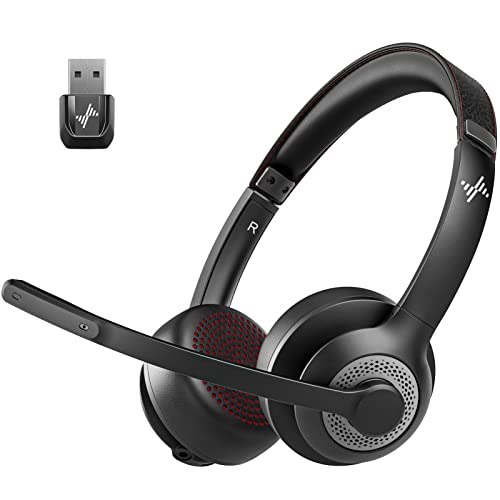
The JIAMQISHI EH02U is a Bluetooth 5.2 headset with a Qualcomm CVC 8.0 noise-canceling microphone and an adjustable padded headband. The listing also mentions a 3.5mm audio cable with a mic mute and indicator switch for wired use.
It is the cheapest wireless option and carries a wired fallback, which helps when the battery runs low. Against the Logitech Zone 301 it has less proven software and a less documented mic placement.
Choose it if you need wireless on a budget and are happy to rely on the cable as a backup. Documentation is thinner than for the Logitech.
Best for: budget wireless calls with a wired backup
Check price on AmazonPros
- +Wireless at a low cost
- +Wired fallback cable
- +Padded adjustable headband
- +Noise-canceling mic
Cons
- −Thin documentation
- −No named meeting certification
How We Evaluated These Headsets for Zoom Calls
Each pick was assessed across 5 criteria weighted for real-world use.
Microphone design
We compared boom placement, noise-canceling claims and whether the mic can be tucked away.
Connection
USB-A, USB-C, Bluetooth and 3.5mm options were noted for each headset.
Certification claims
We only record certification where the listing names it, and mark the platform.
Comfort
Weight, cushion type and padding were compared for long sessions.
Call controls
In-line or on-ear mute, volume and software tools were weighed.
How to Choose the Right Headsets for Zoom Calls
By Connection
| Your setup | Pick from this guide |
|---|---|
| Desktop or laptop with USB-A | Yealink UH34 Lite or Logitech H390 |
| Laptop with USB-C only | Jabra Evolve 20 (2025) or Poly Blackwire 5220 |
| Move around on calls | Logitech Zone 301 |
| Wireless on a budget | JIAMQISHI EH02U Wireless Headset |
By Budget
| Budget | Pick from this guide |
|---|---|
| Under $25 | Logitech H390 |
| $25 to $50 | Yealink UH34 Lite, Jabra Evolve 20 (2025) or JIAMQISHI EH02U Wireless Headset |
| $50 to $75 | Logitech Zone 301 |
| $75 to $100 | Poly Blackwire 5220 |
Wired vs Wireless
A wired headset never runs out of battery, while a wireless one frees you to move.
Wired
Never needs charging and has less delay. The Poly Blackwire 5220, Yealink UH34 Lite, Jabra Evolve 20 and Logitech H390 are wired.
Wireless
Lets you move around and works with a phone. The Logitech Zone 301 and JIAMQISHI EH02U are Bluetooth, and the latter includes a wired fallback.
Most people at a desk should pick wired for reliability.
By Noise Environment
| Environment | Pick from this guide |
|---|---|
| Open office | Poly Blackwire 5220 for the mic and ear cushions |
| Home with household noise | Logitech Zone 301: dual beamforming mics |
| Quiet room | Logitech H390 |
| Shared apartment | Yealink UH34 Lite |
For Company Device Policies Specifically
Look for
A named certification on the listing for the platform your company uses, and plug-and-play behavior with no drivers.
In this comparison
The Poly Blackwire 5220 names both Teams and Zoom, and the Yealink UH34 Lite names Teams.
When to Spend More
Spend more if
You want a certified, durable headset: the Poly Blackwire 5220 is the best-documented option.
Save if
You need a simple, working headset: the Logitech H390 or Yealink UH34 Lite do the job.
Frequently Asked Questions
Do I need a special headset for Zoom?
No. Any headset that your computer recognizes as an audio device works. A headset with a boom mic usually sounds clearer to others.
Is wired or wireless better for Zoom?
Wired is simpler and never runs out of battery. Wireless lets you move around but may cut out if the battery runs low.
What does Zoom certification mean?
It means the manufacturer has had the headset checked for compatibility, such as button controls. A headset without certification can still work, but buttons may not sync.
How do I set my headset as the default in Zoom?
Open Zoom's audio settings and pick your headset for both the speaker and microphone. Many USB headsets are selected automatically.
Why do people hear echo or background noise?
It often means the mic is too far away or the speakers are picking up the room. A boom mic held close and a closed-back headset reduce both.
How do I keep a headset comfortable for long meetings?
Pick a lightweight model with soft cushions, adjust the band, and take short breaks. Heavy clamping force is the main cause of fatigue.
Bottom Line
best overall: Poly Blackwire 5220 - best overall pick in this roundup.
See the full rankings above for all picks with pros, cons, and best-for summaries.
Browse on Amazon
All Prime-eligible options with current pricing.
Shop on Amazon →