
6 Best Microsoft Teams Certified Headsets in 2026
Six Microsoft Teams certified headsets compared by Teams button, open-office certification, wired or wireless design and price, based on listing details.

New to Amazon Prime?
Get fast, free shipping on every pick in this guide, plus Prime Video and exclusive deals.
Try Prime Free




At a Glance
A Teams certified headset is not the same thing as a headset that works in Teams. Almost any headset will carry audio, but a certified one has been checked against Microsoft's requirements, which usually means the mute button stays in sync with the app and a dedicated Teams button can join a meeting or open the app. Those are the details that save you fiddling at the start of every call.
We looked only at headsets whose listings state Teams certification or a Teams version, then compared them by form (wired or wireless), the Teams button, open-office claims and price. Where a listing is vague, we say so, since certification is one thing worth confirming on Microsoft's own list before you buy.
5 Criteria to Look For Before Buying a Microsoft Teams Certified Headset
Key buying criteria so you get the right fit the first time.
What the certification claim actually says
Teams certified is a program run by Microsoft with the manufacturer, and it signals that the headset meets requirements for audio and call controls. Open Office is a separate tier for microphone performance in noisy rooms. Read the exact wording on the listing and confirm it on Microsoft's device list.
Dedicated Teams button
Some certified headsets have a button that opens Teams or joins a meeting with one press, and others do not. This matters if you start many meetings a day. Look for 'Teams button' in the bullets or the images of the earcup.
Wired, Bluetooth or dongle
Wired headsets are the simplest and have no battery. Wireless models may need a dongle for full Teams functionality, as one pick here says. Check whether the USB receiver is required for certified features.
Microphone and noise handling
A boom with dual noise-canceling mics rejects more room noise than a single mic. Open-office models are designed for busy rooms. Look for the number of mics and the word 'noise-canceling' next to the microphone.
Warranty and replaceable parts
A headset is used every day, and cushions wear. A longer warranty or replaceable ear cushions extends its life. One pick here lists a 3 year warranty and another has replaceable cushions.
6 Best Microsoft Teams Certified Headsets in 2026
Logitech Zone 305
About this pick
The Logitech Zone 305 is a wireless Bluetooth headset that the listing says is certified for Microsoft Teams and works with Chromebooks. It has dual noise-canceling mics on a flip-to-mute boom, 30mm drivers, a weight of 122 grams and a 30 meter range, with up to 20 hours of listening or 16 hours of talk time on a charge.
It is built for mass deployment and can be managed through Logitech Sync, which suits teams but is unneeded for one person. Compared with the Logitech Zone Wireless it is lighter, though it lacks noise-canceling earcups and wireless charging.
Choose it for a hybrid worker who moves between a desk and meetings. If you want active noise cancellation, the Zone Wireless is the upgrade.
Best for: hybrid workers who move around
Check price on AmazonPros
- +Teams certification stated on listing
- +Light 122 gram body
- +Flip-to-mute boom
- +Quick 5 minute charge gives an hour of talk
Cons
- −No active noise cancelling
- −Bluetooth connection to two devices only
Logitech Zone Wireless
About this pick
The Logitech Zone Wireless is a Bluetooth headset certified for Microsoft Teams, with active noise cancellation, Qi wireless charging, on-ear controls and a dedicated Teams button. It connects to a computer and a phone together with a range of 30 meters, and it has a flip-to-mute mic.
It is the only pick with active noise cancellation, which helps with focus in an open office, and one of the few with wireless charging. That makes it the clear step up from the Zone 305, though it costs about the same.
Pick it for open workspaces where background noise is a problem. The batteries and extras make it heavier than the 305.
Best for: open offices where noise is a problem
Check price on AmazonPros
- +Active noise cancellation
- +Qi wireless charging
- +Teams button on the earcup
- +Connects to computer and phone together
Cons
- −Heavier than the Zone 305
- −Needs regular charging
Lenovo Wireless VoIP Headset
About this pick
The Lenovo Wireless VoIP Headset lists Microsoft Teams Open Office certification, a three-mic noise suppression system, Bluetooth 5.3 with multipoint, and a USB-A receiver. It weighs 140 grams and the listing quotes 31 hours of talk time or 60 hours of music playback on a charge.
There is an important gotcha in the listing: the USB-A receiver is required for all Microsoft Teams functions, so Bluetooth alone will not give you the certified experience. Compared with the Logitech Zone 305, it costs less and offers longer battery life.
Choose it if you want an open-office-certified wireless headset at a mid price. Plug the dongle in, or you will not get the Teams features.
Best for: a wireless open-office headset at a mid price
Check price on AmazonPros
- +Open Office certification stated
- +Long battery rating
- +Three-mic noise suppression
- +Multipoint Bluetooth
Cons
- −Dongle needed for Teams features
- −No Qi charging
Poly Blackwire 3320 Teams
About this pick
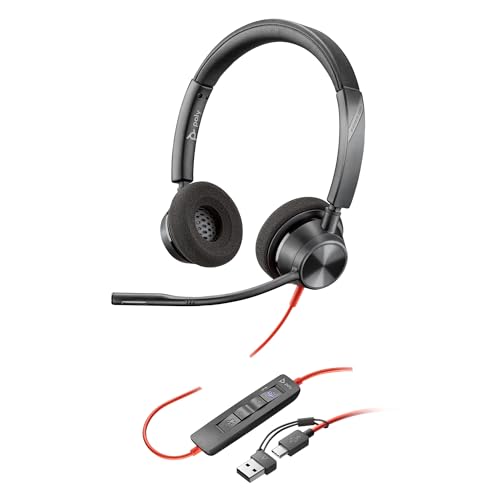
The Poly Blackwire 3320 is a wired headset sold as a Microsoft Teams version, with a dedicated Teams button for instant access to the app. It connects over USB-C with a USB-C to USB-A adapter, has 180-degree pivoting speakers and a flexible microphone boom, and a padded headband with pillow-soft cushions.
It is wired, so you never charge it and there is no battery to fail. Compared with the Yealink UH34 it has a more adjustable fit and a more rugged design.
Pick it for a wired Teams desk setup where fit and durability matter. If you want to leave the desk, choose a wireless model.
Best for: a wired Teams desk with an adjustable fit
Check price on AmazonPros
- +Dedicated Teams button
- +No battery to charge
- +Fully adjustable fit
- +Flexible boom microphone
Cons
- −Wired only
- −Costs more than basic wired headsets
Lenovo Wired VoIP Headset 5000
About this pick
The Lenovo Wired VoIP Headset 5000 is listed as officially certified for Microsoft Teams with a dedicated Teams button, an AI-enhanced noise-canceling microphone, and USB-C with a USB-A adapter included. It uses memory foam ear cushions and carries a 3 year warranty.
It is the lowest-cost certified pick with a Teams button, and the 3 year warranty is the longest on this list. Against the Yealink UH34 it adds the dedicated button and a longer warranty for a similar price.
Choose it for a certified headset on a budget. It is not wireless and lacks premium extras.
Best for: a certified Teams headset on a tight budget
Check price on AmazonPros
- +Teams button at a low cost
- +3 year warranty
- +AI noise-canceling microphone
- +Lightweight design
Cons
- −Wired only
- −Basic accessories
Yealink UH34
About this pick
The Yealink UH34 is a wired USB-A headset that the listing says is certified by Microsoft Teams, with noise-canceling microphones, in-line call controls with LED indicators, replaceable leather ear cushions and a 6.89 foot cable. It works with Zoom, Skype and WhatsApp as well.
It has no dedicated Teams button, which separates it from the Lenovo 5000 and the Poly Blackwire 3320. In return, it has in-line LED controls and replaceable cushions that extend its life.
Pick it if you want a certified, no-frills USB headset. If you use a USB-C-only laptop, you will need an adapter.
Best for: a simple certified USB headset
Check price on AmazonPros
- +Replaceable ear cushions
- +In-line LED call controls
- +Long cable
- +Works with Zoom and others
Cons
- −USB-A only
- −No dedicated Teams button
How We Evaluated These Microsoft Teams Certified Headsets
Each pick was assessed across 5 criteria weighted for real-world use.
Certification wording
We recorded exactly what each listing claims: Teams certified, Teams version, or open-office certified.
Teams button and call control
Dedicated Teams buttons, in-line controls and mute behavior were compared.
Connection and dongle needs
Wired, Bluetooth and dongle requirements were noted, including cases where a receiver is needed for certified features.
Noise handling
Microphone design, noise cancelling and open-office claims were compared.
Price and warranty
Price bucket and warranty length were weighed together.
How to Choose the Right Microsoft Teams Certified Headsets
By Work Setting
| Your situation | Pick from this guide |
|---|---|
| Open office with noise | Logitech Zone Wireless: active noise cancellation |
| Hybrid, on the move | Logitech Zone 305 |
| Open-office certified wireless | Lenovo Wireless VoIP Headset |
| Fixed desk, wired | Poly Blackwire 3320 Teams |
| Budget certified | Lenovo Wired VoIP Headset 5000 |
By Budget
| Budget | Pick from this guide |
|---|---|
| $25 to $50 | Lenovo Wired VoIP Headset 5000 or Yealink UH34 |
| $50 to $75 | Poly Blackwire 3320 Teams or Lenovo Wireless VoIP Headset |
| $75 to $100 | Logitech Zone 305 or Logitech Zone Wireless |
Teams Certified vs Open Office Certified
Microsoft's program includes a tier aimed at noisy offices, and the wording on listings varies.
Teams certified
Means the headset has been checked for use with Teams. The Yealink UH34, Lenovo Wired VoIP Headset 5000, Logitech Zone 305 and Logitech Zone Wireless say this.
Open Office
Is a separate claim about microphone performance in noisy rooms. The Lenovo Wireless VoIP Headset lists it, so it is the one to check first if you work in a busy space.
Verify any certification on Microsoft's own device list before buying.
By Teams Button Need
| Need | Pick from this guide |
|---|---|
| Teams button on earcup | Logitech Zone Wireless |
| Teams button, wired | Lenovo Wired VoIP Headset 5000 or Poly Blackwire 3320 Teams |
| Do not need a button | Yealink UH34 |
| Dongle required for Teams features | Lenovo Wireless VoIP Headset |
For Work-from-Home Setups Specifically
Look for
A dedicated mute and Teams button, a boom mic that blocks household noise, and either a long cable or a wireless range of 30 meters.
In this comparison
The Logitech Zone 305 lists a 30 meter range and flip-to-mute boom, and the Lenovo Wired VoIP Headset 5000 offers a 3 year warranty.
When to Spend More
Spend more if
You work in a loud open office: the Logitech Zone Wireless adds active noise cancellation and a Teams button.
Save if
You work at a desk with a cable: the Lenovo Wired VoIP Headset 5000 gives a Teams button and a long warranty for less.
Frequently Asked Questions
What does Microsoft Teams certified mean?
It means Microsoft and the manufacturer have checked the headset against requirements for audio and call controls. That usually means features like mute sync work as expected.
Will a non-certified headset work with Teams?
Usually yes for audio, but features such as the mute button or call answer may not sync. A certified headset reduces that risk.
Do I need a Teams button?
No, it is a convenience feature. If you join many meetings a day, a button saves steps.
Why do some wireless headsets need a dongle for Teams?
Certified functions often work through a USB receiver rather than Bluetooth. The Lenovo Wireless VoIP Headset lists the receiver as required for Teams features.
Is open-office certification important?
It matters if you work in a noisy space because it is about microphone performance. At a quiet desk it is less important.
How can I check certification?
Look up the model on Microsoft's own list of certified devices, and treat marketing claims as a starting point.
Bottom Line
best overall: Logitech Zone 305 - best overall wireless pick in this roundup.
See the full rankings above for all picks with pros, cons, and best-for summaries.
Browse on Amazon
All Prime-eligible options with current pricing.
Shop on Amazon →