
7 Best Headsets for Work Under $50 in 2026
Seven work headsets under $50 with microphones for calls, compared on Teams certification, boom mics, USB-C plugs and wired or wireless use.

New to Amazon Prime?
Get fast, free shipping on every pick in this guide, plus Prime Video and exclusive deals.
Try Prime Free


At a Glance
A work headset under fifty dollars is a call tool first: a microphone that callers can understand, a plug that fits your laptop and controls you can reach mid-call. Gaming headsets at the same price chase sound effects; the picks here chase clear voices and certification.
We evaluated seven business-grade headsets from specialist brands, with one wireless model for people who stand on calls. Everything is judged on listing specifications and buyer feedback, and certification claims should be confirmed on the vendor's list before you buy.
6 Criteria to Look For Before Buying a Headsets for Work Under $50
Key buying criteria so you get the right fit the first time.
Microphone noise reduction versus earcup noise cancelling
Microphone noise reduction filters keyboard clatter and room hum from what callers hear, while active noise cancelling on the earcups reduces what you hear. They are separate features, and a work headset can have one without the other. Check the listing for a noise-cancelling microphone and, if you sit in a loud room, for ANC on the earcups.
Platform certification
Teams and Zoom certification means the headset has been tested to work with the platform's call controls and gives extra in-call buttons such as a dedicated Teams key. A certified headset reduces support problems at work. Confirm certification on the vendor or Microsoft list rather than trusting a logo in a photo.
Wired or wireless
A wired USB headset has near-zero latency, no battery and instant plug-and-play, while a wireless headset lets you stand up and walk away from the desk. Battery life and range vary widely among wireless models. Choose wired for a fixed desk and wireless only if you move on calls.
Boom mic or built-in mics
A boom microphone sits close to the mouth and picks up your voice more directly, while built-in or beamforming mics are tidier and less obvious. Boom mics suit noisy rooms and flip up to mute. Look at the photo for a boom and read the mic count.
Connector and compatibility
USB-A, USB-C and a 3.5mm jack are not interchangeable, and some headsets ship with an adapter. A laptop with only USB-C ports needs either a USB-C plug or an adapter. Read which plugs are in the box.
What the $50 ceiling buys
The cheapest pick here, Jabra Evolve 10, is built around a plug-and-play USB-A headset with a noise-cancelling mic and inline call controls, while the priciest, Jabra Evolve 20, is built around Microsoft Teams certification, a dual-ear design and both USB-A and USB-C plugs. A higher ceiling is worth it when noisy rooms, long call days or a certification rule are part of your job. Think about your noisiest call of the week, and pick whichever of the two would have saved it.
7 Best Headsets for Work Under $50 in 2026
Yealink UH42
About this pick
The Yealink UH42 is a Teams and Zoom certified wired headset with an AI-powered noise-cancelling microphone, inline controls and a 7-foot cable. The plug is USB-C with a USB-A adapter, the dual-ear version weighs 5.64 oz, and memory-foam ear cushions are aimed at eight-hour days.
We put Yealink UH42 first, chosen for Teams and Zoom certification, an AI noise-cancelling mic and a USB-C plug with a USB-A adapter. Runner-up Logitech H570e trades part of that away for Microsoft Teams certification, two noise-cancelling mics and a USB-C plug.
Yealink UH42 is aimed at people who join Teams and Zoom calls all day and want a certified headset at a low cost. It is wired, so you are tied to about 7 feet of cable.
Best for: people who join Teams and Zoom calls all day and want a certified headset at a low cost
Check price on AmazonPros
- +Certified for Teams and Zoom
- +Memory-foam ear cushions
- +USB-C and USB-A both covered
- +Light at 5.64 oz
Cons
- −Wired only
- −Not meant for music
Logitech H570e
About this pick
The Logitech H570e is a wired USB-C headset certified for Microsoft Teams, with two noise-canceling microphones and a 30mm audio driver. Inline controls cover volume, mute, call and Teams functions, and LED indicators on the controller show call and mute status at a glance.
Compared with Yealink UH42, which sits one place higher, the Logitech H570e is stronger on Microsoft Teams certification, two noise-cancelling mics and a USB-C plug but it gives up a boom microphone and wireless.
The mics are built into the body of the headset rather than on a boom, so voice pickup is less direct. Otherwise the Logitech H570e suits Teams users in a noisy open office who want a USB-C headset with an LED mute indicator.
Best for: Teams users in a noisy open office who want a USB-C headset with an LED mute indicator
Check price on AmazonPros
- +Teams certified
- +LED mute indicator
- +USB-C plug
- +Inline Teams controls
Cons
- −Wired only
- −Not a boom-mic design
Poly Blackwire 3220
About this pick
The Poly Blackwire 3220 is a wired stereo headset with a flexible noise-canceling boom mic and conforming ear cushions that give passive noise isolation. Dynamic EQ shapes the voice for call clarity, and a USB-C cord plus an included USB-A adapter connect to a PC, with a tethered 3.5mm option for a phone.
The Poly Blackwire 3220 sits between Logitech H570e and Jabra Evolve 20. It stands out for a flexible noise-cancelling boom mic, stereo sound and a USB-C cord with a USB-A adapter, whereas Jabra Evolve 20 brings Microsoft Teams certification, a dual-ear design and both USB-A and USB-C plugs.
Poly Blackwire 3220 is aimed at office workers who want a durable, stereo, boom-mic headset from a business-audio brand. The headset is wired and its boom is tethered, so it is a desk headset, not a mobile one.
Best for: office workers who want a durable, stereo, boom-mic headset from a business-audio brand
Check price on AmazonPros
- +Boom mic for call clarity
- +Passive isolation from ear cushions
- +USB-C and USB-A covered
- +3.5mm for a phone
Cons
- −Wired only
- −Mid-range cost for a wired set
Jabra Evolve 20
About this pick
The Jabra Evolve 20 (2025 Edition) is a wired dual-ear headset with noise-cancelling microphones, in-line call controls and Microsoft Teams certification. It plugs into laptops through USB-A or USB-C and uses lightweight foam or leatherette ear cushions aimed at all-day wear.
Where Poly Blackwire 3220 leads with a flexible noise-cancelling boom mic, stereo sound and a USB-C cord with a USB-A adapter, the Jabra Evolve 20 answers with Microsoft Teams certification, a dual-ear design and both USB-A and USB-C plugs, and it gives up wireless freedom.
It is wired, and the listing does not spell out the cable length. Otherwise the Jabra Evolve 20 suits people who need a dual-ear certified headset that fits both USB ports.
Best for: people who need a dual-ear certified headset that fits both USB ports
Check price on AmazonPros
- +Teams certified
- +Works on USB-A and USB-C
- +Dual-ear focus
- +Lightweight cushions
Cons
- −Wired only
- −No ANC on the earcups
EPOS PC 7 USB
About this pick
The EPOS PC 7 USB is a wired USB-A headset with a noise-cancelling boom microphone and wideband audio, aimed at clear calls on Skype, Zoom and Teams. It is plug and play on Windows and macOS and positions itself as good value for a work headset.
What separates the EPOS PC 7 USB from Jabra Evolve 20 above it is focus: a lightweight noise-cancelling boom mic with wideband audio over plain USB-A, and it gives up a USB-C plug and a stereo-heavy sound to get there.
EPOS PC 7 USB is aimed at call-heavy workers who value the voice pickup of a boom mic over a flashy design. The listing is sparse on details, so check the cable length and USB-A plug before buying.
Best for: call-heavy workers who value the voice pickup of a boom mic over a flashy design
Check price on AmazonPros
- +Boom mic for clear calls
- +Wideband audio
- +Plug and play
- +Good value
Cons
- −Sparse listing detail
- −USB-A plug only
Jabra Evolve 10
About this pick
The Jabra Evolve 10 is a wired USB-A headset with a noise-cancelling microphone, inline call and volume controls and a lightweight, minimalist build. It is TCO certified and needs no software, so it works the moment you plug it in.
Compared with EPOS PC 7 USB, which sits one place higher, the Jabra Evolve 10 is stronger on a plug-and-play USB-A headset with a noise-cancelling mic and inline call controls but it gives up Teams certification and a USB-C plug.
The plug is USB-A, so a laptop with only USB-C ports needs an adapter. Otherwise the Jabra Evolve 10 suits home workers who want a light, simple wired headset from a known brand.
Best for: home workers who want a light, simple wired headset from a known brand
Check price on AmazonPros
- +Plug in and talk
- +Very light on the head
- +Inline mute and volume
- +Known work-headset brand
Cons
- −USB-A plug only
- −No Teams certification listed
TECKNET Wireless Headset
About this pick
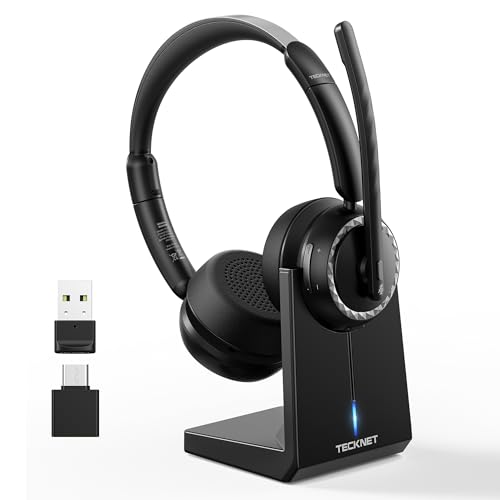
The TECKNET wireless headset has Bluetooth 6.0, a USB dongle, a charging base and ENC environmental noise cancellation on the microphone. Protein-leather ear cushions are described as soft for long wear, and it is aimed at remote work, call center and trucker use.
The TECKNET Wireless Headset closes the list. Next to Jabra Evolve 10 it gives up business certification, in return for a Bluetooth headset with a charging base, a USB dongle and ENC noise reduction.
TECKNET Wireless Headset is aimed at people who want to stand up and move around on calls without paying for a premium wireless headset. The noise-blocking claim comes from the maker, so treat the percentage as marketing.
Best for: people who want to stand up and move around on calls without paying for a premium wireless headset
Check price on AmazonPros
- +Wireless with a dongle
- +Charging base included
- +Mic noise reduction
- +Soft ear cushions
Cons
- −No business certification listed
- −Lesser-known brand
How We Evaluated These Headsets for Work Under $50
Each pick was assessed across 5 criteria weighted for real-world use.
Microphone clarity
We compared microphone design, noise reduction claims and boom or beamforming approach for each pick.
Certification and call controls
Teams and Zoom certification, mute indicators and inline controls were weighed.
Connection and battery
Wired plugs, wireless modes, dongle needs and rated talk time were compared.
Comfort and weight
Weight, ear cushion material and single or dual ear design were compared against all-day wear.
Value inside the price ceiling
Cost was set against call features, so certification, mic clarity and plug type count for more than extra sound effects. Every pick here lists below $50, and Jabra Evolve 10 to Jabra Evolve 20 marks the spread.
How to Choose the Right Headsets for Work Under $50
By Work Setup
Start with how your calls usually go, because each headset below is built for a different kind of workday.
| Work Setup | Pick from this guide |
|---|---|
| Needs a headset an IT team will approve | Yealink UH42: Teams and Zoom certification, an AI noise-cancelling mic and a USB-C plug with a USB-A adapter |
| Open office with chatter around you | Logitech H570e: Microsoft Teams certification, two noise-cancelling mics and a USB-C plug |
| Wants stereo sound and a boom mic from a specialist brand | Poly Blackwire 3220: a flexible noise-cancelling boom mic, stereo sound and a USB-C cord with a USB-A adapter |
| Needs dual-ear focus in a shared room | Jabra Evolve 20: Microsoft Teams certification, a dual-ear design and both USB-A and USB-C plugs |
| Wants clear voice pickup on every call | EPOS PC 7 USB: a lightweight noise-cancelling boom mic with wideband audio over plain USB-A |
| Wants a brand-name headset for a cheap work-from-home setup | Jabra Evolve 10: a plug-and-play USB-A headset with a noise-cancelling mic and inline call controls |
| Wants to walk away from the desk on calls | TECKNET Wireless Headset: a Bluetooth headset with a charging base, a USB dongle and ENC noise reduction |
By Budget
| Budget | Pick from this guide |
|---|---|
| Under $30 | EPOS PC 7 USB (Best Boom Mic Value); Jabra Evolve 10 (Lowest Cost Name Brand) |
| Up to $40 | Logitech H570e (Best Teams-Certified USB-C); Yealink UH42 (Best Certified Low Price) |
| Up to $50 | Jabra Evolve 20 (Best Dual-Ear Certified); TECKNET Wireless Headset (Best Cheap Wireless); Poly Blackwire 3220 (Best Stereo Wired Pick) |
Wired USB vs Wireless
Cabled against cordless is the fork that matters most for headsets, and it narrows the picks quickly.
Wired USB
A wired headset has near-zero latency, never needs charging and is plug-and-play, which suits a fixed desk. In this guide: Yealink UH42, Logitech H570e, Poly Blackwire 3220, Jabra Evolve 20, EPOS PC 7 USB, Jabra Evolve 10.
Wireless
A wireless headset lets you stand and move on calls but needs a charge, and range and battery vary by model. In this guide: TECKNET Wireless Headset.
Most buyers at a fixed desk should default to wired unless they genuinely walk during calls.
By Second Priority
| Second priority | Pick from this guide |
|---|---|
| Uses a USB-C laptop and Teams every day | Logitech H570e (Best Teams-Certified USB-C): gives up a boom microphone and wireless |
| Takes calls on a PC and a phone | Poly Blackwire 3220 (Best Stereo Wired Pick): gives up a Teams logo and wireless |
| Uses a mix of USB-A desktops and USB-C laptops | Jabra Evolve 20 (Best Dual-Ear Certified): gives up wireless freedom |
| Needs a headset that works on Mac and Windows with no software | EPOS PC 7 USB (Best Boom Mic Value): gives up a USB-C plug and a stereo-heavy sound |
| Takes calls all day and needs a light headset | Jabra Evolve 10 (Lowest Cost Name Brand): gives up Teams certification and a USB-C plug |
For Hybrid Work Specifically
Look for
Platform certification, a clear mic in a noisy room and a connector that fits your laptop.
In this comparison
Start with Yealink UH42, which brings Teams and Zoom certification, an AI noise-cancelling mic and a USB-C plug with a USB-A adapter.
When to Spend More
Spend more if
You work in a loud open office or want ANC and long battery life. Here, Jabra Evolve 20 is the example, with Microsoft Teams certification, a dual-ear design and both USB-A and USB-C plugs.
Save if
You only need clear calls at a quiet desk. Here, Jabra Evolve 10 is the example, with a plug-and-play USB-A headset with a noise-cancelling mic and inline call controls.
Frequently Asked Questions
Do I need a boom mic for work calls?
A boom mic picks up your voice more directly in a noisy room, while a headset with built-in mics is tidier. Either can work with noise reduction.
Wired or wireless headset for a desk job?
Wired has no battery and near-zero latency, so it suits a fixed desk. Wireless helps if you walk during calls.
Will it work with my laptop that has only USB-C?
Choose a model with a USB-C plug or an included adapter, and avoid USB-A-only models unless you have a dongle.
How do I stop my headset sounding tinny to callers?
Place the boom about a thumb-width from the corner of your mouth, set the mic as the default input and turn on the platform's noise suppression.
How should I clean a headset?
Wipe leatherette cushions with a damp cloth, replace worn cushions and keep the cable coiled loosely.
What do I give up by staying under $50?
Going to the low end, Jabra Evolve 10 keeps a plug-and-play USB-A headset with a noise-cancelling mic and inline call controls but gives up Teams certification and a USB-C plug. Jabra Evolve 20 adds Microsoft Teams certification, a dual-ear design and both USB-A and USB-C plugs, while giving up wireless freedom. If your calls are quiet ones, the cheaper headset is usually enough.
Bottom Line
best overall: Yealink UH42 - best overall pick in this roundup.
See the full rankings above for all picks with pros, cons, and best-for summaries.
Browse on Amazon
All Prime-eligible options with current pricing.
Shop on Amazon →