
7 Best Headsets for Work Under $100 in 2026
Seven work headsets under $100 compared, from Teams-certified wired models to native Bluetooth and ANC wireless picks for hybrid and office calls.

New to Amazon Prime?
Get fast, free shipping on every pick in this guide, plus Prime Video and exclusive deals.
Try Prime Free




At a Glance
A hundred dollars opens up the wireless and noise-cancelling headsets that fixed-budget buyers rarely see, along with sturdier wired models from specialist brands. The upgrade only pays when you need it: a loud room that calls for ANC, a habit of walking during calls or an IT team that insists on certification.
We evaluated seven work headsets with microphones, mixing wired boom-mic models and wireless Bluetooth ones, with one cheaper certified pick kept as a baseline. We read the listing specifications and buyer feedback instead of running bench measurements.
6 Criteria to Look For Before Buying a Headsets for Work Under $100
Key buying criteria so you get the right fit the first time.
Microphone noise reduction versus earcup noise cancelling
Microphone noise reduction filters keyboard clatter and room hum from what callers hear, while active noise cancelling on the earcups reduces what you hear. They are separate features, and a work headset can have one without the other. Check the listing for a noise-cancelling microphone and, if you sit in a loud room, for ANC on the earcups.
Wired or wireless
A wired USB headset has near-zero latency, no battery and instant plug-and-play, while a wireless headset lets you stand up and walk away from the desk. Battery life and range vary widely among wireless models. Choose wired for a fixed desk and wireless only if you move on calls.
Mono or stereo
A mono headset leaves one ear free for the office and is lighter, while a dual-ear or stereo headset isolates you better and suits music. A single-ear headset can tire one ear over a long day. Decide whether you need awareness of the room or focus.
Connector and compatibility
USB-A, USB-C and a 3.5mm jack are not interchangeable, and some headsets ship with an adapter. A laptop with only USB-C ports needs either a USB-C plug or an adapter. Read which plugs are in the box.
Comfort and weight over a full day
Weight, ear cushion material and clamp force decide whether you can wear a headset for eight hours. Leatherette wipes clean but runs warm, while foam breathes. Check the stated weight and cushion type.
What the $100 ceiling buys
The cheapest pick here, Yealink UH42, is built around Teams and Zoom certification, an AI noise-cancelling mic and a USB-C plug with a USB-A adapter, while the priciest, Logitech Zone Wireless, is built around active noise cancellation, Qi charging and Teams and Zoom certification. A higher ceiling is worth it when noisy rooms, long call days or a certification rule are part of your job. Think about your noisiest call of the week, and pick whichever of the two would have saved it.
7 Best Headsets for Work Under $100 in 2026
Logitech Zone Wireless
About this pick
The Logitech Zone Wireless is a Bluetooth headset certified for Microsoft Teams and Zoom with active noise cancellation that cuts unwanted noise around you. It charges wirelessly through Qi, uses leatherette ear pads, supports Logitech Sync device management and has a noise-cancelling microphone for the call side.
Logitech Zone Wireless leads the list on active noise cancellation, Qi charging and Teams and Zoom certification, a combination no other pick here matches. If native Bluetooth with Teams certification, dual noise-cancelling mics on a flip-to-mute boom matters more to you, Logitech Zone 305 is the one to read next.
Logitech Zone Wireless is aimed at people who sit in noisy open spaces and want ANC on the earcups as well as the mic. It costs the most of the group, and the ANC is what the extra money buys.
Best for: people who sit in noisy open spaces and want ANC on the earcups as well as the mic
Check price on AmazonPros
- +ANC on the earcups
- +Qi charging
- +Teams and Zoom certified
- +Fits music as well as calls
Cons
- −Costs the most here
- −Bulkier than light headsets
Logitech Zone 305
About this pick
The Logitech Zone 305 for Business is a wireless headset certified for Microsoft Teams over native Bluetooth. Two noise-cancelling mics on a flip-to-mute boom, a custom noise-suppression algorithm and Logitech Sync management support fit it for mass deployments.
Where Logitech Zone Wireless leads with active noise cancellation, Qi charging and Teams and Zoom certification, the Logitech Zone 305 answers with native Bluetooth with Teams certification, dual noise-cancelling mics on a flip-to-mute boom, and it gives up a wired connection and a dongle in the box.
It uses native Bluetooth only, so the computer has to have Bluetooth built in. Otherwise the Logitech Zone 305 suits hybrid workers who want a certified wireless headset that connects without a dongle.
Best for: hybrid workers who want a certified wireless headset that connects without a dongle
Check price on AmazonPros
- +Teams certified over Bluetooth
- +Flip-to-mute boom
- +Managed with Logitech Sync
- +Windows, Mac, Linux, mobile
Cons
- −Needs built-in Bluetooth
- −No wired fallback
Poly Blackwire 3325
About this pick
The Poly Blackwire 3325 is a wired stereo USB headset with a flexible boom, speakers that pivot 180 degrees and Microsoft Teams certification. USB-C connects to a PC or Mac, USB-A works through an included adapter, and a 3.5mm connection serves mobile devices.
What separates the Poly Blackwire 3325 from Logitech Zone 305 above it is focus: 180-degree pivoting speakers, a flexible boom and Teams certification over USB-C, and it gives up a lower price to get there.
Poly Blackwire 3325 is aimed at people who want a customized fit, a stereo sound and a boom mic from a business-audio brand. It costs more than basic wired headsets, with the extra money going to build and fit rather than new features.
Best for: people who want a customized fit, a stereo sound and a boom mic from a business-audio brand
Check price on AmazonPros
- +Fully adjustable fit
- +Flexible boom mic
- +Teams certified
- +Three connection options
Cons
- −Wired only
- −Higher cost than basic headsets
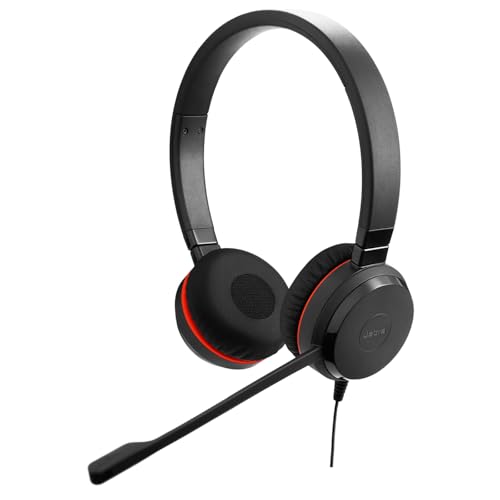
Jabra Evolve 30 II
About this pick
The Jabra Evolve 30 II (2025 Edition) is a wired dual-ear headset that connects through a 3.5mm jack or USB-A and USB-C, so one headset covers a laptop and a mobile device. Its noise-cancelling microphone, Teams certification, call controls and soft leatherette cushions target full workdays.
Compared with Poly Blackwire 3325, which sits one place higher, the Jabra Evolve 30 II is stronger on a 3.5mm jack plus USB-A and USB-C, soft leatherette cushions and Teams certification but it gives up wireless.
The microphone is noise cancelling, not the earcups, so it will not silence a loud room for you. Otherwise the Jabra Evolve 30 II suits people who split calls between a laptop and a phone and want a comfortable certified headset.
Best for: people who split calls between a laptop and a phone and want a comfortable certified headset
Check price on AmazonPros
- +Works with laptops and phones
- +Teams certified
- +Soft cushions
- +Call controls
Cons
- −Wired only
- −No ANC on the earcups
Jabra Evolve 20 SE
About this pick
The Jabra Evolve 20 SE is a wired dual-ear headset with noise-cancelling microphones, leatherette ear cushions and both USB-A and USB-C connections. It is certified for Microsoft Teams and offers in-line call and volume controls.
The Jabra Evolve 20 SE sits between Jabra Evolve 30 II and Logitech Zone Vibe 100. It stands out for a dual-ear, Teams-certified wired headset with leatherette ear cushions and USB-A or USB-C, whereas Logitech Zone Vibe 100 brings lightweight over-ear wireless with multipoint Bluetooth and beamforming mic tech.
Jabra Evolve 20 SE is aimed at people who want a simple, certified, dual-ear wired headset for daily calls. It matches the Evolve 20 closely, so only pick it over the cheaper model if the stock or the cushion type matters.
Best for: people who want a simple, certified, dual-ear wired headset for daily calls
Check price on AmazonPros
- +Teams certified
- +Both USB plugs
- +Leatherette cushions wipe clean
- +In-line controls
Cons
- −Wired only
- −No ANC on the earcups
Logitech Zone Vibe 100
About this pick
The Logitech Zone Vibe 100 is a lightweight over-ear wireless headset with multipoint Bluetooth for work and play. Beamforming technology and digital signal processing capture your voice and reduce background sound, and it works with Teams, Google Meet and Zoom on PC and Mac.
Where Jabra Evolve 20 SE leads with a dual-ear, Teams-certified wired headset with leatherette ear cushions and USB-A or USB-C, the Logitech Zone Vibe 100 answers with lightweight over-ear wireless with multipoint Bluetooth and beamforming mic tech, and it gives up a boom mic and Teams branding.
It has no boom, so it picks up your voice less directly than a boom-mic headset. Otherwise the Logitech Zone Vibe 100 suits people who want a light, stylish wireless headset for calls and casual listening.
Best for: people who want a light, stylish wireless headset for calls and casual listening
Check price on AmazonPros
- +Light on the head
- +Multipoint Bluetooth
- +Three color choices
- +Good for music and calls
Cons
- −No boom mic
- −Less call-focused than the Zone 305
Yealink UH42
About this pick
The Yealink UH42 is a Teams and Zoom certified wired headset with an AI-powered noise-cancelling microphone, inline controls and a 7-foot cable. The plug is USB-C with a USB-A adapter, the dual-ear version weighs 5.64 oz, and memory-foam ear cushions are aimed at eight-hour days.
The Yealink UH42 closes the list. Next to Logitech Zone Vibe 100 it gives up wireless freedom, in return for Teams and Zoom certification, an AI noise-cancelling mic and a USB-C plug with a USB-A adapter.
Yealink UH42 is aimed at people who join Teams and Zoom calls all day and want a certified headset at a low cost. It is wired, so you are tied to about 7 feet of cable.
Best for: people who join Teams and Zoom calls all day and want a certified headset at a low cost
Check price on AmazonPros
- +Certified for Teams and Zoom
- +Memory-foam ear cushions
- +USB-C and USB-A both covered
- +Light at 5.64 oz
Cons
- −Wired only
- −Not meant for music
How We Evaluated These Headsets for Work Under $100
Each pick was assessed across 5 criteria weighted for real-world use.
Microphone clarity
We compared microphone design, noise reduction claims and boom or beamforming approach for each pick.
Certification and call controls
Teams and Zoom certification, mute indicators and inline controls were weighed.
Connection and battery
Wired plugs, wireless modes, dongle needs and rated talk time were compared.
Comfort and weight
Weight, ear cushion material and single or dual ear design were compared against all-day wear.
Value inside the price ceiling
Cost was set against call features, so certification, mic clarity and plug type count for more than extra sound effects. Every pick here lists below $100, and Yealink UH42 to Logitech Zone Wireless marks the spread.
How to Choose the Right Headsets for Work Under $100
By Work Setup
Start with how your calls usually go, because each headset below is built for a different kind of workday.
| Work Setup | Pick from this guide |
|---|---|
| Open plan office that is noisy | Logitech Zone Wireless: active noise cancellation, Qi charging and Teams and Zoom certification |
| Wants wireless Teams calls without a dongle | Logitech Zone 305: native Bluetooth with Teams certification, dual noise-cancelling mics on a flip-to-mute boom |
| Wants a customized fit and a boom that moves out of the way | Poly Blackwire 3325: 180-degree pivoting speakers, a flexible boom and Teams certification over USB-C |
| Switches between a laptop and a phone | Jabra Evolve 30 II: a 3.5mm jack plus USB-A and USB-C, soft leatherette cushions and Teams certification |
| Home office with a mix of laptop ports | Jabra Evolve 20 SE: a dual-ear, Teams-certified wired headset with leatherette ear cushions and USB-A or USB-C |
| Wants one wireless headset for calls and music | Logitech Zone Vibe 100: lightweight over-ear wireless with multipoint Bluetooth and beamforming mic tech |
| Needs a headset an IT team will approve | Yealink UH42: Teams and Zoom certification, an AI noise-cancelling mic and a USB-C plug with a USB-A adapter |
By Budget
| Budget | Pick from this guide |
|---|---|
| Under $60 | Jabra Evolve 20 SE (Best Everyday Wired); Yealink UH42 (Best Certified Low Price) |
| Up to $70 | Logitech Zone 305 (Best Native Bluetooth); Jabra Evolve 30 II (Best Wired Premium Comfort); Poly Blackwire 3325 (Best Adjustable Wired Boom) |
| Up to $100 | Logitech Zone Wireless (Best Active Noise Cancelling); Logitech Zone Vibe 100 (Best Light Wireless) |
Wired USB vs Wireless
Cabled against cordless is the fork that matters most for headsets, and it narrows the picks quickly.
Wired USB
A wired headset has near-zero latency, never needs charging and is plug-and-play, which suits a fixed desk. In this guide: Poly Blackwire 3325, Jabra Evolve 30 II, Jabra Evolve 20 SE, Yealink UH42.
Wireless
A wireless headset lets you stand and move on calls but needs a charge, and range and battery vary by model. In this guide: Logitech Zone Wireless, Logitech Zone 305, Logitech Zone Vibe 100.
Most buyers at a fixed desk should default to wired unless they genuinely walk during calls.
By Second Priority
| Second priority | Pick from this guide |
|---|---|
| Needs a headset an IT team can manage | Logitech Zone 305 (Best Native Bluetooth): gives up a wired connection and a dongle in the box |
| Splits time between a PC and a mobile phone | Poly Blackwire 3325 (Best Adjustable Wired Boom): gives up a lower price |
| Wants all-day comfort | Jabra Evolve 30 II (Best Wired Premium Comfort): gives up wireless |
| Wants a durable, simple headset | Jabra Evolve 20 SE (Best Everyday Wired): gives up wireless and active noise cancelling |
| Switches between laptop and phone | Logitech Zone Vibe 100 (Best Light Wireless): gives up a boom mic and Teams branding |
For Hybrid Work Specifically
Look for
Platform certification, a clear mic in a noisy room and a connector that fits your laptop.
In this comparison
Logitech Zone 305 fits best in this list, thanks to native Bluetooth with Teams certification, dual noise-cancelling mics on a flip-to-mute boom.
When to Spend More
Spend more if
You work in a loud open office or want ANC and long battery life. Here, Logitech Zone Wireless is the example, with active noise cancellation, Qi charging and Teams and Zoom certification.
Save if
You only need clear calls at a quiet desk. Here, Yealink UH42 is the example, with Teams and Zoom certification, an AI noise-cancelling mic and a USB-C plug with a USB-A adapter.
Frequently Asked Questions
Is Teams certification necessary?
It is not required, but it adds tested call controls and fewer support problems. Check the vendor's certification list.
Wired or wireless headset for a desk job?
Wired has no battery and near-zero latency, so it suits a fixed desk. Wireless helps if you walk during calls.
What does ANC do on a work headset?
Active noise cancelling quiets what you hear, not what callers hear. The microphone noise reduction is a separate feature.
Will it work with my laptop that has only USB-C?
Choose a model with a USB-C plug or an included adapter, and avoid USB-A-only models unless you have a dongle.
How should I clean a headset?
Wipe leatherette cushions with a damp cloth, replace worn cushions and keep the cable coiled loosely.
What do I give up by staying under $100?
Going to the low end, Yealink UH42 keeps Teams and Zoom certification, an AI noise-cancelling mic and a USB-C plug with a USB-A adapter but gives up wireless freedom. Logitech Zone Wireless adds active noise cancellation, Qi charging and Teams and Zoom certification, while giving up a lower price. If your calls are quiet ones, the cheaper headset is usually enough.
Bottom Line
best overall: Logitech Zone Wireless - best overall pick in this roundup.
See the full rankings above for all picks with pros, cons, and best-for summaries.
Browse on Amazon
All Prime-eligible options with current pricing.
Shop on Amazon →