
6 Best Gaming Desks Under $100 in 2026
Six gaming desks under $100, 40 to 55 inches, compared on weight rating, RGB, outlets and depth for a budget battle station.

New to Amazon Prime?
Get fast, free shipping on every pick in this guide, plus Prime Video and exclusive deals.
Try Prime Free



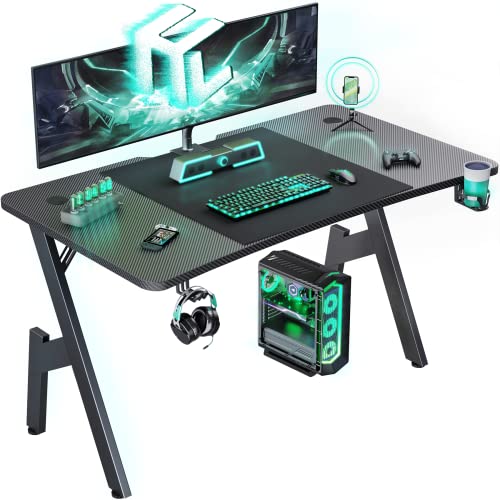

At a Glance
A gaming desk under $100 can still bring a carbon fiber top, an RGB strip and cable holes, but you usually give up drawers and a thick top. The six picks here run from a basic red R-shaped desk to a 48 inch desk with drawers and a CPU shelf.
We evaluated six gaming desks on load, lighting, outlets and storage from specs and listings, and kept them distinct from the pricier tiers. Prices change, so check the live price.
5 Criteria to Look For Before Buying a Gaming Desks Under $100
Key buying criteria so you get the right fit the first time.
Compare per bucket, not per feature
A desk that costs a little more often adds one thing, such as a drawer, a thicker top or a power hub, rather than everything. Ask which single addition is worth the jump to the next bucket. List the features of two neighboring picks and see what the gap buys.
RGB lighting and power draw
LED strips add mood but also a power adapter and a remote or app, and they are one more part that can fail. A desk with lights is a style choice, not an ergonomic one. Check whether the lights run from the desk's own hub and whether they can be switched off.
Why steel-frame ratings are higher
Particleboard tops are light and cheap, but the frame under them sets the true capacity, which is why the strongest listings here quote a steel structure rather than just a top thickness. A frame made of thick square tube resists flex when you lean on it, while thin tube legs bend under the same load. Look for the frame material and any tube thickness in the bullets, not just a big claimed number.
Depth you can actually use
Listed depth includes the whole top, but hutches, shelves and monitor stands eat part of it, so the usable keyboard zone is smaller than the headline number. A top that is 19 to 20 inches deep with a riser on it often leaves less typing room than a clear 17 inch top. Look at the product photos to see where the shelf or hutch begins and measure your keyboard against the open part only.
Instructions, tools and support
Clear labeled parts and included tools save the most time, and a listing that mentions video guides or a support contact is a good sign. The common mistake is not tightening every screw at the end, which causes wobble weeks later. Check what is in the box and plan to retighten the hardware after the first week.
6 Best Gaming Desks Under $100 in 2026
BestOffice 47 Inch Red R-Shaped Gaming Desk
About this pick
The BestOffice 47 inch gaming table has an R-shaped steel frame, MDF with a carbon fiber texture, a cup holder, a headphone hook and two wire holes. It is offered in red.
First place comes from the lowest price with gaming-style features. HLDIRECT 47 Inch A-Shaped Carbon Fiber Desk is the neighbor, and this one relies on MDF and steel.
Worth it for someone who wants a gaming look without electronics. No power or lights.
Best for: someone who wants a gaming look without electronics
Check price on AmazonPros
- +Lowest cost gaming desk
- +Cup holder and hook
- +Dual wire holes
- +Adjustable feet
Cons
- −No power or lights
- −Depth not stated
HLDIRECT 47 Inch A-Shaped Carbon Fiber Desk
About this pick
The HLDIRECT 47 inch A-shaped gaming desk has a 47 by 23.6 inch top with a curved edge, a 1.1 mm steel frame rated for 200 pounds, a carbon fiber surface, cable management and a cup holder.
It lands second because of a 200 lb capacity and a 23.6 inch top. Looking at GTPLAYER 55 Inch T-Shaped Gaming Desk beside it, this desk offers 8 fewer inches of width and uses steel and MDF.
Made for someone who types and games for hours. No outlets.
Best for: someone who types and games for hours
Check price on AmazonPros
- +23.6 inch depth
- +200 lb capacity
- +Curved top avoids pressing the abdomen
- +Cable management
Cons
- −No outlets
- −Carbon fiber style only
GTPLAYER 55 Inch T-Shaped Gaming Desk
About this pick
The GTPLAYER 55 inch T-shaped gaming desk has a carbon fibre surface, a built-in mouse pad, integrated LED lights, a headphone hook and rounded corners.
Its third slot comes from a mouse pad and LED on a 55 inch top. In contrast to Lufeiya 40 Inch Gaming Desk with Power Outlets, it gives 15 extra inches side to side and has no outlets built in.
Best suited to a gamer who wants width. Depth not listed.
Best for: a gamer who wants width
Check price on AmazonPros
- +Built-in mouse pad
- +LED lights
- +Headphone hook
- +Rounded corners
Cons
- −Depth not stated
- −Basic electronics
Lufeiya 40 Inch Gaming Desk with Power Outlets
About this pick
The Lufeiya 40 inch gaming desk has a carbon fiber surface, a built-in power strip with 2 outlets and 2 USB ports, an RGB LED strip with 7 colors and 4 dynamic modes and a monitor stand for two monitors or laptops.
As the fourth pick, it offers a 40 inch desk with outlets and a riser. Next to HLDIRECT 55 Inch A-Shaped Carbon Fiber Desk, this desk trims 15 inches from the width and includes outlets.
This one is for a gamer with a laptop and monitor. Depth not listed.
Best for: a gamer with a laptop and monitor
Check price on AmazonPros
- +Monitor stand for two screens
- +Power strip
- +RGB LED
- +Carbon fiber top
Cons
- −Depth not stated
- −Fewer drawers
HLDIRECT 55 Inch A-Shaped Carbon Fiber Desk
About this pick
The HLDIRECT 55 inch A-shaped gaming desk has a curved top, a 1.1 mm steel frame rated for 200 pounds, a carbon fiber surface, cable management and a cup holder. Its bullets quote a 32 by 19.7 inch desktop, so check the diagram.
Ranked fifth, it is chosen for a 200 lb rating with a curved top. Against Korfile 48 Inch Gaming Desk with Drawers and CPU Stand, it stretches 7 inches further across and steps down in cost to $50 to $75.
A good match for someone who wants an A-shaped frame. The listing quotes two different sizes, so check the dimensions.
Best for: someone who wants an A-shaped frame
Check price on AmazonPros
- +200 lb capacity
- +Curved top
- +Cable management
- +Cup holder
Cons
- −Bullets cite a 32 x 19.7 inch desktop
- −No outlets
Korfile 48 Inch Gaming Desk with Drawers and CPU Stand
About this pick
The Korfile 48 inch gaming desk has a carbon fiber textured MDF surface, three fabric drawers, four side hooks, a reversible PC storage shelf, 3 AC outlets, a USB-A port and a Type-C port and an RGB strip.
The sixth spot is earned through three drawers, a CPU shelf and 3 outlets. Set beside HLDIRECT 55 Inch A-Shaped Carbon Fiber Desk, it measures 7 inches less across, while it moves up from $50 to $75 to $75 to $100.
Choose it if you are a gamer with a tower. Depth not listed.
Best for: a gamer with a tower
Check price on AmazonPros
- +Three drawers
- +Reversible CPU shelf
- +3 AC outlets
- +RGB with 10 modes
Cons
- −Depth not stated
- −Fabric drawers
How We Evaluated These Gaming Desks Under $100
Each pick was assessed across 5 criteria weighted for real-world use.
Size and footprint
Lufeiya 40 Inch Gaming Desk with Power Outlets is the narrowest at 40 inches and HLDIRECT 55 Inch A-Shaped Carbon Fiber Desk the widest at 55. HLDIRECT 47 Inch A-Shaped Carbon Fiber Desk leads on depth with 23.6 inches. 5 of 6 listings leave depth out.
Frame and stability
Frame bracing is described for none of the picks. Stated weight ratings number 2 among 6.
Storage and power
Korfile 48 Inch Gaming Desk with Drawers and CPU Stand supply the drawers. Lufeiya 40 Inch Gaming Desk with Power Outlets and Korfile 48 Inch Gaming Desk with Drawers and CPU Stand carry the outlets.
Materials and finish
BestOffice 47 Inch Red R-Shaped Gaming Desk uses MDF and steel, while Korfile 48 Inch Gaming Desk with Drawers and CPU Stand uses MDF and metal. Laminate scores lower than solid wood for long-term wear.
Value for the price tier
BestOffice 47 Inch Red R-Shaped Gaming Desk is cheapest ($50 to $75) and Korfile 48 Inch Gaming Desk with Drawers and CPU Stand dearest ($75 to $100). We compare features per price bucket.
How to Choose the Right Gaming Desks Under $100
By Budget Setup
Under $100, decide between RGB, power and storage.
| Your situation | Pick from this guide |
|---|---|
| The cheapest gaming desk | BestOffice 47 Inch Red R-Shaped Gaming Desk: the lowest price with gaming-style features |
| A curved-edge desk with a 200 lb rating | HLDIRECT 47 Inch A-Shaped Carbon Fiber Desk: a 200 lb capacity and a 23.6 inch top |
| A 55 inch desk with mouse pad and LED | GTPLAYER 55 Inch T-Shaped Gaming Desk: a mouse pad and LED on a 55 inch top |
| Compact gaming with outlets | Lufeiya 40 Inch Gaming Desk with Power Outlets: a 40 inch desk with outlets and a riser |
| A wide A-frame at a moderate cost | HLDIRECT 55 Inch A-Shaped Carbon Fiber Desk: a 200 lb rating with a curved top |
| A fully equipped 48 inch gaming desk | Korfile 48 Inch Gaming Desk with Drawers and CPU Stand: three drawers, a CPU shelf and 3 outlets |
By Budget
Starting with BestOffice 47 Inch Red R-Shaped Gaming Desk ($50 to $75) and ending with Korfile 48 Inch Gaming Desk with Drawers and CPU Stand ($75 to $100), the list is grouped by price bucket.
| Budget | Pick from this guide |
|---|---|
| $50 to $75 | BestOffice 47 Inch Red R-Shaped Gaming Desk for the lowest price in the guide; HLDIRECT 47 Inch A-Shaped Carbon Fiber Desk for a curved tabletop; GTPLAYER 55 Inch T-Shaped Gaming Desk for a built-in mouse pad; Lufeiya 40 Inch Gaming Desk with Power Outlets for a monitor stand for two screens; HLDIRECT 55 Inch A-Shaped Carbon Fiber Desk for a curved top |
| $75 to $100 | Korfile 48 Inch Gaming Desk with Drawers and CPU Stand for a reversible PC shelf |
RGB lighting vs a plain gaming look
RGB lighting
RGB strips add ambiance and sometimes an app, but they add an adapter, a controller and one more part that can fail. In this guide: GTPLAYER 55 Inch T-Shaped Gaming Desk, Lufeiya 40 Inch Gaming Desk with Power Outlets and Korfile 48 Inch Gaming Desk with Drawers and CPU Stand.
A plain top
A plain gaming desk costs less, has fewer parts and keeps the setup simple, but it has less visual flair. In this guide: BestOffice 47 Inch Red R-Shaped Gaming Desk, HLDIRECT 47 Inch A-Shaped Carbon Fiber Desk and HLDIRECT 55 Inch A-Shaped Carbon Fiber Desk.
Most buyers should default to a plain top unless the lighting is part of the room's look.
By Priority
Load rating, lighting and storage vary.
| Your concern | Pick from this guide |
|---|---|
| Price | BestOffice 47 Inch Red R-Shaped Gaming Desk: the lowest price in the guide |
| Curved edge | HLDIRECT 47 Inch A-Shaped Carbon Fiber Desk: a curved tabletop |
| Mouse pad | GTPLAYER 55 Inch T-Shaped Gaming Desk: a built-in mouse pad |
| Dual screens on a stand | Lufeiya 40 Inch Gaming Desk with Power Outlets: a monitor stand for two screens |
| Curved edge | HLDIRECT 55 Inch A-Shaped Carbon Fiber Desk: a curved top |
| Tower shelf | Korfile 48 Inch Gaming Desk with Drawers and CPU Stand: a reversible PC shelf |
For a First Gaming Desk Specifically
Look for
A 47 to 55 inch top, a 200 pound rating and a headphone hook and cup holder.
In this comparison
The HLDIRECT 47 Inch A-Shaped Carbon Fiber Desk suits this need through a 200 lb capacity and a 23.6 inch top. No outlets.
When to Spend More
Spend more if
you plan to keep the desk for years. The Korfile 48 Inch Gaming Desk with Drawers and CPU Stand offers three drawers, a CPU shelf and 3 outlets and sits at $75 to $100. Depth not listed.
Save if
you want the lowest outlay: the BestOffice 47 Inch Red R-Shaped Gaming Desk ($50 to $75) offers the lowest price with gaming-style features. No power or lights.
Frequently Asked Questions
Can a cheap gaming desk hold a PC and monitors?
Some have a stated 200 pound capacity, such as the A-shaped HLDIRECT desks. Others do not state a rating, so check the listing. Put the tower on a shelf or the floor.
Is RGB worth paying for on a gaming desk?
It is a style choice, not an ergonomic one. A cheap strip adds an adapter and a controller, so it is one more part. Skip it if you want fewer parts.
How heavy is a typical desk setup?
A 27 inch monitor can weigh 15 to 20 pounds, a tower 20 pounds or more, and speakers, a printer and books add up fast. A desk rated for 110 pounds handles that comfortably, while a 20 pound rated top does not.
How can I make a flimsy desk more stable?
Two things stop most wobble: even leg contact and a rigid frame. Adjust the feet so none float, tighten the brace hardware and keep heavy items such as a tower near a leg rather than mid-span. A small anti-slip pad under each foot helps on hard floors.
Can one person assemble a desk alone?
You can build a small one alone, but a second person makes a long desk much easier, since the heaviest panels can weigh 50 pounds or more. Keep the packing material until you are sure nothing is missing.
How deep should a desk be for a monitor?
Aim for 24 inches if you use a desktop monitor, which most buying advice also names as the minimum. If you sit closer than about 20 inches to a screen, move it back or choose a deeper desk. A monitor arm can recover a little distance on a shallower top.
Bottom Line
best overall: BestOffice 47 Inch Red R-Shaped Gaming Desk - best lowest cost pick in this roundup.
See the full rankings above for all picks with pros, cons, and best-for summaries.
Browse on Amazon
All Prime-eligible options with current pricing.
Shop on Amazon →