
How to Choose Pegboard Accessories That Fit Your Board
Affiliate Disclosure: We may earn a small commission on qualifying Amazon purchases at no extra cost to you. Full disclosure →
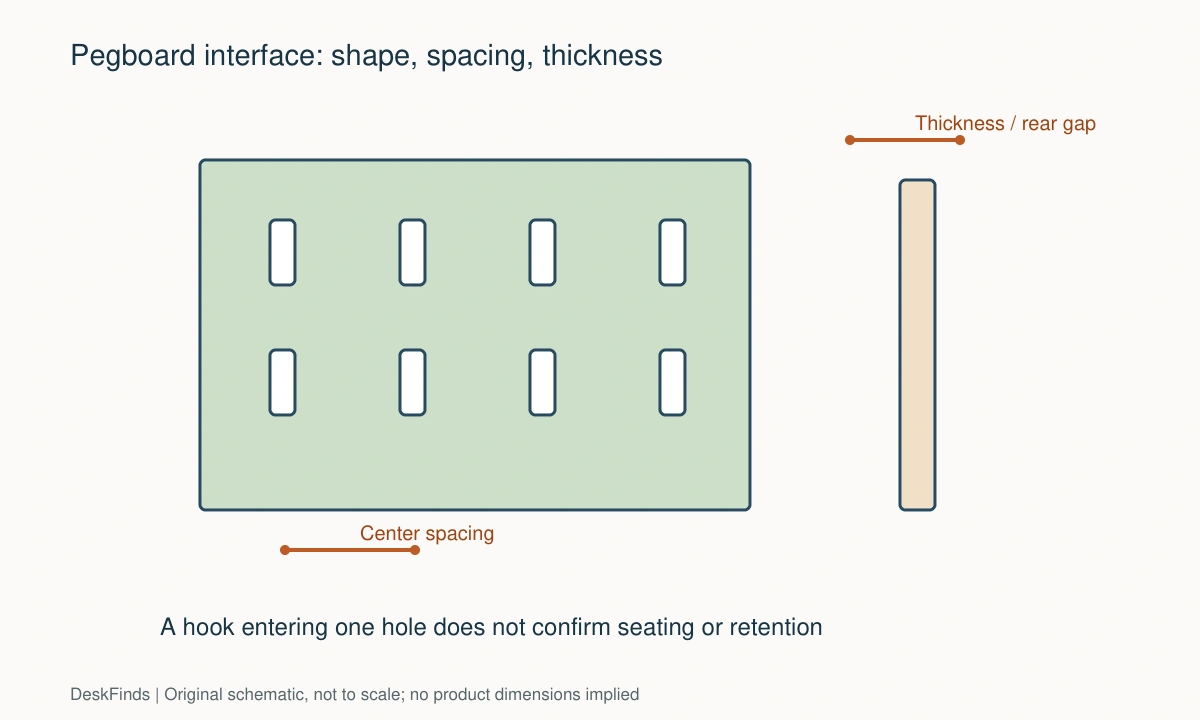
Pegboard accessories can look interchangeable while using different hole shapes, spacing, hook depths, and locking systems. A hook entering one hole does not prove that it will seat, lock, or carry the intended item correctly.
Quick answer: Identify the board system, then match hole shape, hole dimensions, spacing, panel thickness, rear clearance, and the accessory’s retention design. Prefer the board maker’s compatibility information. Test a small suitable accessory before buying a whole kit, and keep the wall or desk mounting requirements separate from the accessory fit.
Identify the board system
Look for the board model, maker, and material. A round-hole workshop board and a slotted modular home organizer may need completely different fittings. Board color and outside dimensions do not identify the interface.
If the board is already installed, check the purchase record or a discreet label. Photograph the front and an accessible edge. Do not pull a loaded board away from the wall to inspect it; unload and follow its instructions when removal is needed.
Measure the hole pattern
Record hole shape and dimensions, then measure spacing from the center of one hole to the center of the next. Measure several intervals to reduce small reading errors, then divide by the number of intervals. Keep the horizontal and vertical spacing separate.
Do not compare edge-to-edge spacing on one product with center-to-center spacing on another. A diagram with labeled reference points is more useful than a single number. Also check whether the pattern repeats uniformly or uses alternating slots.
Check board thickness
A hook may require a particular panel thickness to seat and lock. A thin panel can leave the hook loose, while a thick panel may stop it engaging. Match the stated range rather than assuming the hole size decides everything.
Material also matters. A fitting designed for one system should not be forced into another material because the holes seem close. Excessive force can damage coatings, slots, or the panel around the hole.
Include the space behind the board
Many hooks need room to pass through and rotate or drop into position. A board mounted directly against a wall may not provide that clearance. Use the mounting rail or spacers specified by the board maker.
Do not add random spacers to compensate without checking the mounting design. Changing the board’s distance from the wall can change how its fixings are loaded. The whole installation needs to remain consistent with the instructions.

Understand how accessories lock
Some accessories hang on hooks; others twist, clip, or use a secondary retainer. Learn the insertion and removal motion. A part that enters a slot but cannot complete that motion has not passed the fit check.
For a basket or shelf with several attachment points, check every point. One matching hook does not prove the spacing of the second hook. Rigid multi-point accessories are especially sensitive to small pattern differences.
Choose accessories around real objects
Measure the item you want to store and the hand movement needed to retrieve it. A cup that holds pens may not fit scissors with wide handles. A shallow shelf may carry a phone but not provide a suitable support for a tablet.
Keep frequently used items within comfortable reach. Do not arrange the board solely for a photograph and leave daily tools behind a monitor. The clear retrieval path matters as much as the storage position.
Treat capacity as a system
The accessory, panel, mounting rail, fixings, and wall all contribute to the installation. An accessory’s load claim does not establish the capacity of the complete board on your wall. Follow the limits and loading instructions of each component.
Avoid concentrating heavy objects near one edge unless the system permits it. A desk-clamped board adds another interface: the desk must support the connector and load. Wall and desk mounting are not interchangeable by assumption.
Compare proprietary and mixed systems
Using accessories from the same documented system reduces measurement uncertainty. Mixed-system accessories can be useful when the manufacturer explicitly supports the board. Look for a named compatibility statement and relevant dimensions.
For example, IKEA presents SKÅDIS as a board-and-accessory system and specifies its own mounting requirements. That is a reason to check the exact system, not a claim that every IKEA organizer shares one hole pattern.
Start small
Buy the few accessories needed for the first set of items rather than a large assortment chosen by piece count. Confirm installation and retrieval, then expand. A bag of unused hooks is not useful storage capacity.
If trying a third-party compatible part, keep the packaging and return terms. Do not enlarge holes or bend hooks to force a questionable match. Resolve the interface instead of modifying a loaded system experimentally.
Build a compatibility card
| Board field | Accessory comparison |
|---|---|
| Model/system | Explicit supported board list |
| Hole shape and size | Required hook or connector profile |
| Hole spacing | Number and spacing of attachment points |
| Panel thickness | Supported thickness range |
| Rear clearance | Insertion and locking space |
| Loading | Accessory and complete installation limits |
Our pegboard organization guide helps with layout after compatibility is resolved. Choose fittings that seat correctly and make the stored objects easy to use. A tidy board is a working system, not simply a matching set of containers.
Three accessory purchases to assess differently
Simple single-point hooks
A small hook is a useful first compatibility trial when it is explicitly intended for the board. Check insertion, seating, and any retainer before loading it. The object should not pull the hook out during ordinary retrieval.
Start with a light item within the published limits and follow the instructions. Do not use a trial as an improvised overload test. The purpose is to confirm interface and retrieval behavior, not to establish a new capacity rating.
Shelves and baskets with multiple connectors
Measure the spacing between every attachment point. A shelf can have hooks that individually match the slot shape while their spacing does not match the board. Rigid accessories have less freedom to accommodate mismatch.
Include the depth of the loaded basket and the path for lifting an item out. A container behind a monitor may fit the board perfectly but be inconvenient to use. Choose the layout from retrieval tasks rather than fitting the maximum number of accessories.
Third-party accessories for a named system
Look for an explicit supported board model and installation instructions. A vague compatible-with-pegboard label is not enough. Compare any dimensional information with the actual board, especially thickness and rear clearance.
Adapters add another interface and should have documented compatibility and loading. Do not combine several unverified adapters to reach a desired object position. A direct accessory from a supported system may be simpler and more reliable.
For structural loading context, review shelf-capacity basics.
Make an object-first layout
Put the tools or supplies on a table in the groups you use together. Measure them and decide which should hang, stand in a cup, or rest on a shelf. Only then choose accessories. A large mixed kit often includes many shapes that do not answer your storage needs.
Draw the monitor and lamp in front of the board. Keep daily items visible and reachable without moving those devices. Avoid placing a heavy or awkward object where removing it requires reaching over a screen or pulling sideways on a hook.
Maintain the installation as a system
When adding accessories, review the board’s total loading and mounting condition. A wall rail that was suitable for a few light items should not be assumed sufficient for every later arrangement. Follow the board maker’s instructions about distribution and limits.
Label spare accessories with the board system they fit if your home has more than one type. This avoids forcing a similar-looking hook into the wrong panel during a later reorganization. Keep the mounting instructions with the parts rather than relying on memory of how the first accessory was installed.

Compare usable storage rather than accessory count
A bundle with many pieces may provide less useful storage than three correctly chosen fittings. Count the objects you need to store and the way each is handled. Pens, headphones, a controller, and a thick notebook need different support shapes and retrieval paths.
Check how much board area a container consumes beyond its visible width. Its attachment pattern may reserve several holes, and a shelf can block access to nearby hooks. Arrange the largest accessories first on a sketch, then add smaller pieces without hiding everyday tools behind them.
If the board sits behind a monitor, compare reach with the screen in its normal position. A shelf above the screen may be visible but awkward to use. A side-mounted cup may be easier to reach, provided it does not enter a lamp’s movement path or another user’s area.
Consider spare-part availability and future expansion within the system. A proprietary interface can be a reasonable choice when its supported accessories meet your needs. A more open interface can be flexible when compatible parts are well documented. Neither approach is automatically better; the practical question is whether you can obtain the fittings and support you need.
Keep a simple layout inventory with the board model and installed accessories. When moving the board or adding heavier items, review the mounting instructions again. A well-organized panel should remain easy to maintain and adapt. The point is to reduce desk friction, not to create an attractive wall of containers whose contents are difficult to reach.
For items with cables, test the cable route while removing and returning the object. Headphones can fit a hook while their lead catches a shelf below; a controller charging cable can pull a connector when the controller is lifted. Provide suitable slack and a clear route without using the cable as the object’s support. A hook position should also avoid sharp bends or crushing where the lead rests. This is an object-specific check worth completing before buying additional matching fittings. The correct board interface ensures attachment, while the cable and retrieval test establishes whether that particular item can be stored usefully there.
Before adding containers, use the desk-declutter checklist.
Worked example: a basket that matches the holes but not the pattern
Imagine a buyer with a modular board already installed behind a desk. A third-party basket appears to use hooks shaped like the board’s slots. The product title says pegboard compatible, and the buyer considers ordering a large matching accessory set.
The interface card reveals the missing information. Each hook can enter one slot, but the basket has two rigid attachment points whose spacing does not match the board. The hook shape alone has answered only part of the fit question. Bending the hooks or enlarging slots is not treated as ordinary installation.
The buyer checks a basket explicitly supported for the board model. It seats correctly according to the instructions, but its depth reaches into the monitor’s rear space. Moving the screen forward would reduce the keyboard area. A shallower container or a side position is therefore compared before buying more accessories.
Next, the actual objects are loaded within the product’s limits. A notebook protrudes high enough to make removal awkward beneath a shelf. Pens and cables work well, but the notebook needs another support. The buyer chooses accessories by object and retrieval path instead of assuming one basket should hold everything.
The board’s mounting requirements and total loading are reviewed before expansion. Adding several individually strong accessories does not establish that the wall installation can carry their combined arrangement. Any desk connector or adapter would introduce another interface requiring its own documented compatibility.
The final purchase includes fewer pieces than the original bundle. Each has a specific object group, supported connection, and accessible position. Spare hooks are labeled with the board system and stored with the instructions so they are not later forced into a different panel.
The useful lesson is that pegboard compatibility includes shape, pattern, thickness, rear space, retention, and installation loading. A visually similar hook or a high accessory count does not guarantee a working storage system. The best set is the one that fits the board and makes everyday belongings easier to retrieve without displacing the rest of the workstation.
For a simple alternative to wall storage, compare desk caddies and pen cups.
Your eight-point comparison worksheet
Use these checkpoints to compare the actual room, furniture, or device with a candidate product. Keep each result separate; a favorable overall impression cannot resolve a failed required function. Blank record fields are deliberate so you can use your own measurements rather than copying hypothetical examples.
1. Board identity
Find the maker, model, material, and interface family from the board or purchase record.
Use that identity when comparing accessories, because outside dimensions and color do not reveal the hole system.
2. Hole geometry
Measure round, slotted, or shaped openings at consistent reference points and photograph the pattern with scale.
Match connector profile as well as nominal size; forcing a nearly matching hook can damage the board or prevent proper seating.
3. Pattern spacing
Measure center-to-center in both directions over several intervals, then calculate the repeated spacing.
Keep the measurement convention consistent and check every point on rigid shelves or baskets with more than one connector.
4. Panel thickness
Compare the board’s thickness with the accessory’s stated range and the required retention shape.
A hook can enter the hole but remain loose or fail to lock when thickness is outside the intended interface.
5. Rear space
Inspect the specified mounting rail or spacer arrangement and the room needed behind the board during insertion.
Do not mount a system flush to the wall or add improvised spacers when the instructions require a particular support configuration.
6. Retention motion
Follow the accessory’s hook, drop, twist, clip, or secondary-lock sequence with the board correctly installed.
Count a fit as confirmed only after the part completes its intended seating and retention, not merely when it enters one opening.
7. Object retrieval
Use the real pen, cable, controller, or tool to check grip space and the direction of removal.
A storage position that requires moving the monitor or pulling awkwardly on the hook should be revised before expanding the layout.
8. System loading
Review accessory limits, panel limits, rail, fixings, wall or desk support, and distribution requirements together.
A strong accessory does not establish the capacity of the entire installation; retain the lowest relevant documented limit and required mounting method.
Sources and scope
- IKEA: SKÅDIS board, compatible series, and mounting instructions - Primary example of a named board-and-accessory system and required suitable anchoring.
Editorial note: This is a research-based planning guide, not a hands-on product test or a certification of a custom installation. Dimensions described as hypothetical are examples. Follow the exact product instructions and confirm unresolved compatibility before buying.