
How to Fit a Lockable File Cabinet Under a Desk
Affiliate Disclosure: We may earn a small commission on qualifying Amazon purchases at no extra cost to you. Full disclosure →
A file cabinet can fit beneath the desktop and still block your knees, stop a drawer opening, or place the lock where you cannot reach it. Under-desk storage needs to coexist with the person using the desk and the cabinet’s own operating requirements.
Quick answer: Measure the clear bay between the desk supports, the lowest underside obstruction, and the available depth. Add the cabinet’s handles, casters, lock access, and full drawer travel. Keep the seated user’s leg space clear and follow the cabinet’s stability and anchoring instructions. A locking cabinet is not automatically fire-resistant or a security safe.
Decide what must be locked
List the documents or belongings and their sizes. Letter, A4, and legal files can need different internal arrangements. A cabinet’s outer width does not confirm the filing format or usable drawer capacity.
Choose the required level of access control realistically. A simple office lock may discourage casual access, but it should not be represented as equivalent to a rated safe. Follow workplace or household requirements for sensitive documents.
Measure the actual desk bay
Record clear width between legs or pedestals at several depths. A diagonal support can narrow the space toward the back. Measure height to the lowest drawer, apron, cable tray, or mechanism, not to the top surface.
Check rear depth against crossbars and baseboards. A cabinet may need to sit forward of the wall, which changes where its front meets your knees. Use the installed position in the floor plan.
Include casters and leveling feet
Confirm whether published height includes the casters. Removable wheels are not automatically optional; the instructions determine the permitted configuration. A cabinet designed around a wheeled base may behave differently without it.
Check complete height with any top lip, handle, or lock feature. Also leave room for the cabinet’s intended movement or maintenance. An exact friction fit under the desk can make a mobile cabinet effectively immovable.
Preserve the seated work zone
Sit at the desk in your normal position and mark the space your knees, feet, and chair use. Place a cardboard cabinet outline beside that zone. Test shifting position and turning toward a side task.
Do not force yourself off-center from the keyboard to make storage fit. A smaller cabinet outside the desk may provide more useful storage than a larger one that makes every work session awkward. The desk’s primary job remains supporting work.
Test drawer travel with a user present
Measure the projection of a fully opened drawer from the cabinet’s closed front. Include the handle. Then check the room in front of it with the chair occupied and parked.
You need access to the files, not just room for the drawer to move. A drawer can open beneath the desktop while leaving no practical place to see and remove documents. Consider whether you can use the cabinet from the side or must move the chair.
Check the lock position
A top-mounted or high front lock may sit close to the desk apron. Make sure you can insert, turn, and remove the key. A key left projecting can collide with the chair or a leg.
Give spare keys a separate controlled storage location. Do not keep the only spare inside the locked cabinet. If the cabinet uses an electronic lock, check access to batteries and the manufacturer’s recovery procedure before placing it in a tight bay.
Follow stability requirements
Read the cabinet instructions for loading, drawer opening, interlocks, and anchoring. Placing a cabinet under a desk does not automatically count as an anti-tip restraint. The desktop may not prevent the motion the cabinet’s instructions address.
Do not remove an interlock to allow more drawers to open. Do not stand on a drawer or use the cabinet as a seat. If required anchoring cannot be installed in the proposed position, choose another compatible location or product.
Separate cabinet and desk loads
A file cabinet may look sturdy but should not be used to support a desktop unless designed for that arrangement. Likewise, a freestanding desk should not depend on contact with the cabinet to feel stable.
Keep printers and other equipment off the cabinet unless the product permits the load and the layout provides access and ventilation. A storage purchase should not quietly become an unapproved structural support.
Consider mobile versus stationary use
If you expect to roll the cabinet out, test the route with handles, wheels, and nearby furniture included. Check floor transitions and the desk frame. A narrow gap can prevent pulling it straight out.
If it remains stationary, prioritize access and cleaning over wheels as a feature. Make sure a spill or cable fault behind it can be addressed without dismantling the workstation.
Use a whole-system checklist
| Check | Include |
|---|---|
| Closed fit | Body, casters, handles, lock, and desk obstructions |
| Human fit | Knees, feet, chair approach, and position changes |
| Open fit | Drawer travel and document retrieval |
| Security use | Lock access, key storage, and actual protection level |
| Stability | Required loading, interlocks, and anchoring |
| Service | Cleaning, movement, and battery access if applicable |
Compare under-desk filing cabinets only after these checks. The right cabinet holds the required documents while remaining accessible and leaving you enough space to work.
Three cabinet placements
Beside the primary knee bay
This is usually the first arrangement worth drawing. Place the cabinet outside the user’s normal leg space, then confirm whether its front can align with the desk without blocking the chair. A recessed position may look tidy but make files harder to reach.
Open the drawer with the chair occupied and parked. If files can only be reached after rolling the cabinet out, include that movement in the routine and make sure it is permitted and practical. A mobile feature should solve an actual route, not substitute for planning one.
Under a desk return
An L-shaped desk can provide a secondary bay, but the return may have its own supports and a corner leg. Check the cabinet at its installed depth and verify access from the side where you will use it.
Do not allow the cabinet to become accidental support for the return. A desk and cabinet should carry their intended loads independently unless sold as an integrated support system. Contact between furniture pieces can conceal an incorrect assembly or an unstable arrangement.
Outside the desk instead
A separate location may be the better answer when the under-desk bay is too small. A narrower cabinet beside the desk can preserve leg room and make drawers easier to use. Check its effect on the room route and follow any anchoring requirements.
This is a successful alternative rather than a failed attempt to use space efficiently. Storage is valuable when documents remain accessible and the workstation remains usable. Hiding the cabinet beneath the top is not the only measure of a tidy office.
Build an illustrative access example
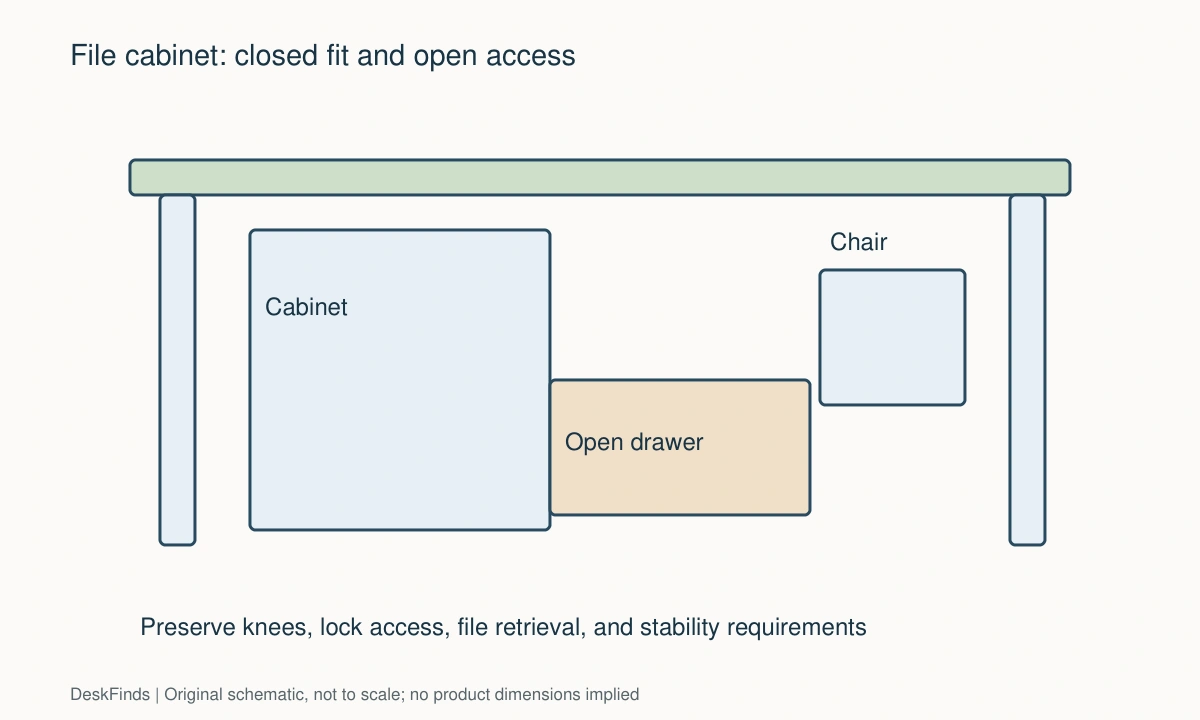
Suppose the desk bay clears the cabinet’s closed body by width and height. The drawer still projects into the chair’s usual location, and the lock sits behind a deep apron. The closed fit has passed, but daily access has failed in two ways.
A smaller cabinet might solve the drawer conflict without fixing lock access. Moving the cabinet forward might fix the key but intrude into the knee bay. Compare the complete arrangement after each change rather than assuming one smaller dimension resolves every problem.
Keep security claims specific
Record whether the product simply locks, has a particular tested protection rating, or includes a documented anti-tip interlock. These features answer different questions. Do not describe a locking drawer as fireproof, tamperproof, or equivalent to a safe without the relevant evidence.
For work documents, check organizational storage requirements and who needs access. The right product may be a file cabinet, lockable box, or another approved solution. Let that requirement guide the purchase before optimizing the under-desk footprint.
For the folder system, review hanging and manila folders.
Compare storage value after human clearance
Measure the remaining knee bay before counting drawer capacity. A cabinet that holds more files but makes you sit sideways is not a better use of the workstation. Consider a smaller cabinet, a separate file box, or storage outside the desk if that preserves the primary task position.
For documents used frequently, retrieval may matter more than maximum capacity. Check whether folder labels can be seen and whether a file can be lifted without striking the underside of the desk. Internal drawer organization can help, but it cannot create missing room above an open drawer.
For infrequent locked storage, a separate location may be acceptable. The cabinet does not need to sit beneath the keyboard simply because it is called under-desk furniture. Compare access frequency, security requirements, and room circulation to choose the location.
Keep stability requirements in the comparison even when one model seems to fit more neatly. An interlock, support caster, or required anchoring can affect the installed envelope and use. Do not leave such parts out of a dimension sketch or treat them as optional cosmetic extras unless the instructions say so.
Before finalizing the purchase, write down the exact cabinet configuration, included base parts, filing arrangement, and unresolved access question. Ask support for any missing dimension. A closed-body fit is only the beginning; useful storage should open, lock, remain stable as instructed, and let the person at the desk work normally every day.
Check drawer contents as a loaded arrangement within the stated limits. Hanging folders, dividers, and a tray can consume space differently from a stack of loose paper. Confirm that the intended folder direction and label visibility remain practical beneath the desk. Do not infer usable filing depth by subtracting guessed wall thickness from the outside body. Ask for the internal specification when it controls the purchase. If a cabinet offers several included organizers, verify which can be removed according to the instructions. A flexible drawer is useful only when the supported arrangement actually accommodates the documents you need to retrieve.
For an alternative format, see file cabinets and file boxes.
Worked example: a cabinet that fits closed but cannot be used
Suppose a desk has a clear side bay large enough for a compact locking file cabinet. The cabinet’s published height includes its casters, and the body clears the apron. The buyer initially considers the under-desk fit confirmed.
A full-size floor outline reveals that the open bottom drawer reaches the chair base. Moving the cabinet farther back reduces the front projection but puts the lock beneath the apron, where the key is difficult to insert and turn. Two practical access problems remain despite the successful closed-body comparison.
The buyer tests a smaller cabinet. Its drawer travel is shorter, but the internal filing arrangement does not support the required documents in the intended orientation. A product is not useful simply because it fits the bay. Storage format and access both need to match the task.
The existing candidate is then considered beneath a desk return. The corner leg limits its extraction route, and the user would need to roll the cabinet out for frequent file access. The buyer checks whether that movement is permitted and practical, including the support and stability instructions, rather than assuming wheels solve the problem.
An external side position finally provides a clear drawer and lock route while preserving the main knee bay. It occupies visible floor space, but the room route remains usable and the files are accessible. Required anchoring or other stability measures are included according to the exact cabinet’s instructions.
The locking function is described accurately as the product specifies it. No claim is made that it provides fire resistance or safe-like security without the relevant evidence. Spare-key storage is arranged separately from the locked drawer.
The final decision favors useful access over hiding the cabinet. The original under-desk plan was not wrong because the cabinet was poorly made; it was wrong because the desk, chair, lock, and drawer actions did not coexist. A complete comparison keeps those functions separate and selects a location that supports all the required ones, even when that location is outside the desk.
For a purchase shortlist, compare small-space filing cabinets.
Your eight-point comparison worksheet
Use these checkpoints to compare the actual room, furniture, or device with a candidate product. Keep each result separate; a favorable overall impression cannot resolve a failed required function. Blank record fields are deliberate so you can use your own measurements rather than copying hypothetical examples.
1. Document format
List letter, A4, legal, folders, binders, and other belongings with their actual dimensions and filing direction.
Confirm internal fittings and usable drawer space; the cabinet’s outside width does not establish supported document format.
2. Clear bay
Measure between desk supports at the front and back and to the lowest apron, drawer, or cable hardware.
Use the installed three-dimensional opening rather than desktop height or total desk width as the cabinet’s available space.
3. Complete cabinet
Include casters, leveling parts, handles, top edges, lock features, and the configuration permitted by the instructions.
Do not remove wheels or alter the base just to lower the unit unless that arrangement is explicitly supported.
4. Seated body
Mark knees, feet, chair approach, and ordinary position changes at the keyboard before placing the cabinet outline.
Preserve the primary work zone even if it requires less storage or a cabinet outside the desk.
5. Drawer operation
Measure full travel and the place a person stands or sits to see and remove files, including the handle.
Check both occupied and parked chair states; mechanical opening alone does not establish practical document access.
6. Lock operation
Test room to insert, turn, and remove the key or service the electronic lock without reaching through an obstruction.
Keep spare-key and battery access practical, and avoid a projecting key where it can collide with the chair or legs.
7. Stability instructions
Read loading, interlock, drawer-opening, and anchoring requirements for the exact cabinet.
Do not treat the desktop as an automatic anti-tip restraint or remove safety mechanisms to make the storage routine easier.
8. Movement route
If the cabinet rolls, check handles, wheel sweep, desk supports, thresholds, and the destination when pulled out.
Give mobile storage a defined route and parked position; a barely fitting closed bay is not enough for reliable movement.
Sources and scope
- UPLIFT: STR003 file-cabinet assembly and warnings - Example of product-specific loading, caster, and drawer-opening instructions; apply the manual for the exact cabinet.
Editorial note: This is a research-based planning guide, not a hands-on product test or a certification of a custom installation. Dimensions described as hypothetical are examples. Follow the exact product instructions and confirm unresolved compatibility before buying.