
4 Best XLR Audio Interfaces Under $150 in 2026
We compared XLR audio interfaces under $150 by preamp count, onboard recorder features, and driver support, since podcast-focused units diverge sharply here.

New to Amazon Prime?
Get fast, free shipping on every pick in this guide, plus Prime Video and exclusive deals.
Try Prime Free


At a Glance
At the $150 ceiling, XLR audio interfaces start splitting into two genuinely different product categories: traditional computer-tethered interfaces and standalone podcast recorders that can operate without a computer at all, and picking the wrong category for your workflow matters more than any single spec.
We compared this lineup on onboard recording capability, preamp count, and driver compatibility, since a standalone recorder like the Zoom PodTrak P4 serves a fundamentally different use case than a traditional Focusrite or Behringer interface even at a similar price.
5 Criteria to Look For Before Buying a XLR Audio Interfaces Under $150
Key buying criteria so you get the right fit the first time.
Standalone SD-Card Recording Solves a Genuinely Different Problem Than a Computer-Tethered Interface
The Zoom PodTrak P4 records directly to an SD card without needing a connected computer, meaning it can travel to an interview location, a live event, or anywhere a laptop and stable power aren't guaranteed, a capability a traditional USB interface like the Behringer UMC404HD simply doesn't have since it requires a live computer connection the entire time it's recording. This matters directly if your content involves recording away from a fixed desk setup, such as location interviews or field reporting, and matters much less if you exclusively record from the same home studio setup every time. Check whether a listing specifically states standalone SD-card recording capability versus computer-only operation before assuming any 'portable' interface can record without a laptop attached.
Onboard DSP Voice Processing Trades Customization for Convenience, and That Tradeoff Cuts Both Ways
The Shure MVX2U Gen 2's built-in Denoiser, limiter, and compressor process your voice signal before it reaches your recording software, meaning you get professional-sounding audio without configuring a single plugin, but you also have less granular control than manually setting up your own processing chain in a DAW like Audacity or Reason. This matters if you want a genuinely fast setup with good default results, particularly for live streaming where you can't pause to adjust settings mid-broadcast, but matters less if you're an experienced audio engineer who prefers full manual control over every processing stage. Check whether a listing's onboard processing features are adjustable or fixed before assuming built-in DSP will suit your specific level of technical control preference.
Simultaneous Input Channel Count Should Match Your Actual Recording Format, Not Just Your Budget
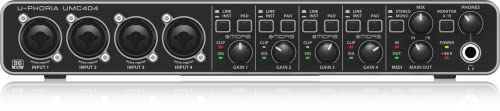
The Behringer UMC404HD's 4 simultaneous mic preamps let you record a full band or a 4-person podcast panel in one take, a capability the single-preamp Scarlett Solo and Shure MVX2U simply can't replicate no matter how good their individual preamp quality is. This matters as a hard functional requirement based on your typical recording format, where a solo creator genuinely doesn't need 4 channels and would be better served by a single higher-quality preamp, while anyone regularly recording multiple simultaneous voices needs the channel count as a baseline requirement before any other spec comparison matters. Count your actual typical number of simultaneous recording sources before comparing preamp quality or bundled software across single-input and multi-input options.
Auto-Gain Technology Meaningfully Lowers the Learning Curve for First-Time Interface Users
The Focusrite Scarlett Solo 4th Gen's Auto Gain feature analyzes a few seconds of your loudest recorded signal and automatically sets the appropriate input level, removing a genuinely common first-time-user mistake where a microphone is either too quiet to hear clearly or clipped and distorted from too much gain. This matters significantly if you've never manually gain-staged a recording before and don't want to learn that skill immediately, and matters less if you already understand how to read input meters and set levels manually, since auto-gain is a convenience feature rather than a quality improvement for experienced users. Look specifically for stated auto-gain or auto-leveling features in a listing if you're a first-time buyer, rather than assuming every entry-level interface includes this convenience.
Rack-Mountable Design Suits a Permanent Studio Setup Better Than a Desktop Interface, But Costs Desk Space Flexibility
The Behringer UMC404HD's rack-mountable form factor is designed to be permanently installed in a studio rack alongside other audio gear, which suits a dedicated, unchanging studio setup well but takes up more physical space and is less convenient to move or store than the compact desktop designs of the Scarlett Solo or Shure MVX2U picks. This matters if you have a permanent studio space with rack infrastructure already in place, and matters less if you're recording from a small desk or dorm room where a compact, easily stored desktop unit is more practical. Check the stated physical dimensions and mounting design in a listing to confirm it will actually fit your specific desk or studio space before assuming a rack-mountable unit is a drop-in size equivalent to a desktop interface.
4 Best XLR Audio Interfaces Under $150 in 2026
Focusrite Scarlett Solo 4th Gen USB Audio Interface
About this pick
The 4th generation Scarlett Solo adds an Auto Gain feature that automatically sets input levels by analyzing a few seconds of your loudest signal, a genuinely useful addition for first-time users who don't know how to manually gain-stage a microphone. Its Clip Safe technology continuously monitors and adjusts gain in real time to prevent distortion, working alongside the manual Air mode for added clarity on vocals and acoustic instruments.
Compared to the Behringer UMC404HD pick below, this one trades 4 inputs for a single, more refined mic preamp with smarter auto-leveling technology, prioritizing ease of use over raw channel count. It still includes the same substantial software bundle as its 3rd-gen predecessor, including Ableton Live Lite and a suite of plugins.
Best for buyers who want smart auto-gain technology that removes the guesswork from setting recording levels.
Best for: buyers who want smart auto-gain technology for effortless level setting
Check price on AmazonPros
- +Auto Gain removes guesswork from setting levels
- +Clip Safe prevents distortion in real time automatically
- +Substantial bundled software suite included
Cons
- −Single preamp limits it to one microphone at a time
- −Costs slightly over this tier's stated $150 ceiling
Zoom PodTrak P4 Portable Multitrack Podcast Recorder
About this pick
The PodTrak P4 is a genuinely different product category from the other three picks in this comparison: a standalone multitrack recorder with 4 built-in mic preamps that records directly to an SD card with zero computer required, making it usable for on-location interviews where bringing a laptop isn't practical. It includes dedicated smartphone inputs specifically for recording phone-in guests directly into the mix.
Compared to the traditional computer-tethered interfaces in this comparison, this one adds built-in sound pad buttons for playing jingles or sound effects live during recording, a feature no traditional interface offers. It can also function as a standard USB audio interface when connected to a computer, giving it dual-mode flexibility.
Best for buyers who specifically want a standalone recorder that works without a computer for on-location interviews.
Best for: buyers who specifically want a standalone recorder for on-location or computer-free interviews
Check price on AmazonPros
- +Records standalone to SD card with no computer needed
- +Dedicated smartphone inputs for phone-in guests
- +Built-in sound pads for live jingles and effects
Cons
- −Lower audio fidelity ceiling than dedicated studio interfaces
- −Less useful if you never record away from your desk
Behringer UMC404HD 4x4 USB Audio Interface
About this pick
The UMC404HD packs 4 Midas-designed mic preamps into a single rack-mountable unit, bringing recording console technology from Behringer's professional Midas mixing board lineup down to a budget interface price point. Its 24-bit/192kHz converters and MIDI I/O support make it genuinely versatile for both audio recording and connecting external MIDI gear like keyboards or drum machines.
Compared to the Scarlett Solo pick above, this one offers 4x more simultaneous input channels for a lower price, making it the clear choice for anyone recording a full band or multi-person podcast rather than a solo creator. Its rack-mountable design also suits a permanent studio setup better than the desktop-only competitors in this comparison.
Best for buyers who need 4 simultaneous XLR inputs for full-band or multi-person recording at the lowest price in this tier.
Best for: buyers who need 4 simultaneous inputs for full-band or multi-person recording
Check price on AmazonPros
- +4 simultaneous XLR inputs at the lowest price in this tier
- +Midas-designed preamps bring pro mixing console tech down in price
- +MIDI I/O adds versatility for connecting external gear
Cons
- −Bulkier rack-mount design less suited to a small desk
- −Bundled software is less extensive than the Focusrite bundle
Shure MVX2U Gen 2 Digital Audio Interface
About this pick
The MVX2U Gen 2 pairs Shure's studio-quality mic preamp with built-in DSP voice processing modes specifically tuned for podcasting, streaming, and gaming, so effects like a limiter, compressor, and noise gate are handled onboard rather than requiring separate plugin software. Its real-time Denoiser specifically strips out background hum, fan noise, and other ambient sound before it ever reaches your recording software.
Compared to the Behringer pick above, this one trades multi-channel capacity for a single, more processed and streaming-ready audio path with built-in effects that a bare 4-channel interface leaves entirely to your DAW. ShurePlus MOTIV desktop software gives real-time control over these onboard voice modes without needing a separate mixer.
Best for buyers who specifically want built-in voice processing for streaming or gaming without a separate DAW-based mixer.
Best for: buyers who want built-in voice processing for streaming without a separate mixer
Check price on AmazonPros
- +Built-in DSP voice modes need no separate mixer software
- +Real-time Denoiser strips background noise automatically
- +Shure's established studio-quality preamp reputation
Cons
- −Single input limits it to solo streaming or podcasting
- −Onboard processing may not suit users who prefer manual DAW control
How We Evaluated These XLR Audio Interfaces Under $150
Each pick was assessed across 5 criteria weighted for real-world use.
Onboard Recording Capability
Compared standalone SD-card recording versus computer-tethered-only designs.
Channel Count
Compared single versus multi-channel simultaneous XLR input support.
Built-in Processing
Compared onboard DSP voice modes versus DAW-dependent processing.
Driver and Software Support
Compared bundled control software and driver compatibility across platforms.
Form Factor
Compared desktop versus rack-mountable physical designs for studio fit.
How to Choose the Right XLR Audio Interfaces Under $150
By Primary Need
| If you mainly need | Recommended pick |
|---|---|
| Smart auto-gain technology for effortless recording | Focusrite Scarlett Solo 4th Gen USB Audio Interface |
| A standalone recorder for on-location interviews | Zoom PodTrak P4 Portable Multitrack Podcast Recorder |
| 4 simultaneous inputs for a full band or group | Behringer UMC404HD 4x4 USB Audio Interface |
| Built-in voice processing for streaming or gaming | Shure MVX2U Gen 2 Digital Audio Interface |
By Budget
| Price range | Recommended pick |
|---|---|
| Under $140 | Behringer UMC404HD or Shure MVX2U Gen 2 (both under $140) |
| Under $148 | Zoom PodTrak P4 (under $150) |
| Under $160 | Focusrite Scarlett Solo 4th Gen (under $160) |
Computer-Tethered Interface vs Standalone Recorder
Computer-tethered interface (Scarlett Solo, UMC404HD, MVX2U)
Requires a connected computer to record, but typically offers higher fidelity ceilings and deeper DAW integration for studio work.
Standalone recorder (Zoom PodTrak P4)
Records directly to an SD card with no computer needed, ideal for on-location interviews or field recording where a laptop isn't practical.
If you always record from the same desk, a computer-tethered interface is simpler and often cheaper for the fidelity. If you need to record away from your desk or want on-location flexibility, the PodTrak P4's standalone capability is worth the tradeoff.
By Channel Count Needed
| Your recording format | Recommended pick |
|---|---|
| Solo podcasting or streaming | Focusrite Scarlett Solo 4th Gen or Shure MVX2U Gen 2 |
| Two to four person interviews or bands | Behringer UMC404HD or Zoom PodTrak P4 |
For Live Streaming or Gaming Specifically
Look for
Onboard DSP processing (limiter, compressor, noise gate, denoiser) that handles voice cleanup in real time without needing a separate mixer app running in the background.
In this comparison
The Shure MVX2U Gen 2 specifically includes a real-time Denoiser and onboard voice modes controlled through ShurePlus MOTIV, built for exactly this streaming and gaming use case.
When to Spend More
Spend more if
You want smart auto-gain technology that removes manual level-setting entirely, where the Focusrite Scarlett Solo 4th Gen sits at the top of this tier for that reason.
Save if
You need multiple simultaneous inputs on a budget, where the Behringer UMC404HD delivers 4 channels for about $20 less than the Scarlett Solo.
Frequently Asked Questions
Can the Zoom PodTrak P4 replace a full computer-based recording setup entirely?
For on-location or interview-style recording where portability matters most, yes, since it records standalone to an SD card, but for detailed post-production editing you'll still want to transfer those recordings to a computer with proper editing software afterward.
What's the most common mistake buyers make when choosing between single and multi-channel interfaces at this price?
Buying a single-channel interface like the Scarlett Solo or Shure MVX2U for a format that actually requires recording multiple people simultaneously, then discovering they need to record each person separately or purchase a second interface, when a 4-channel option like the Behringer UMC404HD would have solved this from the start.
Is the Focusrite Scarlett Solo 4th Gen worth the upgrade over the Behringer UMC404HD if I only record solo content?
If auto-gain technology and Shure-quality bundled software matter to you as a first-time user, yes, but if you're comfortable manually setting levels and might eventually record with a second person, the Behringer's 4 channels provide more long-term flexibility for a similar price.
How do I set up the Shure MVX2U Gen 2's onboard voice processing for a livestream?
Install the ShurePlus MOTIV desktop software, which gives real-time control over the Denoiser, limiter, and compressor settings, and most streamers find the default preset settings work well immediately without needing manual adjustment for typical voice recording.
Do any of these interfaces work with both Windows and Mac without extra driver downloads?
All four picks in this comparison are designed for both Windows and Mac compatibility, though checking each product's specific listed system requirements and confirming your operating system version meets the minimum stated requirement is worth doing before purchase.
Can the Behringer UMC404HD's MIDI I/O be used at the same time as its 4 audio inputs?
Yes, the MIDI I/O operates independently from the 4 analog XLR/TRS combo inputs, so you can simultaneously record multiple microphones while also connecting a MIDI keyboard or drum machine through the dedicated MIDI ports.
Bottom Line
best overall: Focusrite Scarlett Solo 4th Gen USB Audio Interface - best overall pick in this roundup.
See the full rankings above for all picks with pros, cons, and best-for summaries.
Browse on Amazon
All Prime-eligible options with current pricing.
Shop on Amazon →